
JS-120 · Lesson 9 of 12 · 28 min
Running tasks in parallel
▶ Video coming soon A video version of this lesson is on the way.
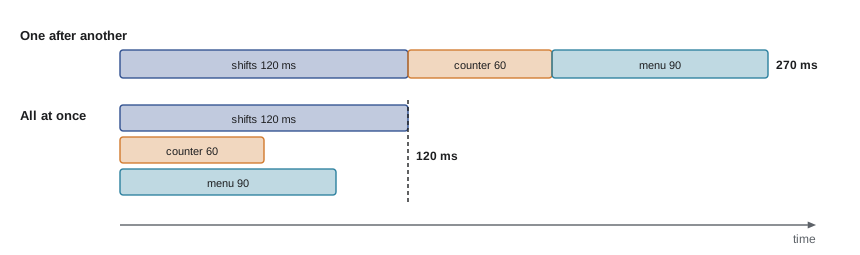
Lucy's dashboard needs three things from the server every time it refreshes: today's shifts with their bookings, the lunch counter's totals so far, and the menu, so that the screen can show what has sold out. Mira's first version, written on the bus before the session planned for Thursday, March 25, 2027, awaited them one after another. Against the pretend server it took 270 milliseconds. "Each request waits for the one before it," Gareth says, "yet none of them needs the others' answers. Start all three, then wait once." The same code then took 120 milliseconds, the time of the slowest request alone.
This lesson is about running independent asynchronous operations at the same time, about the four built-in tools that wait for groups of promises, and about the opposite problem: keeping too many requests from running at once.
Sequential and concurrent
The difference lies entirely in when each operation starts. A promise represents work that has already begun. Writing await on each call in turn starts the second only after the first has finished. Calling all the functions first, keeping their promises, and only then awaiting, lets all the requests travel and wait at the same time.
const routes = {
  'GET /api/v1/shifts': () => [200, { items: [{ id: 17, needed: 4, booked: 3 }, { id: 18, needed: 3, booked: 3 }] }, 120],
  'GET /api/v1/counter/today': () => [200, { orders: 37, cents: 41250 }, 60],
  'GET /api/v1/menu': () => [200, [{ code: 'SOUP', soldOut: false }, { code: 'EGG', soldOut: true }], 90],
};

// ---- stand-in for the network (Lesson 6): answers from routes after a delay ----
function fakeFetch(url, { method = 'GET', body, signal } = {}) {
  return new Promise((resolve, reject) => {
    if (signal?.aborted) return reject(signal.reason);
    const u = new URL(url, 'https://riverside-food-hub.example');
    const route = routes[method + ' ' + u.pathname];
    const [status, data, ms = 80] = route ? route(body && JSON.parse(body), u.searchParams) : [404, { error: 'Not found' }];
    const timer = setTimeout(() => resolve(fakeResponse(status, data)), ms);
    signal?.addEventListener('abort', () => { clearTimeout(timer); reject(signal.reason); });
  });
}
function fakeResponse(status, data) {
  const text = JSON.stringify(data);
  return { status, ok: status >= 200 && status < 300, headers: new Headers({ 'Content-Type': 'application/json' }),
           json: async () => JSON.parse(text), text: async () => text };
}
// ---- end of stand-in ----

function track(name, path) {
  console.log('start', name);
  return fakeFetch(path).then((r) => { console.log('  done', name); return r.json(); });
}

console.log('-- one after another');
await track('shifts', '/api/v1/shifts');
await track('counter', '/api/v1/counter/today');
await track('menu', '/api/v1/menu');

console.log('-- all at once');
const pShifts = track('shifts', '/api/v1/shifts');
const pCounter = track('counter', '/api/v1/counter/today');
const pMenu = track('menu', '/api/v1/menu');
await pShifts; await pCounter; await pMenu;
console.log('all three loaded');-- one after another start shifts done shifts start counter done counter start menu done menu -- all at once start shifts start counter start menu done counter done menu done shifts all three loaded
What this code does
In the first half, each request starts only when the previous one is done, so the total time is the sum of all three: 120, 60 and 90 milliseconds. In the second half, all three start before any await, so they wait together and finish in order of speed, counter first. The second half takes only as long as the slowest request.
Concurrent requests are not free. Each one uses the server's capacity and the device's connection, and browsers limit how many requests go to the same server at once over the older HTTP/1.1 protocol, typically six. Over HTTP/2 and HTTP/3, which Theo's server will use, many requests share one connection. For three or ten requests the gain is pure; for hundreds, the end of this lesson shows how to set a limit.
Promise.all
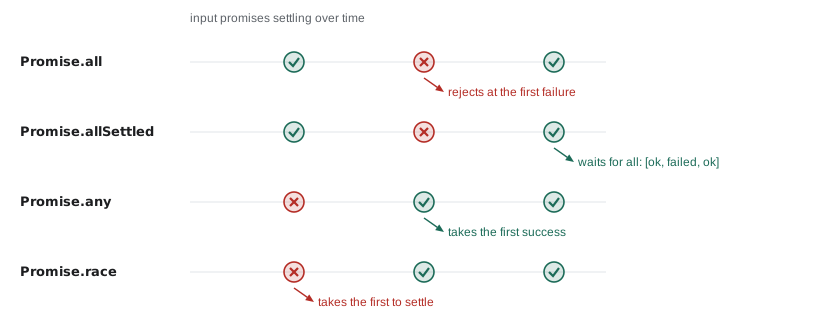
Keeping each promise in its own variable gets tedious. Promise.all(promises) takes an array, or any iterable, of promises and returns one promise. It is fulfilled when every input is fulfilled, with an array of their values in the same order as the inputs, whatever order they finished in. Destructuring the result gives each value a name in one line.
const routes = {
  'GET /api/v1/shifts': () => [200, { items: [{ id: 17, needed: 4, booked: 3 }, { id: 18, needed: 3, booked: 3 }] }, 120],
  'GET /api/v1/counter/today': () => [200, { orders: 37, cents: 41250 }, 60],
  'GET /api/v1/menu': () => [200, [{ code: 'SOUP', soldOut: false }, { code: 'EGG', soldOut: true }], 90],
};

// ---- stand-in for the network (Lesson 6): answers from routes after a delay ----
function fakeFetch(url, { method = 'GET', body, signal } = {}) {
  return new Promise((resolve, reject) => {
    if (signal?.aborted) return reject(signal.reason);
    const u = new URL(url, 'https://riverside-food-hub.example');
    const route = routes[method + ' ' + u.pathname];
    const [status, data, ms = 80] = route ? route(body && JSON.parse(body), u.searchParams) : [404, { error: 'Not found' }];
    const timer = setTimeout(() => resolve(fakeResponse(status, data)), ms);
    signal?.addEventListener('abort', () => { clearTimeout(timer); reject(signal.reason); });
  });
}
function fakeResponse(status, data) {
  const text = JSON.stringify(data);
  return { status, ok: status >= 200 && status < 300, headers: new Headers({ 'Content-Type': 'application/json' }),
           json: async () => JSON.parse(text), text: async () => text };
}
// ---- end of stand-in ----

const getJSON = (path) => fakeFetch(path).then((r) => r.json());

const [shifts, counter, menu] = await Promise.all([
  getJSON('/api/v1/shifts'),
  getJSON('/api/v1/counter/today'),
  getJSON('/api/v1/menu'),
]);

const open = shifts.items.filter((s) => s.booked < s.needed).length;
const soldOut = menu.filter((m) => m.soldOut).map((m) => m.code);
console.log('Shifts still needing people:', open);
console.log('Counter:', counter.orders, 'orders,', (counter.cents / 100).toFixed(2));
console.log('Sold out:', soldOut.join(', ') || 'nothing');Shifts still needing people: 1 Counter: 37 orders, 412.50 Sold out: EGG
What this code does
All three requests start inside the array, before Promise.all is even called, and Promise.all waits for all of them. The values come back in the order the promises were listed, so destructuring names them correctly even though the counter answered first. The rest of the code uses them as ordinary data.
Promise.all is fail-fast. If any input is rejected, the combined promise is rejected at once with that reason, without waiting for the others. That is right when the results are useless separately, such as the parts of one order. The other requests keep running, though, because a promise cannot stop the work behind it; to stop them as well, give them a shared AbortController and abort it in the catch.
const wait = (ms, value, fail) => new Promise((resolve, reject) =>
  setTimeout(() => (fail ? reject(new Error(value)) : resolve(value)), ms));

try {
  const results = await Promise.all([
    wait(100, 'shifts'),
    wait(40, 'counter summary failed with 503', true),
    wait(70, 'menu'),
  ]);
  console.log('Got', results);
} catch (err) {
  console.log('Promise.all rejected:', err.message);
}
await wait(80);   // let the other two finish before the program ends
console.log('done');Promise.all rejected: counter summary failed with 503 done
What this code does
The second promise is rejected after 40 milliseconds, and Promise.all rejects straight away with its reason, without waiting for the shifts or the menu. Their results are lost, even though both arrive soon after. For a dashboard, where one failed section should not blank the whole screen, that is the wrong behavior.
Promise.allSettled
Promise.allSettled(promises) waits for every input to settle, however it settles, and is never rejected. Its value is an array of result objects, one per input, in order: { status: 'fulfilled', value } or { status: 'rejected', reason }. It is the right tool when each result is useful on its own, as on Lucy's dashboard: if the counter summary fails, the shifts should still be shown, with a note that the counter figures are out of date.
const routes = {
  'GET /api/v1/shifts': () => [200, { items: [17, 18] }, 100],
  'GET /api/v1/counter/today': () => [503, { error: 'Restarting' }, 40],
  'GET /api/v1/menu': () => [200, [{ code: 'SOUP' }], 70],
};

// ---- stand-in for the network (Lesson 6): answers from routes after a delay ----
function fakeFetch(url, { method = 'GET', body, signal } = {}) {
  return new Promise((resolve, reject) => {
    if (signal?.aborted) return reject(signal.reason);
    const u = new URL(url, 'https://riverside-food-hub.example');
    const route = routes[method + ' ' + u.pathname];
    const [status, data, ms = 80] = route ? route(body && JSON.parse(body), u.searchParams) : [404, { error: 'Not found' }];
    const timer = setTimeout(() => resolve(fakeResponse(status, data)), ms);
    signal?.addEventListener('abort', () => { clearTimeout(timer); reject(signal.reason); });
  });
}
function fakeResponse(status, data) {
  const text = JSON.stringify(data);
  return { status, ok: status >= 200 && status < 300, headers: new Headers({ 'Content-Type': 'application/json' }),
           json: async () => JSON.parse(text), text: async () => text };
}
// ---- end of stand-in ----

async function getJSON(path) {
  const r = await fakeFetch(path);
  if (!r.ok) throw new Error(path + ' answered ' + r.status);
  return r.json();
}

const sections = ['shifts', 'counter', 'menu'];
const results = await Promise.allSettled([
  getJSON('/api/v1/shifts'), getJSON('/api/v1/counter/today'), getJSON('/api/v1/menu'),
]);

results.forEach((result, i) => {
  if (result.status === 'fulfilled') console.log(sections[i], 'updated');
  else console.log(sections[i], 'kept old data:', result.reason.message);
});shifts updated counter kept old data: /api/v1/counter/today answered 503 menu updated
What this code does
allSettled waits for all three and reports each outcome separately, so the failed counter request does not hide the other two. Each result object says whether it was fulfilled or rejected and carries the value or the reason. The dashboard can update the sections that succeeded and mark the others as stale.
Promise.any and Promise.race
The last two tools resolve on the first result rather than all of them. Promise.any(promises) is fulfilled with the first input to be fulfilled, ignoring rejections; only if every input is rejected is it rejected, with an AggregateError whose errors property lists all the reasons. It suits asking several equivalent sources and using whichever answers first, such as two copies of the same file on different servers.
const wait = (ms, value, fail) => new Promise((resolve, reject) =>
  setTimeout(() => (fail ? reject(new Error(value)) : resolve(value)), ms));

const first = await Promise.any([
  wait(50, 'main server down', true),
  wait(90, 'menu from main server'),
  wait(70, 'menu from backup copy'),
]);
console.log('Using:', first);

try {
  await Promise.any([wait(30, 'main down', true), wait(60, 'backup down', true)]);
} catch (err) {
  console.log(err.name + ':', err.errors.map((e) => e.message).join(' and '));
}
await wait(40);Using: menu from backup copy AggregateError: main down and backup down
What this code does
In the first call the fastest promise is rejected, which Promise.any ignores; the backup copy is the first to be fulfilled, so its value is used. In the second call every input is rejected, so Promise.any rejects with an AggregateError listing both reasons. The final wait just lets the slower first-call timer finish.
Promise.race(promises) settles the same way as the first input to settle, fulfilled or rejected. Its classic use was a timeout: race the request against a timer that rejects. Since AbortSignal.timeout arrived, that is better done with a signal, which also stops the request; a race only stops waiting for it. Race is still useful for "whichever happens first" between different kinds of events, such as a response arriving or the user pressing Cancel.
const sleep = (ms) => new Promise((resolve) => setTimeout(resolve, ms));
const request = sleep(300).then(() => 'Receipt for order 41');

let timer;
const tooSlow = new Promise((_, reject) => {
  timer = setTimeout(() => reject(new Error('Gave up waiting after 100 ms')), 100);
});

try {
  const winner = await Promise.race([request, tooSlow]);
  console.log(winner);
} catch (err) {
  console.log(err.message);
} finally {
  clearTimeout(timer);
}
const late = await request;
console.log('The request still finished later:', late);Gave up waiting after 100 ms The request still finished later: Receipt for order 41
What this code does
The timer rejects after 100 milliseconds, before the pretend request finishes, so the race is rejected and the catch reports it. finally clears the timer so it cannot fire after a fast success. The last lines show the weakness of a race: the request itself was never stopped and still finished, which a timeout signal on a real fetch would have prevented.
| Method | Fulfilled when | Rejected when | Value | Use for |
|---|---|---|---|---|
| Promise.all | All inputs are fulfilled | Any input is rejected (at once) | Array of values in order | Parts that are useless alone |
| Promise.allSettled | All inputs have settled | Never | Array of status objects | Independent parts, such as dashboard sections |
| Promise.any | Any input is fulfilled | All inputs are rejected | The first value | Equivalent sources, use the fastest |
| Promise.race | The first input to settle is fulfilled | The first input to settle is rejected | The first value or reason | Whichever event happens first |
Worked problem
Choosing a combinator
The counter page, at start-up, needs the menu and today's order count, and cannot work without both. Lucy's dashboard shows shifts, counter totals and the garden forecast in three separate panels. Which combinator suits each?
Show solution
- The counter page needs both results together, and if either fails it should fall back to its saved data.
- A failure of either means the start-up step has failed, so fail-fast behavior is right: Promise.all.
- The dashboard's panels are independent; one failure should not hide the others.
- It needs every outcome, success or failure: Promise.allSettled.
Answer: Promise.all for the counter's start-up, Promise.allSettled for the dashboard.
Limiting concurrency
Sometimes there are many independent operations: at the end of the pilot, Lucy wants a report that fetches the sign-ups for each of 120 shifts. Starting 120 requests at once would hammer Theo's server and might trigger its rate limit, answering 429. Doing them one at a time would take two minutes. The middle way is a concurrency limit: a fixed number of requests in flight at once, with a new one starting each time one finishes.
const sleep = (ms) => new Promise((resolve) => setTimeout(resolve, ms));

async function mapLimit(items, limit, fn) {
  const results = new Array(items.length);
  let next = 0, active = 0, maxActive = 0;
  async function worker() {
    while (next < items.length) {
      const i = next++;
      active++; maxActive = Math.max(maxActive, active);
      results[i] = await fn(items[i]);
      active--;
    }
  }
  await Promise.all(Array.from({ length: limit }, worker));
  console.log('At most', maxActive, 'requests were in flight at once');
  return results;
}

const shiftIds = Array.from({ length: 10 }, (_, i) => 101 + i);
const counts = await mapLimit(shiftIds, 3, async (id) => {
  await sleep(20 + (id % 4) * 15);            // pretend request
  return { id, signups: id % 5 };
});
console.log('Sign-ups fetched for', counts.length, 'shifts; total', counts.reduce((t, c) => t + c.signups, 0));At most 3 requests were in flight at once Sign-ups fetched for 10 shifts; total 20
What this code does
mapLimit starts three workers, each of which keeps taking the next unprocessed item until none are left. Because next is shared and read and increased in one step on the single thread, no item is taken twice. Results are stored by index, so they stay in the original order whichever request finishes first.
Libraries such as p-limit package this pattern, but it is short enough to write yourself, and writing it once makes clear why it works: the single thread guarantees that next++ can never be run by two workers at the same instant, so no locks are needed.
Sharing one request
A last parallel pitfall is accidental duplication. If three parts of the page each ask for the menu at start-up, three identical requests go out. A small cache that stores the promise, not the result, solves it: the first caller starts the request and stores its promise; callers that arrive while it is still pending get the same promise; and a failed promise is removed so that the next caller can try again.
let requests = 0;
const sleep = (ms) => new Promise((resolve) => setTimeout(resolve, ms));
async function loadMenuFromServer() { requests++; await sleep(80); return ['SOUP', 'EGG', 'DRINK']; }

const inFlight = new Map();
function shared(key, load) {
  if (!inFlight.has(key)) {
    const p = load().catch((err) => { inFlight.delete(key); throw err; });
    inFlight.set(key, p);
  }
  return inFlight.get(key);
}

const [a, b, c] = await Promise.all([
  shared('menu', loadMenuFromServer),
  shared('menu', loadMenuFromServer),
  shared('menu', loadMenuFromServer),
]);
console.log('Three callers got', a.length, b.length, c.length, 'items');
console.log('Requests sent:', requests);Three callers got 3 3 3 items Requests sent: 1
What this code does
The first call to shared starts the load and stores its promise under the key menu; the next two find it and return the same promise. All three callers receive the same result, but only one request was sent. If the load had failed, the catch would have removed the entry, so a later call would try again instead of reusing a failure.
Storing promises rather than values is a neat trick worth remembering. It works because a promise can be awaited any number of times by any number of callers, and each gets the same settled result. A real version would also expire entries after a while, so that the menu is refreshed; Lesson 12 does that for the dashboard.
Try it yourself
Load the dashboard at once
Rewrite loadDashboard so that the three requests start together and are awaited with one Promise.all, destructuring the results into shifts, counter and menu.
The output stays the same, but the order of the start and done lines must show that all three started before any finished.
const sleep = (ms) => new Promise((resolve) => setTimeout(resolve, ms));
async function get(name, ms, value) {
  console.log('start', name);
  await sleep(ms);
  console.log('done', name);
  return value;
}

async function loadDashboard() {
  const shifts = await get('shifts', 90, 2);
  const counter = await get('counter', 30, 37);
  const menu = await get('menu', 60, 3);
  return shifts + ' shifts, ' + counter + ' orders, ' + menu + ' dishes';
}

const summary = await loadDashboard();
console.log(summary);
Try it yourself
Count what settled
Use Promise.allSettled to wait for all the sign-up requests, then print <n> booked, <m> failed followed by one line per failure with its message.
Expected: 2 booked, 2 failed, Shift 18 is full, Shift 21 not found.
const sleep = (ms) => new Promise((resolve) => setTimeout(resolve, ms));
async function signUp(id) {
  await sleep(id);
  if (id === 18) throw new Error('Shift 18 is full');
  if (id === 21) throw new Error('Shift 21 not found');
  return id;
}

const ids = [17, 18, 19, 21];
try {
  const results = await Promise.all(ids.map(signUp));
  console.log(results.length, 'booked, 0 failed');
} catch (err) {
  console.log('Something failed:', err.message);
}
await sleep(30);
Common mistakes
MistakeWriting await before each of three calls runs them in parallel.
InsteadEach await waits before the next call starts. Start them first, then await together.
MistakePromise.all stops the other requests when one fails.
InsteadIt stops waiting, but the requests carry on. Abort them with a shared controller if needed.
MistakePromise.all returns results in the order they finished.
InsteadResults are in the order of the inputs.
MistakePromise.allSettled rejects if any input rejects.
InsteadIt never rejects; it reports each outcome as a status object.
MistakeStarting hundreds of requests at once is the fastest approach.
InsteadIt can overload the server and hit rate limits. Use a concurrency limit.
MistakePromise.race cancels the slower promises.
InsteadPromises cannot be canceled; the slower work continues unless it is aborted.
Summary and key terms
- A promise stands for work already started, so independent operations should be started first and awaited together.
- Concurrent requests take about as long as the slowest, sequential ones the sum of all.
- Promise.all fulfills with an array of values in input order and rejects as soon as any input rejects.
- Promise.allSettled waits for every input and reports each as fulfilled with a value or rejected with a reason.
- Promise.any takes the first fulfilled value and rejects with an AggregateError only if all fail.
- Promise.race settles like the first input to settle; for timeouts, AbortSignal.timeout is better because it stops the request.
- None of them cancels the losing operations.
- A concurrency limit runs a fixed number of operations at once.
- Storing in-flight promises in a map shares one request between callers.
- concurrent
- Running at the same time, with waits overlapping.
- Promise.all
- Waits for all promises; fulfills with their values in order, or rejects with the first rejection.
- fail-fast
- Rejecting as soon as any part fails, without waiting for the rest.
- Promise.allSettled
- Waits for all promises to settle and fulfills with a status object for each.
- Promise.any
- Fulfills with the first promise to fulfill; rejects only when all reject.
- AggregateError
- An error holding several errors in its errors property, used by Promise.any.
- Promise.race
- Settles the same way as the first promise to settle.
- concurrency limit
- A maximum number of operations allowed to run at once.
- combinator
- A function that combines several promises into one.
Practice problems
Work each problem on paper first, then reveal the answer to check.
Three independent requests take 100, 50 and 80 ms. About how long do they take sequentially and concurrently?
Show answer
About 230 ms sequentially and about 100 ms concurrently.
What does Promise.all do when the second of three promises is rejected?
Show answer
It rejects at once with that reason, ignoring the others' results.
What does each element of the allSettled array contain?
Show answer
A status, fulfilled or rejected, and either a value or a reason.
When does Promise.any reject?
Show answer
Only when every input is rejected, with an AggregateError.
Why store promises rather than results in a request cache?
Show answer
Callers that arrive while the request is pending can share the same promise.
Lesson quiz · 5 questions
Score 60% or more to complete this lesson.
Create a free account to save your progress, take quizzes and earn a certificate.