
JS-120 · Lesson 1 of 12 · 27 min
Synchronous and asynchronous code
▶ Video coming soon A video version of this lesson is on the way.
On Tuesday, February 23, 2027, if the plan holds, Rosa Delgado's kitchen trainees will try the new counter order page at the Riverside Community Food Hub's lunch counter for the first time. Mira Castellanos built it in The DOM and Browser Events: a tablet page where a trainee taps the dishes a customer orders, chooses a tip for the youth garden and sees the total at once. Daily use is planned from Monday, March 1. For now, the page keeps everything on the tablet. The menu is written into the code, the day's tally sits in localStorage, and nothing leaves the building.
That is the next thing to change. Theo Marchetti, the back-end developer at Brightwater Web Studio, is building the Food Hub's server for a pilot in April 2027. Once it is running, the counter page should load the menu from the server, so that Rosa can change a price without asking a developer, and it should send every confirmed order to the server, so that the kitchen's numbers live in one place. Lucy Tran, the volunteer coordinator, wants something new as well: a screen in the volunteer office that shows today's shifts, how many people have booked each one and how the lunch counter is doing, updated through the day without anyone pressing reload.
Gareth Lindqvist, the senior developer and Mira's mentor, has planned a fourth block of Tuesday and Thursday sessions for this work, beginning on Thursday, February 25, 2027, and ending in the second week of April with a capstone: a live data dashboard for Lucy's office screen. This course follows that plan. It assumes you have finished The DOM and Browser Events and JavaScript Programming II, or can write functions, closures, classes and modules, handle errors and work with JSON and the DOM at the same level.
"Every program you have written so far has had one thing in common," Gareth says at the first session. "Each line finished before the next one started. Talking to a server breaks that rule, because a server takes time to answer, and the page cannot stand still while it waits. This course is about code that starts something now and finishes it later."
Code that runs in order
Ordinary JavaScript is synchronous. The engine runs one statement, finishes it completely, and only then moves to the next. A function call is part of this: when a line calls a function, the engine jumps into the function, runs all of it, and returns to the line that called it with the result. Nothing else happens in the meantime. If you read a program from top to bottom and follow every call, you can predict the order of everything it prints.
function lineTotal(code, qty) {
  const prices = { SOUP: 550, EGG: 625, DRINK: 200 };
  console.log('  pricing', qty, code);
  return prices[code] * qty;
}

console.log('Start order');
const soup = lineTotal('SOUP', 2);
const drink = lineTotal('DRINK', 1);
console.log('Subtotal in cents:', soup + drink);
console.log('End order');Start order pricing 2 SOUP pricing 1 DRINK Subtotal in cents: 1300 End order
What this code does
Each statement runs to completion before the next begins. The two calls to lineTotal run their whole bodies, including the indented log line, before the program moves on, so the output follows the code from top to bottom. That predictable order is what synchronous means.
Synchronous code is easy to reason about, and most of the code in any program stays synchronous: working out prices, checking a form, building a list of shifts, formatting a total. The difficulty is only with operations whose result is not available yet, because something outside the program has to happen first.
Operations that take time
Some operations depend on the world outside the JavaScript engine. A request to Theo's server has to travel across the network, wait for the server to look things up in its database and travel back. A timer has to wait for the clock. A user has to tap a button. None of these can be finished in a few nanoseconds by working harder; the program simply has to wait. The question is what the program does while it waits.
| Operation | Typical time | Compared with adding two numbers |
|---|---|---|
| Adding two numbers in JavaScript | About a nanosecond | 1 times |
| Reading a value from localStorage | A few microseconds to a millisecond | Thousands to a million times longer |
| A request to a server in the same city | 10 to 50 milliseconds | Tens of millions of times longer |
| A request to a server on another continent | 100 to 300 milliseconds | Hundreds of millions of times longer |
| A request over a weak mobile or tablet connection | Half a second to several seconds, or never | Billions of times longer |
| Waiting for a person to tap Add | Seconds to minutes | Too large to matter |
The figures in the table are only typical, but the gaps between them are what matter. A network request takes millions of times longer than the code around it. If the engine sat and waited for each one, a page would spend nearly all its time doing nothing, and while it did nothing it could not do anything else either.
Why a page must not block
JavaScript in a web page runs on the page's main thread, the same thread the browser uses to respond to taps and clicks, run event listeners, work out the layout and paint the screen. There is one main thread per page, and it can do one thing at a time. While a piece of JavaScript is running, the browser cannot paint a new frame or run a listener for the button the trainee has just tapped. Code that keeps the main thread busy for a long time is said to block it.
Screens usually redraw about 60 times a second, which leaves roughly 16.7 milliseconds per frame. Browser tools treat any single piece of main-thread work longer than 50 milliseconds as a long task, because a delay of that size is already noticeable. A page that blocked for the full length of a slow network request would freeze: buttons would not respond, animations would stop and the browser might eventually offer to close the page.
The runner on this page is not a web page, but it shows the effect. Here a loop keeps the engine busy for about 300 milliseconds. A timer was set to fire after 10 milliseconds, but it cannot run until the loop lets go, because the engine is doing one thing at a time.
const started = Date.now();
setTimeout(() => {
  const late = Date.now() - started >= 300;
  console.log('Timer finally ran. Waited for the loop?', late);
}, 10);

console.log('Busy loop starts');
while (Date.now() - started < 300) {
  // doing nothing useful, very fast, for 300 ms
}
console.log('Busy loop ends');Busy loop starts Busy loop ends Timer finally ran. Waited for the loop? true
What this code does
setTimeout asks for a function to run after 10 milliseconds, then the program goes straight into a loop that does not stop for 300 milliseconds. The timer's time arrives during the loop, but its function cannot start until the loop has finished and the program has ended its current work. On a page, every tap and every repaint would be stuck behind the loop in the same way.
The lesson for the counter page is direct. If sending an order meant blocking until Theo's server answered, a slow connection would freeze the tablet in the middle of a lunch rush. The page must start the request, let the trainee carry on, and deal with the answer when it arrives.
Asynchronous code
Asynchronous code splits an operation into two parts: starting it now and handling its result later. The program asks the environment, the browser or Node.js, to do something that takes time, and hands over a function to call when it is done. Then the program carries on with its next statement. When the operation finishes, the environment arranges for the program's function to run. In between, the main thread is free.
You have already written asynchronous code. In The DOM and Browser Events, addEventListener registered a function that the browser called later, whenever a button was tapped, and setTimeout scheduled a function for later. The order in which such code runs is not the order in which it is written, and that is the first thing to get used to.
console.log('1. Trainee taps Place order');

setTimeout(() => {
  console.log('3. Server confirms order 41');
}, 200);

console.log('2. Page shows Sending...');1. Trainee taps Place order 2. Page shows Sending... 3. Server confirms order 41
What this code does
The first and last log lines run immediately, one after the other. setTimeout only registers a function and returns at once, so the program does not wait for it. About 200 milliseconds later the timer's function runs, which is why the confirmation is printed last even though it is written in the middle.
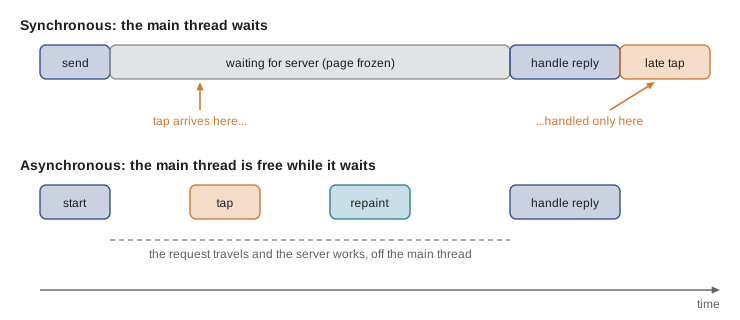
In the second timeline of the figure, nothing becomes faster: the server still takes the same time to answer. What changes is that the waiting no longer happens on the main thread. The request travels and the server works while the page keeps responding.
Simulating a slow server
Throughout this course, examples need a server that takes time to answer. The runner on this site has no network access, so examples use setTimeout to stand in for that time: a function waits a few hundred milliseconds and then delivers an answer, exactly as a real request would deliver its response later. From Lesson 6 onwards a small stand-in for the browser's fetch function works the same way.
function sendOrder(order, whenDone) {
  console.log('Sending order for', order.items.length, 'items');
  setTimeout(() => {
    whenDone({ number: 41, total: order.total });
  }, 300);
}

sendOrder({ items: ['SOUP', 'DRINK'], total: 845 }, (receipt) => {
  console.log('Confirmed: order', receipt.number, 'total', (receipt.total / 100).toFixed(2));
});
console.log('Trainee can take the next customer');Sending order for 2 items Trainee can take the next customer Confirmed: order 41 total 8.45
What this code does
sendOrder starts the pretend request and returns at once, after scheduling a function for 300 milliseconds later. It takes a second argument, whenDone, which is the code to run with the result, so the confirmation is handled when it arrives. Meanwhile the last line runs straight away, which is the whole point.
The function passed as whenDone is a callback: a function handed to other code so that it can be called later. Callbacks are the oldest way to write asynchronous JavaScript, and Lesson 3 looks at them closely, including why programmers looked for something better.
Worked problem
Reading the order of output
A program logs A, schedules a function that logs B after 100 ms, schedules another that logs C after 50 ms, and then logs D. In what order are the four letters printed?
Show solution
- A runs first because it is the first statement.
- Both setTimeout calls only register functions and return at once, so D runs next.
- After the program ends, the timer with the shorter delay is due first, so C is printed at about 50 ms.
- B is printed at about 100 ms.
Answer: A, D, C, B. Code written later can run earlier, and timers run in the order their times come due, not the order they were set.
One thread, many waits
It is tempting to imagine that asynchronous code runs "in the background" on another thread. In page JavaScript that is not what happens. There is still one main thread running your code. The browser does the waiting elsewhere: its network code sends and receives the bytes, its timers count the milliseconds, the operating system reports taps. When something is ready, the browser puts your callback in a queue, and the main thread runs it when it has finished whatever it was doing. Lesson 2 shows this machinery, called the event loop, in detail.
Two words help here. Concurrency means several tasks are in progress during the same period, with their steps interleaved, the way a single cashier serves a queue while also answering the phone between customers. Parallelism means several tasks are actually running at the same instant on different processor cores. Asynchronous JavaScript gives you concurrency on one thread: ten requests can be waiting at once, but their callbacks run one after another. True parallelism in the browser needs Web Workers, which are the subject of Lesson 11.
| Term | Meaning | Example at the Food Hub |
|---|---|---|
| Synchronous | Each step finishes before the next starts | Adding up the order lines |
| Asynchronous | Start now, handle the result later | Sending the order to the server |
| Blocking | Keeping the main thread busy so nothing else can run | A loop that sorts a huge list on the tablet |
| Concurrency | Several tasks in progress at once, interleaved | Loading shifts, the menu and the weather together |
| Parallelism | Several tasks running at the same instant | A Web Worker crunching a year of orders while the page stays responsive |
A single thread has a real benefit: your code is never interrupted halfway through a function by another piece of your own code. When a callback runs, it runs to the end. You do not need the locks and careful coordination that multi-threaded programs in other languages require, and the shared order object on the counter page cannot be changed by two pieces of JavaScript at the same instant.
What is asynchronous in JavaScript
Which operations are asynchronous is decided by the environment, not by the language. The JavaScript language itself has no input or output at all; the browser and Node.js supply them. Both follow the same rule: anything that waits for the outside world is asynchronous, and the rest is synchronous.
| Asynchronous | Synchronous |
|---|---|
| Network requests with fetch | Arithmetic, strings, arrays and objects |
| Timers: setTimeout and setInterval | JSON.parse and JSON.stringify |
| User events: clicks, taps, keys, form input | Reading and changing the DOM |
| Reading a file the user picked | localStorage and sessionStorage |
| IndexedDB, the browser database | Math, Date and Intl formatting |
| Messages to and from Web Workers | Calling your own functions |
| In Node.js: files, databases, the network | In Node.js: the Sync versions of file functions |
localStorage is a notable exception to the rule. It reads from storage, yet it is synchronous, which is one reason the browser keeps it small and why bigger data belongs in IndexedDB, whose interface is asynchronous. Node.js offers both styles for many file operations, such as readFileSync and readFile; the synchronous versions are fine in a short script and harmful in a server that handles many requests at once, for the same reason blocking is harmful on a page.
The plan for the course
Gareth sketches the route on the whiteboard. The first five sessions build the foundations: the event loop, callbacks, promises, and the async and await keywords that make promise code read almost like synchronous code. The next five apply them to the network: fetch, REST APIs and JSON, errors and timeouts, running requests in parallel, and APIs run by other organizations. Lesson 11 covers Web Workers for heavy work, and the capstone in April brings everything together in Lucy's dashboard.
| Lessons | Topic | What Mira builds |
|---|---|---|
| 1 to 3 | Asynchronous basics, the event loop, callbacks | Pretend order sending with timers |
| 4 and 5 | Promises, async and await | A promise-based client for the order page |
| 6 to 8 | fetch, REST and JSON, errors and timeouts | Loading the menu and posting orders to Theo's API |
| 9 and 10 | Parallel requests, third-party APIs | Loading shifts, counter totals and a weather forecast together |
| 11 | Web Workers | Crunching a season of order data off the main thread |
| 12 | Capstone | A live dashboard for the volunteer office screen |
Theo has promised Mira a written description of his API, called an API contract, so that she can build against it before the server exists. Until then, and in every runnable example on this site, a pretend server plays his part.
Try it yourself
Wait for the confirmation
The starter prints Order sent before the pretend server has answered. Change the code so that the line Order 41 sent is printed only when the server's answer arrives, after Waiting for the server.
Move the confirmation into the callback and use the order number from the receipt.
function sendOrder(whenDone) {
  setTimeout(() => whenDone({ number: 41 }), 200);
}

console.log('Waiting for the server');
sendOrder((receipt) => {
  // handle the receipt here
});
console.log('Order sent');
Try it yourself
Reminders in the right order
Three reminders should print in this order: Prep soup, Open counter, Count float. The starter schedules them with setTimeout but the delays put them in the wrong order.
Change only the delays so they print in the required order, with at least 50 milliseconds between them.
setTimeout(() => console.log('Count float'), 100);
setTimeout(() => console.log('Prep soup'), 300);
setTimeout(() => console.log('Open counter'), 200);
Common mistakes
MistakeAsynchronous code makes a slow server answer faster.
InsteadThe server takes the same time. Asynchronous code only stops the page from freezing while it waits.
MistakesetTimeout(fn, 0) runs fn immediately.
InsteadIt schedules fn to run after the current code has finished, never in the middle of it.
MistakeAsynchronous JavaScript runs on several threads at once.
InsteadYour code still runs on one thread; the browser does the waiting elsewhere and queues your callbacks.
MistakeA long loop is fine as long as it finishes eventually.
InsteadAnything over about 50 ms on the main thread is a long task that delays taps and repaints.
MistakeCode written lower in the file always runs later.
InsteadWith timers, events and requests, a callback written in the middle can run after everything below it.
Summary and key terms
- Synchronous code runs one statement at a time, finishing each before the next.
- Network requests, timers and user actions take millions of times longer than ordinary code, because they wait for the outside world.
- A page's JavaScript runs on the main thread, which also handles taps and painting, so code that blocks it freezes the page.
- Browser tools call main-thread work longer than 50 ms a long task.
- Asynchronous code starts an operation now and handles its result later, usually in a callback, leaving the main thread free in between. setTimeout schedules a function for later and returns at once, so output does not follow the order of the code.
- JavaScript gives concurrency on one thread; parallelism needs Web Workers.
- The environment decides what is asynchronous: fetch, timers, events and IndexedDB are, while localStorage, JSON and DOM changes are synchronous.
- synchronous
- Running one step at a time, each finishing before the next starts.
- asynchronous
- Starting an operation now and handling its result later, without waiting.
- main thread
- The single thread on which a page runs its JavaScript, handles events and paints the screen.
- blocking
- Keeping the main thread busy so that nothing else can run.
- long task
- A piece of main-thread work that takes longer than 50 milliseconds.
- latency
- The delay between asking for something and starting to receive it.
- callback
- A function passed to other code so that it can be called later.
- setTimeout
- A function that schedules another function to run after a delay in milliseconds.
- concurrency
- Several tasks in progress during the same period, with their steps interleaved.
- parallelism
- Several tasks running at the same instant on different processor cores.
- API contract
- A written description of the requests a server accepts and the responses it returns.
Practice problems
Work each problem on paper first, then reveal the answer to check.
Why can a page not simply wait for a server's answer?
Show answer
Waiting would block the main thread, so the page could not respond to taps or repaint until the answer came.
A program logs X, sets a 0 ms timer that logs Y, then logs Z. What is printed?
Show answer
X, Z, Y. The timer's function waits until the current code has finished.
Is JSON.parse synchronous or asynchronous?
Show answer
Synchronous: it works on a string already in memory.
What is the difference between concurrency and parallelism?
Show answer
Concurrency is tasks in progress at the same time with interleaved steps; parallelism is tasks running at the same instant on separate cores.
How long is a long task?
Show answer
Main-thread work lasting more than 50 milliseconds.
Lesson quiz · 5 questions
Score 60% or more to complete this lesson.
Create a free account to save your progress, take quizzes and earn a certificate.