
JS-120 · Lesson 10 of 12 · 26 min
Working with third-party APIs
▶ Video coming soon A video version of this lesson is on the way.
Lucy has asked for one more panel on the dashboard. The youth garden crew starts at 10:00 on weekdays from April, and on rainy days the coordinator moves them indoors to the kitchen. A forecast on the office screen would let Lucy make that call early. The Food Hub does not run a weather service, of course, so the data has to come from someone else's API. The session planned for Tuesday, March 30, 2027, is about using APIs that you do not control.
"Your own API you can ask Theo about," Gareth says. "A third-party API has its own rules, its own limits and its own bad days, and you find out about them by reading its documentation, not by guessing. Most of the work is not the fetch call. It is everything around it."
What a third-party API is
A third-party API is one run by another organization for others to use: weather and maps, payments, email delivery, address lookup, translation, sign-in with another account. Some are free and open, some need an account and a key, many charge by the number of requests. All of them are, from your code's point of view, a remote server whose behavior you can read about but not change, and which may change or disappear without asking you.
| Before you build on an API, find out | Why it matters |
|---|---|
| Who runs it and on what terms | Terms of use may limit commercial use, require attribution or forbid storing data |
| How you identify yourself | API key, OAuth sign-in, or a header such as User-Agent |
| The limits | Requests per second, per day or per month, and what happens when you exceed them |
| The data format and units | Field names, units, time zones and how missing values are shown |
| How it signals errors | Status codes and error bodies, and whether it uses problem details |
| Whether browsers may call it directly | CORS settings decide whether page code can read its responses |
| How it changes | Versioning, deprecation notices and how long old versions keep working |
| What it costs and what it knows about your users | Price per request, and what personal data you send it |
Two public weather services
In the United States, the National Weather Service publishes forecasts through a free API at api.weather.gov, documented on weather.gov. Getting a forecast takes two requests. First, /points/{latitude},{longitude} returns information about a location, including the URL of its forecast on the forecast office's grid; then that forecast URL returns periods of about twelve hours, each with a name, a temperature, a short forecast and a chance of precipitation. Responses are GeoJSON by default.
// Madison, Wisconsin is at about 43.07 N, 89.40 W.
const headers = { Accept: 'application/geo+json' };
const point = await (await fetch('https://api.weather.gov/points/43.0731,-89.4012', { headers })).json();

const forecastUrl = point.properties.forecast;            // a /gridpoints/... URL
const forecast = await (await fetch(forecastUrl, { headers })).json();
for (const p of forecast.properties.periods.slice(0, 2)) {
  console.log(p.name, p.temperature + p.temperatureUnit, p.shortForecast);
}
What this code does
The first request looks up Madison and returns the URL of its forecast on the forecast office's grid; the NWS says this mapping can be cached but should be checked again from time to time. The second request returns forecast periods such as Today and Tonight. The NWS also asks every caller to send a User-Agent header identifying the application, which page code cannot reliably set, so this call belongs on the server.
Both services are free and need no key, which makes them good for learning. Both also show the realities of third-party data: formats designed for the provider's needs rather than yours, extra steps, fields that may change, and rules about how to call them. The next sections deal with each.
Keys and secrets
Many APIs identify callers with an API key, a long random string sent with each request, and bill or limit you by it. The most important rule about keys is short: anything in front-end code is public. JavaScript files are downloaded to every visitor's browser, and anyone can open the developer tools and read the key, or watch it go past in the Network panel. A key with spending power or access to private data must never appear in page code, in a public Git repository or in a URL that ends up in logs.
| Kind of key | Can it be in page code? | Example |
|---|---|---|
| Publishable key, meant for browsers and limited to your site | Yes, if the provider says so and restricts it by origin | A maps display key, a payments publishable key |
| Secret key with full account access | Never | A payments secret key, an email-sending key |
| Key with a cost per request | No; anyone could run up your bill | Most paid data APIs |
| Credentials for your own database or server | Never | Database passwords, signing secrets |
Secrets belong on the server, in configuration that is not committed to the repository, as Theo's environment variables are. The page asks the Food Hub's own server, and the server adds the key and calls the third party. Back-End Development with Node.js and Express covers configuration and secrets in detail.
Calling through your own server
That arrangement, a proxy or backend for frontend, solves more than the key problem, which is why Theo planned the weather panel this way from the start. The dashboard calls GET /api/v1/weather on the Food Hub's server. The server calls the weather service, converts the answer into the small shape the dashboard needs, caches it for ten minutes and returns it.
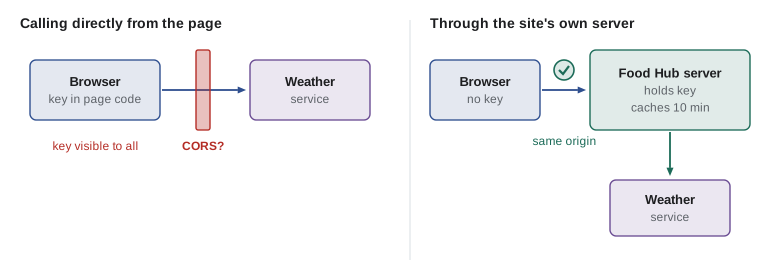
| Problem | Calling directly from the page | Calling through the Food Hub server |
|---|---|---|
| Secret keys | Exposed to every visitor | Kept on the server |
| CORS | Depends on the provider allowing your origin | Same origin: no CORS needed |
| Rate limits | Every screen and tablet calls separately | One cached call serves everyone |
| Format changes | Every page must be updated | Fixed in one adapter on the server |
| Required headers such as User-Agent | Often not settable from page code | Set freely |
| Privacy | Each visitor's IP address goes to the provider | Only the server contacts the provider |
CORS
Browsers enforce the same-origin policy: a page's code may read responses only from its own origin, the same scheme, host and port. Without it, any website you visited could quietly fetch your webmail or bank pages, with your cookies attached, and read them. Cross-Origin Resource Sharing, CORS, is the way a server relaxes the rule for other origins it trusts. The server includes an Access-Control-Allow-Origin header in its response naming the origins allowed to read it, or * for any origin when no credentials are involved.
For requests that could change things or carry unusual headers, such as a PUT, or a POST with Content-Type application/json, the browser first sends a preflight request: an OPTIONS request asking whether the real request is allowed. The server answers with headers listing the allowed methods and headers, and only then does the browser send the real request. A plain GET or a simple form POST skips the preflight.
function corsAllows(request, server) {
  if (request.origin === server.origin) return 'same origin: allowed';
  const simple = ['GET', 'HEAD', 'POST'].includes(request.method) &&
    request.headers.every((h) => ['accept', 'accept-language', 'content-language'].includes(h)) &&
    ['text/plain', 'application/x-www-form-urlencoded', 'multipart/form-data', undefined].includes(request.contentType);
  const originOk = server.allowOrigin === '*' || server.allowOrigin === request.origin;
  if (!originOk) return 'blocked: origin not allowed';
  if (simple) return 'allowed without a preflight';
  const methodOk = server.allowMethods.includes(request.method);
  return methodOk ? 'allowed after a preflight' : 'blocked by the preflight';
}

const server = { origin: 'https://weather.example', allowOrigin: '*', allowMethods: ['GET'] };
const page = 'https://riverside-food-hub.example';
console.log(corsAllows({ origin: page, method: 'GET', headers: ['accept'] }, server));
console.log(corsAllows({ origin: page, method: 'POST', headers: [], contentType: 'application/json' }, server));
console.log(corsAllows({ origin: page, method: 'GET', headers: [] }, { ...server, allowOrigin: 'https://other.example' }));
console.log(corsAllows({ origin: 'https://weather.example', method: 'PUT', headers: [] }, server));allowed without a preflight blocked by the preflight blocked: origin not allowed same origin: allowed
What this code does
corsAllows is a much simplified model of the browser's decision, written only to show the rules. A GET with ordinary headers is a simple request and is allowed because the server allows any origin. A POST with a JSON body needs a preflight, which fails because the server allows only GET, and a server that names a different origin blocks the page entirely.
Three facts about CORS save hours of confusion. It is enforced by the browser, not the server, so the same request works from a server or a command-line tool and fails only in the page. A CORS failure looks like a network failure to your code: fetch rejects with a TypeError, and the details are visible only in the browser console. And it cannot be fixed from page code; only the API's server can send the headers, which is one more reason to go through your own server.
Rate limits and caching
Every public API limits how fast you may call it, to protect itself and to share capacity fairly. The NWS, for example, says its limits are generous but not published, and that a caller over the limit gets an error and can retry after a few seconds. Paid APIs usually publish exact quotas and may return headers showing how many requests remain. Over the limit, the usual answer is 429 Too Many Requests, often with a Retry-After header.
The best way to stay inside a limit is to not ask again for something you already have. Weather forecasts change a few times a day, so a dashboard that refreshes every minute does not need a fresh forecast every minute. Theo's server caches the forecast for ten minutes; the dashboard caches its own copy too, so a brief network hiccup does not blank the panel. A cache entry needs the value, when it was stored and how long it stays fresh, its time to live or TTL.
let calls = 0;
const routes = { 'GET /api/v1/weather': () => { calls++; return [200, { summary: 'Showers', rainChance: 60 + calls }, 30]; } };

// ---- stand-in for the network (Lesson 6): answers from routes after a delay ----
function fakeFetch(url, { method = 'GET', body, signal } = {}) {
  return new Promise((resolve, reject) => {
    if (signal?.aborted) return reject(signal.reason);
    const u = new URL(url, 'https://riverside-food-hub.example');
    const route = routes[method + ' ' + u.pathname];
    const [status, data, ms = 80] = route ? route(body && JSON.parse(body), u.searchParams) : [404, { error: 'Not found' }];
    const timer = setTimeout(() => resolve(fakeResponse(status, data)), ms);
    signal?.addEventListener('abort', () => { clearTimeout(timer); reject(signal.reason); });
  });
}
function fakeResponse(status, data) {
  const text = JSON.stringify(data);
  return { status, ok: status >= 200 && status < 300, headers: new Headers({ 'Content-Type': 'application/json' }),
           json: async () => JSON.parse(text), text: async () => text };
}
// ---- end of stand-in ----

function makeCache(now) {
  const entries = new Map();
  return async function cached(key, ttlMs, load) {
    const hit = entries.get(key);
    if (hit && now() - hit.at < ttlMs) return hit.value;
    const value = await load();
    entries.set(key, { value, at: now() });
    return value;
  };
}

let clock = 0;                        // a pretend clock, in milliseconds
const cached = makeCache(() => clock);
const loadWeather = () => fakeFetch('/api/v1/weather').then((r) => r.json());

for (const t of [0, 60_000, 300_000, 660_000]) {
  clock = t;
  const w = await cached('weather', 600_000, loadWeather);
  console.log('At minute', t / 60_000, '->', w.summary, w.rainChance, '(server calls so far: ' + calls + ')');
}At minute 0 -> Showers 61 (server calls so far: 1) At minute 1 -> Showers 61 (server calls so far: 1) At minute 5 -> Showers 61 (server calls so far: 1) At minute 11 -> Showers 62 (server calls so far: 2)
What this code does
makeCache keeps each value with the time it was stored, and returns the stored value while it is younger than the time to live, here ten minutes. The clock is passed in as a function, so the example can pretend that minutes pass without waiting. Only the first request and the one after ten minutes reach the server; the others are answered from the cache.
HTTP has caching built in as well. A server can send Cache-Control: max-age=600 to let the browser reuse a response for ten minutes without asking, and an ETag header, a fingerprint of the content. When the browser asks again, it sends the fingerprint in If-None-Match, and if nothing has changed the server answers 304 Not Modified with no body. fetch handles both automatically through the browser's HTTP cache, which is why reading an API's caching headers is part of reading its documentation.
Adapting their data to yours
A third-party response is shaped for the provider's purposes: deeply nested, full of fields you do not need, with its own names, units and conventions for missing values. If the dashboard read those fields directly, every part of it would depend on the provider's format, and a change by the provider would mean hunting through the whole page. The cure is an adapter: one function that takes the provider's response and returns your own small, stable shape. Everything else uses only your shape.
// A simplified provider response, shaped like many forecast APIs
const providerResponse = {
  properties: {
    updated: '2027-04-19T13:00:00Z',
    periods: [
      { name: 'Today', isDaytime: true, temperature: 52, temperatureUnit: 'F', shortForecast: 'Showers likely', probabilityOfPrecipitation: { value: 70 } },
      { name: 'Tonight', isDaytime: false, temperature: 39, temperatureUnit: 'F', shortForecast: 'Cloudy', probabilityOfPrecipitation: { value: null } },
      { name: 'Tuesday', isDaytime: true, temperature: 57, temperatureUnit: 'F', shortForecast: 'Sunny', probabilityOfPrecipitation: { value: 10 } },
    ],
  },
};

function toGardenForecast(raw) {
  const periods = raw?.properties?.periods;
  if (!Array.isArray(periods)) throw new TypeError('Unexpected forecast format');
  return {
    updated: raw.properties.updated,
    days: periods.filter((p) => p.isDaytime).map((p) => ({
      day: p.name,
      high: p.temperature,
      summary: p.shortForecast,
      rainChance: p.probabilityOfPrecipitation?.value ?? 0,
    })),
  };
}

const garden = toGardenForecast(providerResponse);
for (const d of garden.days) {
  console.log(d.day.padEnd(8), d.high + ' degrees', d.summary.padEnd(15), 'rain', d.rainChance, 'in 100', d.rainChance >= 60 ? '-> plan indoor work' : '');
}Today 52 degrees Showers likely rain 70 in 100 -> plan indoor work Tuesday 57 degrees Sunny rain 10 in 100
What this code does
toGardenForecast checks that the part it needs is present, keeps only daytime periods and maps each to four fields with the dashboard's own names. A missing chance of rain, given as null by the provider, becomes 0. The dashboard's rule for moving the garden crew indoors then works on the simple shape and never touches the provider's format.
Theo's weather endpoint runs this kind of adapter on the server, so the Food Hub's own API returns the garden shape directly. If the weather service changes its format, or the Food Hub switches providers, only that adapter changes. The same idea applies to any third-party data: translate at the border, and keep your own vocabulary inside.
When the provider has a bad day
Third-party APIs fail like any other server, and sometimes for longer. Their failure must not break the parts of your page that do not depend on them. On the dashboard, the weather panel is the least important: if it cannot be loaded, it shows the last forecast with its time, or simply hides, and the shifts and counter panels carry on. Promise.allSettled from Lesson 9 makes that natural.
| Risk | Defense |
|---|---|
| The API is slow | A timeout signal, such as 5 seconds, and showing the cached copy |
| The API is down | Show cached data with its age, or hide the panel |
| The format changes | An adapter with shape checks that fails clearly in one place |
| You exceed the rate limit | Cache, refresh less often, honor Retry-After |
| The provider retires a version | Watch its announcements; keep provider code in one module |
| The provider shuts down | Keep the adapter small so another provider can be swapped in |
Attribution, terms and privacy
Using someone else's data comes with obligations. Many providers require attribution, a visible credit such as "Data: Environment and Climate Change Canada" or a map provider's logo; open-data licenses usually state the exact wording. Terms of use may forbid storing data beyond a certain time or using it commercially. And every request tells the provider something: at minimum an IP address, and possibly a location or search text. Mira adds a line to the dashboard's footer crediting the weather source and a note in the project's documentation of which external services the site uses, so that the Food Hub's privacy notice can mention them.
Try it yourself
A cache with a lifetime
Complete get(key, ttl, load, now): if store has an entry for key that is younger than ttl milliseconds at time now, return its value; otherwise await load(), store { value, at: now } and return the value.
The pretend clock values make the output call 1, call 1, call 2.
const store = new Map();
let calls = 0;
const load = async () => 'call ' + (++calls);

async function get(key, ttl, load, now) {
  return load();
}

for (const now of [0, 4000, 9000]) {
  const v = await get('menu', 5000, load, now);
  console.log(v);
}
Try it yourself
An adapter for shifts
A volunteer platform returns shifts in its own format. Write toShift(raw) returning { id, area, start, spaces }, where id is raw.shift_id, area is raw.location.name, start is the HH:MM part of raw.begins and spaces is raw.capacity - raw.filled, never below 0.
The loop should print S-88 Kitchen 09:30 2 spaces and S-91 Youth garden 14:00 0 spaces.
const raw = [
  { shift_id: 'S-88', location: { name: 'Kitchen', code: 'K' }, begins: '2027-04-19T09:30:00', capacity: 5, filled: 3 },
  { shift_id: 'S-91', location: { name: 'Youth garden', code: 'G' }, begins: '2027-04-19T14:00:00', capacity: 4, filled: 5 },
];

function toShift(r) {
  return { id: r.id, area: r.area, start: r.start, spaces: r.spaces };
}

for (const s of raw.map(toShift)) console.log(s.id, s.area, s.start, s.spaces, 'spaces');
Common mistakes
MistakeAn API key hidden in a minified JavaScript file is safe.
InsteadEverything sent to the browser can be read. Keep secret keys on the server.
MistakeA CORS error means the server is down.
InsteadIt means the browser blocked the page from reading a response the server did not permit; the server may be fine.
MistakeCORS can be fixed by adding headers to the fetch call.
InsteadOnly the API's server can allow an origin. Otherwise call the API through your own server.
MistakeReading a provider's fields directly all over the page is simplest.
InsteadUse one adapter so a format change is fixed in one place.
MistakeRefreshing third-party data every few seconds is harmless.
InsteadIt wastes the rate limit. Cache data for as long as it stays useful.
Summary and key terms
- Third-party APIs are run by others, with their own terms, limits, formats and failures; read the documentation before building on one.
- The MSC GeoMet API in Canada and the National Weather Service API in the United States publish free weather data.
- Anything in page code is public, so secret keys must stay on the server, and a proxy on your own server can hold keys, cache responses, set required headers and avoid CORS.
- The same-origin policy stops pages reading other origins' responses unless the server allows it with CORS headers; non-simple requests are preflighted with OPTIONS, and CORS failures appear as TypeErrors in fetch.
- Caching with a time to live, and HTTP's Cache-Control, ETag and 304 Not Modified, keep requests within rate limits.
- An adapter converts the provider's format into your own.
- Third-party failures should degrade one panel, not the page, and attribution, terms and privacy must be respected.
- third-party API
- An API run by another organization for others to use.
- API key
- A secret or semi-secret string that identifies the caller of an API.
- proxy
- A server that makes requests on behalf of clients, such as the site's own server calling an API.
- same-origin policy
- The browser rule that page code may read responses only from its own origin.
- CORS
- Cross-Origin Resource Sharing: headers by which a server allows other origins to read its responses.
- Access-Control-Allow-Origin
- The response header naming the origins allowed to read the response.
- preflight
- An OPTIONS request a browser sends to ask whether a non-simple cross-origin request is allowed.
- rate limit
- A cap on how many requests a caller may make in a period.
- time to live
- How long a cached value is considered fresh.
- ETag
- A response header holding a fingerprint of the content, used to check for changes.
- adapter
- A function that converts data from an external format into the application's own.
- attribution
- A visible credit to the source of data, often required by its license.
Practice problems
Work each problem on paper first, then reveal the answer to check.
Why must a secret API key never be in page code?
Show answer
Page code is downloaded to every visitor and can be read in the developer tools.
Who enforces CORS?
Show answer
The browser.
Which request does a browser send before a cross-origin PUT?
Show answer
A preflight OPTIONS request.
What does 304 Not Modified mean?
Show answer
The resource has not changed since the version the client has, so no body is sent.
What is the job of an adapter?
Show answer
To turn a provider's response into the application's own small, stable shape.
Lesson quiz · 5 questions
Score 60% or more to complete this lesson.
Create a free account to save your progress, take quizzes and earn a certificate.