
JS-120 · Lesson 3 of 12 · 22 min
Callbacks and their problems
▶ Video coming soon A video version of this lesson is on the way.
Theo's API contract arrived in Mira's inbox on the evening before the session planned for Thursday, March 4, 2027. It describes the requests the Food Hub's server will accept: one to fetch the lunch counter menu, one to check whether an item is still available today, one to place an order and one to fetch a receipt. To place an order from the counter page, the code will have to make several of these requests one after another, each depending on the answer to the last.
"Before we touch the real tools," Gareth says, "I want you to write this the way JavaScript programmers wrote it for the first fifteen years: with callbacks only. You will see why the language grew promises, and you will recognize callback code when you meet it in older libraries and in Node.js, which is full of it."
Callbacks, synchronous and asynchronous
A callback is a function passed as an argument to another function, which calls it at a suitable moment. The idea is not only about time. Array methods such as map, filter and forEach take callbacks and call them immediately, once per element, before they return; these are synchronous callbacks. setTimeout and addEventListener keep the callback and call it later, after the function that received it has returned; these are asynchronous callbacks.
const menu = ['SOUP', 'EGG', 'DRINK'];

console.log('before map');
const labels = menu.map((code) => {
  console.log('  map callback for', code);
  return code.toLowerCase();
});
console.log('after map:', labels.join(', '));

console.log('before setTimeout');
setTimeout(() => console.log('  timer callback'), 0);
console.log('after setTimeout');before map map callback for SOUP map callback for EGG map callback for DRINK after map: soup, egg, drink before setTimeout after setTimeout timer callback
What this code does
map calls its callback three times before it returns, so those lines appear between before map and after map. setTimeout keeps its callback and returns at once, so after setTimeout is printed before the callback runs. Both take a function as an argument; what differs is when it is called.
The difference matters to the caller. Code after a synchronous callback can rely on the callback having run. Code after an asynchronous one cannot: anything that needs the result must go inside the callback, or be called from it. That single rule shapes everything else in this lesson.
Error-first callbacks
An asynchronous operation can fail: the server may be down or the item may be sold out. With callbacks, the failure has to be passed to the callback too, because by the time it happens the original function has long since returned. Node.js settled on a convention that most callback code follows: the error-first callback. The callback's first parameter is an error, or null if all went well; the result comes second.
const stock = { SOUP: 12, EGG: 0, DRINK: 30 };

function checkStock(code, callback) {
  setTimeout(() => {
    if (!(code in stock)) callback(new Error('Unknown item ' + code));
    else if (stock[code] === 0) callback(new Error(code + ' is sold out'));
    else callback(null, stock[code]);
  }, 100);
}

for (const code of ['SOUP', 'EGG', 'TEA']) {
  checkStock(code, (err, left) => {
    if (err) {
      console.log('Problem:', err.message);
      return;
    }
    console.log(code, 'available,', left, 'left');
  });
}SOUP available, 12 left Problem: EGG is sold out Problem: Unknown item TEA
What this code does
checkStock answers after 100 milliseconds by calling the callback either with an Error as its first argument or with null and the number left. Every callback starts by checking err and returns early if there is one, which is the standard shape of error-first code. The three checks run concurrently and answer in the order they were started.
The convention has a weakness built in: nothing forces the caller to check err. Forgetting the check means carrying on with an undefined result, and the bug may show up far away from its cause. Every callback in a chain has to repeat the same check.
Steps that depend on each other
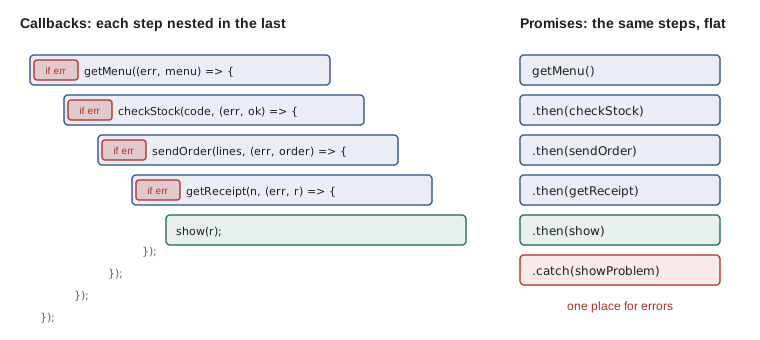
Placing an order needs four steps in sequence: get the menu to find the prices, check that each item is still available, send the order, and fetch the receipt. Each step needs the result of the one before, so each must start inside the previous step's callback. Written with callbacks, the code moves steadily to the right.
function later(fn) { setTimeout(fn, 50); }
function getMenu(cb) { later(() => cb(null, { SOUP: 550, DRINK: 200 })); }
function checkStock(code, cb) { later(() => cb(null, code !== 'EGG')); }
function sendOrder(items, cb) { later(() => cb(null, { number: 41, items })); }
function getReceipt(number, cb) { later(() => cb(null, 'Receipt for order ' + number)); }

getMenu((err, menu) => {
  if (err) return console.log('Menu failed:', err.message);
  checkStock('SOUP', (err, ok) => {
    if (err) return console.log('Stock check failed:', err.message);
    if (!ok) return console.log('Soup sold out');
    sendOrder([{ code: 'SOUP', price: menu.SOUP }], (err, order) => {
      if (err) return console.log('Order failed:', err.message);
      getReceipt(order.number, (err, receipt) => {
        if (err) return console.log('Receipt failed:', err.message);
        console.log(receipt);
      });
    });
  });
});Receipt for order 41
What this code does
Four pretend server calls each answer after 50 milliseconds. Because each step needs the previous result, each call is made inside the previous callback, and the code is nested four levels deep. Every level repeats its own error check, and the one line that matters, printing the receipt, is buried at the deepest point.
This shape has a name: callback hell, or the pyramid of doom, after the triangle of indentation it makes. The example is still readable because it is short and each step does almost nothing. Real code has loops, conditions and cleanup at each level, and the pyramid becomes hard to read, hard to change and very easy to get wrong.
The deeper problems
Indentation is the visible problem, and it can be reduced by giving each callback a name and defining it separately. The deeper problems are about trust and errors, and naming does not fix them.
| Problem | What goes wrong | Example at the counter |
|---|---|---|
| Inversion of control | You hand your code to someone else's function and trust it to call it correctly | A payment library decides when, and whether, your callback runs |
| Called twice | A buggy function calls the callback more than once | One order is added to the tally twice |
| Never called | A function forgets to call the callback on some path | The page shows Sending... forever |
| Sometimes synchronous | A function calls back at once in one case and later in another | Code after the call runs in a different order on cached data |
| Errors escape | A throw inside a callback is not caught by a try around the original call | An exception in the receipt step crashes the page's code |
| Repetition | Every level repeats error checks and cleanup | Spinner hidden in four places, forgotten in one |
Inversion of control is the root of most of them. When you call a function and use its return value, you stay in control: you decide what happens next. When you pass a callback, you give that decision away. You are trusting the other function to call your code exactly once, with the right arguments, at the right time, and you have no way to enforce it.
let tally = 0;

// A badly written library function: on a retry it calls the callback again.
function flakySend(order, callback) {
  setTimeout(() => callback(null, { number: 41 }), 50);
  setTimeout(() => callback(null, { number: 41 }), 120);  // the bug
}

flakySend({ items: ['SOUP'] }, (err, receipt) => {
  tally += 1;
  console.log('Order', receipt.number, 'recorded. Orders today:', tally);
});Order 41 recorded. Orders today: 1 Order 41 recorded. Orders today: 2
What this code does
flakySend calls the callback twice, as a buggy retry might, and the callback has no way to know. The same order is recorded twice and the day's tally is wrong. With callbacks alone, guarding against this is your job in every place you call such a function.
A common defense is a small wrapper that makes sure a function runs at most once. It works, but it has to be remembered everywhere, and it only fixes one of the problems in the table.
function once(fn) {
  let called = false;
  return (...args) => {
    if (called) return;
    called = true;
    fn(...args);
  };
}

let tally = 0;
function flakySend(order, callback) {
  setTimeout(() => callback(null, { number: 41 }), 50);
  setTimeout(() => callback(null, { number: 41 }), 120);
}

flakySend({ items: ['SOUP'] }, once((err, receipt) => {
  tally += 1;
  console.log('Order', receipt.number, 'recorded. Orders today:', tally);
}));
setTimeout(() => console.log('Final tally:', tally), 200);Order 41 recorded. Orders today: 1 Final tally: 1
What this code does
once returns a new function that remembers, in a closure, whether it has already run, and ignores every call after the first. Wrapping the callback with it means the second, buggy call does nothing. The final line confirms that the order was counted only once.
Errors that try and catch cannot reach
In synchronous code, try and catch around a function call catches anything thrown inside it. With asynchronous callbacks that no longer works. The try block finishes as soon as the operation has been started; by the time the callback runs and throws, the try block is long gone and the call stack is a different one. The exception escapes to the top of the event loop, where the browser reports it as an uncaught error.
try {
  setTimeout(() => {
    throw new Error('Receipt printer offline');   // thrown later, outside the try
  }, 100);
  console.log('try block finished');
} catch (err) {
  console.log('Caught:', err.message);           // never runs
}
What this code does
The try block only starts the timer and logs a line, then finishes without any error. When the timer fires 100 milliseconds later, the throw happens in a new task with a fresh call stack, so the catch block cannot see it. The browser reports the error in the console as uncaught, and in this runner the run would stop with an error.
This is why error-first callbacks exist: since errors cannot be thrown to the caller, they have to be passed along by hand. Promises solve it properly, by carrying errors along a chain to a single place where they can be caught.
Making callback code bearable
Plenty of callback code is still in use, so it helps to know how experienced developers kept it under control. Three habits make the biggest difference.
- Name the steps. Define each callback as a named function at the top level instead of nesting anonymous ones, so the code reads as a list of steps.
- Always call back asynchronously. If a function sometimes has its answer at once, from a cache for instance, it should still deliver it later with setTimeout or queueMicrotask, so callers see one consistent order.
- Handle the error first and return. Begin every callback with if (err) return handle(err), so that the success path can never run with a missing result.
function placeOrder(items, done) {
  getMenu(onMenu);

  function onMenu(err, menu) {
    if (err) return done(err);
    checkStock(items[0], (err, ok) => onStock(err, ok, menu));
  }
  function onStock(err, ok, menu) {
    if (err) return done(err);
    if (!ok) return done(new Error(items[0] + ' sold out'));
    sendOrder(items.map((code) => ({ code, price: menu[code] })), onSent);
  }
  function onSent(err, order) {
    if (err) return done(err);
    getReceipt(order.number, done);
  }
}
What this code does
The same four steps are written as named inner functions, so the code is flat and each step can be read on its own. Every step passes errors straight to the single done callback supplied by the caller. The trust problems remain: placeOrder still depends on each helper calling back exactly once.
Where callbacks are still the right tool
Callbacks are not wrong in themselves. For things that happen many times, such as clicks, key presses or messages from a worker, a callback registered with addEventListener is exactly right, and promises, which settle only once, would be the wrong tool. Synchronous callbacks such as those passed to map and sort are everywhere in good modern code. What fell out of favor is using callbacks for one-off results of operations, where promises do the same job with fewer ways to go wrong.
| Situation | Good tool | Why |
|---|---|---|
| Do something for each element now | Synchronous callback (map, filter, forEach) | Runs immediately, no timing questions |
| React every time something happens | Event listener callback | It may happen many times |
| Get one result of an operation later | Promise, with async and await | Settles once, carries errors, composes |
| Older Node.js or library code | Error-first callback, often wrapped in a promise | Many older APIs offer only this |
Node.js shows the history well. Its original file functions, such as fs.readFile, take error-first callbacks; since version 10 it has also offered promise versions under fs/promises, and the util.promisify helper turns most callback functions into promise-returning ones. Lesson 4 shows how such a wrapper works by writing one.
Try it yourself
Book a shift, error first
bookShift(shiftId, callback) calls back with an error if the shift is full. Complete the callback so that it prints Could not book: <message> when there is an error and Booked shift <id>, <n> places left otherwise.
Return early after handling the error.
const places = { K1: 2, K2: 0 };
function bookShift(id, callback) {
  setTimeout(() => {
    if (places[id] === 0) callback(new Error('Shift ' + id + ' is full'));
    else { places[id] -= 1; callback(null, places[id]); }
  }, 50);
}

for (const id of ['K1', 'K2']) {
  bookShift(id, (err, left) => {
    console.log('Booked shift', id + ',', left, 'places left');
  });
}
Try it yourself
At most once
Write once(fn), which returns a function that calls fn with its arguments the first time it is called and does nothing on later calls.
The starter's buggy notify calls its callback three times; with once the message should print a single time.
function once(fn) {
  return fn;   // replace this
}

function notify(callback) {
  setTimeout(() => callback('Order 41 ready'), 10);
  setTimeout(() => callback('Order 41 ready'), 20);
  setTimeout(() => callback('Order 41 ready'), 30);
}

notify(once((msg) => console.log(msg)));
Common mistakes
MistakeEvery callback is asynchronous.
InsteadCallbacks passed to map, filter or sort run immediately; only some APIs call them later.
MistakeA try block around an asynchronous call catches errors thrown in its callback.
InsteadThe try has finished by the time the callback runs, so the error escapes.
MistakeError-first means the error is thrown first.
InsteadIt means the callback's first parameter is the error, or null when there is none.
MistakeNamed functions fix all the problems of callback code.
InsteadThey flatten the indentation, but you still depend on other code calling back exactly once.
MistakeCallbacks should never be used in modern code.
InsteadThey are right for events and synchronous helpers; promises are better for one-off results.
Summary and key terms
- A callback is a function passed to another function to be called later or immediately.
- Synchronous callbacks, as in map, run before the function returns; asynchronous ones, as in setTimeout, run after it.
- Code that needs an asynchronous result must be inside the callback or called from it.
- The error-first convention passes an error, or null, as the callback's first argument.
- Dependent steps written with callbacks nest deeper and deeper: callback hell.
- Inversion of control means trusting other code to call back exactly once, at the right time; callbacks can be called twice, never, or sometimes synchronously. try and catch do not reach errors thrown in asynchronous callbacks.
- Naming steps, always calling back asynchronously and handling errors first make callback code bearable.
- Callbacks remain right for events and synchronous helpers; promises are better for one-off results.
- callback
- A function passed as an argument so that the receiving function can call it.
- synchronous callback
- A callback that is called before the receiving function returns, such as the one passed to map.
- asynchronous callback
- A callback that is kept and called later, after the receiving function has returned.
- error-first callback
- A callback whose first parameter is an error, or null, with the result after it.
- callback hell
- Deeply nested callbacks that are hard to read and change; also called the pyramid of doom.
- inversion of control
- Handing control of when and whether your code runs to someone else's function.
- once
- A wrapper that lets a function run at most one time.
- uncaught error
- An exception that no catch block handles, reported by the browser or runtime.
- util.promisify
- A Node.js helper that turns an error-first callback function into one that returns a promise.
Practice problems
Work each problem on paper first, then reveal the answer to check.
Is the callback passed to forEach synchronous or asynchronous?
Show answer
Synchronous: forEach calls it for each element before it returns.
What are the two arguments of an error-first callback on success?
Show answer
null for the error, then the result.
Why does a try block not catch an error thrown in a setTimeout callback?
Show answer
The try has already finished; the callback runs later in a new task with its own call stack.
What is inversion of control?
Show answer
Giving your code to another function and trusting it to call it correctly.
Name one situation where callbacks remain the best tool.
Show answer
Handling events that happen many times, such as clicks.
Lesson quiz · 5 questions
Score 60% or more to complete this lesson.
Create a free account to save your progress, take quizzes and earn a certificate.