
JS-120 · Lesson 12 of 12 · 32 min
Capstone: a live data dashboard
▶ Video coming soon A video version of this lesson is on the way.
The capstone sessions are planned for Tuesday, April 6, and Thursday, April 8, 2027, with a short review on Friday, April 9. Theo's pilot is due to start on Monday, April 19, with the kitchen and the lunch counter using the new server, and Lucy wants the volunteer office screen running from that morning. Mira will build the dashboard against the API contract and the mock server during the sessions, switch it to Theo's staging server in the week of April 12, and put it on the office screen for the pilot.
"This is the first page you have built that nobody touches," Gareth says. "It sits on a wall and has to look after itself all day: refresh, survive the Wi-Fi dropping, tell people when its numbers are old, and never freeze. Every lesson in this course is in it somewhere."
The brief
Lucy and Rosa's requirements fit on one page. Mira writes them down with a number for each, so that the tests and the review can refer to them.
| No. | Requirement | Lessons used |
|---|---|---|
| R1 | Show today's shifts with the spaces still open in each, the lunch counter's orders, sales and tips so far, and the garden forecast with an indoor-or-outdoor suggestion | 6, 7, 10 |
| R2 | Refresh every 60 seconds without anyone touching it | 2, 5 |
| R3 | Load the three panels at the same time; one failing panel must not blank the others | 9 |
| R4 | Give up on any request after 5 seconds; never show a spinner forever | 8 |
| R5 | When a panel's data is old, say so, with the time of the last update | 8, 10 |
| R6 | When the server is struggling, refresh less often, up to every 5 minutes, and recover by itself | 8 |
| R7 | Never run two refreshes at once | 2, 8 |
| R8 | Pause refreshing when the screen is hidden or the browser tab is in the background | 2 |
| R9 | Readable from across the room, no flashing, and announced politely to screen readers | The DOM and Browser Events |
| R10 | No volunteer names or other personal data on the screen, which visitors can see | Privacy |
Requirement R10 came from Lucy without being asked. The office is next to the reception desk, and visitors and other volunteers see the screen. The dashboard therefore shows counts of open spaces, never who has booked. Theo adds a dashboard-only endpoint that returns exactly that and nothing more, the principle of sending only the data a page needs.
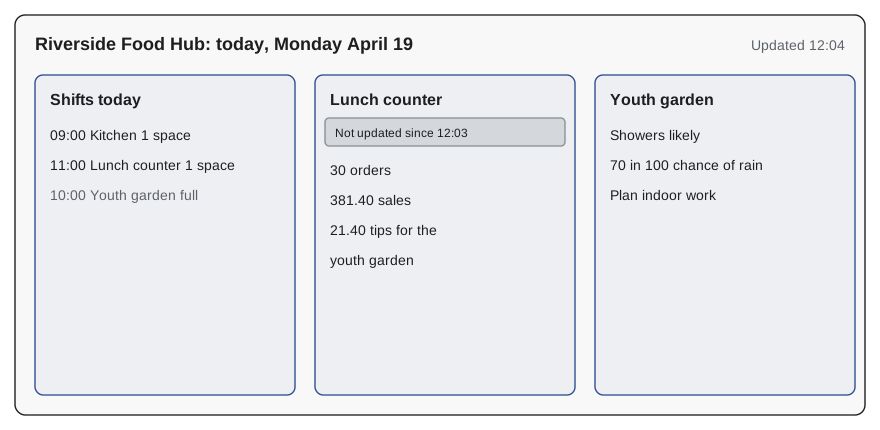
The modules
The structure follows the pattern from The DOM and Browser Events: data in one place, pure functions for the logic, and a thin layer that touches the DOM. Each module can be tested on its own, and most of them do not know they are part of a web page.
| Module | Job | Touches the DOM? |
|---|---|---|
| api.js | getJSON with timeouts and errors, from Lessons 7 and 8 | No |
| sources.js | One loader per panel, each with an adapter to the dashboard's own shape | No |
| refresh.js | refreshAll with Promise.allSettled, and the schedule with backoff | No |
| state.js | The single state object: each panel's data, time and error | No |
| view.js | Turns state into panels, with stale notes | Yes, and only this module |
| main.js | Starts everything, listens for visibility changes | Through view.js |
Loading the panels
Each panel has a loader that fetches its data and adapts it, so the rest of the code sees only the dashboard's own fields: a shift becomes an area, a start time and a number of spaces, and nothing about who is booked. refreshAll runs all three loaders together with Promise.allSettled. A panel that loads gets new data and the time; a panel that fails keeps its old data and records the error, which is how requirement R5 becomes possible.
let tick = 0;
const routes = {
  'GET /api/v1/shifts': () => [200, { items: [
    { area: 'Kitchen', start: '09:00', needed: 4, booked: 3 + (tick > 1 ? 1 : 0) },
    { area: 'Lunch counter', start: '11:00', needed: 3, booked: 2 },
    { area: 'Youth garden', start: '10:00', needed: 5, booked: 5 },
  ] }, 40],
  'GET /api/v1/counter/today': () => (tick === 2 ? [503, { error: 'Restarting' }, 20] : [200, { orders: 12 + tick * 9, cents: 15400 + tick * 11250, tipCents: 900 + tick * 650 }, 30]),
  'GET /api/v1/weather/garden': () => [200, { summary: 'Showers likely', rainChance: 70 }, tick === 1 ? 400 : 50],
};

// ---- stand-in for the network (Lesson 6): answers from routes after a delay ----
function fakeFetch(url, { method = 'GET', body, signal } = {}) {
  return new Promise((resolve, reject) => {
    if (signal?.aborted) return reject(signal.reason);
    const u = new URL(url, 'https://riverside-food-hub.example');
    const route = routes[method + ' ' + u.pathname];
    const [status, data, ms = 80] = route ? route(body && JSON.parse(body), u.searchParams) : [404, { error: 'Not found' }];
    const timer = setTimeout(() => resolve(fakeResponse(status, data)), ms);
    signal?.addEventListener('abort', () => { clearTimeout(timer); reject(signal.reason); });
  });
}
function fakeResponse(status, data) {
  const text = JSON.stringify(data);
  return { status, ok: status >= 200 && status < 300, headers: new Headers({ 'Content-Type': 'application/json' }),
           json: async () => JSON.parse(text), text: async () => text };
}
// ---- end of stand-in ----

const sleep = (ms) => new Promise((resolve) => setTimeout(resolve, ms));

async function getJSON(path, ms) {
  const response = await fakeFetch(path, { signal: AbortSignal.timeout(ms) });
  if (!response.ok) throw new Error(path + ' answered ' + response.status);
  return response.json();
}

const sources = {
  shifts: async () => {
    const data = await getJSON('/api/v1/shifts?date=2027-04-19', 150);
    return data.items.map((s) => ({ area: s.area, start: s.start, spaces: Math.max(0, s.needed - s.booked) }));
  },
  counter: async () => {
    const c = await getJSON('/api/v1/counter/today', 150);
    return { orders: c.orders, total: (c.cents / 100).toFixed(2), tips: (c.tipCents / 100).toFixed(2) };
  },
  garden: async () => {
    const w = await getJSON('/api/v1/weather/garden', 150);
    return { summary: w.summary, rainChance: w.rainChance, indoors: w.rainChance >= 60 };
  },
};

async function refreshAll(state, now) {
  const names = Object.keys(sources);
  const results = await Promise.allSettled(names.map((n) => sources[n]()));
  results.forEach((r, i) => {
    const panel = state[names[i]] ??= { data: null, at: null, error: null };
    if (r.status === 'fulfilled') Object.assign(panel, { data: r.value, at: now, error: null });
    else panel.error = r.reason.name === 'TimeoutError' ? 'timed out' : r.reason.message;
  });
  return results.filter((r) => r.status === 'rejected').length;
}

const state = {};
for (const [t, now] of [[0, '12:01'], [1, '12:02'], [2, '12:03'], [3, '12:04']]) {
  tick = t;
  const failed = await refreshAll(state, now);
  const c = state.counter;
  console.log(now, '| failed:', failed,
    '| kitchen spaces:', state.shifts.data[0].spaces,
    '| counter:', c.data.orders, 'orders', c.at === now ? '' : '(old, from ' + c.at + ')',
    '| garden:', state.garden.error ?? state.garden.data.summary);
}12:01 | failed: 0 | kitchen spaces: 1 | counter: 12 orders | garden: Showers likely 12:02 | failed: 1 | kitchen spaces: 1 | counter: 21 orders | garden: timed out 12:03 | failed: 1 | kitchen spaces: 0 | counter: 21 orders (old, from 12:02) | garden: Showers likely 12:04 | failed: 0 | kitchen spaces: 0 | counter: 39 orders | garden: Showers likely
What this code does
Four refreshes run against a pretend server whose numbers change over time; in the second the garden forecast is too slow, and in the third the counter summary fails. Promise.allSettled lets every other panel update regardless, and a failed panel keeps its last good data with the time it was loaded. Each line shows what the screen would know after one refresh.
Look at how the timeout error is used: a slow panel is reported as timed out rather than with the browser's technical message, and the code that shows it does not need to know about DOMExceptions. The adapters also do the arithmetic once, at the border: spaces are never negative and totals are formatted as money there.
The schedule
Requirements R2, R6 and R7 are about timing. A setTimeout chain, from Lesson 2, gives R7 for free: the next refresh is planned only after the current one has finished, so two can never overlap. For R6, the delay depends on how the last refreshes went. Mira writes the rule as a pure function, so it can be tested without waiting: 60 seconds normally, doubled after each refresh in which every panel failed, never more than 5 minutes, and back to normal as soon as anything succeeds.
function nextDelay(consecutiveFailures, base = 60_000, max = 300_000) {
  return Math.min(max, base * 2 ** consecutiveFailures);
}

let failures = 0;
const outcomes = ['ok', 'all failed', 'all failed', 'all failed', 'all failed', 'ok', 'some failed'];
for (const outcome of outcomes) {
  failures = outcome === 'all failed' ? failures + 1 : 0;
  console.log(outcome.padEnd(12), '-> next refresh in', nextDelay(failures) / 1000, 's');
}ok -> next refresh in 60 s all failed -> next refresh in 120 s all failed -> next refresh in 240 s all failed -> next refresh in 300 s all failed -> next refresh in 300 s ok -> next refresh in 60 s some failed -> next refresh in 60 s
What this code does
nextDelay doubles the base delay for each consecutive refresh in which every panel failed and caps it at five minutes. The loop feeds it a pretend sequence of outcomes, as a whole afternoon might go if the server went down for a while. A refresh in which even one panel succeeds shows the server is answering, so the count resets and the screen returns to once a minute.
Only a refresh in which every panel failed counts as a failure here, because one slow weather service should not slow down the shifts. That decision is written in one line and covered by a test. In a real deployment Mira also adds a little jitter, so that if several screens ever run the dashboard they do not all retry at the same second.
// refresh.js
export function startSchedule({ refresh, base = 60_000, max = 300_000 }) {
  let failures = 0, timer = null, stopped = false;

  async function run() {
    timer = null;
    const { allFailed } = await refresh();
    failures = allFailed ? failures + 1 : 0;
    const jitter = Math.random() * 2_000;
    if (!stopped) timer = setTimeout(run, nextDelay(failures, base, max) + jitter);
  }

  run();
  return {
    pause() { stopped = true; clearTimeout(timer); timer = null; },
    resume() { if (stopped) { stopped = false; run(); } },
  };
}
What this code does
run refreshes, updates the failure count and only then plans the next run, so refreshes can never overlap. pause clears the pending timer and stops the chain; resume refreshes at once and restarts it. A random jitter of up to two seconds spreads out repeated refreshes.
Pausing when hidden
For R8, the page listens for the document's visibilitychange event, which fires when the tab is hidden or shown, or the screen is turned off on many devices. While hidden, nobody can see the panels, so refreshing would only waste the server's capacity and the device's battery. When the page becomes visible again it refreshes at once, so the screen is never stale when someone looks. Browsers also slow down timers in background tabs by themselves, but pausing explicitly is clearer and cheaper.
// main.js
import { startSchedule } from './refresh.js';
import { refreshAll } from './sources.js';
import { state } from './state.js';
import { render } from './view.js';

const schedule = startSchedule({
  refresh: async () => {
    const failed = await refreshAll(state, new Date());
    render(state, new Date());
    return { allFailed: failed === 3 };
  },
});

document.addEventListener('visibilitychange', () => {
  if (document.hidden) schedule.pause();
  else schedule.resume();
});
setInterval(() => render(state, new Date()), 15_000);   // keep the age notes current
What this code does
main.js wires the modules together: each scheduled refresh updates the state, redraws the panels and reports whether all three failed. Hiding the page pauses the schedule and showing it resumes with an immediate refresh. A separate, cheap redraw every 15 seconds keeps notes such as Not updated since 12:03 accurate between refreshes without touching the network.
Showing the age of the data
Requirement R5 is the one Lucy cares about most. "If the screen says three people are needed in the kitchen, I need to know whether that was true a minute ago or an hour ago." Each panel's state holds the time it was last loaded successfully. The view compares that time with now: within two refresh periods the data is current, after that the panel shows a note with the time it was last updated, and after 15 minutes the panel's figures are dimmed as well.
function ageNote(lastMinute, nowMinute) {
  if (lastMinute === null) return 'Waiting for the first update';
  const age = nowMinute - lastMinute;
  if (age <= 2) return null;                       // current: no note
  const hh = String(Math.floor(lastMinute / 60)).padStart(2, '0');
  const mm = String(lastMinute % 60).padStart(2, '0');
  return (age > 15 ? 'Out of date. ' : '') + 'Not updated since ' + hh + ':' + mm;
}

const noon = 12 * 60;
for (const [last, now] of [[null, noon], [noon + 4, noon + 5], [noon + 1, noon + 4], [noon + 1, noon + 20]]) {
  console.log(ageNote(last, now) ?? 'current');
}Waiting for the first update current Not updated since 12:01 Out of date. Not updated since 12:01
What this code does
ageNote takes the minute of the day when a panel was last updated and the minute now, both as plain numbers so the rule can be tested without real clocks or time zones. Data up to two minutes old needs no note; older data gets the time of its last update, and after fifteen minutes it is also marked as out of date. The view module puts the returned text into the panel's note element.
Rendering the panels
view.js is the only module that touches the page. It rebuilds each panel from state with textContent and createElement, never innerHTML, so nothing from the server can become markup, a rule from The DOM and Browser Events that matters just as much for data from your own API. The panels sit inside a region with aria-live set to off, so that a screen reader is not interrupted every minute; a separate, polite live region announces only significant changes, such as a shift becoming full or the garden moving indoors.
// view.js (part)
export function render(state, now) {
  renderPanel('#shifts', state.shifts, now, (data, list) => {
    for (const s of data) {
      const li = document.createElement('li');
      li.textContent = s.start + '  ' + s.area + '  ' + (s.spaces === 0 ? 'full' : s.spaces + (s.spaces === 1 ? ' space' : ' spaces'));
      li.classList.toggle('is-full', s.spaces === 0);
      list.append(li);
    }
  });
  // counter and garden panels are rendered the same way
}

function renderPanel(selector, panel, now, fill) {
  const root = document.querySelector(selector);
  const list = root.querySelector('.items');
  const note = root.querySelector('.note');
  if (panel?.data) list.replaceChildren(), fill(panel.data, list);
  const text = ageNote(minuteOf(panel?.at), minuteOf(now));
  note.hidden = !text;
  note.textContent = text ?? '';
  root.classList.toggle('is-stale', Boolean(text?.startsWith('Out of date')));
}
What this code does
renderPanel finds a panel's list and note, refills the list from the panel's data when there is any, and shows or hides the age note. Text goes in with textContent only. The is-stale class lets the style sheet dim figures that are more than fifteen minutes old, without the script deciding how that looks.
<main class="dashboard">
  <header>
    <h1>Riverside Food Hub: today</h1>
    <p id="updated" aria-live="off"></p>
  </header>
  <section id="shifts" aria-labelledby="shifts-h"><h2 id="shifts-h">Shifts today</h2><p class="note" hidden></p><ul class="items"></ul></section>
  <section id="counter" aria-labelledby="counter-h"><h2 id="counter-h">Lunch counter</h2><p class="note" hidden></p><ul class="items"></ul></section>
  <section id="garden" aria-labelledby="garden-h"><h2 id="garden-h">Youth garden</h2><p class="note" hidden></p><ul class="items"></ul></section>
  <p id="announce" class="visually-hidden" aria-live="polite"></p>
  <footer>Weather data: National Weather Service.</footer>
</main>
What this code does
Each panel is a section labeled by its heading, with a note paragraph for the age of the data and a list for the items. The announce paragraph is the only polite live region, used for the few changes worth announcing. The footer credits the source of the weather data, as its terms require.
Putting it together
Before connecting it to a screen, Mira runs the whole cycle in the runner: the pretend server from earlier, the loaders, the schedule rule and a text version of the view in place of the DOM. Time is scaled down so that a minute is a few milliseconds, and the pretend server fails for a while in the middle, so the run shows the backoff, the stale notes and the recovery in one go.
let tick = 0;
const down = (t) => t >= 2 && t <= 3;
const routes = {
  'GET /api/v1/shifts': () => (down(tick) ? [503, {}, 10] : [200, { items: [{ area: 'Kitchen', start: '09:00', needed: 4, booked: 2 + Math.min(tick, 2) }] }, 10]),
  'GET /api/v1/counter/today': () => (down(tick) ? [503, {}, 10] : [200, { orders: 10 + tick * 5, cents: 12000 + tick * 6000, tipCents: 500 + tick * 300 }, 10]),
  'GET /api/v1/weather/garden': () => (down(tick) ? [503, {}, 10] : [200, { summary: 'Cloudy', rainChance: 30 }, 10]),
};

// ---- stand-in for the network (Lesson 6): answers from routes after a delay ----
function fakeFetch(url, { method = 'GET', body, signal } = {}) {
  return new Promise((resolve, reject) => {
    if (signal?.aborted) return reject(signal.reason);
    const u = new URL(url, 'https://riverside-food-hub.example');
    const route = routes[method + ' ' + u.pathname];
    const [status, data, ms = 80] = route ? route(body && JSON.parse(body), u.searchParams) : [404, { error: 'Not found' }];
    const timer = setTimeout(() => resolve(fakeResponse(status, data)), ms);
    signal?.addEventListener('abort', () => { clearTimeout(timer); reject(signal.reason); });
  });
}
function fakeResponse(status, data) {
  const text = JSON.stringify(data);
  return { status, ok: status >= 200 && status < 300, headers: new Headers({ 'Content-Type': 'application/json' }),
           json: async () => JSON.parse(text), text: async () => text };
}
// ---- end of stand-in ----

const sleep = (ms) => new Promise((resolve) => setTimeout(resolve, ms));

async function getJSON(path, ms) {
  const response = await fakeFetch(path, { signal: AbortSignal.timeout(ms) });
  if (!response.ok) throw new Error(path + ' answered ' + response.status);
  return response.json();
}

const sources = {
  shifts: async () => {
    const data = await getJSON('/api/v1/shifts?date=2027-04-19', 40);
    return data.items.map((s) => ({ area: s.area, start: s.start, spaces: Math.max(0, s.needed - s.booked) }));
  },
  counter: async () => {
    const c = await getJSON('/api/v1/counter/today', 40);
    return { orders: c.orders, total: (c.cents / 100).toFixed(2), tips: (c.tipCents / 100).toFixed(2) };
  },
  garden: async () => {
    const w = await getJSON('/api/v1/weather/garden', 40);
    return { summary: w.summary, rainChance: w.rainChance, indoors: w.rainChance >= 60 };
  },
};

async function refreshAll(state, now) {
  const names = Object.keys(sources);
  const results = await Promise.allSettled(names.map((n) => sources[n]()));
  results.forEach((r, i) => {
    const panel = state[names[i]] ??= { data: null, at: null, error: null };
    if (r.status === 'fulfilled') Object.assign(panel, { data: r.value, at: now, error: null });
    else panel.error = r.reason.name === 'TimeoutError' ? 'timed out' : r.reason.message;
  });
  return results.filter((r) => r.status === 'rejected').length;
}

const nextDelay = (f) => Math.min(5, 2 ** f);           // in pretend minutes: 1, 2, 4, then 5
function textView(state, minute) {
  const at = state.counter.at;
  const note = minute - at > 2 ? ' (not updated since minute ' + at + ')' : '';
  return 'min ' + String(minute).padStart(2) + ': kitchen needs ' + state.shifts.data[0].spaces +
    ', counter ' + state.counter.data.orders + ' orders ' + state.counter.data.total + note;
}

const state = {};
let minute = 0, failures = 0;
while (minute <= 12) {
  const failed = await refreshAll(state, minute);
  failures = failed === 3 ? failures + 1 : 0;
  console.log(textView(state, minute), failed === 3 ? '| all failed' : '');
  const wait = nextDelay(failures);
  await sleep(wait * 5);                                 // 5 ms stands for one minute
  minute += wait;
  tick++;
}min 0: kitchen needs 2, counter 10 orders 120.00 min 1: kitchen needs 1, counter 15 orders 180.00 min 2: kitchen needs 1, counter 15 orders 180.00 | all failed min 4: kitchen needs 1, counter 15 orders 180.00 (not updated since minute 1) | all failed min 8: kitchen needs 0, counter 30 orders 360.00 min 9: kitchen needs 0, counter 35 orders 420.00 min 10: kitchen needs 0, counter 40 orders 480.00 min 11: kitchen needs 0, counter 45 orders 540.00 min 12: kitchen needs 0, counter 50 orders 600.00
What this code does
The loop is the schedule from refresh.js, with five milliseconds standing in for each minute so the run finishes quickly. While the pretend server is down, both refreshes fail completely, so the wait grows from one to two to four minutes, and the text view shows how old the counter figures are. When the server answers again, the failures reset and the screen catches up.
Testing against the brief
Mira writes a test for each requirement. The pure functions are tested directly, like the examples above; the rest is tested against the mock server, which can be told to answer slowly, fail or change its numbers, and finally against Theo's staging server. Gareth insists on two tests that are easy to forget: unplugging the network in the middle of a refresh, and leaving the dashboard running overnight on the actual office screen.
| Requirement | Test | Expected result |
|---|---|---|
| R1 | Mock returns three shifts, counter totals and a forecast with 70 in 100 rain | All three panels filled; garden says plan indoor work |
| R2 | Leave it running for ten minutes with the mock | Ten refreshes, about a minute apart |
| R3 | Mock fails the counter endpoint only | Shifts and garden update; counter keeps old figures with a note |
| R4 | Mock delays the weather by 10 seconds | Garden gives up after 5 seconds; others unaffected |
| R5 | Stop the mock for 20 minutes | Notes appear after two minutes, figures dimmed after fifteen |
| R6 | Mock fails everything for 15 minutes, then recovers | Delays of 1, 2, 4 and 5 minutes, then back to 1 |
| R7 | Mock takes 70 seconds to answer | No second refresh starts before the first ends |
| R8 | Switch to another tab for 5 minutes, then back | No requests while hidden; an immediate refresh on return |
| R9 | Read the screen from the doorway; screen reader for 10 minutes | Readable; only significant changes announced |
| R10 | Inspect every response and the page | No names, emails or phone numbers anywhere |
The overnight test finds the one bug that matters. On Wednesday morning the office screen shows Not updated since 23:58, and its browser tab is using over a gigabyte of memory. The renderer was appending items without clearing the lists in one path, where a panel that had failed recovered. The fix is the replaceChildren call in renderPanel, which empties a list before refilling it, and a new test that runs a thousand refreshes against the mock and checks that the number of list items stays at three.
Review
At the review planned for Friday, April 9, Lucy, Rosa, Theo and Gareth walk through the brief line by line with the dashboard on the screen. Theo checks the requests in the browser's Network panel: three at a time, every minute, each with a 5 second timeout, none while the tab is hidden. Rosa asks for the counter's tip total to be labeled "for the youth garden", as on the tablet, so trainees passing the screen see where tips go. Lucy asks that full shifts be shown in a muted color rather than red, because a full shift is good news. Both changes are one line each.
| Question | Answer at the review |
|---|---|
| What happens if Theo's server goes down at noon? | Panels keep their last figures with a clear age note, refreshes slow to every 5 minutes, and the screen recovers by itself |
| What if the weather service is down? | Only the garden panel is affected; it shows the last forecast with its time |
| Could the screen show someone's name? | No: the dashboard endpoint returns counts only, and the page has no code that could show names |
| How much load does it put on the server? | Three small requests a minute while visible, none while hidden |
| What is left for later? | Real-time updates pushed by the server instead of polling, planned with WebSockets in a later course |
Theo's last point is a fair one. Polling once a minute is simple, reliable and entirely adequate for a wall screen, but for the counter's order board, where the kitchen should see a new order the moment it is placed, the server will eventually push updates as they happen. That is the capstone of APIs, Authentication and Real-Time Apps, and it builds directly on the promises, fetch calls and error handling of this course.
Rollout
The plan for the pilot is written down with dates so that everyone knows what happens when.
| When (planned) | What |
|---|---|
| Week of April 12, 2027 | Switch from the mock server to Theo's staging server; run the full test plan again |
| Friday, April 16 | Install the dashboard on the office screen in full-screen mode; overnight test |
| Monday, April 19 | Pilot starts: kitchen and lunch counter on the new server, dashboard live |
| Pilot weeks | Mira checks the server logs daily for timeouts and failed refreshes; adjust the 5 second timeout if needed |
| End of the pilot | Review with Lucy, Rosa and Paul; decide on the order board and the season report |
At the end of the last session, Mira lists what the dashboard depends on, as Gareth has taught her to do for every project: the event loop and timers for the schedule, promises and await for every step, fetch and the API contract for the data, allSettled for independent panels, timeouts and backoff for bad days, a proxy and an adapter for the weather, and pure functions everywhere they could be used. The season report from Lesson 11, with its worker, follows after the pilot.
Try it yourself
The backoff rule
Write nextDelay(failures, base, max), returning base multiplied by 2 to the power of failures, but never more than max.
With a base of 60 and a maximum of 300, the loop should print 60 120 240 300 300.
function nextDelay(failures, base, max) {
  return base;
}

console.log([0, 1, 2, 3, 4].map((f) => nextDelay(f, 60, 300)).join(' '));
Try it yourself
Refresh what you can
Complete refresh(panels, loaders). It should run every loader at the same time with Promise.allSettled. For each fulfilled result, set panels[name] = { value, stale: false }; for each rejected one, keep the old value and set stale: true. Return the number of failures.
The code should print failures 1, then shifts 3 spaces (fresh), counter 21 orders (stale).
const sleep = (ms) => new Promise((resolve) => setTimeout(resolve, ms));
const loaders = {
  shifts: async () => { await sleep(30); return '3 spaces'; },
  counter: async () => { await sleep(10); throw new Error('503'); },
};
const panels = { shifts: { value: '4 spaces', stale: false }, counter: { value: '21 orders', stale: false } };

async function refresh(panels, loaders) {
  return 0;
}

const failures = await refresh(panels, loaders);
console.log('failures', failures);
for (const [name, p] of Object.entries(panels)) console.log(name, p.value, p.stale ? '(stale)' : '(fresh)');
Common mistakes
MistakeA wall dashboard can use setInterval and forget about it.
InsteadOverlapping refreshes, endless retries and stale numbers all need handling; a setTimeout chain with backoff does.
MistakeIf one panel fails, the dashboard should show an error page.
InsteadIndependent panels should fail independently; keep the others updating.
MistakeOld data is better hidden than shown.
InsteadOld data with its time is useful; old data presented as current is misleading.
MistakeRefreshing while the tab is hidden keeps the data fresh for later.
InsteadNobody can see it; pause and refresh at once when the page is shown again.
MistakeA screen in an office is private, so names are fine.
InsteadVisitors can see it; show only what the purpose needs, such as counts.
Summary and key terms
- The dashboard brief lists ten requirements, each traced to lessons and tests.
- Separate modules keep the API calls, loaders and adapters, the schedule, the state and the view apart, and only the view touches the DOM. refreshAll loads the panels together with Promise.allSettled and per-request timeouts; a failed panel keeps its last data and time.
- A setTimeout chain prevents overlapping refreshes, and a pure nextDelay function doubles the delay after complete failures up to a cap, with jitter in production. visibilitychange pauses and resumes refreshing.
- Age notes tell viewers how old each panel's data is.
- Rendering uses textContent and a single polite live region.
- Running the whole cycle with scaled-down time, a test per requirement, an overnight test and a review with the people who will use it prepare it for the April 2027 pilot.
- Polling is adequate here; pushed real-time updates come later.
- dashboard
- A page that shows key figures at a glance and keeps them up to date.
- polling
- Asking a server for new data at regular intervals.
- backoff
- Waiting longer between attempts after failures.
- stale data
- Data that may no longer be current because it could not be refreshed.
- visibilitychange
- The document event fired when a page is hidden or shown.
- document.hidden
- True when the page is not visible to the user.
- staging server
- A copy of the production server used for testing before going live.
- data minimization
- Sending and showing only the data a purpose actually needs.
- soak test
- Running software for a long time to find problems such as memory leaks.
Practice problems
Work each problem on paper first, then reveal the answer to check.
Why does the dashboard use Promise.allSettled rather than Promise.all?
Show answer
The panels are independent, so one failure should not stop the others updating.
How does the schedule guarantee that refreshes never overlap?
Show answer
Each refresh plans the next one with setTimeout only after it has finished.
When does the refresh delay reset to one minute?
Show answer
After any refresh in which at least one panel succeeds.
Why pause refreshing when the page is hidden?
Show answer
Nobody can see it, so the requests would only waste server capacity and battery.
What did the overnight test find?
Show answer
A rendering path that appended items without clearing the list, which used more and more memory.
Lesson quiz · 5 questions
Score 60% or more to complete this lesson.
Create a free account to save your progress, take quizzes and earn a certificate.