
GCP-212 · Lesson 8 of 12 · 19 min
Audit and investigation logs
▶ Video coming soon A video version of this lesson is on the way.
Alerts tell Amira that something may be wrong. Logs tell her what actually happened. In the eighth session Sofia asks Owen a question he cannot answer yet: "If Daniel asks us in May who opened the payroll spreadsheet in March, where do we look, and will the record still be there?" This lesson answers it. It covers the audit and investigation pages, the main log types, how long events are kept, how to search them, and how to keep events longer than Google does.
Where the logs are
Activity logs are under Reporting, Audit and investigation in the Admin console. Each log type lists events with a time, the actor, the event name and details such as the IP address, the affected document or the setting changed. Administrators filter by any of those fields, save searches, and export results to Google Sheets or CSV. The same events feed the security investigation tool, and they can be read by programs through the Reports API.
| Log | What it records | Typical question it answers |
|---|---|---|
| Admin log events | Changes made in the Admin console: settings, users, roles, OUs | Who turned on automatic forwarding for the Marketing OU? |
| User log events (login) | Sign-ins, failed sign-ins, 2SV changes, suspicious login flags | Did anyone sign in to the buyer's account from outside North America? |
| Drive log events | Views, edits, downloads, sharing changes, deletions | Who opened the payroll spreadsheet in March? |
| Gmail log events | Message delivery and actions such as opening links in messages, where logged | Who received and clicked the phishing message? |
| OAuth log events | Third-party apps granted or using access to accounts | Which people granted access to an unknown app? |
| Groups log events | Membership and settings changes in groups | Who added an outside address to sec-alerts? |
| Devices log events | Device enrollment, compliance changes, wipes | When was the lost tablet wiped? |
| Rule log events | DLP and other rule matches and actions | How often was the card rule overridden last week? |
| Calendar, Chat and Meet log events | Activity in those services | Who joined the board meeting from outside? |
Owen learns the logs by asking each one a real question. In the Admin log, he filters for the event Change Gmail setting over the past week and finds his own change from the routing work in the second course, with his admin account as the actor and the old and new values. That is the first habit Sofia wants him to build: every change he makes should be findable, and when it is not, something is wrong.
How long events are kept
Google's help pages on data retention and lag times give the answer to Sofia's question. Admin, login, Drive and Gmail log events are kept for six months, and administrators cannot change or delete that data. Events usually appear within a few minutes, though some account events take longer and, rarely, events may arrive late or not at all.
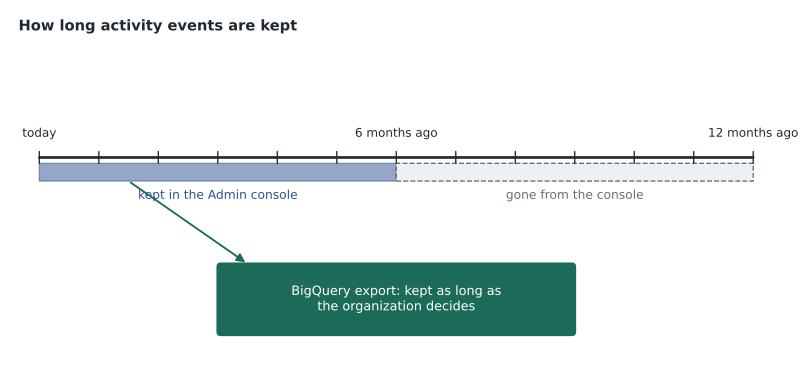
So Daniel's May question about March is fine: March is within six months of May. A question in December about the previous February would not be, unless the events were kept somewhere else. Birchline's records schedule, Teresa notes, asks for security logs to be kept for two years, and several of Birchline's contracts ask for a year of access logs, which six months cannot meet.
Keeping events longer
There are two ways to keep events beyond six months. On editions that include it, such as Enterprise Standard and Plus, administrators can set up an export of logs to BigQuery, which copies activity events into a BigQuery dataset in a Google Cloud project, where they are kept for as long as the dataset's settings say. Alternatively, a program can read events through the Reports API and store them in another system, such as a security information and event management (SIEM) platform.
Birchline already has BigQuery from the first Google Cloud courses, and Ravi Menon's team already manages datasets. Owen plans a dataset workspace_logs in the project bl-data-prod, with access limited to Teresa's team, internal audit and the data team's administrators, a table expiration of two years, and a budget alert, because log volume grows with users.
# Rough BigQuery storage estimate for Workspace activity logs (illustrative figures).
users = 1100
events_per_user_per_day = 220     # sign-ins, Drive views and edits, mail events and so on
bytes_per_event = 1500            # average size of one event row
days_kept = 2 * 365

total_bytes = users * events_per_user_per_day * bytes_per_event * days_kept
gb = total_bytes / 1e9
print(f"Events per day: {users * events_per_user_per_day:,}")
print(f"Storage after two years: about {gb:,.0f} GB")
price_per_gb_month = 0.02         # illustrative active storage price in dollars
print(f"Monthly storage cost at that size: about {gb * price_per_gb_month:,.0f} dollars")Events per day: 242,000 Storage after two years: about 265 GB Monthly storage cost at that size: about 5 dollars
What this code does
The estimate multiplies the number of people by an assumed number of logged events per person per day and an assumed size per event, then by the number of days the logs are kept, to get the total storage after two years. It converts that to gigabytes and multiplies by an illustrative monthly storage price per gigabyte. The result gives the scale of the storage bill once the full two years of logs have built up.
About 242,000 events a day and roughly 265 GB after two years is small for BigQuery, and the storage cost is a few dollars a month at the illustrative price. Queries cost more than storage if they scan everything, so Ravi suggests partitioning by date, which the export does, and writing queries that filter on dates first.
Searching well
Logs answer questions only if the search is precise. Owen writes the search for Daniel's question the way Sofia taught him: narrow the time first, then the object, then the actors.
Log:        Drive log events
Date range: March 1 to March 31, 2027
Document:   Payroll register 2027-Q1 (document ID 1Pq...e7)
Event:      View, Download, Print
Columns:    Date, Actor, Event, IP address, Visibility
Export:     Google Sheets, saved to the Legal matter shared drive
The order matters because logs are large. A search for every Drive event in March across the organization would return millions of rows. A search for one document's views in March returns a few dozen, which a lawyer can read. When the document's name is not known, the search starts from what is known, such as the person, the IP address or the shared drive, and narrows from there.
Building a timeline
In an investigation, Amira needs the events from several logs in one order. Exported results from the login log, the Drive log and the Admin log can be merged by time into a single timeline. The short program below does that for a handful of exported rows, the kind of rehearsal Owen and Amira run on test data before the pilot.
events = [
    ("2026-11-10 08:02", "Login", "j.test@birchline.example", "Sign-in from 203.0.113.50 (new country)"),
    ("2026-11-10 08:07", "Drive", "j.test@birchline.example", "Download: Supplier prices 2027.xlsx"),
    ("2026-11-10 07:58", "Login", "j.test@birchline.example", "Failed sign-in, wrong password"),
    ("2026-11-10 08:15", "Admin", "admin-owen@birchline.example", "Reset password for j.test"),
    ("2026-11-10 08:04", "Drive", "j.test@birchline.example", "Shared Supplier prices 2027.xlsx with an outside address"),
]
for when, log, actor, what in sorted(events):
    print(f"{when}  {log:6} {actor:30} {what}")
first, last = min(events)[0], max(events)[0]
print(f"Window: {first} to {last}")2026-11-10 07:58 Login j.test@birchline.example Failed sign-in, wrong password 2026-11-10 08:02 Login j.test@birchline.example Sign-in from 203.0.113.50 (new country) 2026-11-10 08:04 Drive j.test@birchline.example Shared Supplier prices 2027.xlsx with an outside address 2026-11-10 08:07 Drive j.test@birchline.example Download: Supplier prices 2027.xlsx 2026-11-10 08:15 Admin admin-owen@birchline.example Reset password for j.test Window: 2026-11-10 07:58 to 2026-11-10 08:15
What this code does
Each row is one event exported from a different log, with its time, the log it came from, the account that acted and a description. Sorting the rows by time puts the events from all three logs into a single order, which is the timeline an investigator reads. The last line shows the first and last times, which gives the window to search in other logs.
Sorted, the rehearsal events tell a clear story: a failed sign-in, a successful one from a new country, a sharing change and a download within nine minutes, and a password reset eight minutes after that. Real investigations are messier, with times in different time zones and events missing from one log, so Amira always notes the time zone of each export and checks for gaps before drawing conclusions.
Reading a login event
Login events are the logs Amira reads most, and they repay careful reading. Each event names the account, the event type, such as successful sign-in, failed sign-in, logout, 2SV enrollment change or suspicious sign-in, the IP address, and details such as the login type and whether a challenge was presented. A few patterns recur in investigations.
| Pattern in the login log | Likely meaning | Next check |
|---|---|---|
| Many failed sign-ins for many accounts from one IP address | Password spraying: one common password tried against many accounts | Block the source at the network edge if possible; check whether any attempt succeeded |
| A few failures, then a success, from a new country | Possibly a stolen password | Contact the person; check Drive and Gmail events after the success |
| Success with 2SV, then 2SV turned off by the user | Possibly an attacker weakening the account | Re-enforce 2SV; reset the password; review recovery details |
| Sign-ins from two distant places within minutes | Impossible travel, or a VPN | Ask the person; compare with their usual IP ranges |
With 2SV enforced, password spraying usually fails at the second step, but the failed attempts still matter: they show which accounts attackers are targeting, and an account that shows a successful password followed by a failed second step has a password that needs changing today.
Protecting the logs themselves
Logs are evidence, so they need the same care as the data they describe. The console logs cannot be altered by administrators, which is one reason Google keeps them that way. The BigQuery copy can be, by anyone with enough rights on the dataset, so Owen's plan for workspace_logs gives write access only to the export itself, read access to a small group, and no one the right to delete tables; changes to the dataset's permissions are logged by Google Cloud's own audit logs and alert Teresa's team. Internal audit checks once a quarter that the row counts in BigQuery match the console for a sample day.
Exports to Sheets and CSV are handled carefully too. An export of Drive events for a legal matter goes into the matter's shared drive, not someone's My Drive, and is labeled Restricted. An export made for a quick check is deleted when the check is done. Teresa's rule is that a log export is personal information about staff and must be treated like any other HR record.
Reports and dashboards
Not every question needs an event search. The Admin console's reports summarize activity over time: how many people use each app, how much storage is used, how many accounts have 2SV enrolled, how many files are shared outside. Owen uses the 2SV enrollment report during each wave (lesson 2) and the external sharing report each month for the baseline review. The security dashboard in the security center adds charts for things such as spam and phishing volumes and suspicious device activity; Google's help pages say it refreshes regularly, which makes it the place Teresa looks first when she wants a picture of the week rather than a single event.
Common mistakes
MistakeAssuming Admin console logs keep events forever.
InsteadThey keep about six months; export to BigQuery or a SIEM for longer.
MistakeSearching all events for a long period first.
InsteadNarrow by time, then object, then actor.
MistakeMixing exports from different time zones in one timeline without noting it.
InsteadRecord each export's time zone and convert before merging.
MistakeLetting everyone with admin rights read the exported logs.
InsteadLimit access to the log dataset as strictly as to Vault.
Worked problem
Who changed the sharing setting?
On Monday morning, the Marketing OU allows sharing with anyone outside, which the baseline says it should not. Who changed it, and when?
Show solution
- Open Admin log events and filter for the Drive sharing setting events for the Marketing OU over the past week.
- Read the event: it shows the administrator account, the time, and the old and new values.
- Check the matching change ticket. If there is none, ask the administrator, and check the account's login events for unusual sign-ins in case the account was misused.
- Restore the baseline value and record the change in the baseline document.
- Add or confirm an activity rule that alerts when that setting changes again.
Answer: The Admin log shows who changed it and when; restore the setting, confirm whether the change was approved, and set an alert.
Summary and key terms
- Audit and investigation pages hold logs for admin actions, sign-ins, Drive, Gmail, OAuth, Groups, devices, rules and other services, searchable by time, actor, event and details and exportable.
- Admin, login, Drive and Gmail events are kept for six months and usually appear within minutes.
- Keep events longer with a BigQuery export, on editions that include it, or through the Reports API into another system.
- Search narrowly: time, then object, then actor.
- Merge exports into a timeline, noting time zones, and limit access to log data.
- Audit and investigation page
- The Admin console area that shows activity logs for each service.
- Admin log events
- Records of changes made in the Admin console.
- Login (user) log events
- Records of sign-ins, failures and 2SV changes.
- Drive log events
- Records of views, edits, downloads and sharing changes on files.
- BigQuery log export
- A copy of Workspace activity events kept in a BigQuery dataset.
- Reports API
- The interface programs use to read Workspace activity events.
- SIEM
- A security information and event management system that collects and analyses logs.
- Timeline
- Events from several logs merged in time order for an investigation.
Practice problems
Work each problem on paper first, then reveal the answer to check.
How long are Drive log events kept in the Admin console?
Show answer
About six months.
Why does Birchline export logs to BigQuery?
Show answer
To keep them for two years, beyond the six months in the console.
What should a log search narrow first?
Show answer
The time range.
Lesson quiz · 5 questions
Score 60% or more to complete this lesson.
Create a free account to save your progress, take quizzes and earn a certificate.