
GCP-212 · Lesson 6 of 12 · 18 min
Google Vault: retention, holds and search
▶ Video coming soon A video version of this lesson is on the way.
Birchline's general counsel, Daniel Ferreira, has been waiting for this session. For years, the company's records policy said that financial records are kept for seven years and ordinary mail for three, and for years nobody could prove it was followed, because Exchange mailboxes were kept forever and file shares were cleaned whenever a server filled up. Workspace includes Google Vault, and Daniel wants the policy to be something the system enforces. He also has a practical request: a former store manager has filed a wrongful termination lawsuit, and he needs to be sure that nothing relevant can be deleted once the people involved move to Workspace. This lesson covers Vault's retention rules, holds, searches and exports, and how they interact.
What Vault is, and what it is not
Vault is Workspace's tool for information governance and eDiscovery. It can keep data for a set time even if users delete it, delete data after a set time, preserve data indefinitely for legal matters, and search and export data for investigations and lawsuits. Google's help pages list the editions that include it, among them Business Plus, Enterprise Standard and Plus, and Frontline Standard and Plus, so all of Birchline's licenses do. The services it covers include Gmail, Drive, Chat (when history is on), Meet recordings and related chat logs, Calendar, Groups, Sites and Voice, and, since June 2026, retention rules and holds for conversations in the Gemini app.
Two facts about Vault surprise new administrators. First, Vault keeps nothing until a rule tells it to. With no retention rules, users can delete data and it is purged under each service's normal policies. Second, Vault is not a backup. Data purged under a retention rule is gone and cannot be recovered, and Vault is not designed for restoring a user's deleted folder. Owen notes both in capitals at the top of the Vault plan.
Retention rules
A retention rule tells Vault how long to keep data for a service, and what to do when the period ends. There are two kinds.
- Default retention rules apply to a whole service for the whole organization, for example all Gmail messages are kept for three years and then purged.
- Custom retention rules apply to an OU or, for some services, to data matching conditions such as a Drive label, a date range or search terms, for example Finance mail kept for seven years.
Rules can be for a set number of days or indefinite, and when the period ends, Vault purges the data. Several rules can apply to the same item, and Vault resolves them in a fixed order that Owen draws on the whiteboard.
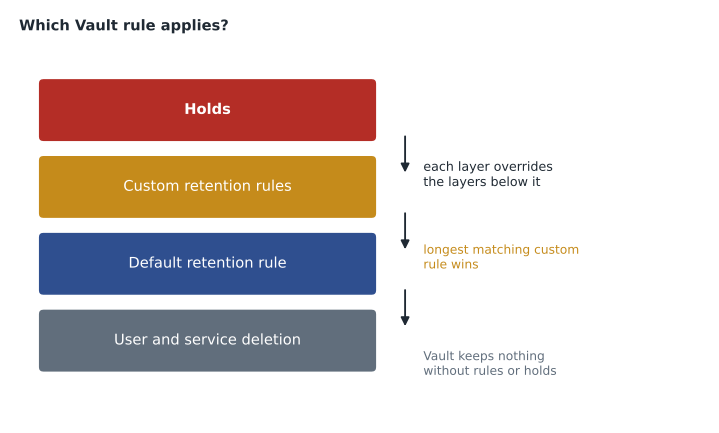
| Situation | Result |
|---|---|
| A hold covers the item | The item is kept for as long as the hold exists, whatever the retention rules say |
| No hold; one or more custom rules match | The custom rule with the longest period applies; the default rule is ignored |
| No hold, no custom rule | The default rule for the service applies |
| No rules at all | Vault keeps nothing; normal deletion applies |
Birchline's retention plan
Daniel's policy turns into a short list of rules. The periods come from Birchline's records schedule, which follows the law in each country: the IRS generally expects records supporting a tax return to be kept for three to seven years depending on the situation, and Birchline uses seven for financial records.
| Service | Rule | Scope | Period, then |
|---|---|---|---|
| Gmail | Default | Whole organization | 3 years, then purge |
| Gmail | Custom | Finance OU | 7 years, then purge |
| Drive | Custom | Files labeled Retention class: Financial | 7 years from last modification, then purge |
| Drive | Default | Whole organization | None at first; users manage their own files |
| Chat | Default | Whole organization | 1 year, then purge |
| Meet recordings | Default | Whole organization | 90 days, then purge |
| Gemini app conversations | Default | Whole organization | 1 year, then purge |
Owen tests each rule before it touches real data. Purge rules are dangerous: a rule set to 30 days by mistake instead of 3 years can delete years of mail within days of being saved, once the purge runs. He creates each rule first in a test OU with test accounts, checks the expected purge dates with a small calculation, and has Daniel approve the final settings in writing.
from datetime import date, timedelta

def purge_date(sent: date, years: int) -> date:
    # Vault periods are set in days; Owen converts years to days with 365 per year.
    return sent + timedelta(days=365 * years)

today = date(2026, 11, 12)
messages = [
    ("Supplier invoice to Finance", date(2027, 3, 1), 7),
    ("Ordinary meeting request", date(2027, 3, 1), 3),
    ("Mail migrated from Exchange, sent in 2021", date(2021, 6, 15), 3),
]
for subject, sent, years in messages:
    p = purge_date(sent, years)
    status = "would be purged at the first run after the rule is saved" if p <= today else f"kept until {p}"
print(f"{subject:44} {years} y -> {status}")Supplier invoice to Finance 7 y -> kept until 2034-02-27 Ordinary meeting request 3 y -> kept until 2030-02-28 Mail migrated from Exchange, sent in 2021 3 y -> would be purged at the first run after the rule is saved
What this code does
The function adds a retention period to the date a message was sent to find when Vault would purge it, counting each year as 365 days, because Vault periods are entered in days. Three example messages are checked: a finance invoice under the seven-year rule, an ordinary message under the three-year rule, and an old message migrated from Exchange. The output shows the purge date for each, or warns when a message is already older than the rule allows.
The third line is the important one. Mail migrated from Exchange keeps its original dates, so a three-year default rule would purge everything older than three years soon after the rule is saved. Daniel wants that old mail reviewed before anything is purged, because some of it may be relevant to the claim. Owen's plan is to save the three-year default rule only after the migrated mail has been reviewed, and to protect the relevant accounts with a hold first.
Holds
A hold preserves data for a legal matter indefinitely, overriding every retention rule and every user deletion. Holds belong to matters, which are workspaces in Vault for one case or investigation, and each matter has its own collaborators. A hold applies to accounts, an OU or a group, for one service; Gmail and Chat holds can be limited by conditions such as dates or search terms, while a Drive hold covers the files the account owns or can access in shared drives, as the help pages describe for each service.
For Daniel's case, Owen prepares a matter called Wrongful termination lawsuit 2026-04 with holds on Gmail, Drive and Chat for the former manager's account, the district manager and the two regional HR advisors. Some of those people are still on Exchange and will move in April; the holds are created as part of the migration checklist so they take effect from the moment each account's data reaches Workspace. Departed employees under hold keep a license or are moved to an archive license as the first course described; deleting the account of someone under hold is one of the mistakes Vault cannot undo.
Searching and exporting
Inside a matter, a search finds data by account, OU, date, and terms, with Boolean operators for most services, and shows a preview. An export packages the results with metadata and verification information. Google's help pages say exports remain available for download for 15 days and are then deleted. Searching does not move or change data, and anyone with Vault privileges can see everything their role allows, so Vault access is tightly limited: Daniel, one paralegal, and Teresa for security investigations, with Owen as administrator but without search privileges by default.
| Vault role (example) | Who | Can |
|---|---|---|
| Vault administrator | Owen | Manage retention rules; cannot search |
| Legal | Daniel, paralegal | Create matters, holds, searches and exports |
| Security investigator | Teresa | Search and export for security matters only |
| Auditor | Internal audit | View the Vault audit log |
Every action in Vault, including each search, is recorded in Vault's own audit log, which internal audit reviews quarterly. Context-aware access requires a managed device for Vault (lesson 3).
Drive retention needs extra care
Mail has a clear date: when it was sent or received. Files do not. A spreadsheet created in 2019 and edited last week is both old and current, and a retention rule has to pick which date counts. Vault's Drive rules can be based on dates such as when a file was created or last modified, and can target files by Drive label, which is why the second course's Retention class label matters here. A rule that purges files seven years after their last modification keeps the living budget spreadsheet and removes the forgotten export from 2018.
Shared drives add a second consideration. Files in shared drives belong to the organization, and Vault's custom rules can target shared drives as well as users' files, so a department's shared drive can follow the department's schedule even when its members change. Owen's plan keeps Drive's default rule off at first, because purging files is the step most likely to upset people, and relies on the label-based Financial rule for the records that the law requires. A broader Drive rule will be proposed after the head office wave, once people have had time to move personal files into shared drives and label them.
Departing staff and Vault
Most retention questions arrive when someone leaves. The first course set out the steps for departed staff: suspend, transfer ownership of files, move to the Departed staff OU, and decide whether to keep a license. Vault adds one question to that checklist: is the person, or are any of their files, covered by a hold or by a retention rule that is still running?
| Departing employee situation | Vault action before the account is deleted |
|---|---|
| Covered by a hold in an open matter | Do not delete; keep the account or move it to an archived user license |
| Not under hold; mail covered by the 7-year Finance rule | Keep or archive the account until the rule's period has passed for the mail that matters, or export it to a records store first |
| Not under hold; only the 3-year default applies | Transfer files, export what the manager needs, then delete under the normal schedule |
| Under investigation by security | Teresa decides; no deletion until the investigation matter is closed |
Daniel adds one line to the checklist in his own handwriting: no account is deleted without a Vault check by legal. The helpdesk had deleted accounts on the first business day after a departure for years under Exchange, and that habit is exactly what would destroy evidence in a lawsuit.
Watching Vault itself
Because Vault can delete data at scale and reveal everything, changes to Vault are watched as closely as changes to admin roles. Owen sets alerts for three events: a retention rule created, changed or deleted; a hold removed; and an export started. Each alert goes to Teresa's team and to Daniel. A hold removed without a closed matter, or an export by someone outside legal and security, is treated as a possible incident.
Common mistakes
MistakeAssuming Vault keeps everything automatically.
InsteadVault keeps nothing until retention rules or holds say so.
MistakeSaving a short default rule before migrated mail has been reviewed.
InsteadProtect relevant accounts with holds first, then save the rule.
MistakeDeleting the account of a departed employee who is under hold.
InsteadKeep or archive the account; deletion removes the data.
MistakeGiving the Vault administrator search rights by default.
InsteadSeparate rule management from searching, and log both.
Worked problem
Choosing which rule applies
A Finance analyst's message is covered by the Gmail default rule of 3 years and the Finance custom rule of 7 years. The analyst is also under a hold for an audit matter. The analyst deletes the message. What happens?
Show solution
- The hold covers the message, so it is preserved for as long as the hold exists, despite the deletion.
- If the hold is later released, the custom rule applies, because custom rules override the default.
- The message is then kept until 7 years after it was sent and purged after that.
- The default rule of 3 years is ignored, because a custom rule matches.
Answer: Kept while the hold exists; afterwards the 7-year Finance rule applies.
Summary and key terms
- Vault handles retention, holds, search and export for Gmail, Drive, Chat, Meet, Calendar, Groups, Sites, Voice and the Gemini app.
- It keeps nothing until rules or holds exist and is not a backup.
- Default rules cover a service for everyone; custom rules cover OUs or conditions; holds override all rules, custom rules override the default, and the longest custom rule wins.
- Test purge rules on test accounts and protect relevant migrated data with holds first.
- Holds live in matters; exports are available for 15 days.
- Limit and log Vault access.
- Google Vault
- Workspace's tool for retention, legal holds, search and export.
- Retention rule
- A rule that keeps data for a period and then purges it.
- Default retention rule
- A rule covering a whole service for the whole organization.
- Custom retention rule
- A rule covering an OU or data matching conditions.
- Hold
- A preservation order that keeps data indefinitely for a legal matter.
- Matter
- A Vault workspace for one case, containing its holds, searches and exports.
- Purge
- Permanent deletion of data at the end of a retention period.
- eDiscovery
- Finding and producing electronic information for legal proceedings.
Practice problems
Work each problem on paper first, then reveal the answer to check.
What does Vault keep if no retention rules or holds exist?
Show answer
Nothing; normal deletion applies.
Two custom rules of 5 and 7 years match an item. Which applies?
Show answer
The 7-year rule, the longest custom rule.
Why does Owen create holds before saving the 3-year default rule?
Show answer
Migrated mail keeps its old dates and could be purged before it is reviewed.
Lesson quiz · 5 questions
Score 60% or more to complete this lesson.
Create a free account to save your progress, take quizzes and earn a certificate.