
GCP-212 · Lesson 12 of 12 · 18 min
Lab walkthrough: investigating a security alert
▶ Video coming soon A video version of this lesson is on the way.
The last session is a rehearsal. Teresa has prepared a scenario on test accounts in the Pilot OU, with a set of sample log exports she built to match it, and she runs it as a tabletop exercise: Amira Saleh plays the analyst, Owen the administrator, Sofia the observer who stops the clock to ask why. The story is simple and realistic. A buyer, played by the test account jordan.test@birchline.example, received a fake invoice, typed their password into a look-alike page and approved a sign-in prompt they did not start. This lesson follows the team through the alert, from the first email to the written report, using everything in the course.
09:12: The alert arrives
The alert center shows a high-severity Suspicious login alert for jordan.test, and the same alert reaches the sec-alerts group by email. The details say the sign-in came from an IP address in a country where Birchline has no staff, with signs Google associates with automation, at 08:51. Amira assigns the alert to herself and sets it to in progress at 09:14, inside the 15-minute target from lesson 7.
Her first decision is not to investigate yet. Sofia stops the clock here on purpose: "What do you do first?" The answer is to contain, because every minute an attacker keeps access is a minute of possible damage, and containment actions are reversible if the alert turns out to be harmless.
09:16: Contain
Owen, as administrator, takes five actions from the user's page and the security settings, in this order, and notes the time of each.
| Time | Action | Why |
|---|---|---|
| 09:16 | Sign the user out of all sessions | Ends the attacker's web and mobile sessions immediately |
| 09:17 | Reset the password and require a change at next sign-in | The stolen password stops working |
| 09:18 | Review 2SV: remove the phone prompt method the attacker used, keep the security key, issue no backup codes until the person is verified | The attacker approved a prompt; methods they could use are removed |
| 09:20 | Review and revoke third-party app access granted today | An attacker can grant an app access that survives a password change |
| 09:22 | Check and remove mail forwarding, filters and mail delegation added today | Attackers often set a forwarding rule or a filter that hides replies |
The fourth and fifth rows are the ones newcomers miss. Changing a password does not revoke OAuth tokens that apps already hold, and a forwarding address or a filter that deletes messages from the finance team survives every password change. Amira checks the OAuth log and finds one app, "Doc Viewer Pro", granted access to Gmail and Drive at 08:58, which Owen revokes. The Admin log will show both actions with his admin account as the actor, which is exactly the trail the report needs.
09:25: Scope
With access contained, the question becomes what the attacker did between 08:51 and 09:16. Amira searches each log for the account and the window, exports the results with their time zone noted, and merges them into one timeline, as lesson 8 described.
events = [
    ("08:47", "Gmail", "Message 'Invoice 4471 overdue' delivered from pay-notices.example"),
    ("08:49", "Gmail", "Link in the message opened"),
    ("08:51", "Login", "Sign-in from 203.0.113.77 (suspicious), 2SV prompt approved"),
    ("08:58", "OAuth", "App 'Doc Viewer Pro' granted Gmail and Drive access"),
    ("09:02", "Gmail", "Forwarding address added: j.archive@mailbox.example"),
    ("09:05", "Drive", "Download: Supplier prices 2027.xlsx"),
    ("09:06", "Drive", "Download: Buying plan Q1.xlsx"),
    ("09:09", "Gmail", "Message sent to 14 suppliers: 'Updated bank details'"),
    ("09:16", "Admin", "All sessions signed out by admin-owen"),
]
attacker = [e for e in events if "08:51" <= e[0] < "09:16"]
print(f"Events in the attacker's window: {len(attacker)}")
for t, log, what in attacker:
    print(f"  {t} {log:6} {what}")
downloads = [e for e in attacker if e[1] == "Drive" and "Download" in e[2]]
print(f"Files downloaded: {len(downloads)}")Events in the attacker's window: 6 08:51 Login Sign-in from 203.0.113.77 (suspicious), 2SV prompt approved 08:58 OAuth App 'Doc Viewer Pro' granted Gmail and Drive access 09:02 Gmail Forwarding address added: j.archive@mailbox.example 09:05 Drive Download: Supplier prices 2027.xlsx 09:06 Drive Download: Buying plan Q1.xlsx 09:09 Gmail Message sent to 14 suppliers: 'Updated bank details' Files downloaded: 2
What this code does
The list holds the merged timeline of events from the Gmail, login, OAuth, Drive and Admin logs, all in the same time zone. The program keeps only the events between the suspicious sign-in at 08:51 and the moment the sessions were ended at 09:16, which is the period the attacker had access. It prints those events in order and counts the files downloaded, which is the core of the scope.
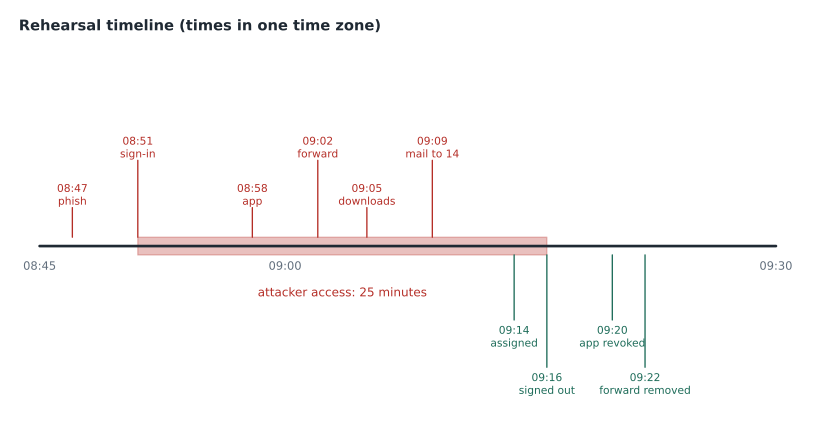
The scope has three parts. Two spreadsheets were downloaded; both are supplier price files, labeled Confidential, with no personal information. A forwarding address was added, and Gmail log search shows that four incoming messages were forwarded to it before it was removed. And most serious, a message was sent to 14 suppliers claiming that Birchline's bank details had changed: a classic invoice fraud attempt.
09:40: Eradicate and recover
Eradication removes everything the attacker left behind; recovery restores normal work safely.
- Remove the phishing message everywhere. In the investigation tool, Amira searches for messages from pay-notices.example in the last three days: 11 people received it. She deletes them from all mailboxes, after a second check because the count is small, and adds the domain to the blocked senders list.
- Warn the suppliers. The fraudulent message went to 14 suppliers. Amira finds the sent message and its recipients in the investigation tool, and Birchline's buying team calls each supplier by phone, using numbers from the supplier file, not from the email, to say the message is fraudulent and bank details have not changed.
- Check the forwarded messages. The four forwarded messages are reviewed with Daniel Ferreira, the general counsel, to see whether any contained personal information.
- Check who else clicked. The Gmail log shows two other people opened the link; their login events show no suspicious sign-ins, but both get a password reset and a short call.
- Restore the user. Once the real person is verified by a call-back, they sign in with their security key, set a new password and review their own recent activity with Amira.
Notification decisions
Not every incident must be reported to a regulator, but every one must be assessed. Daniel and Teresa review the facts: the downloaded files contained supplier prices, a business secret but not personal information; the forwarded messages included one with a supplier contact's name and phone number.
Under Ohio's breach notification law and those of other states, notification duties usually turn on whether specific kinds of personal information, such as Social Security numbers, account numbers with access codes or certain other identifiers, were acquired by an unauthorized person, and Ohio's law requires notice within 45 days when they were. A supplier contact's work name and number is not that kind of information, so Daniel concludes no notification is required, records the assessment, and keeps the incident report in Birchline's incident register for the period its records schedule sets.
The supplier price files are a business matter, not a privacy one, and Dana Leclair and the buying director decide how to handle them commercially. The fraudulent bank details email is reported to Birchline's bank, which flags the account in the message for monitoring.
Roles and communication during the incident
Sofia stops the clock a second time, at 09:30, to ask who is in charge. In the first run of the exercise, the answer was everyone and no one: Amira was searching logs, Owen was changing settings, Teresa was drafting a message to the board, and nobody was keeping the timeline. The second run assigns roles at the start.
| Role | Who in the rehearsal | Responsibilities |
|---|---|---|
| Incident lead | Teresa | Decides priorities, approves containment and communication, calls in legal |
| Analyst | Amira | Investigates logs and the investigation tool, builds the timeline |
| Administrator | Owen | Makes changes in the Admin console, records each one with its time |
| Scribe | Sofia (observer) in the exercise; a second analyst in a real incident | Keeps the running log of decisions and times |
| Legal | Daniel | Assesses notification duties, handles evidence and holds |
Communication runs through the incident lead. The buyer's manager is told what happened and that their colleague will be back at work within the hour; the buying team is briefed before it phones the suppliers; and the wider company is told nothing until the facts are clear, because a vague all-staff warning sent too early causes more confusion than it prevents. A short message to all staff about the phishing campaign goes out once the messages have been removed, with a screenshot of the fake invoice and a reminder to report suspicious mail with the Report phishing button.
Handling the evidence
Evidence from an incident may be needed months later, for an insurer, a regulator or a court. Daniel asks for three things. First, the log exports are saved as they were exported, with their time zones, in the incident's folder in the IT security shared drive, and copies used for analysis are kept separate. Second, a Vault matter is opened with holds on the affected account's Gmail, Drive and Chat, so nothing the attacker touched can be purged under the normal retention rules. Third, the account is not deleted or renamed, even if the person later leaves, until legal closes the matter. Because the console logs keep events for six months, Amira also checks that the BigQuery export from lesson 8 holds the same events, so they will still exist after that.
Lessons learned
Sofia's final question is what the team will change. The rehearsal produces four actions, each with an owner and a date, and each tied to a lesson in the course.
| Finding | Change | Owner |
|---|---|---|
| The buyer approved a phone prompt they did not start | Move buyers to security keys or passkeys, which a fake page cannot relay (lesson 2) | Owen |
| The attacker granted an app access in seven minutes | Restrict unconfigured third-party apps to basic sign-in information for everyone (second course, lesson 10) | Owen |
| A forwarding address was added and used | Confirm automatic forwarding is off in the baseline before the pilot; it is a critical item (lesson 1) | Owen |
| The fraud message went to suppliers unnoticed | Add an activity rule for messages to more than 10 outside recipients containing "bank details" (lesson 7) | Amira |
The third row is the most sobering. Automatic forwarding was one of the two critical items still open in lesson 1's baseline score, scheduled for the week of November 16. In the rehearsal it was the attacker's second move. Teresa moves it to tomorrow.
The written report
The exercise ends with the report, because a real incident is not over until it is written down. Owen and Amira fill in Birchline's incident template together: summary, timeline, scope, actions taken, notification assessment, lessons learned and attachments (the log exports, the alert ID and the change records). The report is saved in the IT security shared drive, labeled Restricted, and a Vault matter is opened for it so the evidence is held. Teresa signs off the exercise and schedules the next one, a lost-tablet scenario, for the store wave.
Common mistakes
MistakeInvestigating for an hour before containing the account.
InsteadContain first: sign out, reset, review 2SV, revoke apps, remove forwarding and filters.
MistakeAssuming a password reset removes the attacker completely.
InsteadRevoke OAuth tokens and check forwarding, filters and delegation as well.
MistakeContacting suppliers by replying to the fraudulent message.
InsteadCall them on known numbers from Birchline's own records.
MistakeClosing the incident when access is restored.
InsteadAssess notification, record lessons learned with owners, and file the report.
Worked problem
Measuring the response
Using the rehearsal times, how long was the attacker's access, how long did it take to acknowledge the alert after it fired, and how long from alert to containment?
Show solution
- The suspicious sign-in was at 08:51 and sessions were signed out at 09:16: 25 minutes of access.
- The alert reached the console and email at 09:12 and was assigned at 09:14: 2 minutes to acknowledge, inside the 15-minute target.
- Containment began at 09:16 and the last containment step finished at 09:22: 10 minutes from alert to full containment.
- Most of the 25 minutes passed before the alert fired at 09:12, which is why phishing-resistant sign-in matters more than a faster response.
Answer: 25 minutes of access, 2 minutes to acknowledge, 10 minutes from alert to full containment.
Summary and key terms
- An incident follows a set order: triage the alert, contain the account, scope what happened, eradicate and recover, assess notification, record lessons learned and write the report.
- Containment means signing out sessions, resetting the password, reviewing 2SV methods, revoking third-party app access and removing forwarding, filters and delegation.
- Scope comes from a merged timeline of login, Gmail, OAuth, Drive and Admin events.
- Remove phishing messages everywhere with the investigation tool and warn affected outsiders through known channels.
- Assess privacy notification against the law, record the decision, and turn each finding into a dated change with an owner.
- Tabletop exercise
- A rehearsal of an incident using a scenario and sample evidence.
- Containment
- Actions that stop an attacker's access quickly and reversibly.
- Scope
- What an attacker did and which data and people were affected.
- Eradication
- Removing everything the attacker left behind.
- OAuth token
- A grant that lets an app act for a user, which survives a password change until revoked.
- Invoice fraud
- A scam that tricks people into paying money to a criminal's account.
- Breach register
- The organization's record of security incidents involving personal information.
- Lessons learned
- Changes agreed after an incident, each with an owner and a date.
Practice problems
Work each problem on paper first, then reveal the answer to check.
Why contain before investigating in depth?
Show answer
Every minute of access is possible damage, and containment is reversible.
Why revoke third-party app access after a password reset?
Show answer
Tokens already granted keep working until they are revoked.
How should suppliers be warned about a fraudulent message?
Show answer
By phone, on numbers from Birchline's own records.
Lesson quiz · 5 questions
Score 60% or more to complete this lesson.
Create a free account to save your progress, take quizzes and earn a certificate.