
GCP-194 · Lesson 4 of 12 · 19 min
Review: Data preparation and ingestion
▶ Video coming soon A video version of this lesson is on the way.
Section 1 is the largest section of the exam, at about 30 in 100, so it was the first review of the Saturday workshop. In the diagnostic Mateo had answered 7 of its 11 questions correctly. On a 60-question exam it is worth about 18 questions. Mateo had spent six weeks on this material in GCP-220, loading Birchline's till files, cleaning supplier price lists and streaming web events, so Ravi did not reteach it. Instead he went through the two objectives in the exam guide one consideration at a time and asked Mateo to explain each in a sentence, with an example. Where Mateo hesitated, they stopped and filled the gap.
The section has two objectives. Objective 1.1 is about preparing and processing data: choosing between ETL, ELT and ETLT, choosing transfer tools, judging data quality and cleaning data. Objective 1.2 is about extracting and loading: recognizing formats, choosing extraction tools, choosing where to store data and in what kind of location, classifying data, and the methods for loading it. This lesson follows that order.
ETL, ELT and ETLT
The three patterns differ in where the transformation happens. In ETL, data is extracted from a source, transformed in a separate processing step, and only the clean result is loaded into the destination. In ELT, raw data is loaded into the destination first, usually BigQuery, and transformed there with SQL. ETLT is a mix: a light transformation happens before loading, often to remove or mask sensitive fields or fix a format, and the main transformation happens after loading.
| Pattern | Where transformation happens | Fits when | Birchline example |
|---|---|---|---|
| ETL | Before loading, in a tool such as Dataflow or Cloud Data Fusion | Raw data must not reach the destination, or the destination cannot transform it well | Supplier price lists cleaned in Cloud Data Fusion before loading to staging |
| ELT | After loading, inside BigQuery with SQL or Dataform | The warehouse can do the work, and keeping raw data is useful | Till files loaded raw, then transformed with Dataform |
| ETLT | A light step before loading, the rest after | Some fields must be removed or masked before they land, but most work suits SQL | Returns JSON converted in Cloud Run and the phone number dropped, then transformed in BigQuery |
The exam often presents these as a choice. ELT is the usual modern default on Google Cloud, because BigQuery is fast and keeping the raw data lets a team rerun transformations when the logic changes. ETL fits when the raw data must not land in the warehouse, for example because it contains fields that are not allowed to be stored, or when heavy processing is easier in a pipeline tool. ETLT fits the middle case. When a question mentions personal information that must never be stored, look for ETL or ETLT. When it mentions analysts who want to reprocess history with new rules, look for ELT.
Transfer tools
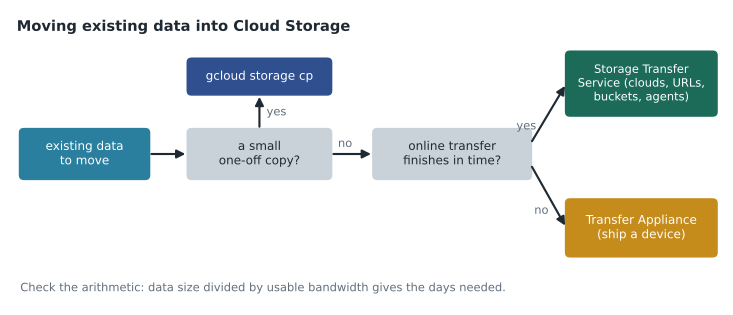
Moving existing data into Google Cloud is a different job from loading daily data, and the exam distinguishes the tools clearly. Storage Transfer Service moves data online into Cloud Storage from other clouds, from HTTP sources, from other Cloud Storage buckets, or from on-premises file systems through agents installed locally. It can run once or on a schedule. Transfer Appliance is a physical storage device that Google ships to the customer, who fills it and ships it back; it fits when the amount of data is so large, or the network so limited, that an online transfer would take too long. For small, one-off copies, the gcloud storage command is enough.
Worked problem
Online or offline?
A manufacturer wants to move 200 TB of historical sensor files from its own data center to Cloud Storage. Its internet connection is 1 gigabit per second, and the team expects to use about 70 in 100 of it for the transfer. The data must be in Google Cloud within three weeks. Should it use Storage Transfer Service or Transfer Appliance?
Show solution
- Convert the data to bits: 200 TB is 200 × 10^12 bytes, which is 1.6 × 10^15 bits.
- At the full 10^9 bits per second, the transfer would take 1.6 × 10^6 seconds.
- 1.6 × 10^6 ÷ 86,400 seconds per day is about 18.5 days.
- At 70 in 100 of the link, it takes about 18.5 ÷ 0.7, or 26.5 days.
- That is longer than three weeks, even before allowing for retries or other traffic.
Answer: Transfer Appliance, because an online transfer would take about 26 days, beyond the three-week deadline.
The example is the arithmetic behind the decision tree. Birchline faced the same question with its 40 TB photo library in GCP-220, and there the answer was Storage Transfer Service with an agent in the head office data center, because 40 TB over the company's link would finish in about five days. Mateo makes a note: the exam may not give the numbers, only the hint, such as "limited bandwidth" or "hundreds of terabytes".
Data quality
The guide asks candidates to assess data quality. In GCP-220 Mateo learned six common dimensions, and the exam uses the same ideas even if it does not always name them.
| Dimension | The question it asks | Example check |
|---|---|---|
| Completeness | Is anything missing? | Every store sent a till file; no null store IDs |
| Accuracy | Does the data match reality? | Till totals reconcile with end-of-day register reports |
| Validity | Does each value follow the rules? | Dates parse, quantities are not negative except refunds |
| Consistency | Do related values agree? | The same SKU has the same category in every table |
| Uniqueness | Are there duplicates? | Each sale line appears once, even if a file is reloaded |
| Timeliness | Is the data current enough? | Curated tables are complete by 06:00 |
For cleaning, the guide names four tools. BigQuery and SQL handle most cleaning in an ELT design: trimming, casting, deduplicating with window functions, and filtering bad rows into a quarantine table. Dataflow handles cleaning as part of a batch or streaming pipeline written with Apache Beam, which suits large volumes, streaming data and complex logic. Cloud Data Fusion offers a visual interface, with its Wrangler tool for interactive cleaning, which suits teams who prefer not to write code. BigQuery data preparation, generally available since March 2025, suggests cleaning steps from a sample of the data with help from Gemini and saves them as a repeatable preparation that can be scheduled.
Recognizing data formats
The guide lists CSV, JSON, Parquet, Avro and structured database tables. The exam often asks which format suits a job, and the answers follow from a few properties.
| Format | Layout | Schema | Good for | Watch out for |
|---|---|---|---|---|
| CSV | Rows of text | None in the file | Simple exports, spreadsheets, small loads | Delimiters inside values, headers, no types |
| JSON (newline-delimited for BigQuery) | Text records, can be nested | None in the file | Web events, API output, nested data | BigQuery loads one JSON object per line, not a single array |
| Avro | Binary rows | Stored with the data | Fast, reliable loads; pipelines and streaming records | Not human-readable |
| Parquet | Binary columns | Stored with the data | Analytics, external tables, smaller files | Less suited to writing one record at a time |
| ORC | Binary columns | Stored with the data | Hadoop and Hive systems | Less common outside that ecosystem |
Two rules of thumb cover most questions. If a question asks for the fastest or most reliable load into BigQuery, a self-describing binary format such as Avro is usually best, because the schema travels with the data and BigQuery can read it in parallel. If a question asks for efficient analytics on files that stay in Cloud Storage, a columnar format such as Parquet is usually best, because queries read only the columns they need. When Birchline converted 1.2 TB of warehouse history from CSV to Parquet in GCP-220, it shrank to about 0.6 TB.
Structured, semi-structured and unstructured
The guide asks candidates to classify data. Structured data has a fixed schema of rows and columns, such as a sales table. Semi-structured data has structure that can vary from record to record, such as JSON web events with optional fields. Unstructured data has no schema a database can use directly, such as product photos, PDFs and audio. The classification matters because it points to storage: structured data to BigQuery or a database, semi-structured data to BigQuery with JSON or nested columns, or to Firestore, and unstructured data to Cloud Storage.
Extraction and loading tools
| Tool | What it does | Choose it when |
|---|---|---|
| BigQuery Data Transfer Service | Scheduled, managed loads into BigQuery from Google sources such as Google Ads, from Cloud Storage, and from some other clouds and warehouses | A recurring load from a supported source, with no code |
| Dataflow | Batch and streaming pipelines with Apache Beam, many ready-made templates | Large or streaming data, custom transformation, or a template fits |
| Database Migration Service | Migrates databases such as MySQL, PostgreSQL and SQL Server to Cloud SQL or AlloyDB, with continuous replication until cut-over | Moving an operational database into a managed database service |
| Datastream | Change data capture: streams inserts, updates and deletes from databases into BigQuery or Cloud Storage | Keeping analytics copies of a live database current |
| Cloud Data Fusion | Visual pipelines with many connectors | A low-code team needs to pull from many sources |
| bq load, gcloud storage, client libraries | Command-line and programmatic loading | Scripts, small jobs or application code |
The look-alike that catches many candidates is Database Migration Service against Datastream. Both read from a database. Database Migration Service moves the database to a new home: the destination is another operational database, and after cut-over the application uses the new one. Datastream copies changes out of a database that stays where it is, so analysts can query a current copy. Birchline's shop database stayed in MySQL, and Datastream fed its orders into BigQuery; if Birchline had been moving the shop to Cloud SQL, the answer would have been Database Migration Service.
bq load --source_format=AVRO raw.pos_sales_20261112 gs://bl-data-landing/pos/2026-11-12/*.avroChoosing where to store data
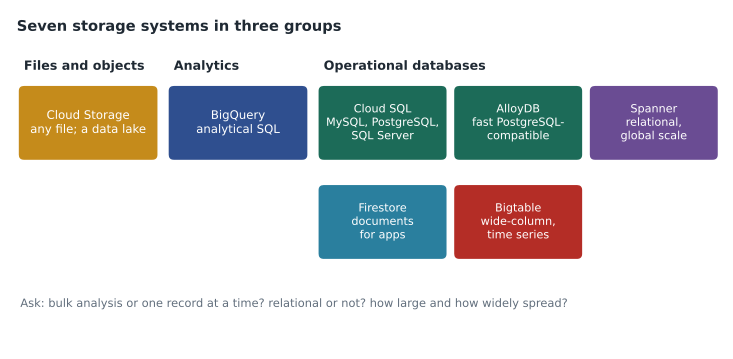
The guide lists seven storage options. The exam rarely asks for deep detail about any of them, but it often asks which one fits a described workload. The clues are the shape of the data, the way it is read and written, and the scale.
| Service | Kind | Typical clue in a question |
|---|---|---|
| Cloud Storage | Object storage | Files, images, backups, a data lake, raw landing zone |
| BigQuery | Analytics data warehouse | SQL analysis over large data, reporting, BI, machine learning in SQL |
| Cloud SQL | Managed relational database (MySQL, PostgreSQL, SQL Server) | An application's transactional database, lift and shift of a familiar engine |
| AlloyDB | PostgreSQL-compatible database | Demanding PostgreSQL workloads, fast analytics on operational data |
| Spanner | Relational database that scales horizontally | Global users, very high scale, strong consistency across regions |
| Firestore | Document database | Mobile or web app data, flexible documents, offline sync |
| Bigtable | Wide-column NoSQL database | Huge volumes of time-series or sensor data, very low latency at very high throughput |
Mateo had used three of these at work. The other four were the known gap from lesson 1, so Ravi gave him a simple rule for each: SQL analytics means BigQuery; an app's ordinary database means Cloud SQL; PostgreSQL with extra speed means AlloyDB; worldwide relational scale means Spanner; app documents mean Firestore; enormous streams of keyed readings mean Bigtable; and files of any kind mean Cloud Storage.
Location types
The guide asks about four location types. A region is a single geographic area such as Toronto or Columbus, containing several zones. A dual-region is a specific pair of regions, which keeps data available if one region fails. A multi-region is a large area such as the US or the EU containing several regions. A zone is a single location inside a region; most storage does not use zonal locations, but Cloud Storage's Rapid storage class does, for very fast access close to compute in that zone.
Data residency is a common constraint. For data that must stay in the United States, the US multi-region or a US dual-region such as the predefined NAM4 pair keeps data available if one region fails. Birchline's landing bucket is in the Columbus region, with a dual-region for the photo library.
Common mistakes
MistakeChoosing Transfer Appliance for every large migration.
InsteadWork out whether an online transfer would finish in time; choose the appliance only when it would not.
MistakeConfusing Database Migration Service with Datastream.
InsteadMigration moves a database to a new home; Datastream copies changes out of a database that stays.
MistakeLoading a JSON array file into BigQuery.
InsteadBigQuery expects newline-delimited JSON, one object per line.
MistakeChoosing Bigtable for SQL analytics.
InsteadBigtable is for very high-throughput keyed access; SQL analytics belongs in BigQuery.
MistakeAssuming there is a Canadian multi-region.
InsteadUse a Canadian region or the Montréal and Toronto dual-region.
Summary and key terms
- Section 1 is about 30 in 100 of the exam.
- ETL transforms before loading, ELT after, and ETLT does a light step before and the rest after.
- Storage Transfer Service moves data online; Transfer Appliance ships a device when the network is too slow.
- Data quality has six common dimensions, and BigQuery, Dataflow, Cloud Data Fusion and BigQuery data preparation can clean data.
- Avro loads quickly with its schema; Parquet suits analytics on files.
- Database Migration Service moves databases; Datastream copies changes.
- Seven storage services each have a clue, and four location types control where data lives.
- ETL
- Extract, transform, load: transformation before the destination.
- ELT
- Extract, load, transform: raw data loaded first and transformed in the destination.
- ETLT
- A light transformation before loading and the main transformation after.
- Storage Transfer Service
- A managed service for moving data online into Cloud Storage.
- Transfer Appliance
- A physical device shipped to a customer for moving very large data offline.
- Datastream
- A change data capture service that copies database changes into BigQuery or Cloud Storage.
- Database Migration Service
- A service for moving databases to Cloud SQL or AlloyDB.
- Dual-region
- A storage location made of a specific pair of regions.
Practice problems
Work each problem on paper first, then reveal the answer to check.
A team must never store customers' full card numbers, but wants to analyze the rest of the record in BigQuery. Which pattern fits?
Show answer
ETL or ETLT: remove or mask the card number before loading, then transform the rest.
Which format usually gives the fastest, most reliable load into BigQuery?
Show answer
Avro, because the schema travels with the data and it can be read in parallel.
A game stores player profiles that change shape often and must sync to phones. Which storage fits?
Show answer
Firestore, a document database for app data with offline sync.
Lesson quiz · 5 questions
Score 60% or more to complete this lesson.
Create a free account to save your progress, take quizzes and earn a certificate.