
GCP-101 · Lesson 5 of 12 · 18 min
Billing accounts, budgets and pricing models
▶ Video coming soon A video version of this lesson is on the way.
Dana Leclair, Birchline's CFO, has one worry about the cloud, and she states it at the first steering meeting. "With the old data center I knew the cost to the dollar for five years. It was too high, but it was predictable. How do I know the cloud bill won't double while nobody is looking?" Farah promises her an answer, and asks Owen to help build it. This lesson covers how Google Cloud charges, who pays, and the tools that keep spending visible and under control.
Cloud Billing accounts
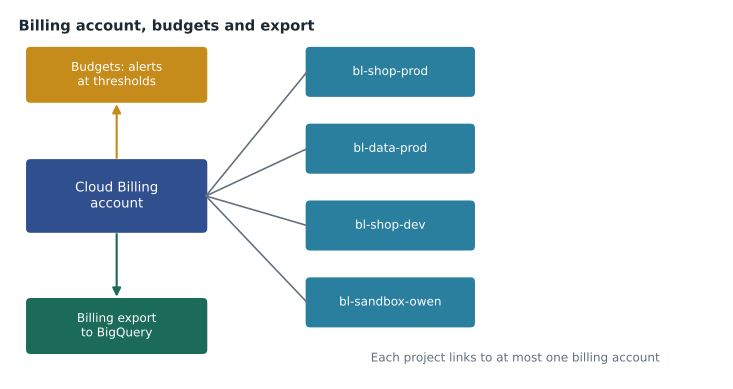
A Cloud Billing account is the account that pays for Google Cloud usage. It holds the payment method, such as a card or an invoiced arrangement, and it receives the charges from every project linked to it. Billing accounts sit beside the resource hierarchy rather than inside it: a billing account belongs to an organization, and projects are linked to it. One billing account can pay for many projects, and a project can be moved from one billing account to another, but each project is linked to at most one billing account at a time.
A project that has no billing account linked can use only free features. If a project's billing is disabled, its paid resources stop, and some may be deleted after a period, so unlinking billing is a drastic step, not a pause button. Birchline has a single billing account, Birchline main, linked to every project. Larger organizations sometimes use several, for example one per subsidiary or country, so that each pays its own bills.
| Billing role | Lets the holder |
|---|---|
| Billing Account Administrator | Manage the billing account, payment method, users and budgets |
| Billing Account User | Link projects to the billing account (combined with a project role) |
| Billing Account Viewer | See costs and transactions without changing anything |
| Project Billing Manager | Link or unlink a project from a billing account |
Billing roles follow the same IAM rules as everything else. Dana's finance team has Billing Account Viewer so they can see every cost; only two people hold Billing Account Administrator; and the platform team has Billing Account User so it can link new projects as they are created.
How Google Cloud charges
Most Google Cloud services are pay as you go: you pay for what you use, metered in small units. Different services meter different things, and knowing the main meters helps Owen predict a bill.
| Service type | Typically charged for |
|---|---|
| Virtual machines (Compute Engine) | vCPU and memory per second of running time, plus disks and any GPUs or licenses |
| Serverless compute (Cloud Run) | CPU and memory while handling requests, plus the number of requests |
| Object storage (Cloud Storage) | Gigabytes stored per month, operations performed, and data retrieved from colder classes |
| Managed databases (Cloud SQL) | Instance size and running time, storage, and backups |
| Analytics (BigQuery) | Data stored, and either data scanned by queries or reserved query capacity |
| Networking | Data leaving Google Cloud to the internet, and some traffic between zones or regions |
Owen is surprised by how much depends on whether resources are running. A virtual machine left on all month costs about 730 hours of compute; the same machine used only in business hours costs less than a third of that. Most cloud savings come from three habits: choosing the right size, switching off what is idle, and paying less for steady, predictable use through discounts.
Network charges catch many newcomers. Data coming into Google Cloud from the internet (ingress) is generally free, while data going out to the internet (egress) is charged by the gigabyte, and traffic between regions, and in many cases between zones, also has a price. Birchline's product photo library is large, so serving those images to shoppers through Cloud CDN, which caches them near users, matters for cost as well as speed.
Discounts and pricing models
Google Cloud offers several ways to pay less than the standard on-demand price.
- Sustained use discounts apply automatically to eligible Compute Engine machine series that run for a large part of the month. The longer a machine runs in the month, the larger the discount, reaching up to about 30 out of every 100 dollars of the resource cost for a full month on eligible series. Some newer series, such as E2, are not eligible, because their base price is already lower.
- Committed use discounts (CUDs) give a significant discount in exchange for a one-year or three-year commitment. Resource-based commitments cover a set amount of vCPU and memory in a region; spend-based commitments cover a minimum hourly spend on certain services. Three-year commitments save more than one-year commitments. The commitment is paid whether or not the resources are used, so it suits steady workloads.
- Spot VMs use spare Compute Engine capacity at a much lower price, but Google can stop them at short notice when it needs the capacity back. They suit work that can be interrupted and restarted, such as batch processing or rendering, never the checkout page.
- The free tier includes small monthly allowances of some products, such as one e2-micro virtual machine per month in certain US regions and 5 GB-months of Standard Cloud Storage, and new customers receive a free trial credit of 300 US dollars. Owen used the trial credit to learn before Birchline's account was set up.
Farah explains how Birchline will combine them. The shop's steady baseline of web servers and the always-on databases are good candidates for committed use discounts once a few months of real usage show the baseline. The nightly inventory batch job can run on Spot VMs, because if it is interrupted it simply restarts. Development projects get schedules that stop virtual machines at night and at weekends.
hours_month = 730
on_demand_rate = 0.20        # illustrative price per hour for one VM, in dollars
cud_saving = 0.37            # illustrative 1-year commitment saving (37 cents per dollar)
business_hours = 12 * 22     # 12 hours a day, 22 working days

always_on = on_demand_rate * hours_month
committed = always_on * (1 - cud_saving)
scheduled = on_demand_rate * business_hours
print(f"Always on, on demand : {always_on:7.2f}")
print(f"Always on, committed : {committed:7.2f}")
print(f"Business hours only : {scheduled:7.2f}")Always on, on demand : 146.00 Always on, committed : 91.98 Business hours only : 52.80
What this code does
Using an illustrative hourly price for one virtual machine, the program compares three ways of paying for a month. Running it all month at the normal rate is the most expensive, a one-year commitment discount lowers that cost, and running only during business hours costs least of all. The point is that switching machines off when not needed can save more than a discount.
The prices in the example are illustrative, not current list prices, but the pattern holds. For a development server used only in office hours, switching it off saves more than any commitment. For a production database that must always be on, a commitment is the main lever.
Estimating costs before you build
Google's pricing calculator estimates the monthly cost of a planned design: Owen enters the machine types, regions, disk sizes, storage amounts and expected network traffic, and the calculator totals them. Estimates are only as good as the assumptions, so the team records the assumptions beside each estimate and compares them with real bills after launch. For large migrations, Google and its partners also offer assessment tools that measure existing servers and suggest right-sized cloud equivalents, which helps avoid moving an oversized server and paying for it monthly.
Budgets and alerts
A budget watches actual or forecast spending against an amount and sends alerts when it crosses thresholds that you choose, such as half, 90 out of 100, and 100 out of 100 of the budget. Budgets can cover a whole billing account or be filtered to particular projects, folders, services or labels. Alerts go by email to billing administrators and to chosen recipients, and can also be published as messages to Pub/Sub so that automated tools can react.
Farah makes sure Dana understands one point clearly: a budget does not stop spending. It is an alarm, not a cap. If an alert fires, people must act, or an automated function can respond, for example by scaling down a development environment or, as a last resort in a sandbox, by disabling billing on the project. Birchline's sandbox projects have exactly that automation, with a small budget each; production projects alert people instead, because automatically switching off the shop would be worse than the overspend.
| Budget | Scope | Amount (monthly) | At thresholds |
|---|---|---|---|
| Production | Production folder | Planned run rate plus a margin | Email platform team and finance at 50, 90 and 100 out of 100, and on forecast to exceed |
| Non-production | Non-production folder | A fixed amount | Email team leads; scale down idle environments |
| Sandboxes | Each sandbox project | A small fixed amount | Email the owner; disable billing at 100 out of 100 automatically |
gcloud billing budgets create \
    --billing-account=BILLING_ACCOUNT_ID \
    --display-name="Sandbox owen" \
    --budget-amount=50USD
Seeing where the money goes
The console's billing reports show costs over time, broken down by project, service, SKU, region or label, with forecasts for the rest of the month. For detailed analysis, Birchline turns on the billing export to BigQuery, which writes every cost line, with its labels, into a BigQuery dataset each day. Ravi builds Dana's monthly report from that export: cost by team using the team label, cost by system, the trend for each, and the top ten resources by cost. The unlabeled-resources line from lesson 3 appears at the bottom.
This practice of making cloud spending visible, assigning it to owners, and steadily improving it is called FinOps, short for cloud financial operations. It brings finance, engineering and business teams together around shared numbers. GCP-102 returns to FinOps as part of cloud operations.
Quotas: a different kind of limit
Quotas are limits on how much of a resource a project can use, such as the number of vCPUs in a region or the number of API requests per minute. Google sets them to protect the platform and customers from runaway use, for example a bug that tries to create a thousand virtual machines. Quotas are not budgets: hitting a quota stops the request, while crossing a budget only sends an alert. When Birchline plans its holiday capacity, the team checks the relevant quotas in advance and requests increases where needed, since approval can take time.
Common mistakes
MistakeAssuming a budget will stop charges once it is reached.
InsteadBudgets only alert. Use automated responses or human action to reduce spending.
MistakeLeaving development VMs running all night and every weekend.
InsteadSchedule them to stop outside working hours, or use services that scale to zero.
MistakeBuying a three-year commitment before knowing the real baseline.
InsteadRun for a few months, measure steady usage, then commit to that level.
MistakeRunning interruption-sensitive production systems on Spot VMs.
InsteadUse Spot VMs only for work that can be stopped and restarted safely.
Worked problem
Choosing between a commitment and a schedule
A development database VM costs 150 dollars a month if left running all the time. A one-year commitment would cut that by 37 cents on the dollar. Alternatively, a schedule could run it only 60 hours a week. Which saves more? (Use 730 hours a month and about 4.3 weeks a month.)
Show solution
- With a commitment: 150 × (1 − 0.37) = 94.50 dollars a month.
- With a schedule: 60 × 4.3 = 258 running hours, which is 258 ÷ 730 of the month, about 0.35.
- Scheduled cost: 150 × 258 ÷ 730 ≈ 53 dollars a month.
Answer: The schedule saves more, about 53 dollars a month against 94.50, and commits Birchline to nothing.
Dana's question has an answer now, and she likes it more than she expected: budgets per folder with alerts to named owners, labels on everything, a daily export into BigQuery, a monthly cost review, and commitments only for proven steady use. "So it is predictable," she says, "as long as somebody is actually watching." Farah agrees. That is what the reports and alerts are for.
Summary and key terms
- A Cloud Billing account pays for the projects linked to it; each project has at most one billing account, and billing roles control who can see and manage costs.
- Most services are pay as you go, metered by running time, storage, operations, data scanned or network egress.
- Sustained use discounts are automatic on eligible machine series; committed use discounts trade a one- or three-year commitment for lower prices; Spot VMs are cheap but can be stopped at short notice; the free tier and trial help with learning.
- The pricing calculator estimates costs.
- Budgets alert at thresholds but never cap spending.
- Billing reports and the BigQuery export show where money goes.
- Quotas limit usage and stop requests when reached.
- Cloud Billing account
- The account that pays for usage in the projects linked to it.
- Pay as you go
- Paying for resources as they are used, metered in small units.
- Sustained use discount
- An automatic discount for eligible VMs that run for much of the month.
- Committed use discount
- A lower price in exchange for a one- or three-year commitment.
- Spot VM
- A low-cost VM using spare capacity that Google can stop at short notice.
- Egress
- Data leaving Google Cloud, usually charged per gigabyte.
- Budget
- A spending amount with alert thresholds; it does not stop charges.
- Billing export
- Daily detailed cost data written to a BigQuery dataset.
- Quota
- A limit on how much of a resource a project can use.
- FinOps
- The practice of managing cloud costs jointly across finance, engineering and the business.
Practice problems
Work each problem on paper first, then reveal the answer to check.
What happens when spending passes 100 out of 100 of a budget?
Show answer
Alerts are sent to the chosen recipients and any Pub/Sub subscribers. Spending continues unless someone or something acts.
Which workload suits Spot VMs: the checkout API or a nightly report build?
Show answer
The nightly report build, because it can be restarted if interrupted.
What is the difference between a quota and a budget?
Show answer
A quota limits use and blocks requests beyond it; a budget only alerts on spending.
Lesson quiz · 5 questions
Score 60% or more to complete this lesson.
Create a free account to save your progress, take quizzes and earn a certificate.