
GCP-101 · Lesson 4 of 12 · 19 min
Identity and Access Management basics
▶ Video coming soon A video version of this lesson is on the way.
In the old data center, access was a mix of habits. A shared administrator password lived in a spreadsheet, a few contractors still had accounts years after they left, and the backup server let anyone on the office network read every file. Teresa Okonjo has wanted to fix this for years. "The move is our chance," she tells Owen. "In Google Cloud, every single action is checked against a policy. If we design those policies well, we can answer 'who can do what to which resource' for the first time."
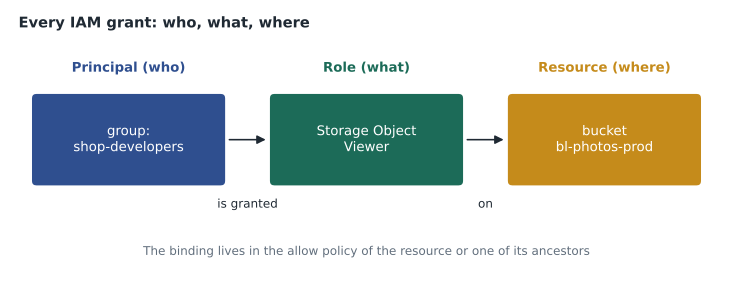
That checking is done by Identity and Access Management (IAM). IAM answers one question every time anyone, or anything, tries to do something in Google Cloud: does this principal have a permission, through a role granted on this resource or above it, that allows this action? This lesson explains the three parts of that question and how Birchline uses them.
Principals: who
A principal is an identity that can be granted access. Google Cloud recognizes several kinds.
| Principal | What it is | Birchline example |
|---|---|---|
| Google account | An individual person signing in with an email address | owen.mitchell@birchline.example |
| Google group | A named collection of accounts managed in Cloud Identity or Workspace | shop-developers@birchline.example |
| Service account | An identity for an application or workload rather than a person | shop-api@bl-shop-prod.iam.gserviceaccount.com |
| Cloud Identity or Workspace domain | Every account in a company domain | birchline.example |
| allAuthenticatedUsers | Anyone signed in with any Google account | Almost never appropriate for a business |
| allUsers | Anyone on the internet, signed in or not | Only for deliberately public content, such as a public website bucket |
Birchline's staff accounts live in Cloud Identity, Google's identity service, which the company already used for its Google Workspace email. Cloud Identity holds the users and groups, enforces password rules and multi-factor authentication, and can federate with another identity provider so people sign in with the company's existing credentials. Google Cloud then trusts those identities. When an employee leaves and HR disables the account, access to every project disappears at once.
Farah's first rule is to grant roles to groups, not to individual people. When Jules hires a new developer, the IT team adds her to shop-developers@birchline.example and she immediately has the right access in the right projects. When someone changes jobs, one group change updates everything. Granting to individuals one by one is how organizations end up with the forgotten contractor accounts Teresa wants to retire.
Roles and permissions: what
A permission allows one specific operation on one kind of resource. Permissions are written as service.resource.verb, for example compute.instances.start to start a virtual machine, or storage.objects.get to read an object in a bucket. There are thousands of them, and nobody grants permissions one at a time. Instead, permissions are collected into roles, and roles are granted to principals.
Google Cloud offers three kinds of role.
- Basic roles are Owner, Editor and Viewer. They predate the rest of IAM and apply across almost every service in a project. Viewer can read most things; Editor can also change most resources; Owner can additionally manage access and billing for the project. They are broad and easy, which is exactly why Google recommends against them for production.
- Predefined roles are created and maintained by Google for specific jobs on specific services, such as Compute Instance Admin, Storage Object Viewer, BigQuery Data Viewer or Cloud SQL Client. Google adds new permissions to them as services change. Most grants should use predefined roles.
- Custom roles are roles an organization builds from a chosen list of permissions, when no predefined role fits closely enough. They give precise control but must be maintained by the organization as services add new permissions.
| Role | Kind | Lets the holder |
|---|---|---|
| Viewer (roles/viewer) | Basic | Read most resources in a project |
| Editor (roles/editor) | Basic | Read and change most resources in a project |
| Owner (roles/owner) | Basic | Do everything Editor can, plus manage IAM and billing for the project |
| Storage Object Viewer | Predefined | Read objects in Cloud Storage buckets |
| Compute Instance Admin (v1) | Predefined | Create, change and delete Compute Engine instances |
| Cloud SQL Client | Predefined | Connect to Cloud SQL instances |
| BigQuery Data Viewer | Predefined | Read data and metadata in BigQuery datasets |
Resources and policies: where
Roles are granted on a resource through an allow policy (often just called an IAM policy). An allow policy is a list of bindings; each binding pairs one role with one or more principals. Allow policies can be set on the organization, a folder, a project, and many individual resources such as a bucket, a dataset or a service account. As lesson 3 explained, policies are inherited down the hierarchy, and a principal's effective access is the union of every binding that applies.
Owen tries out the idea with a few lines of Python. Each level of the hierarchy grants some roles, and the effective set is everything combined.
grants = {
    "organization": {"owen@birchline.example": {"Browser"}},
    "folder Sandbox": {"owen@birchline.example": {"Editor"}},
    "project bl-sandbox-owen": {"owen@birchline.example": {"Owner"}},
    "project bl-shop-prod": {},
}
def effective(user, path):
    roles = set()
    for level in path:
        roles |= grants[level].get(user, set())
    return sorted(roles)
print("sandbox:", effective("owen@birchline.example", ["organization", "folder Sandbox", "project bl-sandbox-owen"]))
print("shop prod:", effective("owen@birchline.example", ["organization", "project bl-shop-prod"]))sandbox: ['Browser', 'Editor', 'Owner'] shop prod: ['Browser']
What this code does
The script models how Google Cloud permissions are inherited: roles granted at the organization and folder levels flow down to the projects beneath them. For a given user it collects every role granted along the path from the organization to a project. Owen ends up with Browser, Editor and Owner on his sandbox project, but only the Browser role inherited from the organization on the production shop project.
In his sandbox Owen is effectively an Owner; in the production shop project he can only browse the structure, because nothing grants him more there.
gcloud projects add-iam-policy-binding bl-shop-dev \
    --member="group:shop-developers@birchline.example" \
    --role="roles/run.developer"
gcloud projects get-iam-policy bl-shop-dev
Least privilege
The principle of least privilege says each principal should have only the permissions it needs to do its job, on only the resources it needs, for only as long as it needs them. It limits the damage from a mistake, a stolen password or a compromised application. Farah turns the principle into four habits for Birchline.
- Prefer predefined roles to basic roles. A developer who deploys Cloud Run services needs Cloud Run Developer on the shop projects, not Editor on everything.
- Grant at the lowest level that works. If a reporting tool only reads one bucket, grant Storage Object Viewer on that bucket, not on the project.
- Use groups so access is reviewed in one place.
- Review access regularly. IAM's role recommendations compare what each principal was granted with what it actually used over recent months and suggest smaller roles; Teresa reviews them every quarter.
Owen asks why Owner and Editor exist at all if they are discouraged. Farah explains that they are handy in a personal sandbox and in the first hours of a project, but that in production they hide what people actually do. An Editor grant gives the power to delete databases to someone who only needed to restart a server.
Service accounts
Applications need identities too. When the shop's order API reads product data from Cloud SQL or writes images to Cloud Storage, it acts as a service account, a special principal that belongs to a project and represents a workload rather than a person. Service accounts are granted roles exactly like people. They are also resources themselves, so IAM controls who may use or impersonate them.
Workloads running on Google Cloud, such as a VM, a Cloud Run service or a GKE workload, can be attached to a service account and receive short-lived credentials automatically, with no password or key file to store. Code running outside Google Cloud is the harder case. The old answer was a downloadable service account key, a long-lived file that grants the account's access to whoever holds it. Keys are frequently leaked in code repositories, which is why Birchline's organization policy blocks key creation and why GCP-205 covers keyless alternatives such as Workload Identity Federation.
| Principle | Birchline practice |
|---|---|
| One service account per workload | shop-api, shop-web and inventory-batch each have their own |
| Least privilege for workloads too | shop-api has Cloud SQL Client and Storage Object Viewer, nothing more |
| Avoid service account keys | Keys are blocked by organization policy; workloads use attached service accounts |
| Control who can act as a service account | Only the deployment pipeline may attach shop-api to new services |
Conditions and deny policies
Two further features refine access. IAM conditions add an attribute-based rule to a binding, so that a role applies only in certain circumstances, for example only to resources whose names start with dev-, or only until a certain date. Birchline uses a time-limited condition when a contractor needs access for a two-week project: the grant expires automatically.
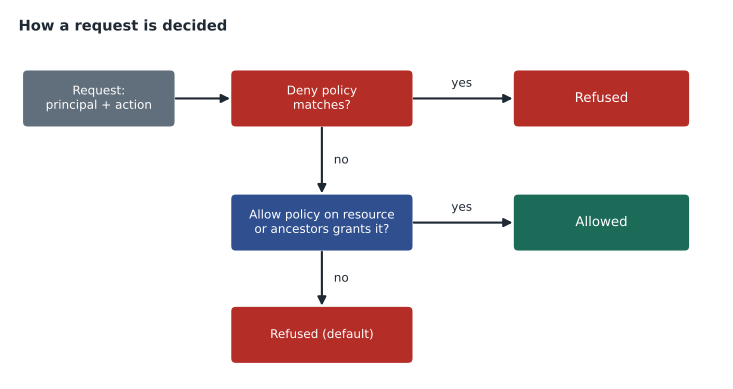
Deny policies do the opposite of allow policies. They list permissions that certain principals may not use, regardless of any role they hold. Deny rules are checked before allow policies, so they create guardrails that hold even if someone is granted a broad role by mistake. Teresa uses one to stop anyone outside the security team from deleting audit log sinks anywhere in the organization.
Seeing who did what
Access control is only half of accountability; the other half is the record. Cloud Audit Logs record administrative actions, such as creating a VM or changing an IAM policy, in every project, and can also record data access for services that support it. Each entry names the principal, the action, the resource and the time. Lesson 11 shows how Birchline routes these logs to a central project where even project owners cannot alter them.
Owen thinks back to the shared administrator password. With named accounts, groups, small roles and audit logs, the question that used to take Teresa a week, who changed this firewall rule and when, now takes a minute.
Common mistakes
MistakeGranting Editor to a whole team on a production project because it is quick.
InsteadGrant predefined roles that match the tasks, on the projects or resources involved.
MistakeGranting roles to individual email addresses.
InsteadGrant to groups so membership changes update access everywhere.
MistakeCreating service account keys for applications running on Google Cloud.
InsteadAttach a service account to the VM, Cloud Run service or GKE workload; no key file is needed.
MistakeMaking a bucket readable by allUsers to share a file with one partner.
InsteadGrant the partner's identity a role on that bucket or object, or use a signed URL that expires.
Temporary and break-glass access
Some access is needed only occasionally. The operations team rarely needs to change production databases, but when a database fails at two in the morning, someone must be able to act quickly. Granting that power permanently breaks least privilege; granting it only after a day of paperwork breaks the shop. Birchline uses just-in-time access instead: people request an elevated role for a short time, with a reason, and an approver grants it. Google Cloud's Privileged Access Manager supports this pattern, and IAM conditions with an expiry time are a simpler option for planned work.
For true emergencies, such as the identity provider itself being unavailable, Teresa keeps a small number of break-glass accounts. They have strong, separately stored credentials and hardware security keys, they are not used day to day, and any sign-in triggers an alert to the whole security team. The point is not that they are never used, but that their use is always noticed and reviewed afterwards.
Owen notices a theme running through the lesson. Good IAM design is not about making access hard. It is about making the normal path easy and safe, through groups and predefined roles, and making the unusual path visible, through requests, expiry times, alerts and audit logs. When people can get what they need quickly, they stop sharing passwords and asking for Owner just in case.
Worked problem
Choosing the right grant
Ravi's reporting tool, running on Cloud Run in bl-data-prod, must read files from one bucket, bl-sales-exports, and query one BigQuery dataset. What should be granted, and to whom?
Show solution
- The tool is a workload, so give it its own service account, reports-runner, attached to the Cloud Run service.
- For the files, grant reports-runner Storage Object Viewer on the bl-sales-exports bucket only, not on the project.
- For BigQuery, grant BigQuery Data Viewer on the one dataset, plus BigQuery Job User on the project so it can run queries.
- No basic roles and no keys are needed.
Answer: A dedicated service account with Storage Object Viewer on one bucket, BigQuery Data Viewer on one dataset and BigQuery Job User on the project.
Summary and key terms
- IAM decides whether a principal may perform an action on a resource.
- Principals include Google accounts, groups, service accounts, domains, allAuthenticatedUsers and allUsers.
- Permissions are collected into roles: broad basic roles (Owner, Editor, Viewer), Google-maintained predefined roles and organization-built custom roles.
- Allow policies bind roles to principals on resources and are inherited down the hierarchy.
- Least privilege means small roles, granted to groups, at the lowest level that works, and reviewed regularly.
- Service accounts give workloads identities without passwords.
- Conditions limit when a grant applies; deny policies block permissions regardless of grants; audit logs record who did what.
- Principal
- An identity that can be granted access: a user, group, service account or domain.
- Permission
- Permission to perform one operation, written as service.resource.verb.
- Role
- A collection of permissions that is granted to principals.
- Basic roles
- Owner, Editor and Viewer: broad, project-wide roles.
- Predefined role
- A Google-maintained role for a specific job on a specific service.
- Custom role
- A role an organization defines from a chosen set of permissions.
- Allow policy
- A set of bindings that grant roles to principals on a resource.
- Service account
- An identity used by an application or workload.
- Least privilege
- Granting only the access needed, where needed, for as long as needed.
- Deny policy
- Rules that block specific permissions for specific principals regardless of grants.
Practice problems
Work each problem on paper first, then reveal the answer to check.
What are the three parts of every IAM grant?
Show answer
A principal (who), a role (what) and a resource (where).
Why are basic roles discouraged in production?
Show answer
They grant broad access across most services in a project, far more than most jobs need.
How does code on a Compute Engine VM authenticate without a key file?
Show answer
Through the service account attached to the VM, which provides short-lived credentials automatically.
Lesson quiz · 5 questions
Score 60% or more to complete this lesson.
Create a free account to save your progress, take quizzes and earn a certificate.