
GCP-101 · Lesson 10 of 12 · 19 min
Virtual Private Cloud networking basics
▶ Video coming soon A video version of this lesson is on the way.
Birchline's old network grew one cable at a time. The data center switch connects to a firewall, which connects to the internet and to a mess of VPN tunnels to the stores, and only one retired network engineer fully understood the firewall rules. "Networking in Google Cloud is software," Farah tells Owen. "There is no switch to rack. But the decisions are the same ones you know: address ranges, what may talk to what, how traffic gets in and out. Make them carefully and write them down as code."
This lesson introduces Virtual Private Cloud (VPC) networks, the private networks that connect Google Cloud resources, along with firewall rules, routes, ways to reach the internet and Google services, load balancing, DNS and the options for connecting the cloud to Birchline's offices and stores. GCP-203 covers each topic in depth for cloud engineers.
VPC networks and subnets
A VPC network is a private network inside a Google Cloud project. Virtual machines, GKE nodes, Cloud SQL private addresses and other resources attach to it and talk to each other over private IP addresses. Two properties of Google Cloud's VPC surprise people who know other platforms. First, a VPC network is global: one network can span every region, and VMs in Toronto and Montréal can talk over private addresses on Google's backbone without any VPN between them. Second, the IP address ranges belong to subnets, and subnets are regional: each subnet lives in one region but spans all the zones in that region.
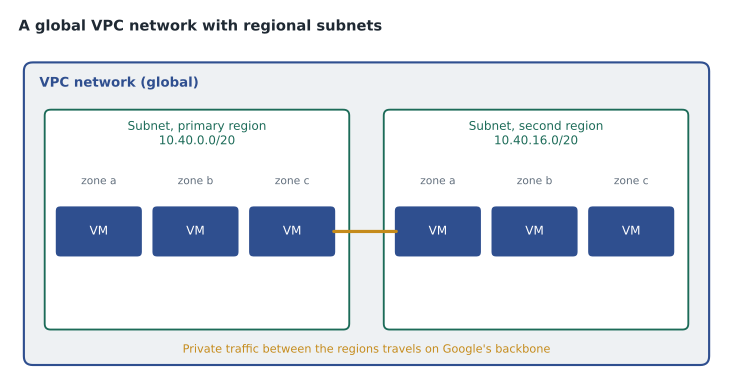
Subnets use private IPv4 ranges such as 10.0.0.0/8, 172.16.0.0/12 or 192.168.0.0/16, and they can also have IPv6 ranges. Ranges must not overlap within a network, and they must not overlap with ranges used in offices or other networks that will be connected later, which is the most common planning mistake. A subnet's range can be expanded later but not shrunk, so Farah plans generously but leaves room.
Networks come in two modes. An auto mode network creates one subnet in every region automatically with predefined ranges; it is convenient for experiments. A custom mode network starts with no subnets, and the team creates exactly the subnets it needs with ranges it chooses. Google recommends custom mode for production, and Birchline's organization policy prevents new projects from getting the old default auto-mode network at all.
Owen plans Birchline's address space with Python's ipaddress module, carving a block reserved for Google Cloud into subnets for each region and environment.
import ipaddress
cloud_block = ipaddress.ip_network("10.40.0.0/16")    # reserved for Google Cloud; offices use 10.10.0.0/16
subnets = list(cloud_block.subnets(new_prefix=20))   # 16 subnets of 4,096 addresses each
plan = ["prod-primary", "prod-recovery", "nonprod-primary", "nonprod-recovery", "shared-services"]
for name, net in zip(plan, subnets):
    print(f"{name:17} {str(net):15} {net.num_addresses:>5} addresses")
print("spare blocks:", len(subnets) - len(plan))
print("overlaps offices:", cloud_block.overlaps(ipaddress.ip_network("10.10.0.0/16")))prod-primary 10.40.0.0/20 4096 addresses prod-recovery 10.40.16.0/20 4096 addresses nonprod-primary 10.40.32.0/20 4096 addresses nonprod-recovery 10.40.48.0/20 4096 addresses shared-services 10.40.64.0/20 4096 addresses spare blocks: 11 overlaps offices: False
What this code does
Python's ipaddress module splits the address range set aside for Google Cloud into sixteen equal subnets of 4,096 addresses. Five of them are named for production, recovery, non-production and shared services, and the rest are counted as spare. A final check confirms the cloud range does not overlap the offices' range.
Every range is written into a Terraform file in the shared networking project, together with a table in the network documentation, so that nobody hands out 10.40.16.0/20 twice.
Firewall rules
VPC firewall rules control which traffic may reach and leave VM instances. Each rule specifies a direction (ingress or egress), an action (allow or deny), a priority (lower numbers win), the protocols and ports, the sources or destinations as IP ranges, and targets, the instances the rule applies to. Targets can be all instances in the network, instances with a particular network tag, or, preferably, instances running as a particular service account, which ties network access to identity.
Firewall rules are stateful: if a connection is allowed in one direction, the return traffic is allowed automatically. Every network has two implied rules at the lowest priority: deny all ingress and allow all egress. So nothing can reach a VM from outside until a rule allows it. Organizations can also use hierarchical firewall policies set on the organization or folders, which apply to every network below, much like organization policies.
| Rule | Direction | Source or destination | Targets | Ports |
|---|---|---|---|---|
| allow-lb-health-checks | Ingress | Google's load balancer and health check ranges | Service account shop-web | TCP 8080 |
| allow-iap-ssh | Ingress | Identity-Aware Proxy range | All VMs in prod | TCP 22 |
| allow-app-to-db | Ingress | Service account shop-api | Service account inventory-db | TCP 3306 |
| deny-all-ingress (implied) | Ingress | Any | All | All |
No rule in the table allows SSH from the internet. Engineers reach VMs through Identity-Aware Proxy (IAP) TCP forwarding, which checks the person's identity and IAM role before passing the connection through, so administrative ports never face the open internet.
Routes, external access and Cloud NAT
Routes tell the network where to send traffic. Each VPC network has system-generated routes to its subnets and a default route to the internet gateway, and teams can add custom routes, for example to send traffic for office ranges through a VPN. Cloud Router exchanges routes dynamically with on-premises routers using BGP, which matters for the hybrid connections described below.
A VM can have an external IP address, making it directly reachable from the internet if firewall rules allow. Birchline avoids this: an organization policy restricts external IPs on production VMs. VMs without external addresses still sometimes need to reach the internet outbound, for example to download operating system updates. Cloud NAT provides that: it lets VMs and other resources without external IPs make outbound connections, while nothing on the internet can start a connection to them.
For Google's own services, such as Cloud Storage and BigQuery APIs, Private Google Access lets VMs without external IPs reach Google APIs over Google's network. Private Service Connect goes further, giving Google services or a partner's service a private address inside Birchline's VPC.
Load balancing
Cloud Load Balancing distributes traffic across backends such as managed instance groups, GKE services, Cloud Run services and Cloud Storage buckets. It is a managed, software-defined service with no appliances to scale, and it checks backend health so that traffic only goes to working instances.
| Load balancer | Layer | Use |
|---|---|---|
| Global external Application Load Balancer | HTTP and HTTPS (layer 7) | Websites and APIs for users anywhere, one global IP, URL-based routing, Cloud CDN and Cloud Armor |
| Regional external Application Load Balancer | HTTP and HTTPS (layer 7) | Web traffic that must be handled in one region, for example for residency |
| Internal Application Load Balancer | HTTP and HTTPS (layer 7) | Services reached only from inside the VPC or connected networks |
| External or internal passthrough Network Load Balancer | TCP and UDP (layer 4) | Non-HTTP traffic that needs client addresses preserved |
| Proxy Network Load Balancer | TCP with optional TLS (layer 4) | TCP services needing proxying, global or regional |
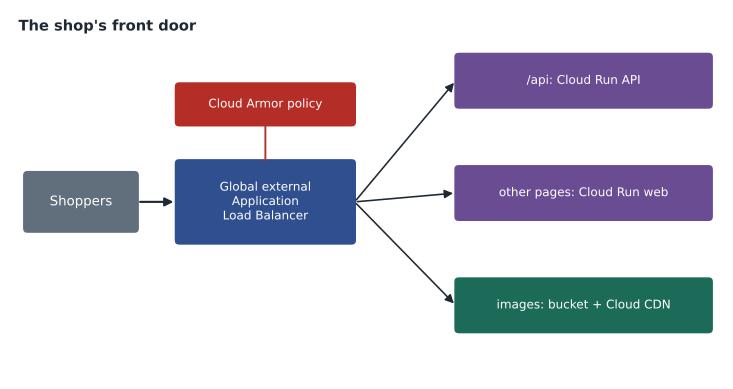
The shop sits behind a global external Application Load Balancer. It terminates HTTPS with a Google-managed certificate, routes /api paths to the Cloud Run API service and everything else to the web front end, serves product images from a Cloud Storage bucket through Cloud CDN, and applies Google Cloud Armor security policies that filter malicious requests and absorb denial-of-service floods before they reach Birchline's code.
Cloud DNS
Cloud DNS is Google's managed Domain Name System service. Public zones publish records such as www.birchline.example on the internet, served from Google's global network with a high availability SLA. Private zones provide names that resolve only inside chosen VPC networks, such as db.prod.internal, so applications can use names instead of hard-coded addresses. Birchline moves its public domain to Cloud DNS during the migration, after lowering record lifetimes a week ahead so that the switch takes effect quickly.
Connecting to offices, stores and other networks
Birchline will be hybrid for a while, so the cloud must connect to the head office, the warehouses and the stores.
- Cloud VPN creates encrypted IPsec tunnels over the internet between an on-premises VPN device and Google Cloud. HA VPN uses two interfaces and tunnels for a high availability SLA when configured as Google recommends. VPN is quick to set up and suits moderate bandwidth.
- Cloud Interconnect provides private, high-bandwidth connections that do not cross the public internet. Dedicated Interconnect is a direct physical connection to Google at a colocation facility; Partner Interconnect connects through a service provider when Birchline cannot reach a Google facility directly or needs less capacity.
- Cross-Cloud Interconnect connects Google Cloud to another public cloud over dedicated links, for multicloud designs.
Inside Google Cloud, two features connect networks across projects. Shared VPC lets one host project own a network that service projects use, so a central network team manages subnets and firewall rules while application teams deploy into them; Birchline's bl-shared-net project is the host. VPC Network Peering connects two separate VPC networks privately so they can exchange traffic, for example with a partner's network, without merging them.
Birchline's plan: HA VPN from head office and the two warehouses at first, upgrading the head office to Partner Interconnect once data volumes grow; stores keep their existing internet connections and reach the shop and back-office apps over HTTPS through the load balancer, with IAP protecting internal apps.
Common mistakes
MistakeUsing overlapping IP ranges for cloud subnets and offices.
InsteadPlan one address scheme for all environments before creating subnets.
MistakeOpening SSH to 0.0.0.0/0 so engineers can reach VMs.
InsteadUse IAP TCP forwarding or OS Login with no public SSH rule.
MistakeGiving every VM an external IP so it can download updates.
InsteadRemove external IPs and use Cloud NAT for outbound access.
MistakeBuilding production in the default auto-mode network.
InsteadCreate custom mode networks with planned subnets, ideally as a Shared VPC.
Network tiers and checking connectivity
Google Cloud offers two Network Service Tiers for traffic between Google Cloud and the internet. In the Premium Tier, the default, traffic enters and leaves Google's network as close to the user as possible and travels on Google's backbone in between, which gives the lowest latency and enables global load balancing. In the Standard Tier, traffic travels more of the way over the public internet and enters Google's network near the region, which costs less but performs less consistently and supports only regional load balancers. Birchline keeps the shop on Premium, and considers Standard only for bulk, latency-tolerant transfers.
When something cannot connect, guessing wastes hours. Google Cloud's Network Intelligence Center includes Connectivity Tests, which analyze the configuration between two endpoints, such as a Cloud Run service and a Cloud SQL private address, and report which firewall rule, route or missing permission would stop the traffic, before anyone captures a single packet. VPC Flow Logs record samples of network flows to and from VMs, which helps with both troubleshooting and security investigations, and firewall rules logging records which rule allowed or denied each connection.
Owen tries a connectivity test on the health-check problem from the worked example below, and it names the implied deny rule straight away. Farah's advice is to run these tests as part of every network change, not only after something breaks: the platform team adds a few standard tests to its pipeline so that a mistaken firewall change is caught in review rather than at nine in the morning on a sale day.
Finally, she reminds him that network design and IAM design meet at the firewall. Rules that target service accounts, rather than IP ranges or tags that anyone with edit rights can add, mean that only workloads running with the right identity can open the database port. That is the same least-privilege thinking from lesson 4, applied to packets.
Worked problem
Reading a firewall situation
The shop's web VMs fail their load balancer health checks after a new network is built. The only custom rule allows TCP 443 from 0.0.0.0/0 to instances tagged web. The VMs listen on port 8080 and run as the shop-web service account without the web tag. What is wrong?
Show solution
- Health checks come from Google's health-check ranges to the port the backend serves, here 8080.
- The existing rule allows 443, not 8080, and targets the web tag, which these VMs do not have.
- With no matching allow rule, the implied deny-all-ingress rule drops the health checks, so the load balancer marks every VM unhealthy.
Answer: Add an ingress rule allowing TCP 8080 from the health-check ranges to the shop-web service account, and remove the broad 443 rule, since the load balancer, not the VMs, faces the internet.
Summary and key terms
- A VPC network is a global private network whose subnets are regional and span zones; custom mode networks with planned, non-overlapping ranges suit production.
- Stateful firewall rules with priorities, targets by tag or service account, and implied deny-ingress and allow-egress rules control traffic; hierarchical policies apply across folders.
- Routes and Cloud Router direct traffic; Cloud NAT gives outbound internet access without external IPs; Private Google Access and Private Service Connect reach Google services privately.
- Cloud Load Balancing offers global and regional layer 7 and layer 4 options, with Cloud CDN and Cloud Armor.
- Cloud DNS serves public and private zones.
- Cloud VPN, Cloud Interconnect, Shared VPC and VPC Network Peering connect networks.
- VPC network
- A global, private software-defined network in a project.
- Subnet
- A regional IP range within a VPC network.
- Custom mode
- A VPC network whose subnets are created explicitly.
- Firewall rule
- A stateful rule allowing or denying traffic to or from instances.
- Cloud NAT
- Managed outbound internet access for resources without external IPs.
- Private Google Access
- Access to Google APIs from VMs without external IPs.
- Application Load Balancer
- A layer 7 HTTP and HTTPS load balancer, global or regional.
- Cloud Armor
- A security service that filters web attacks and absorbs denial-of-service traffic at the load balancer.
- HA VPN
- Highly available IPsec VPN between on-premises networks and Google Cloud.
- Shared VPC
- A host project network used by resources in service projects.
Practice problems
Work each problem on paper first, then reveal the answer to check.
Is a Google Cloud VPC network regional or global? What about a subnet?
Show answer
The network is global; each subnet is regional.
What two implied firewall rules does every network have?
Show answer
Deny all ingress and allow all egress, at the lowest priority.
How can VMs without external IPs download updates from the internet?
Show answer
Through Cloud NAT.
Lesson quiz · 5 questions
Score 60% or more to complete this lesson.
Create a free account to save your progress, take quizzes and earn a certificate.