
GCP-101 · Lesson 2 of 12 · 20 min
Regions, zones and the global network
▶ Video coming soon A video version of this lesson is on the way.
On Owen's second morning, Farah opens a map of Google Cloud's locations on the meeting-room screen. Dots cover North America, South America, Europe, Africa, the Middle East, Asia and Australia, joined by lines that represent Google's own fiber network. "Every decision you make about a resource starts here," she says. "Where it lives decides how fast it is for users, what happens when something breaks, what it costs and which laws apply to the data in it."
Owen's old world had one location: the room behind the warehouse. When that room lost cooling, everything failed together. This lesson explains how Google Cloud's locations are arranged so that a failure in one place does not have to take everything down, and how Birchline will choose where its systems run.
Regions
A region is a specific geographic area where Google Cloud runs its services, such as Montréal, Toronto, Iowa, Ohio, London or Tokyo. Each region has a name made of a continent-style prefix and a number, for example northamerica-northeast1 for Montréal, northamerica-northeast2 for Toronto, us-central1 for Council Bluffs in Iowa and us-east5 for Columbus in Ohio. When Owen checked Google's locations page in November 2026, it listed 43 regions and 130 zones worldwide; the numbers grow as Google opens new regions, so the current page is always the authority.
Regions are far enough apart that a regional disaster, such as a major storm, a flood or a long power failure, is very unlikely to affect two of them at once. They are also independent: services in one region keep running if another region has problems. Choosing a region therefore means choosing three things together: how close the resources are to users, which legal jurisdiction holds the data, and which other region could take over in a disaster.
Zones
Each region is divided into zones, usually three, and some regions have four. A zone is a deployment area within a region, with its own power, cooling and networking, designed to be isolated from failures in the other zones of the same region. Zone names add a letter to the region name: northamerica-northeast2-a, northamerica-northeast2-b and northamerica-northeast2-c are the three Toronto zones, and us-east5-a, us-east5-b and us-east5-c are the three Columbus zones. The letters are labels, not a ranking, and they do not always start at a.
Zones within a region are connected by very fast, low-latency links, typically well under a few milliseconds apart. That makes it practical to run copies of an application in two or three zones and spread traffic between them. If one zone fails, the copies in the others keep serving. This pattern, often called a multi-zone or regional deployment, is the single most important reliability technique in Google Cloud.
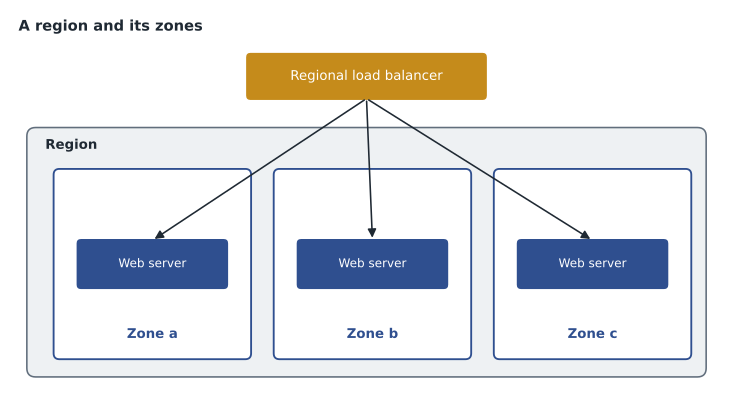
Zonal, regional, multi-regional and global resources
Every Google Cloud resource has a location scope that says where it lives and what it survives. Knowing the scope of each resource is one of the first skills cloud exams test, because it decides what happens in a failure.
| Scope | Lives in | Survives | Examples |
|---|---|---|---|
| Zonal | One zone | Failures elsewhere, but not a failure of its own zone | A Compute Engine virtual machine; a zonal persistent disk |
| Regional | Several zones in one region | Loss of a zone | A regional managed instance group; a regional persistent disk; Cloud Run services; a regional Cloud Storage bucket |
| Multi-regional or dual-region | Two or more regions | Loss of a whole region | A multi-region or dual-region Cloud Storage bucket; a multi-region Spanner instance; BigQuery multi-region datasets |
| Global | Not tied to a location | Regional failures, by design | VPC networks, firewall rules, global load balancers, IAM policies, project settings |
Owen notices that a single virtual machine is zonal. If Birchline put its whole shop on one virtual machine in northamerica-northeast2-a, a problem in that zone would take the shop down even though the region had two healthy zones. Farah nods. "That is exactly what we are not going to do."
Choosing a region
Farah walks Owen through the questions Birchline used to pick its regions.
- Where are the users? Shoppers and store staff are spread across the Midwest and the East Coast, so a region close to them gives low latency.
- Where must the data stay? Leadership wants US customer data kept in US regions.
- Are the needed services available there? Most products run in every region, but some newer services, machine types and AI models start in a few regions. The team checks each product's location list before committing.
- What does it cost? Prices for the same resource differ between regions, sometimes noticeably. The difference is small next to the other factors for Birchline, but it matters at scale.
- Where is the second region? For disaster recovery, the team wants a second region far enough away to be unaffected by a disaster in the first, but in the same legal jurisdiction.
The answer: us-east5 (Columbus, Ohio) as the primary region, close to head office and to most stores, and us-central1 (Council Bluffs, Iowa) for backups and recovery.
Availability and what the numbers mean
Cloud services are often described with an availability target, published in a service level agreement (SLA). An SLA states the availability Google commits to for a service, measured over a month, and the credits the customer receives if Google misses it. Availability figures are usually written with lots of nines, such as 99.9 or 99.99, meaning that the service is available that many minutes out of every hundred. The difference sounds tiny, but it is not, as Owen discovers when he turns the numbers into minutes.
minutes_per_month = 30 * 24 * 60   # a 30-day month
for target in [99.0, 99.5, 99.9, 99.95, 99.99]:
    down = minutes_per_month * (100 - target) / 100
print(f"{target:>6} available: up to {down:7.1f} minutes down per month")99.0 available: up to 432.0 minutes down per month 99.5 available: up to 216.0 minutes down per month 99.9 available: up to 43.2 minutes down per month 99.95 available: up to 21.6 minutes down per month 99.99 available: up to 4.3 minutes down per month
What this code does
For each availability target, the program works out how many minutes a service may be down in a 30-day month. It takes the share of time not covered by the target and multiplies it by the minutes in the month. A target of 99.0 allows about 432 minutes of downtime, while 99.99 allows only about 4 minutes.
A service at 99.9 can be down for about 43 minutes a month and still meet its target, while 99.99 allows only about four minutes. For Birchline's shop, 43 minutes in the middle of a holiday sale would be expensive, which is why the team cares about architecture and not just about the SLA printed on each product page.
Architecture can raise availability above that of any single component. If one zone is available 99.9 of every 100 minutes and failures in different zones are independent, the chance that two zones are down at the same moment is far smaller. Real failures are not perfectly independent, so engineers treat this calculation as an upper bound rather than a promise, but it shows why spreading across zones matters.
zone_up = 0.999                 # one zone available 99.9 minutes in 100
both_down = (1 - zone_up) ** 2  # assumes independent failures
print("one zone :", round(zone_up * 100, 4))
print("two zones:", round((1 - both_down) * 100, 6))one zone : 99.9 two zones: 99.9999
What this code does
One zone is assumed to be up 99.9 minutes in every 100, and the chance that two independent zones are both down at once is that small gap squared. Subtracting it from one gives the availability of a two-zone setup. Running in two zones raises availability from 99.9 to about 99.9999, as long as the zones fail independently.
Owen also learns that an SLA is a commitment about the provider's part, not the whole system. If Birchline deploys a bug that crashes the shop, Google's SLA is still met. The customer's own design, testing and operations decide most of what users actually experience.
Google's global network
Google runs one of the largest private networks in the world, with its own fiber, undersea cables and points of presence where it connects to internet service providers. When a shopper in Atlanta loads Birchline's shop, the request enters Google's network at a nearby point of presence and travels on Google's own backbone to the region instead of crossing the public internet the whole way. This usually means lower latency and more consistent performance.
Several Google Cloud features depend on this global network. A global external Application Load Balancer gives one IP address to users worldwide and sends each request to the nearest healthy backend. Cloud CDN caches content such as product photos at Google's edge locations, close to users. A VPC network is itself global, so virtual machines in Toronto and Montréal can talk over private addresses without any VPN between them. Lesson 10 returns to networking in detail.
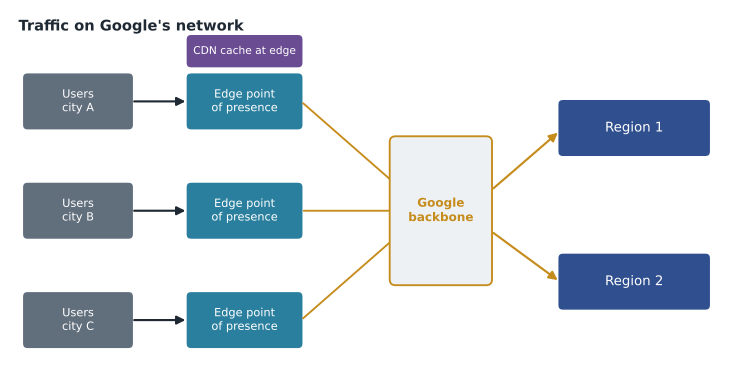
Latency and why distance matters
Light in fiber travels at roughly two thirds of its speed in a vacuum, about 200 kilometers per millisecond. A round trip, request and response, doubles the distance. Real networks add routing and processing time, so actual latency is higher than this physical floor, but the floor is a useful sanity check.
km_per_ms = 200   # approximate speed of light in fibre
routes = {"Toronto to Montreal": 500, "Columbus to Council Bluffs": 1000,
          "Toronto to London, UK": 5700, "Columbus to Tokyo": 10500}
for name, km in routes.items():
print(f"{name:28} minimum round trip about {2 * km / km_per_ms:5.1f} ms")Toronto to Montreal minimum round trip about 5.0 ms Columbus to Council Bluffs minimum round trip about 10.0 ms Toronto to London, UK minimum round trip about 57.0 ms Columbus to Tokyo minimum round trip about 105.0 ms
What this code does
Light in optical fiber travels roughly 200 km every millisecond, so the shortest possible round trip is twice the distance divided by that speed. The program applies this to four routes. It shows that a nearby region adds only a few milliseconds, while distant continents add 50 to 100 milliseconds or more before any processing delay.
A few milliseconds between Birchline's two regions is no problem for nightly backups. Synchronous replication between continents is another matter: every write would wait tens of milliseconds for the far side to confirm. This is why databases that span regions, such as Spanner, are engineered carefully, and why most applications keep their busy, chatty parts inside one region.
Sustainability
Data centers consume a great deal of electricity. Google reports its progress on carbon-free energy for each region and shows a low-carbon indicator for some regions in the console. Birchline's sustainability report now asks for the emissions from its IT, and Google Cloud's Carbon Footprint tool estimates the emissions associated with each project's use. Region choice, right-sizing and switching off idle resources all reduce the footprint, and they usually reduce the bill as well.
Common mistakes
MistakePutting a production application on a single virtual machine and calling it highly available.
InsteadA single VM is zonal. Run copies in at least two zones behind a load balancer.
MistakeChoosing a region only for the lowest price.
InsteadWeigh latency to users, data residency, service availability and the location of a recovery region first.
MistakeTreating an SLA as a guarantee that the application will be up.
InsteadThe SLA covers the provider's service. The customer's design and operations decide what users experience.
MistakeAssuming every product runs in every region.
InsteadCheck the product's locations page; new services and machine types often start in a few regions.
Zones, maintenance and capacity
Owen asks whether Google ever takes a zone down on purpose. Farah explains that Google maintains its hardware continuously, but most maintenance is invisible to customers. Compute Engine can live migrate a running virtual machine to another host in the same zone while the hardware underneath is serviced, usually with no restart and only a brief pause. Some machine types, such as those with attached GPUs, cannot be live migrated and are restarted instead, with notice, so the team checks each machine type's maintenance behavior before choosing it.
Capacity is the other reason to think about zones. A popular machine type can occasionally be short in one zone while plenty is available in another. Spreading a group of virtual machines across zones, and letting Google pick the zone when the exact one does not matter, makes deployments more likely to succeed during busy periods. For the Black Friday rush, Farah also plans to ask for capacity ahead of time rather than discover a shortage on the morning of the sale.
Finally, Farah warns Owen about data transfer. Moving data between zones or between regions is billed in many cases, while traffic within a zone usually is not. A design that copies large files back and forth across regions every hour can cost more than the servers themselves, so lesson 5 includes network charges in the pricing picture.
Worked problem
Downtime from an availability target
A managed service is offered with a monthly availability target of 99.95. Roughly how many minutes may it be unavailable in a 30-day month and still meet the target?
Show solution
- A 30-day month has 30 × 24 × 60 = 43,200 minutes.
- The allowed unavailable share is 100 − 99.95 = 0.05 out of every 100 minutes.
- Allowed downtime = 43,200 × 0.05 ÷ 100 = 21.6 minutes.
Answer: About 22 minutes per month.
By the end of the morning, Owen has redrawn the warehouse server room in his notebook as a single zone, and next to it a region with three zones and a second region far away. "The old room was one zone with no neighbors," he says. Farah agrees, and adds that the next lesson is about a different kind of map: the hierarchy that decides who owns each resource and who may touch it.
Summary and key terms
- Google Cloud runs in regions, independent geographic areas such as Toronto, Montréal, Iowa and Ohio, each divided into usually three isolated zones.
- Resources are zonal, regional, multi-regional or global, and their scope decides what failures they survive.
- Production systems should run across at least two zones; disaster recovery uses a second region.
- Region choice weighs latency, data residency, service availability, price and the recovery region.
- SLAs describe the provider's availability commitment, not the whole application.
- Google's private global network, global load balancing and Cloud CDN bring traffic onto Google's backbone close to users.
- Region
- An independent geographic area where Google Cloud runs services, such as northamerica-northeast2 (Toronto).
- Zone
- An isolated deployment area within a region, with its own power, cooling and networking.
- Zonal resource
- A resource that lives in one zone, such as a single VM.
- Regional resource
- A resource spread across zones in one region.
- Multi-region
- A location made of two or more regions, used by some storage and database services.
- SLA
- Service level agreement: the provider's published availability commitment and the credits if it is missed.
- Latency
- The time a request takes to travel to a service and back.
- Point of presence
- A location where Google's network connects to other networks, close to users.
- Cloud CDN
- A service that caches content at Google's edge locations near users.
Practice problems
Work each problem on paper first, then reveal the answer to check.
Why is a single Compute Engine VM not highly available?
Show answer
It is zonal, so a failure of its zone stops it. Copies in two or more zones behind a load balancer are needed.
Name three factors in choosing a region.
Show answer
Latency to users, data residency or legal requirements, and service availability; price and the recovery region also matter.
What is the minimum round-trip time for 1,000 kilometers of fiber?
Show answer
About 10 milliseconds: 2,000 kilometers at about 200 kilometers per millisecond.
Lesson quiz · 5 questions
Score 60% or more to complete this lesson.
Create a free account to save your progress, take quizzes and earn a certificate.