
DCT-330 · Lesson 4 of 12 · 20 min
Alarm response and alarm fatigue
An alarm is only useful if someone responds to it correctly. This lesson covers the other half of alarm management: what the technician on the desk actually does when an alarm appears, how the desk copes when many appear at once, and how a site measures and improves its alarms so that people keep trusting them. The worst outcome in monitoring is not a missed alarm caused by a broken sensor. It is an alarm that worked perfectly and was ignored, because the people watching had learned from experience that most alarms do not matter.
The alarm response procedure
Stonebridge trains every desk technician in a five-step response, the same for every alarm, so that the steps become habit:
- Acknowledge: stop the alert and record that you have seen it. Do this within a minute for critical and major alarms.
- Assess: read the message, open the point and its trend, and check the related points. Is it real? Is it one unit or several? Has redundancy been lost? Is anything else happening at the same time?
- Act: do what the alarm's response note says for the desk: call, dispatch, walk to the equipment, or start an emergency procedure. Do not operate equipment you are not qualified and authorized to operate.
- Escalate: tell the shift lead about anything major or critical, and call the on-call person named in the escalation matrix (lesson 7) when the response note says so or when in doubt.
- Record: write it in the shift log and, for anything needing work, open or update a ticket.
The assess step is where judgment lives. A technician who acknowledges and records without assessing has done paperwork, not monitoring. A technician who acts before assessing, for example sending someone to Hall D because one CDU alarmed, when in fact all three CDUs alarmed together because the dry coolers tripped (DCT-230 capstone), may send help to the wrong place.
Assessing an alarm: the first five questions
When Roz trained Jamal, she gave him five questions to ask, in order, about any alarm he did not immediately recognize:
- Is the reading real? Check the time stamp, quality flag and trend; look for a jump that a sensor fault would cause.
- Is it alone? Look at the active list for related alarms at the same time, and at neighboring equipment.
- What does it cost us? Has a unit failed, has redundancy dropped, is any load at risk?
- How fast is it moving? A slow drift gives time; a fast rise does not.
- Who owns it? Which team fixes this, and who must know?
Most alarms are answered by the first two questions. A single rack inlet alarm, with a real but steady reading and nothing else active, is a minor issue for the morning. The same alarm on six racks in a row, with a CRAH alarm two minutes earlier, is the start of a cooling failure.
Alarm floods
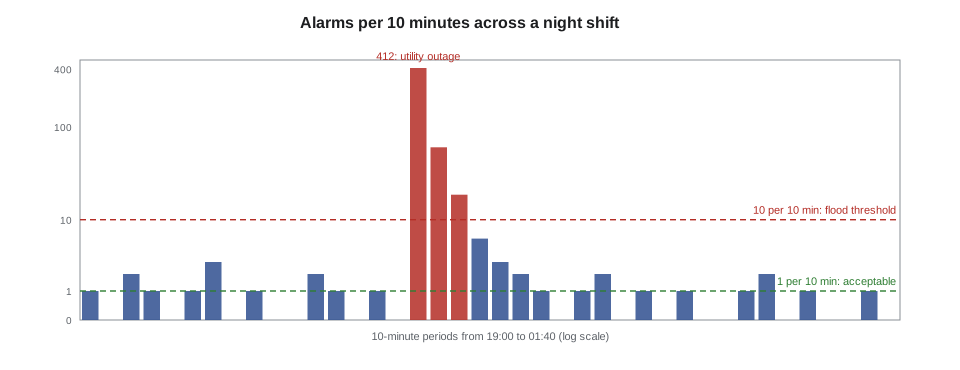
Sometimes one event raises dozens or hundreds of alarms in minutes. A utility outage, a cooling plant trip or a network failure that cuts off a group of controllers can each flood the screen. ANSI/ISA-18.2 defines an alarm flood, in commonly cited terms, as more than 10 alarms in 10 minutes for one operator, and treats it as a condition to be managed and, over time, designed out.
During a flood the danger is that the one alarm that matters is buried among the consequences. Stonebridge's flood procedure tells the desk to stop trying to handle alarms one by one, look at the redundancy board and the electrical one-line first to find the cause, sort the active list by priority, deal with critical alarms, and call the shift lead and on-call staff early. Once the cause is clear, the alarms that are simply consequences can be acknowledged in groups.
On the DCT-220 storm night, the EPMS and BMS between them raised 412 alarms in the first ten minutes after the utility loss: every UPS on battery, every generator starting, every transfer switch operating, every CRAH briefly losing power and restarting. Almost all were expected consequences of a utility outage handled correctly. The few that mattered, GEN-D2 failed to start and later the UPS bypass tolerance alarms, were found because Dmitri went straight to the redundancy board.
Alarm fatigue
Alarm fatigue is what happens to people who see too many alarms that do not matter. They acknowledge without reading, assume the next alarm is the same as the last, and stop escalating. It is well documented in hospitals, aircraft and process plants, and data centers are no different. Its causes are almost always design and maintenance problems rather than lazy operators:
- Chattering and fleeting alarms with no deadband or delay (lesson 3).
- Stale alarms that stay active for days because nobody owns them.
- Duplicate alarms: the same failure reported by the equipment, the gateway and a calculated point.
- Wrong priorities: routine conditions marked major or critical.
- Consequential alarms that are not grouped, as in the flood above.
- Alarms with no action: messages that tell the operator something but give them nothing to do.
The cure is not to tell people to try harder. It is to measure the alarm system, find the worst offenders, and fix them one by one. That process is called alarm rationalization.
Measuring the alarm system
ISA-18.2 and the older EEMUA 191 guideline from the United Kingdom both recommend measuring a few simple things every week or month. Commonly cited targets for one operator are:
| Measure | Commonly cited target | What it tells you |
|---|---|---|
| Average alarms per 10 minutes | About 1 (acceptable); about 2 is the most an operator can manage | Overall load on the operator |
| Share of 10-minute periods in flood | Under about 1 % | How often the operator is overwhelmed |
| Priority distribution | About 80 % low, 15 % medium, 5 % high; top level under 1 % | Whether priorities mean anything |
| Chattering alarms | None | Missing deadbands and delays |
| Stale alarms (active over 24 h) | Fewer than about 5 on any day, each with a plan | Ownership and maintenance |
| Top 10 most frequent alarms | Reviewed every month | Where to start fixing |
These targets come from process control rooms, where one operator may watch an entire plant. Data center operations desks are different: they often have two or more people, and many alarms need only a ticket. Stonebridge uses the targets as a guide rather than a rule, but the principle is the same: if the desk is acknowledging dozens of alarms an hour on a normal night, the alarm system is broken, not the people.
# Weekly alarm metrics from the desk's alarm log (one week, two operators)
from collections import Counter
# (minutes since start of week, priority, alarm name)
log = [(5, 'advisory', 'Door A-14 held'), (62, 'minor', 'A-17-04 inlet high'), (63, 'minor', 'A-17-04 inlet high'),
       (64, 'minor', 'A-17-04 inlet high'), (400, 'major', 'CRAH-A07 supply high'), (1210, 'advisory', 'Filter dP CRAH-A03'),
       (2900, 'minor', 'B row 12 RH high'), (2901, 'minor', 'B row 12 RH high'), (2902, 'minor', 'B row 12 RH high'),
       (2903, 'minor', 'B row 12 RH high'), (4100, 'critical', 'Leak cable D3-04 wet'), (6020, 'advisory', 'Gen exercise running')]
log += [(8000 + k // 8, 'major' if k % 9 == 0 else 'minor', f'Outage consequence {k}') for k in range(140)]
periods = 7 * 24 * 6                         # 10-minute periods in a week
per_period = Counter(m // 10 for m, _, _ in log)
avg = len(log) / periods / 2                 # per operator
floods = sum(1 for n in per_period.values() if n > 10)
print(f"Alarms this week: {len(log)}; average per 10 min per operator: {avg:.2f}")
print(f"Flood periods (>10 in 10 min): {floods} of {periods} = {floods / periods * 100:.2f} %")
mix = Counter(p for _, p, _ in log)
for p in ('critical', 'major', 'minor', 'advisory'):
    print(f"  {p:9s}: {mix[p]:4d}  {mix[p] / len(log) * 100:5.1f} %")
names = Counter(n for _, _, n in log if not n.startswith('Outage'))
print("Most frequent (excluding the outage):", names.most_common(2))Alarms this week: 152; average per 10 min per operator: 0.08
Flood periods (>10 in 10 min): 2 of 1008 = 0.20 %
critical : 1 0.7 %
major : 17 11.2 %
minor : 131 86.2 %
advisory : 3 2.0 %
Most frequent (excluding the outage): [('B row 12 RH high', 4), ('A-17-04 inlet high', 3)]The week's numbers look fine on average, but the flood periods and the two repeating alarms stand out. The outage flood was handled correctly and is an event, not a design fault, though grouping its consequential alarms would help next time. The repeating inlet and humidity alarms are chattering, and are the first two candidates for rationalization.
Alarm rationalization
Rationalization is a structured review of alarms, one at a time, by the people who own the equipment and the people who respond. For each alarm the team asks: what abnormal condition does it indicate, what is the consequence if nobody acts, what should the operator do, how long do they have, and therefore what priority, limit, deadband and delay should it have? An alarm with no required action is removed or changed to a recorded event that does not alert anyone. The result is written into an alarm database, the master list of every alarm with its justification, and changes to alarms from then on go through change management.
Stonebridge ran a rationalization of Hall A's BMS alarms the year before Jamal joined. Of about 2,400 configured alarms, 600 were removed as duplicates or events with no action, 300 had their priority lowered, and 450 gained deadbands or delays. Average alarms per shift on the desk fell by about two-thirds, and the desk's escalation rate on the remaining alarms went up: people trusted them again.
ISA-18.2 describes the whole of this as an alarm management lifecycle: write an alarm philosophy (the site's rules for what deserves an alarm and how priorities are set), identify and rationalize alarms, design and implement them, operate and maintain them, monitor their performance, manage changes to them, and audit the whole system periodically. Technicians take part mainly in operating, monitoring and reporting, which is where their evidence comes from.
Escalating well
Escalation is not a sign of weakness. Stonebridge's rule for new desk staff is simple: when in doubt, call. On-call engineers would rather be woken for a false alarm than learn in the morning that a real one waited. Good escalation is brief and factual: who you are, what alarm, what you see, what you have done, what you need. 'This is Jamal on the YUL-2 desk. CDU-D2B supply temperature is 92.8 and rising 1 degree a minute, D2A and D3A normal, Hall D inlets normal so far. I have checked the flow and it is normal. I need you to look at D2B now.' Lesson 7 covers the escalation matrix that says who to call.
Worked problem
Three alarms in four minutes
At 01:14 a minor alarm appears: 'A-31-03 B side branch current high 23.0 A, limit 22.5 A'. At 01:16, 'A-31-03 A side branch current low 0.0 A, minor'. At 01:18, 'Rack A-31-03 inlet temp high, advisory'. How should Jamal read these together?
Show solution
- Real? The branch readings are fresh and changed suddenly at 01:14; the A side dropped to zero.
- Alone? Three alarms on the same rack: the A side lost its load and the B side picked up all of it. That is a rack running on one feed.
- Cost? The rack is still powered but has no redundancy, and the B side is near its continuous limit. If the B side trips, the customer loses the rack.
- Speed? Steady, but the inlet advisory suggests extra heat or a fan change; not urgent for cooling.
- Owner? The A side zero reading could be a tripped branch breaker (critical facilities) or the customer's rack PDU (customer). Jamal escalates to Dmitri as a major issue even though each alarm alone was minor, opens a ticket, calls the customer's emergency contact, and Dmitri dispatches Roz to look at the branch breaker.
Answer: Roz found the A-side rack PDU's input breaker tripped, a customer device fault; the customer replaced the faulty server's power supply and reset their PDU. The three minor alarms together were a major event, and the response treated them that way.
Common mistakes
MistakeHandling a flood one alarm at a time.
InsteadGo to the redundancy board and one-line first, find the cause, then deal with critical alarms.
MistakeJudging each alarm only by its own priority.
InsteadRead alarms together; several minor alarms on one rack can mean a major event.
MistakeBlaming operators for missed alarms.
InsteadMeasure and fix the alarm system; fatigue comes from bad alarms.
MistakeNot escalating because it is the middle of the night.
InsteadWhen in doubt, call; on-call staff expect it.
MistakeRemoving an annoying alarm from the BMS without review.
InsteadAlarm changes go through rationalization and change management.
Summary and key terms
- The response to every alarm is acknowledge, assess, act, escalate and record; assessing is where judgment lives.
- Five questions guide assessment: is it real, is it alone, what does it cost, how fast is it moving, who owns it.
- An alarm flood (commonly more than 10 alarms in 10 minutes) is handled by finding the cause first, then dealing with critical alarms.
- Alarm fatigue comes from chattering, stale, duplicate, wrongly prioritized and actionless alarms.
- Alarm systems are measured against targets such as about one alarm per 10 minutes per operator and a pyramid of priorities.
- Rationalization reviews each alarm's purpose, consequence, action and priority, and records the result in an alarm database.
- Alarm flood
- A burst of alarms faster than an operator can handle, commonly defined as more than 10 in 10 minutes.
- Alarm fatigue
- Loss of trust and attention caused by too many alarms that do not need action.
- Stale alarm
- An alarm that has stayed active for a long time, commonly more than 24 hours.
- Alarm rationalization
- A structured review that justifies or removes each alarm and sets its priority, limit, deadband and delay.
- Alarm philosophy
- A site's written rules for what deserves an alarm and how alarms are designed and managed.
- Consequential alarm
- An alarm that is an expected result of another event, such as every UPS reporting on battery after a utility loss.
Practice problems
Work each problem on paper first, then reveal the answer to check.
Name the five steps of the alarm response.
Show answer
Acknowledge, assess, act, escalate, record.
A week has 1,008 ten-minute periods and two operators shared 1,512 alarms. What is the average per operator per 10 minutes?
Show answer
1,512 / 1,008 / 2 = 0.75.
What should a desk technician look at first during an alarm flood?
Show answer
The redundancy board and the electrical one-line, to find the cause.
What happens to an alarm that has no required operator action during rationalization?
Show answer
It is removed or turned into a logged event that does not alert anyone.
Lesson quiz · 5 questions
Score 60% or more to complete this lesson.
Create a free account to save your progress, take quizzes and earn a certificate.