
DCT-330 · Lesson 3 of 12 · 19 min
Sensors, points and alarm design
An alarm is a message from the monitoring system saying that something needs a person's attention. Whether that message is useful depends on decisions made long before it appears: which sensor measures what, where it is placed, what value counts as abnormal, how long the value must stay there, and how urgent it is. Technicians do not usually design alarms, but they live with the results every shift, they are often the first to notice an alarm that is badly set, and they help fix it. This lesson explains how alarms are built from points, and the tools used to make them trustworthy.
Sensors and where they sit
Every alarm starts with a sensor. In a data hall the most common are temperature and humidity sensors, usually mounted on the front (cold side) of racks at three heights, as ASHRAE recommends, plus sensors in the return air of each CRAH and in the hot aisles. Differential pressure sensors measure the pressure under a raised floor or between contained aisles. Flow, pressure and temperature sensors sit on every liquid cooling loop. Leak detection uses cables laid under floors and along pipe runs, which change resistance when wet and report how far along the cable the water is. Doors have contacts, fire systems have their own detectors (and their own panel, separate from the BMS), and electrical equipment has its meters.
Placement decides what an alarm means. A rack inlet sensor at the top of a rack reads warmer than one at the bottom if hot air is recirculating over the top. A sensor mounted against a hot surface, or in the path of a perforated tile's cold jet, misleads in the other direction. When Jamal found that rack A-22-09's inlet alarm cleared every time someone stood in front of it, the cause was simple: the sensor was hanging loose, and a person's body shaded it from the hot recirculating air. Sensors are installed and moved by technicians, and their location is recorded in DCIM, so a misplaced sensor is a technician's problem to find and fix.
Setpoints and limits
The simplest alarm compares an analog point with a limit: if the rack inlet temperature goes above 80.6 °F, raise an alarm. Many points have several limits, one for each level of urgency: a high limit and a high-high limit, and often low limits as well. Stonebridge's limits for rack inlet temperature follow ASHRAE's recommended range from DCT-230 lesson 3, with a stricter limit for some customers whose contracts set one.
| Point | Advisory | Minor | Major | Critical |
|---|---|---|---|---|
| Rack inlet temperature (most racks) | 79 °F | 81 °F | 86 °F | 90 °F |
| Rack inlet relative humidity | 60 % | 70 % | ||
| CRAH supply air temperature | setpoint + 4 °F | setpoint + 7 °F | ||
| CDU supply coolant temperature (Hall D) | 88 °F | 90 °F | 93 °F | 97 °F |
| UPS load per module (2N side) | 35 % | 40 % | 45 % | 50 % |
| Leak detection cable | any wet section |
Priorities
Not every alarm is equally urgent, and an operator facing several at once must know which to look at first. Each alarm is given a priority that reflects how serious the consequence is and how quickly someone must respond. Stonebridge uses four levels:
- Critical: the load or people are in immediate danger, or will be within minutes without action. Respond at once, call the shift lead and the on-call engineer. Examples: leak detected in a hall, both feeds to a rack lost, fire system pre-alarm in a hall, UPS on battery with no generator.
- Major: redundancy has been lost or will be soon; respond within 15 minutes. Examples: a CRAH failed, a UPS module out, a generator failed to start.
- Minor: something is drifting or degraded; respond within the hour. Examples: an inlet temperature slightly high, a filter differential pressure high, a battery string with one high-resistance block.
- Advisory: information that needs no immediate action but should be seen, such as a door held open longer than usual or a planned maintenance mode switched on.
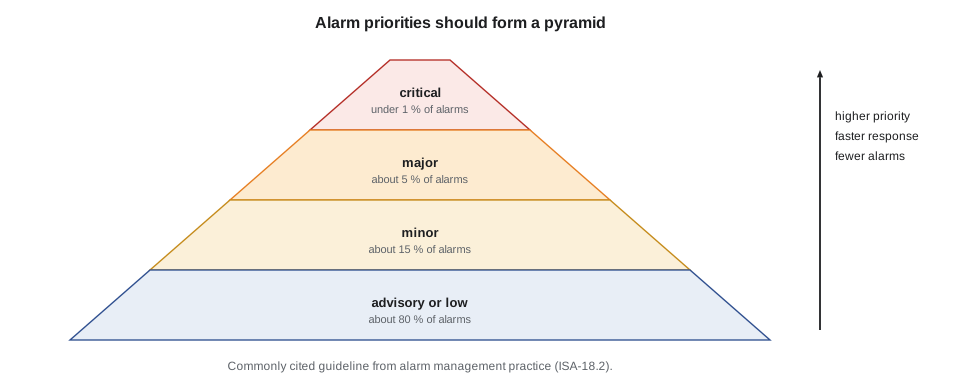
The alarm management standard used across process industries, ANSI/ISA-18.2 (and its international twin, IEC 62682), recommends that most alarms be in the lowest priority and very few in the highest, so that the highest priority keeps its meaning. A commonly cited guideline for a three-level scheme is about 80 % low, 15 % medium and 5 % high; with a fourth, top level, that top level should be well under 1 %. Lesson 4 shows how the desk checks its own alarm mix against such a guideline. The priority names in this course are Stonebridge's own; other sites use other words, such as urgent, high, medium and low.
Deadbands
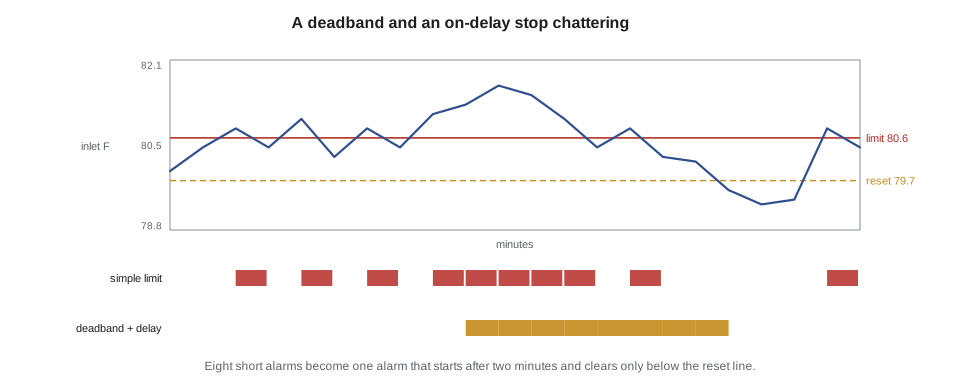
A point that hovers around its limit causes trouble. If the inlet limit is 80.6 °F and the temperature wanders between 80.4 and 80.8 °F, a simple comparison raises and clears the alarm over and over. An alarm that repeatedly activates and clears in a short time is called chattering, and it is one of the main sources of alarm fatigue.
The cure is a deadband, also called hysteresis: the alarm activates when the value goes above the limit but clears only when it falls a set amount below it. With a 1 °F deadband, the inlet alarm raises at 80.6 °F and clears only below 79.6 °F. The temperature has to move back meaningfully before the alarm resets.
Delays
Many values spike briefly for harmless reasons: a door opened, a CRAH restarting, a sensor bumped. An on-delay requires the condition to last a set time before the alarm activates; an off-delay keeps the alarm active for a set time after the condition clears, so a value that drops just below the limit for a few seconds does not clear and re-raise the alarm. Stonebridge uses on-delays of 30 seconds to five minutes for most temperature alarms, and none at all for leaks, fire and loss of power, where a delay could cost more than a false alarm.
Delays have a price: the alarm arrives later. A five-minute on-delay on a CDU supply temperature alarm would be unwise, because a Hall D rack's processors can overheat in less than that if coolant flow stops. Choosing delays is a trade between false alarms and late warnings, and it is made by the engineers who own each system, with the desk's experience as evidence.
# Alarm logic on a sample of one-minute inlet temperature readings
readings = [79.9, 80.4, 80.8, 80.4, 81.0, 80.2, 80.8, 80.4, 81.1, 81.3, 81.7, 81.5, 81.0, 80.4, 80.8, 80.2, 80.1, 79.5, 79.2, 79.3, 80.8, 80.4]
limit, deadband, on_delay = 80.6, 1.0, 2      # on-delay in samples (minutes)

def simple(vals):
    starts, active = 0, False
    for v in vals:
        if v > limit and not active: active, starts = True, starts + 1
        elif v <= limit and active: active = False
    return starts

def with_deadband_delay(vals):
    starts, active, above = 0, False, 0
    for v in vals:
        above = above + 1 if v > limit else 0
        if not active and above >= on_delay: active, starts = True, starts + 1
        elif active and v < limit - deadband: active = False
    return starts

print("Alarm activations, simple limit         :", simple(readings))
print("Alarm activations, deadband + on-delay :", with_deadband_delay(readings))Alarm activations, simple limit : 6 Alarm activations, deadband + on-delay : 1
Rate-of-change and comparison alarms
Some problems are best caught by how fast a value moves rather than where it is. A CDU supply temperature rising by 2 °F per minute is a serious sign even while it is still below its limit, because at that rate it will pass the limit in a few minutes. ASHRAE also recommends limiting how quickly IT inlet temperatures change, so a rate-of-change alarm protects equipment as well as warning operators. DCT-230 lesson 11 introduced these alarms.
Other alarms compare points with each other. The flow-deviation alarm added to Hall D after the DCT-230 capstone compares each rack's coolant flow with the median flow of its row, and alarms when one rack is more than 15 % below the others, which catches a half-closed valve that a fixed limit would miss. Command-versus-feedback alarms (lesson 2) compare what the BMS asked for with what the equipment reports. Comparison alarms are powerful because they adapt to normal changes in load, but they need care in design, so they are added under change control like any other alarm (lesson 9).
Alarm text and response notes
An alarm's message should tell the operator what is wrong, where, and how bad it is, in a form they can read at a glance: 'CDU-D2B supply temp high 93.6, limit 93.2, major'. Stonebridge's best alarms also carry a short response note: the first two or three things to check and who to call. These notes come from the alarm rationalization process in lesson 4, where each alarm is reviewed and justified. A good test of an alarm is whether a technician who has never seen it before can tell from the message and the note what to do next.
| Poor alarm text | Better alarm text |
|---|---|
| TEMP3 HI | Rack A-17-04 inlet temp high 81.7, limit 80.6, minor |
| CDU FAULT | CDU-D2B pump P2 failed, P1 running, N, major |
| Point 4471 alarm | Leak cable D3-04 wet at 12.5 m (row 3, rack D-3-07), critical |
| UPS ALM | UPS-B2 module 3 offline, system at N, major |
Maintenance mode and shelving
During planned work, equipment raises alarms that everyone expects: a CRAH switched off for a filter change will report fan failure. Rather than letting such alarms clutter the screen, the BMS lets authorized staff put the equipment into maintenance mode, which suppresses or marks its alarms for the duration. Shelving is a related feature for a single alarm that is known and being dealt with, such as a failed sensor awaiting replacement: the alarm is temporarily removed from the active list, with a reason and an expiry time.
Both are dangerous if misused. An alarm left shelved or a unit left in maintenance mode after the work is finished hides a real failure. Stonebridge's rules are strict: maintenance mode is set only as a step in a MOP or work order, with the ticket number; every shelved alarm has an owner, a reason and an expiry of no more than 72 hours; and the desk reviews the list of suppressed and shelved alarms at every shift handover. The capstone of this course shows a maintenance-mode error caught by exactly such a check.
Worked problem
A chattering humidity alarm in Hall B
Over one night, the desk log shows 46 activations of 'Hall B row 12 inlet RH high, limit 60 %, advisory'. The value is wandering between 59 and 61 %. What should Jamal do?
Show solution
- He confirms from the trend that the readings are real, not stale: the value changes every minute.
- He checks the dew point and temperature: inlet 75 °F at 60 % RH means a dew point near 60 °F, right at ASHRAE's upper recommended dew point. The condition is genuine but mild and steady.
- The alarm is chattering because it has no deadband and no delay. It is advisory, so no immediate action is needed for the load.
- He records the case in the shift log and opens a ticket to the controls team: 'Hall B row 12 RH alarm chattering, 46 activations overnight, suggest 2 % deadband and 5-minute on-delay, review whether limit should be dew point instead of RH.'
- He does not shelve the alarm himself; it is not his to shelve, and the condition is real.
Answer: The controls engineer later changed the alarm to a dew point limit with a deadband, under a standard change. The 46 nightly activations became none on most nights and one on the most humid.
Common mistakes
MistakeTreating a chattering alarm as a nuisance and ignoring it.
InsteadRecord it and ticket it; chattering alarms train people to ignore alarms.
MistakeAdding a long on-delay to every alarm to cut noise.
InsteadDelays make warnings late; no delays on leaks, fire or power loss, and short ones on fast-moving cooling points.
MistakeLeaving equipment in maintenance mode after the work.
InsteadClear maintenance mode as a MOP step and check the suppressed list at every handover.
MistakeShelving an alarm without a reason or expiry.
InsteadEvery shelved alarm needs an owner, a reason and an expiry time.
MistakeMoving a rack sensor without updating DCIM.
InsteadRecord sensor locations; a sensor's position decides what its alarm means.
Summary and key terms
- Alarms start with sensors; their placement decides what an alarm means.
- Limits at several priority levels compare points against values set by the system owners.
- Priorities tell the operator what to look at first; most alarms should be low priority and very few critical.
- Deadbands stop chattering; on-delays and off-delays filter brief spikes at the cost of later warnings.
- Rate-of-change, comparison and command-versus-feedback alarms catch problems that fixed limits miss.
- Good alarm text says what, where and how bad; maintenance mode and shelving must be controlled and reviewed.
- Alarm
- A message from the monitoring system that a condition needs a person's attention.
- Priority
- The urgency assigned to an alarm, reflecting consequence and required response time.
- Deadband
- The margin a value must move back past the limit before an alarm clears.
- On-delay
- The time a condition must last before the alarm activates.
- Chattering alarm
- An alarm that repeatedly activates and clears in a short time.
- Shelving
- Temporarily removing a known alarm from the active list, with a reason and an expiry.
- Maintenance mode
- A setting that suppresses or marks a unit's alarms during planned work.
Practice problems
Work each problem on paper first, then reveal the answer to check.
An inlet alarm limit is 80.6 °F with a 1 °F deadband. At what value does it clear?
Show answer
Below 79.6 °F.
Why are there no on-delays on leak alarms?
Show answer
A delay could let water spread or reach equipment; a false leak alarm costs little by comparison.
What alarm catches a half-closed valve on one rack whose flow is still above any fixed limit?
Show answer
A comparison alarm against the row's median flow, such as the flow-deviation alarm.
Give three things Stonebridge requires for a shelved alarm.
Show answer
An owner, a reason and an expiry time of no more than 72 hours.
Lesson quiz · 5 questions
Score 60% or more to complete this lesson.
Create a free account to save your progress, take quizzes and earn a certificate.