
DCT-130 · Lesson 5 of 12 · 19 min
Rails, cage nuts and mounting hardware
Between a server and a cabinet there is usually a pair of rails, a handful of screws and a few small square nuts. Mounting hardware is cheap, small and easy to lose, and it is the reason for a remarkable share of installation problems: servers that sag, rails that bind, screws that strip, nuts that fall into the floor void and fingers that get cut. Roz spends an afternoon with Jamal at a bench in the build room with a cabinet rail section, a box of mixed hardware and three different rail kits, and has him install and remove each one until he can do it without looking at the instructions.
Holes: square and round
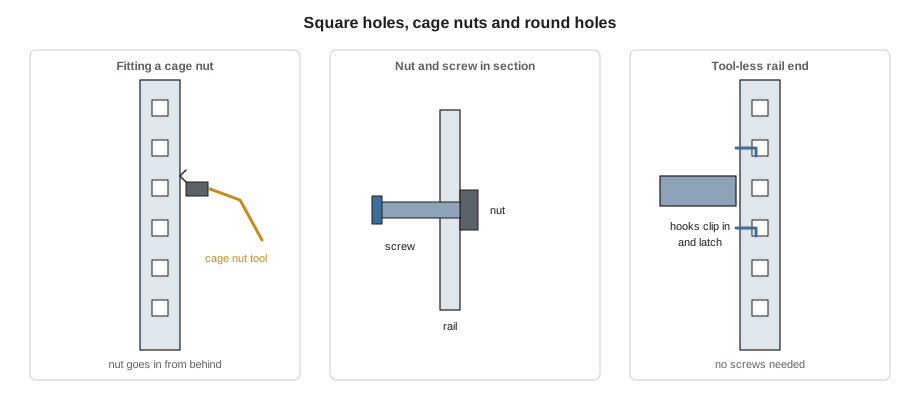
Most data center cabinets have square holes in their mounting rails, about 3/8 in across. Square holes do not hold a screw by themselves. Instead, a cage nut, a square nut held in a spring-steel cage, is clipped into the hole from behind, and a screw threads into it. Square holes are popular because a stripped thread means replacing a cheap nut rather than a whole rail, and because tool-less rail kits clip straight into them.
Round holes are threaded directly, usually with 10-32 or 12-24 machine screw threads in North America, or M6 metric threads. Round-hole racks are common for network equipment and in older installations. Some rails have unthreaded round holes that take clip nuts. Before installing anything, a technician checks which holes the cabinet has and which screws match them. Forcing a metric screw into a 10-32 thread, or the other way around, strips it.
Cage nuts
Cage nuts come in sizes matched to screw threads: M6 is the most common in data centers, with 10-32 and 12-24 also in use. A cage nut is installed from inside the cabinet, behind the rail, so that the nut sits in the hole facing outward:
- Hook one wing of the cage into the hole.
- Compress the other wing with a cage nut tool, a small hooked lever, and push it in until it snaps into place. Using a flat screwdriver instead is how people cut their fingers and scratch rails.
- Check that the cage is seated on both sides and the nut sits flat.
Removing a cage nut is the reverse: hook the tool into one wing and lever it out. Roz has Jamal keep a magnetic tray on the bench and a pick-up tool in his kit, because dropped cage nuts and screws inevitably end up under equipment or in the floor void. A loose screw in a raised floor void is not harmless: it can be drawn into an air handler or short a busbar.
Rail kits
Servers usually come with a rail kit from their manufacturer, designed for that model. There are two broad kinds:
- Sliding rails, also called slide rails, attach to the server's sides and to the cabinet posts. The server slides in and out on them like a drawer, so that it can be serviced in place: covers off, parts replaced, without disconnecting it. Sliding rails often work with a cable management arm at the back that folds as the server moves.
- Static rails, or fixed rails, support the server but do not let it slide out for service. They are simpler and cheaper and are used where servers are replaced rather than repaired in place.
Many modern rail kits are tool-less: hooks or pins at each end clip into the square holes, and a latch locks them. Others need screws at each post. Rails are adjustable in length to suit different post spacings, and their data sheet gives the range. A rail kit that is too short for the cabinet's post spacing simply will not install, which is one reason the rail positions are checked in Lesson 2's depth check.
Other mounting hardware a technician meets every week:
- Shelves, fixed or sliding, for equipment that has no rails: small appliances, tower servers, desktop-size devices.
- Mounting ears or brackets on switches and patch panels, which fix only at the front posts, or at the front and rear with extension brackets for deeper switches.
- Blanking panels, covering empty units. Lesson 9 explains why every empty unit needs one.
- Cable management arms, rings and bars.
- Vertical power strip brackets, which fix the rack power strips to the rear of the cabinet, often without using any rack units.
Installing rails
Roz's sequence for a sliding rail kit, which Jamal practices until it becomes habit:
- Confirm the U position on the ticket and in DCIM, and that the space is empty and clear of blanking panels.
- Identify the left and right rails and their front ends; they are usually marked. Rails installed on the wrong side or back to front are a classic mistake.
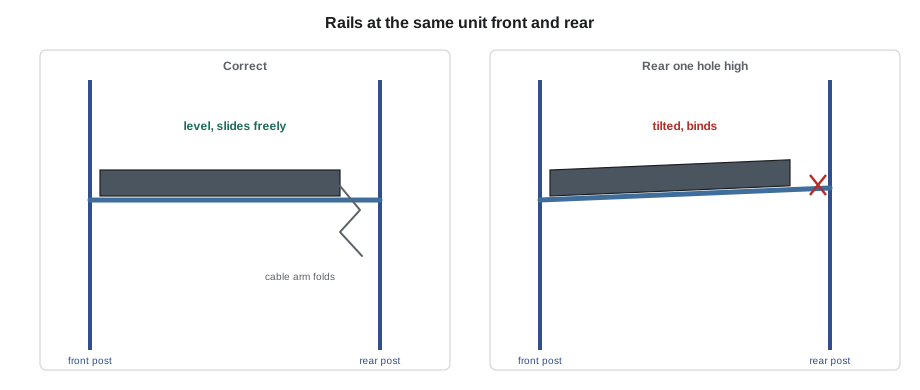
- Fit the front of each rail to the front post at the planned unit, with the hooks or screws in the correct holes for that unit, then extend the rail and fit the rear end at the same unit on the rear post. Count units from the bottom on both posts; a rail that is one hole higher at the back than at the front is easy to fit and wrong.
- Check that both rails are at the same height and level, and that latches have locked.
- Fit the inner rail members to the server, if the kit uses them.
- With a second person for anything heavier than about 40 lb or above shoulder height, lift the server level to the rails, engage both sides together and slide it in. DCT-120 sets the lifting rules and when a lift device is required.
- Check that the server slides smoothly and locks in its closed position, then fit the front retaining screws or latches if the kit has them.
Torque and screws
Screws in rack hardware need to be tight enough to hold and no tighter. Overtightened screws strip cage nuts and threaded holes, crack plastic bezels and distort thin brackets. Undertightened screws vibrate loose. Most manufacturers give a torque for mounting screws, often a few newton-meters, and Stonebridge's technicians use a torque-limiting driver for rack screws so that the result does not depend on the strength of the person holding it. Power tools are used carefully, if at all, and never at full speed into a cage nut.
# Count the hardware for a rack job before going to the hall
devices = [  # name, height in U, mount type
    ("server", 1, "tool-less rails"), ("server", 1, "tool-less rails"), ("server", 2, "screw rails"),
    ("switch", 1, "front ears"), ("patch panel", 1, "front ears"), ("shelf", 1, "screw shelf"),
]
blank_units = 6
need = {"cage nuts": 0, "screws": 0}
for name, h, mount in devices:
    if mount == "screw rails":
        need["cage nuts"] += 8; need["screws"] += 8      # two per post, four posts
    elif mount == "front ears":
        need["cage nuts"] += 4; need["screws"] += 4      # two per side, front posts only
    elif mount == "screw shelf":
        need["cage nuts"] += 8; need["screws"] += 8
    else:
        need["screws"] += 2                              # front retaining screws only
need["blanking panels (1U)"] = blank_units
spare = {k: v + max(2, v // 5) for k, v in need.items()}  # always carry spares
for k in need:
print(f"{k:22s} need {need[k]:3d} take {spare[k]:3d}")cage nuts need 24 take 28 screws need 28 take 33 blanking panels (1U) need 6 take 8
The code is the sort of quick count Jamal learns to make while staging. The spares matter: one cage nut always disappears.
Shelves and odd-shaped equipment
Some equipment does not come with rails: a small appliance, a customer's firewall, an out-of-band console server, a tower-shaped server. It goes on a shelf. Shelves have their own load ratings, and fixed cantilever shelves, which mount only at the front posts, carry much less than shelves fixed at all four posts. Equipment on a shelf is secured with straps or brackets so that it cannot slide off when someone pulls a cable. Equipment is never stacked directly on top of another server, with no support of its own, which happens surprisingly often when a cabinet is full and a customer is in a hurry. The lower server's case is not designed to carry the weight and its cooling may be blocked.
Two-post racks and front-mount equipment
In network rooms, patch panels and many switches are mounted on two-post racks or at the front posts of a cabinet, by their ears. Light patch panels are fine this way. Heavier or deeper switches fixed only at the front cantilever their weight onto two screws, and over time they sag and stress the posts. Manufacturers usually supply rear support brackets or rail kits for deep switches, and Stonebridge uses them. A sagging switch is a ticket, not something to put up with.
Removing equipment safely
Removing a server is not simply installing it backwards. The server must first be confirmed as the right one, by its label, its serial number and its U position, and confirmed as shut down and disconnected by the customer, as Lesson 11 describes. When the server is slid out on sliding rails, it may extend past the point where the rails hold it; most rails have release latches, and a heavy server can drop suddenly when the latches are pressed. Two people take its weight before the latches are released. Rails left behind after a removal are either taken out or left for the next device, and the space is blanked.
Worked problem
A server that will not slide
Jamal installs a new 1U server on tool-less sliding rails at U22 in a Hall A cabinet. The server goes in for most of its depth, then binds, and will not lock closed.
Show solution
- Stop pushing. Forcing a binding server can bend the rails or the server chassis.
- Slide the server back out to its service position and take its weight with a second person.
- Check the rail ends: the front of both rails is at U22, but the rear of the left rail is one hole higher than the right.
- Remove the server, refit the left rear rail end at the correct hole and check both rails with a level.
- Reinstall the server, which now slides and locks properly.
Answer: The rail had been fitted one hole off at the rear, which tilted the server and made the slides bind. Roz says she has never met a technician who did not do this at least once, and that the cure is to count holes on both posts every time.
Tools for rack work
Every Stonebridge technician carries a standard rack kit, and Roz checks Jamal's before he takes his first ticket alone:
- a cage nut insertion and removal tool;
- a torque-limiting screwdriver with bits for the common rack screws;
- a magnetic pick-up tool and a small magnetic parts tray;
- a spirit level and a tape measure in both millimeters and inches;
- a flashlight or headlamp, because the rear of a cabinet is dark;
- a grounded anti-static wrist strap;
- hook-and-loop straps in several lengths;
- a label printer with the site's formats loaded.
Knives and cutters are carried in sheaths and used only away from cables. Power drills and drivers stay in the build room unless a ticket needs them, and are never used near live equipment at full speed. A technician who borrows a tool returns it to the same place, because the next person at three in the morning will look for it there.
Spare hardware is part of the kit too: a small box of M6 cage nuts and screws, a few 10-32 and 12-24 screws, and a handful of snap-in blanking panels. Most customer cabinets at Stonebridge use M6 hardware, but older customer racks often use the imperial threads, and a technician who carries only one kind will eventually be unable to finish a job.
Common mistakes
MistakePushing cage nuts in with a flat screwdriver.
InsteadUse a cage nut tool; screwdrivers cut fingers and scratch rails.
MistakeForcing a screw with the wrong thread into a threaded rail.
InsteadCheck the thread: M6, 10-32 or 12-24.
MistakeFitting a rail one hole off at the rear.
InsteadCount units from the bottom on both posts and check with a level.
MistakeOvertightening rack screws with a power driver.
InsteadUse a torque-limiting driver at the maker's torque.
MistakeStacking a device on top of a server with no support.
InsteadUse a rated shelf or rails, and secure the device.
Summary and key terms
- Square-hole rails take cage nuts or tool-less hooks; round holes are threaded or take clip nuts.
- Install cage nuts from behind with a cage nut tool, and catch dropped hardware.
- Sliding rails let servers be serviced in place; static rails only support them.
- Rails must be at the same unit on front and rear posts, level, and on the right sides.
- Tighten rack screws to the maker's torque with a torque-limiting driver.
- Use rated shelves for equipment without rails; never stack devices directly on servers.
- Cage nut
- A square nut in a spring-steel cage that clips into a square rail hole.
- Tool-less rails
- Rails that clip into square holes with hooks or pins and lock with a latch.
- Sliding rails
- Rails on which a server slides out for service like a drawer.
- Static rails
- Fixed rails that support a server but do not let it slide.
- Cable management arm
- A folding arm at the rear of a server that carries its cables as it slides.
- Cantilever shelf
- A shelf fixed only at the front posts.
Practice problems
Work each problem on paper first, then reveal the answer to check.
Why do most data center cabinets use square holes and cage nuts?
Show answer
A stripped thread means replacing a cheap nut rather than a rail, and tool-less rails clip straight in.
A server binds when slid in. What is the most likely cause?
Show answer
A rail fitted at different heights front and rear, or on the wrong side.
What tool should be used to fit a cage nut?
Show answer
A cage nut insertion tool.
What should be done before releasing the latches on a heavy server on sliding rails?
Show answer
Have two people take its weight, because it can drop suddenly.
Lesson quiz · 5 questions
Score 60% or more to complete this lesson.
Create a free account to save your progress, take quizzes and earn a certificate.