
DCT-130 · Lesson 11 of 12 · 19 min
Decommissioning and removing equipment
Equipment leaves a data center as often as it arrives. Servers reach the end of their lives, customers consolidate, leases end and whole halls are refreshed. Removing equipment looks easier than installing it, and it is where some of the most damaging mistakes happen: the wrong server switched off, a cable pulled from a live device, a drive full of a customer's data leaving the building without anyone knowing where it went. Decommissioning is the process that prevents those mistakes. Ike Adeyemi, the security supervisor, joins Roz for this lesson, because the security of data on retired equipment is as much his concern as the physical work is Roz's.
Decommissioning is a project, not a task
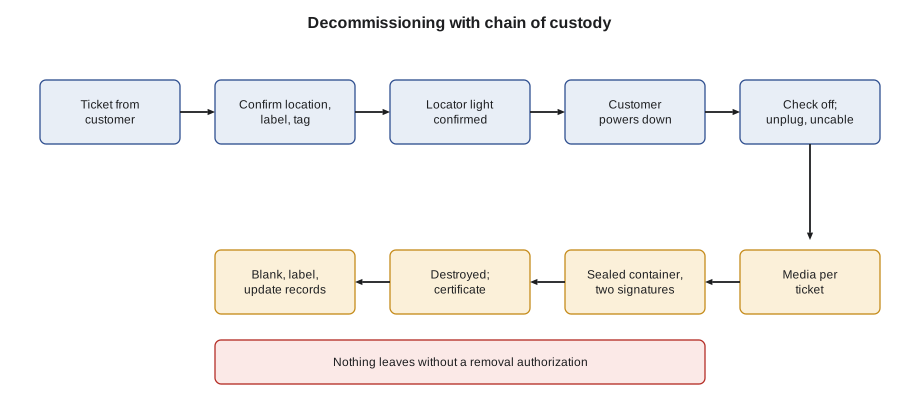
At Stonebridge, removing equipment from a customer cabinet always starts with a decommissioning ticket from an authorized person at the customer. The ticket lists each device by name, asset tag and serial number, its cabinet and U position, and says what the customer wants done with it: returned to the customer, shipped to a vendor or recycler, held for collection, or destroyed. It also says what should happen to any storage media in the device, and when the device may be powered off. Removing a single server is a small job; removing a cage of fifty is a project with its own plan, change windows and checkpoints. Either way, nothing is removed that is not on the ticket.
Confirm the device, then confirm again
The most important step in a removal is identifying the device correctly. Roz's rule is that at least three independent things must match the ticket before anything is unplugged:
- the cabinet and U position;
- the device label front and rear;
- the asset tag or serial number.
If any of them disagree, the work stops and the customer is asked. Many customers also want a fourth check before they let a technician unplug anything: they confirm from their own systems that the device is the one they expect, by having the technician press the server's identify button, which lights a blue locator light, or by asking the customer to turn its locator light on remotely. A blue light on the right server is the most reassuring sight in a removal.
Powering down and disconnecting
A device is powered down by the customer, normally from their own systems, after they have moved its workload elsewhere. A technician presses a power button only if the ticket says so, and only after the device has been confirmed. Once it is off, the technician checks that it really is off: power supply lights out, fans stopped, the strip readings for its outlets at zero. Then the disconnection follows a fixed order:
- Unplug the power cords at both ends: device and strip. Unused cords are removed from the cabinet, not left hanging from the strip.
- Disconnect the network cables at the device end, and at the far end too if the ticket says so. Cables that served only the removed device are removed; cables that go elsewhere are labeled spare or left for the customer.
- Check the strip readings again to make sure nothing else in the cabinet was affected.
- Remove the device from its rails, with a second person for heavy equipment, as Lesson 5 describes.
- Remove the rails if the ticket says so, or leave them for the next device.
- Fit blanking panels in the empty units.
- Remove labels for the removed device from the cabinet, and update the cabinet's other labels if anything changed.
- Photograph the cabinet, front and rear, after the work.
Data on the way out
Most servers, storage arrays and many switches hold data: on hard drives, solid-state drives, memory cards and sometimes in the device's own internal storage. A retired device that leaves the building with its data intact is a security incident waiting to happen. The decision about what to do with the data is the customer's, because it is their data, but Stonebridge's job is to make sure the customer's decision is carried out and recorded.
The standards most customers follow are the United States National Institute of Standards and Technology's guidelines for media sanitization, NIST Special Publication 800-88, whose second revision was published in September 2025, and, in Canada, the Canadian Center for Cyber Security's guidance on IT media sanitization, ITSP.40.006. Both describe a range of methods from overwriting data so that ordinary tools cannot recover it, through stronger methods such as cryptographic erase and the device's own secure erase commands, to physical destruction. Choosing a method is the customer's security team's job, and it depends on the sensitivity of the data and the type of media. A technician needs to know the ideas well enough to follow the ticket and to recognize when something does not add up:
- Overwriting and secure erase are done by the customer or their vendor, using software, usually before the device is powered off for the last time. Technicians do not run them unless the customer specifically asks and provides the tools.
- Cryptographic erase destroys the encryption key of a self-encrypting drive, which makes its data unreadable. It too is done by the customer.
- Physical destruction, by shredding, crushing or disintegrating drives, is done by an approved vendor, either at the site with a mobile shredder or at the vendor's facility.
Ike's rule for technicians is short: you never read, copy or try to access data on any media; you handle every drive as if it held the customer's most sensitive data; and you never let a drive out of documented custody.
Removing drives
Many customers want drives removed from devices before the devices leave, so that the drives can be destroyed on site and the rest of the device returned or recycled. When the ticket asks for it, the technician removes the drives in the build room, under camera, records each drive's serial number against the device it came from, and places them in a sealed, numbered container. Drives are counted out of the device and counted into the container, and the count is signed by two people.
Chain of custody
Chain of custody is the unbroken record of who had a piece of media, when and where, from the moment it leaves its device to the moment it is destroyed or handed to the customer. Every transfer is signed: from the technician who removed the drives, to the secure storage cage where they wait, to the destruction vendor, to the destruction itself. The vendor issues a certificate of destruction listing each drive's serial number, the method and the date, and Stonebridge attaches it to the ticket and sends it to the customer. A drive that cannot be found in the chain is treated as a security incident.
# Chain of custody check: every drive removed must reach destruction, in sealed containers
removed = {  # drive serial: device it came from
    "WD-7A11": "srv-bcu-07", "WD-7A12": "srv-bcu-07", "WD-7A13": "srv-bcu-08",
    "WD-7A14": "srv-bcu-08", "SS-3B02": "stor-bcu-01", "SS-3B03": "stor-bcu-01",
}
container = {"SEAL-2219": ["WD-7A11", "WD-7A12", "WD-7A13", "WD-7A14", "SS-3B02"]}
certificate = ["WD-7A11", "WD-7A12", "WD-7A13", "WD-7A14", "SS-3B02"]   # vendor's destruction certificate
sealed = [d for drives in container.values() for d in drives]
for d, dev in removed.items():
    if d not in sealed:
        print(f"NOT IN ANY SEALED CONTAINER: {d} from {dev}  -> stop, find it, report to security")
    elif d not in certificate:
        print(f"Sealed but not on certificate: {d}")
print(f"Removed {len(removed)}, sealed {len(sealed)}, destroyed {len(certificate)}")
print("Custody complete" if set(removed) == set(certificate) else "Custody INCOMPLETE - incident")NOT IN ANY SEALED CONTAINER: SS-3B03 from stor-bcu-01 -> stop, find it, report to security Removed 6, sealed 5, destroyed 5 Custody INCOMPLETE - incident
The check finds one drive removed from a storage array that never reached the sealed container. In the real version of this case, which Ike describes, the drive was found in a drive carrier on the build room bench, where it had been set aside to check a serial number. Nothing had left the building, but the incident was recorded and the procedure was changed so that drives go straight from the device into the container, with the serial numbers scanned as they go in.
Equipment leaving the building
A device or container leaving the campus needs an equipment removal authorization: a record, approved by the customer and checked by security, listing exactly what is leaving, by asset tag and serial number, and who is taking it. Security checks the items against the authorization at the dock. Equipment without an authorization does not leave, however reasonable the person carrying it seems. Ike explains that this is one of the oldest and most effective controls in the building, because the most common way equipment goes missing is out of the front door with someone who looks as though they belong.
Closing out
When the devices have gone, the job is not finished until the records are. The technician updates DCIM: each device is marked as removed, with the date and the ticket; its power and network connections are cleared; the cabinet's elevation shows the empty units as blanked. Power strip outlets that served the device are recorded as free. Cables removed are recorded. The ticket closes with the photographs, the custody records and, when it comes, the certificate of destruction.
Worked problem
Removing a customer's old storage array
The Bayview Credit Union opens a ticket to remove storage array stor-bcu-01 from cabinet A-31-02, U1 to U4. It holds 24 drives. The customer wants the drives destroyed on site and the empty array shipped to a recycler.
Show solution
- Confirm the array by its location, its front and rear labels and its asset tag; the customer turns on its locator light remotely to confirm.
- The customer confirms it is powered down. Jamal checks the power supply lights are out and the strip outlets read zero.
- Unplug and remove its four power cords and its eight network cables, which served only the array. Check the strips for the cabinet's other devices.
- Remove the array with Roz, using the lift device, since it weighs about 100 lb even without drives, and take it to the build room.
- Under camera, remove the 24 drives, scanning each serial number into the custody record as it goes into sealed container SEAL-2231. Count signed by Jamal and Roz.
- Fit four blanking panels at U1 to U4, update DCIM and the labels, photograph the cabinet.
- The shredding vendor destroys the drives on site, watched by Ike, and issues a certificate listing all 24 serial numbers. The empty array leaves on an equipment removal authorization.
Answer: Every drive is accounted for from array to certificate, and the customer receives the certificate with the ticket closure.
Removing whole cabinets and cages
When a customer leaves a cage entirely, the work is larger but follows the same steps for every device, followed by the cabinets themselves. Customer-owned cabinets are emptied, their power strips disconnected and removed by the facilities team, their bonding conductors disconnected, and the cabinets moved out by the route planning in Lesson 4, usually empty. Stonebridge-owned cabinets stay and are cleaned, inspected as in Lesson 1, and returned to inventory. Floor PDU breakers that fed the cage are switched off and locked out by the facilities team, and the whips are removed or recorded as spare. The cage itself is checked for anything left behind: loose screws in the floor void, cable ties, labels, a forgotten console cable.
Before the cage is released to the next customer, Roz and the shift lead walk it together with the move-out checklist. It is the same discipline as the first-course capstone tour, aimed at an empty space: everything recorded, nothing left, every opening sealed, every record updated.
Common mistakes
MistakeUnplugging a device after checking only its U position.
InsteadConfirm location, label and asset tag, and use the locator light.
MistakeLeaving unused power cords plugged into the strip.
InsteadRemove cords and dedicated cables with the device.
MistakePutting a drive down on the bench to check something.
InsteadDrives go straight from the device into the sealed container, scanned as they go.
MistakeLetting equipment leave because the person carrying it works for the customer.
InsteadNothing leaves without an equipment removal authorization checked by security.
MistakeClosing the ticket when the device is out of the cabinet.
InsteadClose it when DCIM, labels, custody records and the certificate are done.
Summary and key terms
- Every removal starts with a decommissioning ticket from an authorized customer contact.
- Confirm the device by location, labels and asset tag, and use the locator light.
- The customer powers it down; check it is off before disconnecting cords and cables.
- Data decisions are the customer's; NIST SP 800-88 and ITSP.40.006 guide them.
- Keep an unbroken chain of custody for every drive until a certificate of destruction.
- Nothing leaves without an equipment removal authorization; update DCIM before closing.
- Decommissioning
- The controlled removal of equipment from service and from the site.
- Locator light
- A light on a server, often blue, turned on to identify it.
- Media sanitization
- Making data on storage media unrecoverable, by erasing, cryptographic erase or destruction.
- Chain of custody
- The signed record of who held media, when and where, until its destruction or return.
- Certificate of destruction
- A vendor's record listing destroyed media by serial number, method and date.
- Equipment removal authorization
- An approved list of items allowed to leave the site, checked by security.
Practice problems
Work each problem on paper first, then reveal the answer to check.
What three things must match the ticket before a device is unplugged?
Show answer
Its location, its labels front and rear, and its asset tag or serial number.
Who decides how a customer's data is sanitized?
Show answer
The customer, usually their security team.
What is a chain of custody?
Show answer
The unbroken signed record of who held each piece of media, when and where, until it is destroyed or returned.
A drive removed from an array is not in the sealed container. What happens?
Show answer
Work stops, the drive is found, and it is reported to security as an incident.
Lesson quiz · 5 questions
Score 60% or more to complete this lesson.
Create a free account to save your progress, take quizzes and earn a certificate.