
DCT-130 · Lesson 3 of 12 · 20 min
Receiving, unboxing and staging equipment
Every server that ends up in a rack at Stonebridge starts its life on the campus at the loading dock. What happens in the next hour decides a surprising amount: whether damage is caught and claimed, whether the equipment is matched to the right customer, whether packaging dust and cardboard stay out of the halls, and whether the device is tracked from the moment it arrives. Receiving is not glamorous work, and new technicians are sometimes tempted to rush it. Roz takes Jamal to the dock on a Tuesday morning, when three deliveries are due, and introduces him to Tomás Reyes, who runs shipping and receiving for the campus.
Before the truck arrives
Nothing arrives at Stonebridge unannounced. A customer who is sending equipment opens a receiving ticket in advance, giving the carrier, the expected date, the number of pieces, the tracking numbers and the destination: cage, cabinet and, when they know it, the U position. Large deliveries also need a dock booking, because the campus has two docks and AI racks take one of them for hours. Tomás checks each morning's bookings against the tickets and the dock schedule. A delivery with no ticket is not refused out of hand, but it is held at the dock while the customer is contacted, and it does not enter the building until there is a ticket.
The reasons are partly security and partly practical. Equipment arriving without a ticket could be misdelivered, could belong to someone who is no longer a customer, or could be an attempt to get an unknown device inside. And without a ticket nobody knows where it should go or who should be told it has arrived.
At the dock
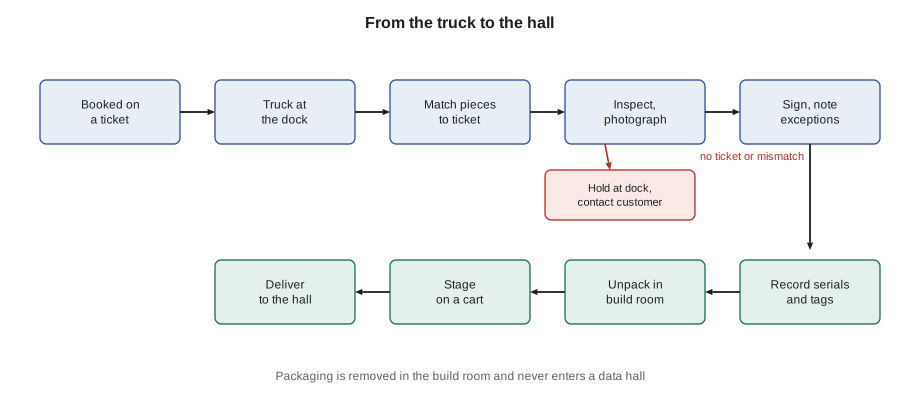
When a truck arrives, the driver checks in with security at the gate, as every visitor does, and backs up to the dock. Tomás or a technician meets the delivery and works through a fixed sequence:
- Match the delivery to a ticket: carrier, tracking numbers and the number of pieces on the bill of lading against the ticket.
- Inspect before signing: look at every piece for crushed corners, holes, water damage, tilted or broken pallets and tamper indicators. Many shipments of heavy equipment carry tilt and shock indicators, small labels that change color if the package was tipped over or dropped.
- Note exceptions on the delivery receipt before signing: "one carton crushed corner", "tilt indicator tripped". A clean signature tells the carrier that everything arrived in good order, which makes a later damage claim much harder.
- Photograph any damage, the labels and the indicators.
- Count the pieces again as they come off the truck.
Only then does the driver get a signature. Jamal watches Tomás refuse to sign for the second delivery until the driver agrees to note on the receipt that a pallet wrap was torn and re-taped. When the carton is opened later, the server inside is fine, but Tomás points out that the note cost nothing and might have saved a claim.
Receiving room and records
From the dock, equipment goes into the receiving room, a secured space next to the dock with cameras, racks of shelving and a small desk. Here it is recorded. For each piece Tomás or the technician records:
- the ticket number and the customer;
- the manufacturer, model and serial number, scanned from the carton label and later checked against the device itself;
- the Stonebridge asset or receiving tag applied to the carton, a barcode that links it to the ticket in DCIM;
- the date and time received, who received it, and any damage noted;
- the storage location while it waits.
The customer is then told the delivery has arrived. Many customers want to know at once, because their own installation crews are scheduled around the delivery. Equipment does not sit in receiving indefinitely: Stonebridge's house rules give customers a limited number of days of free storage, after which they are charged, and long-stored equipment is reported to the customer weekly.
# Match a delivery to its receiving ticket and report exceptions
ticket = {"id": "RCV-30551", "customer": "Bayview Credit Union",
          "pieces": 6, "serials": ["SV7421", "SV7422", "SV7423", "SV7424", "ST1180", "PDU-88A"]}
scanned = ["SV7421", "SV7423", "SV7424", "ST1180", "PDU-88A", "SV7499"]   # serials scanned at receiving
damaged = {"ST1180": "crushed corner, tilt indicator tripped"}

missing = [s for s in ticket["serials"] if s not in scanned]
extra = [s for s in scanned if s not in ticket["serials"]]
print(f"Ticket {ticket['id']} for {ticket['customer']}: expected {ticket['pieces']}, scanned {len(scanned)}")
for s in missing:
    print(f"  missing: {s}  -> note on receipt, ask carrier and customer")
for s in extra:
    print(f"  not on ticket: {s}  -> hold in receiving, confirm with customer")
for s, why in damaged.items():
    print(f"  damage: {s} ({why})  -> photographs, customer told before unpacking")
print("Status:", "CLEAN" if not (missing or extra or damaged) else "EXCEPTIONS - do not release to the hall yet")Ticket RCV-30551 for Bayview Credit Union: expected 6, scanned 6 missing: SV7422 -> note on receipt, ask carrier and customer not on ticket: SV7499 -> hold in receiving, confirm with customer damage: ST1180 (crushed corner, tilt indicator tripped) -> photographs, customer told before unpacking Status: EXCEPTIONS - do not release to the hall yet
The code shows the kind of check that the receiving system does automatically when cartons are scanned. One expected server is missing, one unexpected one has arrived, and one carton is damaged. None of these is unusual; what matters is that each is caught and recorded while the driver is still at the dock or within the hour, not discovered weeks later when someone tries to install a server that is not there.
Why packaging stays out of the halls
Equipment is unpacked in the build room, never in a data hall. The rule is strict, and Roz explains why with three examples. Cardboard sheds fibers and dust, which the cooling units carry into server inlets and filters. Cardboard, foam and plastic are fuel, and the fire protection design of a data hall assumes the hall holds very little that burns. And packaging left in a hall blocks aisles, perforated floor tiles and exit routes. One of the findings on Jamal's tour in his first course was a stack of cardboard in row 12 of Hall A. It had come from a customer crew who unpacked in their cage to save time.
Unpacking in the build room
The build room is a clean, well-lit space with benches, carts, tools, an anti-static work area and bins for recycling. Technicians unpack here, following the manufacturer's instructions:
- Let cold equipment warm up. Equipment delivered in winter can be well below room temperature, and if it is unpacked at once, moisture from the air condenses on it. Manufacturers typically ask for several hours for the equipment to reach room temperature in its packaging before it is opened or powered.
- Open cartons with care: no blades driven deep into a carton that may hold a device just below the surface.
- Use anti-static precautions when handling boards, drives and memory: a grounded wrist strap and an anti-static mat, as DCT-120 describes.
- Check the device against the packing list: rails, power cords, mounting hardware, cable arms, bezels and documentation. Missing rail kits are the most common problem and the most annoying, because a server cannot be racked without them.
- Compare the serial number on the device with the one scanned from the carton.
- Keep the packaging until the customer confirms the device works, if it may need to go back; otherwise sort it for recycling.
Large customers sometimes have their own build room practices, and integrated racks follow the integrator's procedure, which Lesson 12 describes. But the principle never changes: packaging is removed before equipment goes into a hall.
Staging
Staging means preparing equipment so that the work in the hall is short and orderly. A staged installation is laid out on carts in the order it will be installed, with every part and tool needed, so that the technician in the hall is not searching for screws or walking back and forth through the security doors. Staging includes:
- fitting rails to servers, or preparing rail kits for the cabinet;
- labeling the device, its power cords and its cables, as Lesson 10 describes;
- pre-cutting or selecting patch cables of the right lengths;
- checking the elevation drawing from DCIM and the ticket, so that every device has a planned U position;
- loading the cart in installation order, heaviest items lowest on the cart.
Carts used in the halls are anti-static, have their own load ratings and fit through the doors and aisles. Jamal is surprised how many of the questions he would otherwise have to ask in the hall are answered by an hour of staging in the build room.
Moving equipment to the hall
From the build room, equipment moves to the hall along a route that the site plans in advance for anything heavy: corridors, doors, ramps and the freight elevator, each with its own rating. A delivery for Hall A has to cross a ramp up to the raised floor. The carts move slowly, with two people for heavy loads, and stop at every security door, where each person badges through and the door is not propped open. Lesson 4 covers moving whole cabinets, which needs much more planning.
Worked problem
A delivery that does not match
A carrier delivers five cartons for a Hall A customer. The receiving ticket lists four servers. The fifth carton is a storage shelf with the customer's name on the label, and its tilt indicator has tripped.
Show solution
- Hold the delivery at the dock until the pieces are matched.
- Note on the receipt: "5 pieces received against 4 expected; 1 carton tilt indicator tripped" and photograph the indicator.
- Sign with the exception noted and move all five to receiving.
- Record the four expected servers against the ticket. Record the shelf as received but not on a ticket, and hold it.
- Contact the customer, who confirms the shelf is theirs and adds it to the ticket. Tell them about the tilt indicator before anyone unpacks it.
Answer: All five pieces are accounted for, the damage indicator is on record before unpacking, and the customer decides whether to unpack the shelf or return it unopened. The customer's vendor sends someone to inspect it, and the shelf is accepted.
Special deliveries
Some deliveries need more than the routine. Integrated racks arrive upright on air-ride trucks and need the dock leveler, moving skates and the integrator's crew, as Lesson 12 shows. Replacement parts for an outage arrive by courier at any hour and go straight to the technician on the ticket, but they are still recorded at receiving first, even at three in the morning, because a part that skips receiving is a part nobody can trace. Equipment returned by a customer's vendor after repair is checked against the original serial number, because vendors sometimes send a different unit. And customers occasionally ship equipment that contains batteries, such as small UPS units or lithium-ion battery modules, which have their own shipping labels and storage rules; Tomás keeps them in a marked area away from combustible packaging until they are installed.
Outbound shipments follow the same discipline in reverse. Equipment leaving the campus for repair, return or recycling is packed in the build room, recorded against a ticket and released only with the authorization described in Lesson 11. The dock is where things enter and leave the building, and so it is one of the places Ike Adeyemi's security team watches most closely.
Storage while waiting
Equipment waiting in receiving or the build room is stored on shelving, not on the floor, with its receiving tag visible, grouped by customer and ticket. Different customers' equipment is never mixed on the same shelf section. Heavy items go on low shelves. Nothing is stored in corridors, exit routes or the halls. Roz checks the receiving room at the start of each week and chases any item that has waited longer than the customer's ticket said it would.
Common mistakes
MistakeSigning a delivery receipt before inspecting the pieces.
InsteadInspect, photograph and note exceptions, then sign.
MistakeAccepting equipment with no ticket straight into the building.
InsteadHold it at the dock or in receiving until the customer opens a ticket.
MistakeUnpacking in a cage to save time.
InsteadUnpack in the build room; packaging never goes into a hall.
MistakePowering cold equipment straight off a winter truck.
InsteadLet it reach room temperature in its packaging first, as the manufacturer asks.
MistakeFinding out in the hall that the rail kit is missing.
InsteadCheck every part against the packing list while staging.
Summary and key terms
- Every delivery is announced on a ticket and booked for the dock.
- Inspect and photograph before signing, and note any damage or shortage on the receipt.
- Record ticket, customer, model, serial number, tag and location for every piece.
- Unpack in the build room only; cardboard and foam stay out of the halls.
- Let cold equipment warm up before unpacking and powering.
- Stage carts in installation order with every part, label and cable ready.
- Bill of lading
- The carrier's document listing the pieces in a shipment.
- Tilt indicator
- A label that changes color if a package has been tipped beyond a set angle.
- Receiving room
- The secured room by the dock where deliveries are checked and recorded.
- Build room
- The room where equipment is unpacked, prepared and staged before going to a hall.
- Staging
- Preparing equipment, parts and cables in installation order before the hall work.
- Exception
- A note on a delivery receipt recording damage or a shortage.
Practice problems
Work each problem on paper first, then reveal the answer to check.
Why note damage on the delivery receipt before signing?
Show answer
A clean signature tells the carrier the shipment arrived in good order, which weakens a later claim.
What five things are recorded for each piece at receiving?
Show answer
Ticket and customer; model and serial number; asset or receiving tag; date, time, receiver and damage; storage location.
Give two reasons packaging stays out of data halls.
Show answer
It sheds dust into server inlets and filters, and it adds fuel to a space designed to hold very little that burns.
What should be done with a server delivered from a cold truck in January?
Show answer
Leave it in its packaging until it reaches room temperature before unpacking and powering it.
Lesson quiz · 5 questions
Score 60% or more to complete this lesson.
Create a free account to save your progress, take quizzes and earn a certificate.