
DCT-130 · Lesson 1 of 12 · 19 min
Racks and cabinets in the data center
Jamal Pierce has spent his first month at Stonebridge Data learning where things are. In this course he learns how things go in. Almost everything a customer brings to a data center ends up in a rack: a steel frame with standard mounting rails into which servers, switches, storage arrays and power strips are bolted. A rack is simple to look at and easy to get wrong. A rack loaded past its rating, installed without blanking panels, cabled across its exhaust or labeled carelessly causes outages, overheating and lost hours for years after the person who installed it has moved on. Roz Kerr, his mentor, starts the course in an empty bay of the build room with a single new cabinet still on its shipping pallet. "Before you put anything in one of these," she tells him, "you need to know what every part of it is for."
Racks, cabinets and frames
People in the trade use the words rack and cabinet loosely, and often interchangeably, but they mean different things. A rack is an open frame: vertical posts with mounting holes, joined at the top and bottom, with no sides or doors. A cabinet, or enclosure, is a rack with panels: a front door, a rear door, side panels and a top, usually with ways in for cables and power. Most of what a technician installs at Stonebridge goes into cabinets, because cabinets control airflow and lock, but open racks are still common in network rooms and meet-me rooms, where cables are changed often and airflow matters less.
- Two-post racks have a single pair of vertical posts. They hold light equipment such as patch panels and small switches, mounted by their front ears. They are common in network rooms and telecommunications rooms.
- Four-post racks have posts at the front and the rear. Equipment is supported front and back by rails, so they can hold servers and other deep, heavy equipment. Open four-post racks are sometimes used for network cores.
- Cabinets are four-post racks with doors and panels. The doors are usually perforated, so that air can pass straight through from the cold aisle to the hot aisle. Customer cabinets lock, with keys, combination locks or electronic locks tied to the access control system.
- Integrated racks arrive already built: the manufacturer or an integrator installs and cables every server at its own plant and ships the whole rack. AI racks such as the ones Corvid AI is installing in Hall D are always delivered this way, as Lesson 12 shows.
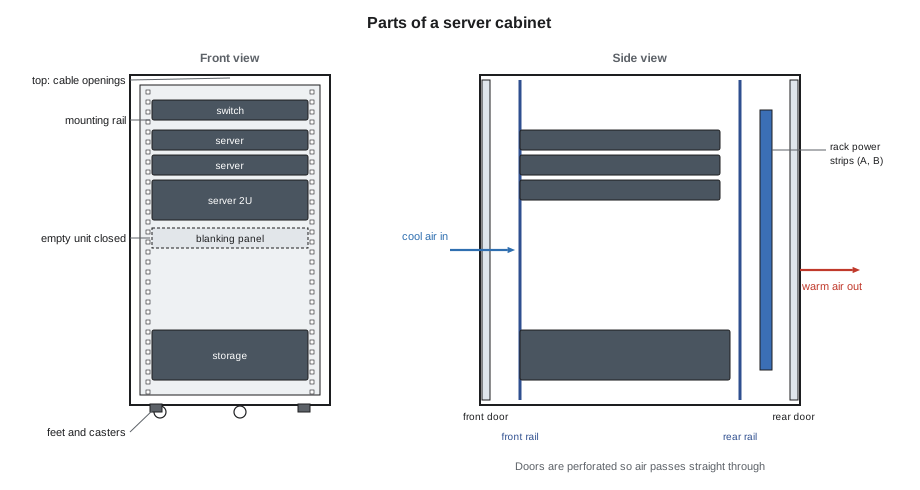
The parts of a cabinet
Roz walks Jamal around the new cabinet and names each part. She wants him to be able to describe any cabinet over the phone to a customer who cannot see it, and to spot missing or damaged parts before equipment goes in.
- The frame is the welded or bolted steel structure that carries the load. Its rating, in kilograms or pounds, is the most important number on the cabinet's label, and Lesson 2 explains the different ratings.
- The mounting rails, also called vertical mounting rails or posts, are the four strips with square holes into which equipment is fixed. In most cabinets they can be moved forward and back to suit the depth of the equipment.
- The doors are perforated, typically with most of their area open to air. The front door lets cold air in; the rear door lets hot exhaust out. A cabinet with solid doors in a data hall is almost always a mistake.
- The side panels close the sides, so that air passes front to back rather than sideways between cabinets. In a row, cabinets are often joined with baying kits and the panels between them left in place.
- The top has openings for cables and sometimes for a chimney that carries hot air to a ceiling return. Unused openings are closed with brush strips or plates.
- Vertical power strips, the rack power distribution units, mount at the rear, usually one on each side, for the A and B feeds. Lesson 8 covers them.
- Cable managers run vertically at the rear or the sides and horizontally between devices. They keep cables tidy, away from exhaust and off moving parts.
- Leveling feet and casters sit under the frame. Casters let the cabinet be rolled into place; leveling feet then carry the load and stop it moving. Some cabinets are also bolted to the floor or joined to each other for seismic restraint.
Sizes
The opening between the mounting rails of almost every data center cabinet is the same, the width defined by the EIA-310 standard for 19-inch equipment. The cabinet itself comes in a few common sizes:
- Width: 24 in cabinets are the most common for servers. 31.5 in cabinets leave room at the sides for heavy cable bundles and are common for network equipment.
- Depth: 39 to 48 in is typical for servers. AI and GPU servers are deep, and cabinets for them are often 48 in or more.
- Height: given in rack units, U. 42U is the classic height; 45U, 48U and taller cabinets fit more equipment where the ceiling and the floor loading allow it.
Lesson 2 explains the rack unit and the hole pattern in detail. For now, Roz wants Jamal to know that a cabinet's outside dimensions matter for the floor plan and the aisles, while its inside dimensions, the rail opening, the usable depth and the number of units, matter for what fits inside it.
Where cabinets live at Stonebridge
Each hall at the campus uses cabinets differently, and a technician has to know which hall's rules apply before installing anything:
| Hall | Cabinets | Typical load | Who installs equipment |
|---|---|---|---|
| Hall A (2014, raised floor) | Customer-owned or Stonebridge cabinets, 24 in wide, 42U, in locked cages | About 6 kW per cabinet | Customers or Stonebridge technicians on remote hands tickets |
| Halls B and C (cloud lease) | Tenant's standard cabinets, delivered integrated | About 12 kW per cabinet | The tenant's own staff; Stonebridge receives and positions |
| Hall D (AI, liquid cooled) | Integrated AI racks, about 132 kW each | About 132 kW per rack | The integrator and Corvid AI, with Stonebridge receiving, moving and connecting facilities |
| Edge site | Two modules of eight cabinets each | About 8 kW per cabinet | Stonebridge technicians, visiting on tickets |
In Hall A, Jamal will do most of the hands-on installation in this course: racking servers for the enterprise customers who use Stonebridge's remote hands service. In Halls B and C the cloud tenant does its own installation and Stonebridge's work stops at the dock and the cabinet position. In Hall D the work is shared and closely controlled, because each rack is worth millions of dollars, weighs more than a small car and needs liquid connections as well as power and network.
Who owns the cabinet
Ownership matters because it decides who may open, change or move a cabinet. In a retail colocation hall like Hall A, Stonebridge owns most of the cabinets and the customer rents them, but some customers bring their own. Either way, the equipment inside belongs to the customer. A technician works inside a customer cabinet only under that customer's ticket, and changes only what the ticket describes. In wholesale halls like B and C, the tenant owns the cabinets and controls access to them. In Hall D, Corvid AI owns the racks; Stonebridge owns the floor, the power and the cooling to the point where they connect.
Roz is direct about the consequences. "If you open the wrong cage door, even to look, that is a security incident. If you unplug the wrong cord, that is an outage. The ticket tells you the cage, the cabinet and the U position. You check all three before you touch anything."
Grounding and bonding
Every cabinet is bonded to the building's grounding system, usually by a green or green-and-yellow conductor from a bonding point on the frame to a ground bar in the row or under the floor. Bonding protects people from shock if a power fault reaches the metal frame, and it gives a common reference that reduces electrical noise on network equipment. Doors and side panels are bonded to the frame by short straps. Technicians check that the bonding conductor is present and tight when a cabinet is placed, and never remove one to make room for something else. The bonding design itself belongs to the electrical engineers and electricians, and the DCE school covers it in detail.
A first inspection
Before any equipment goes into a new or reused cabinet, a technician inspects it. Roz has Jamal do the inspection on the new cabinet in the build room while she watches. He works from the outside in:
- Label and rating: the manufacturer's label shows the model, the serial number and the load ratings. If the label is missing, the cabinet is not used for heavy equipment until someone confirms its rating.
- Frame: no bent posts, cracked welds or missing bolts. Shipping damage often shows as a cabinet that does not stand square.
- Rails: straight, at the right depth, with no stripped or deformed holes.
- Doors and locks: open and close freely, latch properly, keys or codes on file.
- Panels and brush strips: present and fitted.
- Casters and feet: all present; the feet turn freely.
- Bonding: the bonding point and straps are present.
The new cabinet passes except for one thing: a rear door hinge pin is bent, and the door drags. Jamal writes it on the receiving record and photographs it. The supplier sends a replacement hinge, and the cabinet waits in the build room until it arrives.
# Which cabinet fits the job? Compare usable space with what is going in.
cabinets = {  # name: (rack units, usable depth in, static rating lb)
    "Standard server": (42, 39, 3000),
    "Deep server":     (48, 47, 3000),
    "Network":         (42, 35, 2000),
}
job_units = 30
job_depth = 41     # deepest device, plus room for cables and power cords
job_mass = 1800       # equipment and cables
for name, (units, depth, rating) in cabinets.items():
    ok = units >= job_units and depth >= job_depth and rating >= job_mass
print(f"{name:16s} {units}U, depth {depth}, rating {rating}:", "fits" if ok else "does not fit")Standard server 42U, depth 39, rating 3000: does not fit Deep server 48U, depth 47, rating 3000: fits Network 42U, depth 35, rating 2000: does not fit
The code shows a check every technician makes without thinking once they are experienced: is there enough height, enough depth and enough rated strength? Depth is the one that catches people out. A server that is 32 in deep needs much more than 32 in of cabinet, because its power cords and cables leave the back and need room to bend.
Worked problem
Choosing a cabinet for a customer
The Bayview Credit Union wants to add a storage array and four servers in its Hall A cage. The array is 41 in deep and the whole set weighs about 1,800 lb with cables. Two Stonebridge cabinets are free in the cage: a standard server cabinet 39 in deep and a deep cabinet 47 in deep. Both are rated for 3,000 lb static load.
Show solution
- Height: both cabinets have enough units.
- Depth: the standard cabinet is shallower than the array before any room for cables, so it fails.
- Load: both ratings are well above 1,800 lb.
- Floor: Hall A has a raised floor, so the floor tile ratings under the cabinet position must also be checked, as Lesson 4 explains.
Answer: The deep cabinet is the right choice, subject to the floor check. Jamal records the choice and the reason on the ticket, so that the customer can see why their array went where it did.
Common mistakes
MistakeCalling every cabinet a rack and every rack a cabinet on a ticket.
InsteadUse the right word; the difference tells the next person whether there are doors, locks and panels.
MistakeInstalling equipment in a cabinet without reading its load rating.
InsteadFind the label first; no label, no heavy equipment.
MistakeChoosing a cabinet by height alone.
InsteadCheck height, depth and load rating together, and leave depth for cables.
MistakeOpening a customer cabinet that the ticket does not name.
InsteadCheck cage, cabinet and U position on the ticket before touching anything.
MistakeRemoving a bonding strap because it is in the way.
InsteadBonding stays; report it if it blocks an installation.
Summary and key terms
- A rack is an open frame; a cabinet adds doors, panels and locks.
- Two-post racks hold light front-mounted equipment; four-post racks and cabinets hold servers.
- Cabinets come in standard widths, depths and heights; the rail opening is set by EIA-310.
- Doors are perforated so air passes front to back; side panels and brush strips keep it from leaking.
- Equipment belongs to the customer; work inside a cabinet only under that customer's ticket.
- Inspect every cabinet before use: label, frame, rails, doors, panels, casters, bonding.
- Rack
- An open frame with mounting posts and no doors or panels.
- Cabinet
- A four-post rack enclosed by doors, side panels and a top; also called an enclosure.
- Integrated rack
- A rack built, cabled and tested at the factory and shipped whole.
- Mounting rails
- The vertical strips with square holes to which equipment is fixed.
- Baying
- Joining cabinets side by side into a row.
- Bonding conductor
- The wire that connects the cabinet frame to the building grounding system.
Practice problems
Work each problem on paper first, then reveal the answer to check.
What is the difference between a rack and a cabinet?
Show answer
A rack is an open frame; a cabinet has doors, side panels and a top.
Why are cabinet doors in a data hall perforated?
Show answer
So that cold air can pass in at the front and hot exhaust can leave at the rear.
A server is 32 in deep. Is a cabinet with 32 in of usable depth enough?
Show answer
No; the power cords and cables need room behind the server.
Who may open a customer's cabinet in Hall A?
Show answer
The customer, or a technician working on that customer's ticket for that cabinet.
Lesson quiz · 5 questions
Score 60% or more to complete this lesson.
Create a free account to save your progress, take quizzes and earn a certificate.