
CSCO-111 · Lesson 9 of 12 · 25 min
Network devices: switches, routers, access points and firewalls
▶ Video coming soon A video version of this lesson is on the way.
Riverside Family Law's network lives in a narrow cupboard beside the kitchen. When Jordan opens it for the first time, there are six boxes with blinking lights stacked on a shelf and a tangle of cables between them. A sticker on the top box says 'DO NOT UNPLUG' in Marisol's handwriting. Jordan's task is to draw what is there: which box is which, what each one does, and how they connect. Dev says that a technician who can walk into any network cupboard and name every device and its job has already learned half of what matters.
This lesson describes the devices found in small and medium networks: the provider's equipment, routers, switches, access points and controllers, firewalls and a few others. It explains which layer each works at, what it does with traffic, and how to recognize it. CSCO-112 covers how to connect to and configure these devices.
Where the internet comes in
Every site's connection to the outside world starts with equipment that belongs to, or is supplied by, the internet provider. A cable modem connects to coaxial cable and uses the DOCSIS standards. A DSL modem connects to a telephone line. For fiber service, an optical network terminal, ONT, converts the provider's fiber signal to Ethernet. For fixed wireless or satellite service, a small dish or antenna connects to an indoor unit. A cellular router or modem uses a SIM card to connect to a mobile network. In each case, the provider's device hands off an Ethernet connection, called the demarcation point or demarc: everything on the provider's side is the provider's responsibility, and everything on the customer's side is the customer's.
Many providers supply a combined device that acts as a modem, router, switch and access point in one box. These suit homes, but businesses often put the provider's device into bridge mode, so that it passes the public address straight through to a business-grade router or firewall that the business controls. At Riverside, the top box in the cupboard is the provider's fiber ONT, and its single Ethernet cable runs to the firm's firewall.
Hubs, repeaters and bridges
Some devices are mostly history but still appear in exam questions. A repeater regenerates a signal to extend a cable's reach; it works at layer 1 and does not read addresses. A hub is a multiport repeater: whatever arrives on one port is copied to all the others, so every device shares the bandwidth and every port is in one collision domain. Hubs have been replaced by switches. A bridge connects two network segments and forwards frames between them by MAC address, working at layer 2; a switch is essentially a fast bridge with many ports. Media converters, which change copper Ethernet to fiber and back, are a modern relative of the repeater and are common where a fiber run reaches a device that only has a copper port.
Switches
A switch connects devices within a local network and forwards frames by MAC address, as lesson 3 described. Each port is its own collision domain and can run at full duplex, and all ports are in one broadcast domain unless VLANs divide them. Switches are the devices technicians handle most: every desk outlet, camera and access point connects to a switch port, usually through a patch panel.
Switches come in two broad kinds. An unmanaged switch works out of the box with no settings; it is cheap and suitable for a few desks in a small room, but it offers no VLANs, no monitoring and no way to see what is happening. A managed switch has an operating system, a management address and settings for VLANs, port security, PoE, speed and duplex, monitoring and more. Business networks use managed switches so that technicians can see port status, find which device is on which port, and change settings remotely. Many managed switches can also be managed from a cloud dashboard. A layer 3 switch, or multilayer switch, can also route between VLANs at high speed, combining the jobs of switch and router inside a building.
Switch front panels follow common patterns. Most have rows of RJ45 ports for copper, a few SFP or SFP+ slots for fiber uplinks, and a console port for initial configuration. Each port has one or two LEDs: on many switches, a steady green light means a link, blinking green means traffic, amber means a problem or a port blocked by a protection mechanism, and off means no link. The exact meanings vary by model, so the device's documentation is the authority. PoE switches often have an extra LED or mode to show which ports are supplying power.
Routers
A router connects different networks and forwards packets between them by IP address. It keeps a routing table, a list of known networks and where to send packets for each, and for each packet it chooses the best match. Each router interface belongs to a different network and is the default gateway for the hosts on that network. Because routers do not forward broadcasts, each interface is also the edge of a broadcast domain.
In a small business, the router usually also connects the private internal network to the public internet. On that edge it performs network address translation, NAT, so that many private addresses can share one public address; it often runs the DHCP service that gives devices their addresses; and it may provide basic firewall filtering. In larger networks these jobs are split between separate devices. Enterprise routers connect sites over private links or encrypted tunnels across the internet, and providers' routers carry traffic between whole networks. CSCO-112 explains routing tables, NAT and DHCP in detail.
Access points and wireless controllers
A wireless access point connects wireless devices to the wired network. It translates between 802.11 radio frames and Ethernet frames, so wireless clients appear on the network like wired ones, and it usually draws its power from a PoE switch port. Access points are layer 2 devices from the network's point of view: they bridge clients onto a VLAN, and a router or layer 3 switch provides their gateway.
Access points are managed in one of three ways. An autonomous, or standalone, access point is configured individually, which works for one or two access points but becomes tedious beyond that. A controller-based system uses a wireless LAN controller, WLC, that configures all access points centrally, coordinates channels and power, and manages roaming; the access points are called lightweight access points because they depend on the controller. A cloud-managed system does the same from a web dashboard run by the vendor. Home and small-office mesh systems are a simplified form of central management. Northfield's two access points are cloud-managed, which is why Dev could change their channels from his desk.
Firewalls
A firewall controls which traffic may pass between networks, according to rules. It sits at boundaries: between the internet and the inside network, between the guest Wi-Fi and the business network, or in front of servers. The simplest kind, a packet filter, checks each packet's addresses and port numbers against a list of rules without remembering anything about earlier packets. A stateful firewall tracks connections: once an inside computer opens a connection to a web server, the firewall automatically allows the replies for that connection back in, while blocking unsolicited traffic from outside. Nearly all modern firewalls are stateful.
A next-generation firewall, NGFW, also looks inside traffic at layer 7. It can recognize applications regardless of port, filter websites by category, block known malicious files, and include an intrusion prevention system, IPS, that detects and stops attack patterns. An intrusion detection system, IDS, by contrast, only alerts. Firewalls organize their interfaces into zones, such as inside, outside, guest and DMZ, the last being a separate network for servers that must be reachable from the internet, and rules control traffic between zones. Firewalls may be dedicated appliances, software on a server, a feature of a router, or a cloud service. Every computer also has a host-based firewall, such as the one built into Windows, which protects that device alone.
| Device | Main layer | Forwards by | Main job |
|---|---|---|---|
| Repeater or hub | 1 | Nothing; repeats signals | Extend or share a segment (historic) |
| Switch | 2 | MAC address | Connect devices within a LAN |
| Access point | 2 | MAC address | Connect wireless clients to the LAN |
| Router | 3 | IP address | Connect networks; be the gateway |
| Layer 3 switch | 2 and 3 | MAC and IP address | Switch and route inside a building |
| Firewall | 3, 4 and often 7 | Rules on addresses, ports, applications | Control traffic between zones |
| Modem or ONT | 1 and 2 | Converts provider media to Ethernet | Hand off internet service |
Other devices you will meet
Several other devices appear in network cupboards and on the exam. A wireless LAN controller, as described, manages access points. A load balancer spreads traffic across several servers so that no one server is overwhelmed. A proxy server makes web requests on behalf of users, which allows filtering and caching. A VPN concentrator, often built into a firewall, terminates encrypted tunnels from remote workers or other sites. A network-attached storage device, NAS, provides shared files on the network. An uninterruptible power supply, UPS, keeps the network running through short power cuts and is often the box nobody remembers until it starts beeping. PoE injectors add power to a single cable where the switch cannot supply it.
Endpoints are the devices people use and the devices that use the network on their own: desktop and laptop computers, phones and tablets, printers, IP phones, security cameras, point-of-sale terminals, smart TVs and displays, badge readers and sensors. Devices connected to the internet without a person using them are often grouped as the internet of things, IoT. Many of them, such as cameras, phones and access points, are powered by PoE, so a failing PoE switch can take out several kinds of endpoint at once. IoT devices are often poorly secured and are best placed on their own network segment, which is one reason Kettle & Crumb's cameras have their own subnet.
Drawing a small office
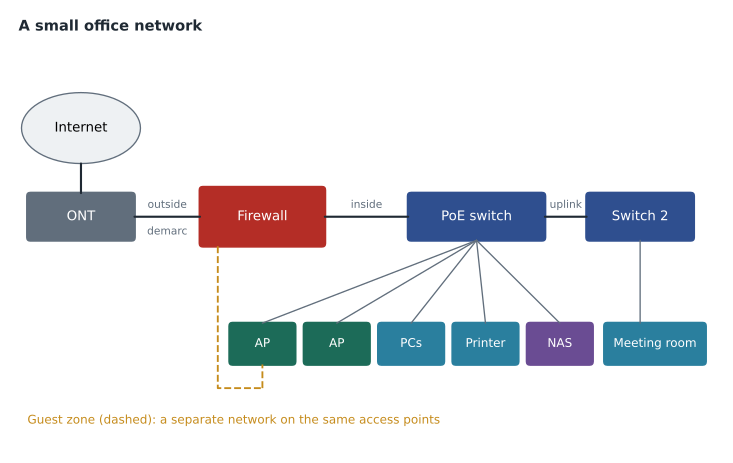
Jordan's finished drawing of the Riverside cupboard shows a typical small-office layout. The provider's ONT connects to the firewall's outside interface. The firewall's inside interface connects to a 24-port managed PoE switch, which has two access points on the ceiling, eight desk outlets, two printers and the network storage device. A second, smaller switch in the meeting room connects to the first by an uplink cable. The firewall also has a guest interface that connects only to a separate guest network on the access points. A UPS at the bottom of the shelf powers the ONT, firewall and main switch. The sixth box, the one labeled 'DO NOT UNPLUG', turns out to be the NAS.
Worked problem
Naming the device
A box in a Kettle & Crumb shop has one coaxial connector and one Ethernet port, and its Ethernet cable runs to a small business router. What is the box, and where is the demarcation point?
Show solution
- A coaxial connector on the provider side and an Ethernet port on the customer side identify a cable modem.
- Cable modems use the DOCSIS standards to carry internet service over the provider's coaxial network.
- The modem hands off Ethernet to the customer's router.
- The demarc is the modem's Ethernet port: the provider is responsible for the modem and the coaxial line, the business for the router and everything behind it.
Answer: It is a cable modem, and the demarcation point is its Ethernet hand-off to the router.
Worked problem
Choosing a device for a job
Prairie Paws wants the reception kiosk, which is used by the public, to be unable to reach the practice-management server, while staff computers on the same switch must reach it. Which device should enforce this?
Show solution
- A basic switch forwards frames within one broadcast domain and cannot block by application or address.
- The kiosk should be on its own VLAN and subnet, so that its traffic to the server must pass through a layer 3 device.
- A firewall, or a router with filtering rules, between the kiosk's network and the staff network can then block the kiosk from the server.
- A stateful firewall can allow the kiosk to reach the internet while denying the server.
Answer: Put the kiosk on its own network and use a firewall between that network and the server.
Jordan adds labels to every cable in the Riverside cupboard and tapes a copy of the drawing inside the door. Marisol removes the 'DO NOT UNPLUG' sticker and replaces it with a printed label: 'NAS — file server — on UPS'. The next lesson looks at the protocols that run across these devices and the port numbers that identify them.
Common mistakes
MistakeCalling every box with network ports a router.
InsteadIdentify devices by what they forward and by which addresses: switches by MAC, routers by IP, firewalls by rules.
MistakeAssuming an access point is a router.
InsteadAccess points bridge wireless clients onto the LAN; the gateway is a router or layer 3 switch.
MistakeThinking a firewall that only alerts is protecting the network.
InsteadAn IDS alerts; an IPS or firewall rule blocks.
MistakeUsing an unmanaged switch where VLANs or monitoring are needed.
InsteadOnly managed switches support VLANs, port settings and monitoring.
MistakeForgetting who owns what at the demarc.
InsteadThe provider owns its side of the demarcation point; the customer owns everything after it.
Summary and key terms
- Provider equipment such as cable modems, DSL modems and ONTs hands off Ethernet at the demarcation point.
- Hubs and repeaters work at layer 1 and are historic; bridges and switches forward by MAC address at layer 2.
- Managed switches support VLANs, PoE control and monitoring; layer 3 switches also route.
- Routers forward by IP address between networks, act as gateways, and in small offices also do NAT and DHCP.
- Access points bridge wireless clients to the LAN and may be autonomous, controller-based or cloud-managed.
- Firewalls filter traffic between zones; stateful firewalls track connections; NGFWs inspect applications.
- Other devices include load balancers, proxies, VPN concentrators, NAS devices, UPS units and PoE injectors.
- Demarcation point
- The point where the provider's responsibility ends and the customer's begins.
- ONT
- Optical network terminal, which converts a provider's fiber service to Ethernet.
- Managed switch
- A switch with configurable settings such as VLANs, PoE and monitoring.
- Layer 3 switch
- A switch that can also route between networks.
- Wireless LAN controller
- A device that centrally manages lightweight access points.
- Stateful firewall
- A firewall that tracks connections and allows return traffic automatically.
- NGFW
- Next-generation firewall, which also inspects applications and content.
- DMZ
- A separate network zone for servers reachable from the internet.
- IoT
- Internet of things: devices that use the network without a person operating them.
Practice problems
Work each problem on paper first, then reveal the answer to check.
At which layer does a hub work?
Show answer
Layer 1.
What does a switch use to forward frames?
Show answer
Destination MAC addresses.
What three services does a small-office router often provide besides routing?
Show answer
NAT, DHCP and basic firewall filtering.
What is a lightweight access point?
Show answer
An access point managed by a wireless LAN controller.
How does a stateful firewall handle replies to inside requests?
Show answer
It allows them automatically because it tracks the connection.
What is the difference between an IDS and an IPS?
Show answer
An IDS detects and alerts; an IPS also blocks.
What device converts fiber provider service to Ethernet?
Show answer
An optical network terminal, ONT.
Lesson quiz · 5 questions
Score 60% or more to complete this lesson.
Create a free account to save your progress, take quizzes and earn a certificate.