
CSCO-111 · Lesson 10 of 12 · 25 min
Common protocols and port numbers
▶ Video coming soon A video version of this lesson is on the way.
On Monday morning, the firm's receptionist at Riverside Family Law can send email but cannot receive any. Her phone, which uses the same mailbox, receives messages normally. Jordan checks the laptop's mail settings and finds that someone has changed the incoming server's port number while trying to fix a different problem the previous Friday. Changing one number back fixes the fault. Dev says that this is why every technician learns the common port numbers by heart: a port is the address of a service, and an application pointed at the wrong port is like a letter addressed to the wrong apartment in the right building.
This lesson explains the transport layer's two main protocols, TCP and UDP, how port numbers identify services, the ports and protocols the CCST Networking exam expects you to know, and the different ways traffic can be addressed: unicast, broadcast, multicast and anycast.
TCP and UDP
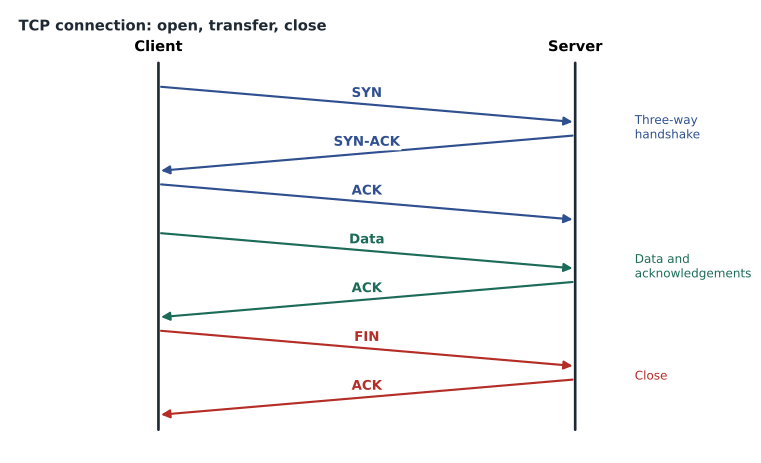
The transport layer carries data between applications on two hosts. Almost all applications use one of two transport protocols. The Transmission Control Protocol, TCP, is connection-oriented and reliable. Before sending data, the two hosts set up a connection with a three-way handshake: the client sends a segment with the SYN flag, the server replies with SYN and ACK, and the client answers with ACK. TCP then numbers every byte it sends, the receiver acknowledges what arrives, and anything not acknowledged is sent again. TCP puts segments back in order, controls the flow so a fast sender does not overwhelm a slow receiver, and slows down when the network is congested. When the conversation ends, each side closes the connection, usually with FIN segments.
The User Datagram Protocol, UDP, is connectionless and does not guarantee delivery. It sends each datagram on its own, with no handshake, no acknowledgments, no retransmission and no ordering. That sounds worse, but it makes UDP faster and lighter. It suits short request-and-reply exchanges, such as DNS lookups, where an application can simply ask again if no answer comes, and real-time traffic, such as voice and video calls, where a late packet is useless and resending it would only add delay. Some newer protocols, such as QUIC, used by HTTP/3, build their own reliability on top of UDP.
| Feature | TCP | UDP |
|---|---|---|
| Connection | Connection-oriented, three-way handshake | Connectionless |
| Reliability | Acknowledgments and retransmission | None built in |
| Ordering | Reassembles in order | No ordering |
| Flow and congestion control | Yes | No |
| Header size | 20 bytes or more | 8 bytes |
| Typical uses | Web, email, file transfer, remote access | DNS queries, DHCP, voice, video, streaming, NTP |
Port numbers and sockets
A host can run many network applications at once, so the transport layer needs a way to deliver each segment to the right one. It uses port numbers, 16-bit values from 0 to 65,535 carried in every TCP and UDP header. A server listens on a known port for its service: a web server listens on TCP port 443 for HTTPS. A client opening a connection picks a temporary source port, called an ephemeral port, so that its replies come back to the right browser tab or app. The combination of an IP address, a transport protocol and a port number is called a socket, and a connection is identified by the sockets at both ends.
Port numbers are divided into three ranges by the Internet Assigned Numbers Authority, IANA. Ports 0 to 1023 are the well-known ports, assigned to the most common services. Ports 1024 to 49151 are registered ports, assigned to specific applications on request. Ports 49152 to 65535 are dynamic or private ports, used for ephemeral client ports, although some operating systems use a wider range. A firewall rule that allows 'TCP 443 to the web server' is a rule about the server's listening port.
C:\> netstat -an

  Proto  Local Address          Foreign Address        State
  TCP    0.0.0.0:135            0.0.0.0:0              LISTENING
  TCP    0.0.0.0:445            0.0.0.0:0              LISTENING
  TCP    192.168.5.37:51244     203.0.113.80:443       ESTABLISHED
  TCP    192.168.5.37:51250     198.51.100.25:993      ESTABLISHED
  UDP    0.0.0.0:123            *:*
In that output, the laptop is listening on ports 135 and 445 for Windows services, has an HTTPS connection from its ephemeral port 51244 to a web server's port 443, and has a secure IMAP connection to the mail server's port 993. On Linux, ss -tuln shows listening ports in a similar way.
The ports to know
The exam expects you to recognize the common services, their port numbers and whether they use TCP, UDP or both. Technicians use the same list every day when they read firewall rules, set up email clients and printers, and troubleshoot blocked applications. Learn them in groups: web and remote access, email, network services, file sharing, and management.
| Port | Protocol | Service | Notes |
|---|---|---|---|
| 20, 21 | TCP | FTP | File transfer; 21 control, 20 data; sends passwords in clear text |
| 22 | TCP | SSH and SFTP | Encrypted remote command line and file transfer |
| 23 | TCP | Telnet | Unencrypted remote command line; avoid |
| 25 | TCP | SMTP | Mail between servers; 587 is used for client submission |
| 53 | UDP and TCP | DNS | Name lookups; TCP for large replies and zone transfers |
| 67, 68 | UDP | DHCP | Server 67, client 68 |
| 69 | UDP | TFTP | Simple file transfer, used for device images and phone configs |
| 80 | TCP | HTTP | Unencrypted web |
| 110 | TCP | POP3 | Downloads mail; 995 for POP3 over TLS |
| 123 | UDP | NTP | Time synchronization |
| 143 | TCP | IMAP | Mail kept on the server; 993 for IMAP over TLS |
| 161, 162 | UDP | SNMP | Device monitoring; 162 for traps |
| 389 | TCP and UDP | LDAP | Directory services; 636 for LDAP over TLS |
| 443 | TCP (and UDP for HTTP/3) | HTTPS | Encrypted web |
| 445 | TCP | SMB | Windows file and printer sharing |
| 514 | UDP | Syslog | Sending log messages to a log server |
| 3389 | TCP and UDP | RDP | Windows Remote Desktop |
| 5060, 5061 | UDP and TCP | SIP | Voice over IP call setup; 5061 with TLS |
A pattern helps with memory. Most plain-text protocols have an encrypted partner on another port: HTTP on 80 and HTTPS on 443, IMAP on 143 and IMAPS on 993, POP3 on 110 and POP3S on 995, LDAP on 389 and LDAPS on 636, Telnet on 23 replaced by SSH on 22, and FTP on 21 replaced by SFTP over SSH on 22 or FTPS. Modern practice is to use the encrypted version everywhere and to block the plain-text version at the firewall. The Riverside receptionist's laptop had been switched from 993 to 143, and the mail server, quite rightly, refused unencrypted connections.
Try it yourself
Look up a port
Complete the function service(port) so that it returns the service name for these well-known ports, using a dictionary: 22 SSH, 53 DNS, 80 HTTP, 443 HTTPS, 3389 RDP. For any other port, return 'unknown'.
PORTS = {}

def service(port):
    pass

print(service(443))
Try it yourself
Classify a port number
Write port_range(n) that returns 'well-known' for 0 to 1023, 'registered' for 1024 to 49151, 'dynamic' for 49152 to 65535, and 'invalid' for anything else.
def port_range(n):
    pass

print(port_range(51244))
Protocols without ports
Some important protocols do not use TCP or UDP ports at all because they work below the transport layer. ICMP, the Internet Control Message Protocol, carries error and diagnostic messages for IP. The ping command sends ICMP echo request messages and waits for echo replies, and traceroute uses ICMP time-exceeded messages to reveal each router along a path. ICMP messages are identified by type and code numbers rather than ports: an echo request is type 8 and an echo reply type 0 in IPv4. ICMPv6 plays the same role in IPv6 and also carries neighbor discovery. ARP, covered in lesson 3, works at layer 2 and has no ports either.
Because ICMP has no ports, a firewall rule that 'allows all TCP and UDP' does not allow ping. Many organizations block ICMP from the internet, which is why a ping to some public websites fails even when the site works. For troubleshooting inside a network, allowing ICMP is useful, and in IPv6 it is essential.
Services that support every network
A few services run quietly in every network, and when they fail, everything seems to fail. DNS translates names such as example.com into IP addresses; if DNS is down, users report that 'the internet is down' even though addresses still work. DHCP hands out addresses, masks, gateways and DNS server addresses; if it fails, new devices get 169.254 addresses. NTP keeps clocks synchronized; when clocks drift, logins can fail because security systems reject tickets and certificates with the wrong time. Syslog and SNMP let devices report problems and be monitored. CSCO-112 covers DNS, DHCP and NAT in depth; here, the goal is to recognize their ports and transport protocols.
Unicast, broadcast, multicast and anycast
Traffic can be addressed in four ways, and the exam lists them in the standards and concepts domain. Unicast traffic goes from one sender to one receiver, the normal case for web pages, email and file transfers. Broadcast traffic goes from one sender to every device in the broadcast domain, as ARP requests and DHCP discovery do in IPv4; routers do not forward it. Multicast traffic goes from one sender to a group of receivers that have asked to join, such as a video stream sent to many displays or routing protocol updates between routers; IPv4 multicast uses 224.0.0.0/4 and IPv6 multicast uses ff00::/8. Anycast traffic goes to the nearest of several devices that share the same address: large DNS services use anycast so that a query from Omaha is answered by a nearby server rather than one on another continent.
Testing whether a port is open
When an application fails but the network seems fine, technicians test the specific port. On Windows, the PowerShell command Test-NetConnection with a computer name and a port number tries to open a TCP connection and reports whether it succeeded. On Linux and macOS, tools such as nc, short for netcat, do the same. A successful test proves that the network path, any firewalls along the way and the listening service all allow the connection; a failed test narrows the fault to one of those three. Because UDP has no handshake, a UDP port cannot be tested this simply, and technicians use the application itself, such as an nslookup query to test DNS on UDP 53.
PS C:\> Test-NetConnection mail.example.com -Port 993

ComputerName     : mail.example.com
RemoteAddress    : 198.51.100.25
RemotePort       : 993
TcpTestSucceeded : True
At Riverside, a successful test to port 993 and a failed test to port 143 showed exactly what had happened: the mail server accepted only encrypted IMAP. Recording both results in the ticket saved the next technician from repeating the work.
Worked problem
Choosing TCP or UDP
Kettle & Crumb wants to add an internet phone system for its shops. Voice calls carry a small packet every 20 milliseconds. Should the voice traffic use TCP or UDP, and why?
Show solution
- Voice is real-time: a packet that arrives late cannot be used, because the conversation has moved on.
- TCP would hold up later packets while it resent a lost one, adding delay and choppy audio.
- UDP sends each packet as soon as possible and lets the phone skip or smooth over the occasional loss.
- Call setup, using SIP, may use TCP or UDP, but the audio itself uses UDP.
Answer: The voice packets should use UDP; reliable retransmission would add delay without helping.
Worked problem
Reading a firewall request
Prairie Paws' practice-management vendor asks Brightline to allow remote support to the server on TCP 3389 from the internet. What service is that, and what should the technician consider?
Show solution
- TCP 3389 is the Remote Desktop Protocol, RDP.
- Exposing RDP directly to the internet is risky, because it is constantly scanned and attacked.
- A safer approach is to require the vendor to connect through a VPN or a remote-support tool, and to allow RDP only from inside the VPN.
- Whatever is chosen, the change should be approved, documented and reviewed later.
Answer: It is RDP. Rather than opening it to the internet, provide access through a VPN or support tool and record the change.
Jordan makes flash cards for the ports and leaves them on the service desk. By the end of the week, Marisol and two other technicians have been caught testing each other with them. The next lesson zooms out from protocols to the shapes networks take and the diagrams technicians use to describe them.
Common mistakes
MistakeThinking UDP is unreliable and therefore useless.
InsteadUDP is chosen deliberately for speed and real-time traffic; applications handle loss themselves.
MistakeForgetting that DNS uses TCP as well as UDP.
InsteadDNS uses UDP 53 for most queries and TCP 53 for large replies and zone transfers.
MistakeExpecting ping to work because TCP and UDP are allowed.
InsteadPing uses ICMP, which has no ports and needs its own rule.
MistakeMixing up DHCP's server and client ports.
InsteadDHCP servers listen on UDP 67 and clients on UDP 68.
MistakeOpening plain-text ports such as 23 or 21 when secure alternatives exist.
InsteadUse SSH on 22, SFTP, HTTPS on 443 and TLS versions of mail protocols.
Summary and key terms
- TCP is connection-oriented and reliable, using a three-way handshake, acknowledgments and retransmission.
- UDP is connectionless and lightweight, suited to quick queries and real-time traffic.
- Port numbers identify services; an IP address, protocol and port form a socket.
- Ports 0 to 1023 are well-known, 1024 to 49151 registered, 49152 to 65535 dynamic.
- Key ports: 22 SSH, 23 Telnet, 25 SMTP, 53 DNS, 67/68 DHCP, 80 HTTP, 110 POP3, 123 NTP, 143 IMAP, 161 SNMP, 443 HTTPS, 445 SMB, 3389 RDP.
- ICMP and ARP have no ports; ping uses ICMP echo request and reply.
- Traffic can be unicast, broadcast, multicast or anycast.
- TCP
- Transmission Control Protocol, a connection-oriented, reliable transport protocol.
- UDP
- User Datagram Protocol, a connectionless transport protocol.
- Three-way handshake
- The SYN, SYN-ACK, ACK exchange that opens a TCP connection.
- Port number
- A 16-bit number that identifies a service or application endpoint.
- Ephemeral port
- A temporary client port chosen for one connection.
- Socket
- The combination of IP address, transport protocol and port.
- ICMP
- Internet Control Message Protocol, used for errors and diagnostics such as ping.
- Multicast
- Traffic from one sender to a group of receivers that have joined.
- Anycast
- Traffic delivered to the nearest of several devices sharing one address.
Practice problems
Work each problem on paper first, then reveal the answer to check.
What are the three steps of the TCP handshake?
Show answer
SYN, SYN-ACK, ACK.
Which transport protocol do voice calls usually use for audio?
Show answer
UDP.
What port does HTTPS use?
Show answer
TCP 443.
What does port 3389 carry?
Show answer
Remote Desktop Protocol, RDP.
What range are dynamic ports in?
Show answer
49152 to 65535.
Why does ping not use a port?
Show answer
It uses ICMP, which works at the network layer and has no ports.
Which kind of traffic goes to the nearest of several servers with the same address?
Show answer
Anycast.
Lesson quiz · 5 questions
Score 60% or more to complete this lesson.
Create a free account to save your progress, take quizzes and earn a certificate.