
CSCO-111 · Lesson 3 of 12 · 28 min
Ethernet, MAC addresses and frames
▶ Video coming soon A video version of this lesson is on the way.
Kettle & Crumb Bakery's second shop has a new problem every few days. A point-of-sale terminal at the front counter freezes for a minute, then recovers. Nothing is unplugged, and the internet connection never drops. Dev asks Jordan to bring a laptop to the shop, connect it to the same switch, and look at the switch's table of MAC addresses before and after a freeze. Twenty minutes into the visit, the terminal freezes again, and the switch table shows something strange: the terminal's MAC address has briefly appeared on a different port, the one connected to a tablet in the kitchen. Someone, months earlier, had configured the tablet with a cloned hardware address to get around a licensing limit. Two devices claiming the same address confused the switch, and frames meant for the terminal were sent to the kitchen.
Dev uses the story to introduce layer 2. Almost every wired network in an office, a shop or a home uses Ethernet, and every Ethernet device has a MAC address. Switches build their forwarding decisions on those addresses. This lesson explains the Ethernet frame, the structure of MAC addresses, how switches learn and forward, how ARP links IPv4 addresses to MAC addresses, and the settings that affect a link's speed and duplex.
Ethernet and IEEE 802.3
Ethernet was developed at Xerox in the 1970s and standardized by the Institute of Electrical and Electronics Engineers as IEEE 802.3. Early Ethernet ran on shared coaxial cable, where every device heard every transmission and devices had to take turns. Modern Ethernet runs on twisted-pair copper or fiber, with each device connected to its own switch port. The 802.3 family now includes standards from 10 megabits per second to hundreds of gigabits per second, but the basic frame format has stayed almost the same for decades. That stability is one reason Ethernet has outlasted every competing local-network technology.
Wi-Fi is defined by a different family of standards, IEEE 802.11, and its radio frames differ from Ethernet frames. But Wi-Fi uses the same 48-bit MAC addresses, and an access point translates between wireless frames and Ethernet frames so that wireless and wired devices can share one network. For most troubleshooting, a technician can think of a Wi-Fi client as just another Ethernet device with an unusually long and invisible cable.
Inside an Ethernet frame
An Ethernet frame begins with a preamble of seven bytes and a one-byte start frame delimiter. These give the receiving network card a pattern to synchronize with and mark where the frame really begins; they are usually not shown by capture tools. Next come the destination MAC address and the source MAC address, six bytes each. The destination comes first so that a receiver can decide quickly whether the frame is meant for it. Then comes a two-byte field called EtherType, which says what kind of data the frame carries: the value 0x0800 means IPv4, 0x86DD means IPv6, and 0x0806 means ARP. In very old frame formats this field held a length instead.
After the EtherType comes the payload, the data handed down from layer 3, usually an IP packet. The payload must be at least 46 bytes; shorter payloads are padded. On most networks the largest payload allowed is 1,500 bytes, a limit called the maximum transmission unit, or MTU. Some data center and storage networks use jumbo frames with payloads of about 9,000 bytes, but every device on the path must support them. The frame ends with a four-byte frame check sequence, or FCS, a cyclic redundancy check calculated from the rest of the frame. The receiver recalculates the check, and if it does not match, the frame is discarded. Rising FCS or CRC error counts on a switch port are a classic sign of a damaged cable or a bad connector.
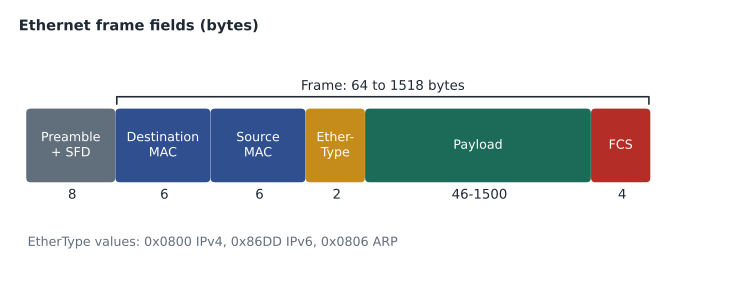
Adding up the fields gives the frame sizes that appear in exam questions and switch statistics. Without the preamble, the smallest frame is 6 + 6 + 2 + 46 + 4 = 64 bytes and the largest standard frame is 6 + 6 + 2 + 1,500 + 4 = 1,518 bytes. Frames smaller than 64 bytes are called runts, and frames larger than the maximum are called giants; both are counted as errors. A frame that carries a VLAN tag, covered in CSCO-112, is four bytes longer, so a tagged frame can be up to 1,522 bytes.
MAC addresses
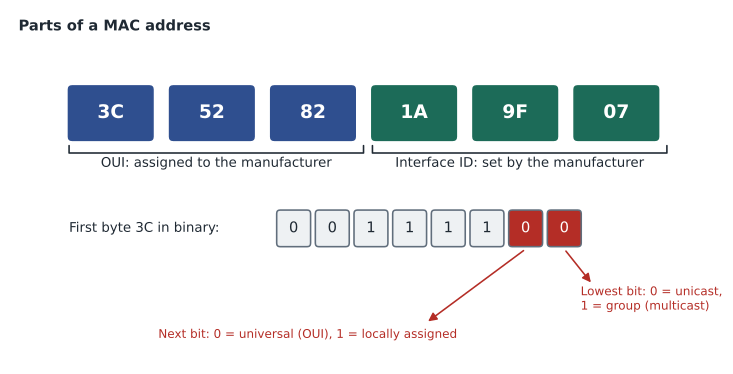
A MAC address, short for media access control address, is a 48-bit number that identifies a network interface on the local network. It is usually written as twelve hexadecimal digits, grouped in one of three common styles: pairs separated by colons, as in 3C:52:82:1A:9F:07, pairs separated by hyphens, as Windows shows them, or groups of four separated by dots, as Cisco devices show them, 3c52.821a.9f07. All three styles describe the same address, and letter case does not matter.
The first 24 bits of a MAC address form the organizationally unique identifier, or OUI, which the IEEE assigns to a manufacturer. The last 24 bits are assigned by the manufacturer to each interface it makes. Technicians use the OUI to identify unknown devices: looking up the first six hex digits in a public OUI list often reveals that a mystery device is a particular brand of printer, camera or phone. At Kettle & Crumb, the OUI of the cloned address belonged to the terminal's maker, not the tablet's, which was the clue that the tablet was impersonating the terminal.
Two bits in the first byte have special meanings. The lowest bit of the first byte is the individual/group bit: 0 means the address belongs to one interface, a unicast address; 1 means it is a group address, used for multicast. The next bit is the universal/local bit: 0 means the address was assigned by the manufacturer under its OUI; 1 means it was assigned locally, by software or an administrator. Modern phones and laptops often use randomized, locally assigned MAC addresses on Wi-Fi to protect privacy, so the same phone may appear with different addresses on different networks. This matters when a network tries to recognize devices by MAC address, such as a clinic that reserves addresses for its tablets.
Three kinds of destination address appear in frames. A unicast address names one interface. The broadcast address, FF:FF:FF:FF:FF:FF, all ones, is delivered to every device on the local network; ARP requests and DHCP discovery use it. Multicast addresses, which have the group bit set, are delivered to a group of interested devices; IPv4 multicast uses MAC addresses beginning 01:00:5E, and IPv6 multicast uses addresses beginning 33:33.
# Check the special bits of a MAC address in any common format.
def parse_mac(text):
    digits = ''.join(ch for ch in text if ch.isalnum()).lower()
    assert len(digits) == 12, 'a MAC address has 12 hex digits'
    return bytes.fromhex(digits)

for mac in ['3C:52:82:1A:9F:07', 'ff-ff-ff-ff-ff-ff', '0100.5e00.00fb', 'da:a1:19:22:7b:40']:
    b = parse_mac(mac)
    kind = 'broadcast' if b == bytes([255] * 6) else ('group (multicast)' if b[0] & 1 else 'unicast')
    origin = 'locally assigned' if b[0] & 2 else 'manufacturer (OUI ' + b[:3].hex(':').upper() + ')'
print(f'{mac:20} {kind:18} {origin}')3C:52:82:1A:9F:07 unicast manufacturer (OUI 3C:52:82) ff-ff-ff-ff-ff-ff broadcast locally assigned 0100.5e00.00fb group (multicast) manufacturer (OUI 01:00:5E) da:a1:19:22:7b:40 unicast locally assigned
Try it yourself
Normalize MAC addresses
Write a function to_cisco(mac) that accepts a MAC address written with colons, hyphens or dots, in any letter case, and returns it in Cisco's dotted style: lower case, three groups of four hex digits, such as 3c52.821a.9f07.
def to_cisco(mac):
    # keep only the hex digits, then regroup them
    pass

print(to_cisco('3C:52:82:1A:9F:07'))
How a switch learns and forwards
A switch keeps a MAC address table, sometimes called a CAM table, that lists which MAC address was last seen on which port. It fills the table by learning: whenever a frame arrives, the switch records the frame's source address against the port it came in on. To forward a frame, the switch looks up the destination address. If the address is in the table on a different port, the switch forwards the frame out of that port only. If the address is on the same port the frame came in on, the switch filters it, dropping it because the destination is already on that segment. If the address is not in the table, or if it is the broadcast address, the switch floods the frame out of every port except the one it arrived on.
Entries in the table age out if a device stays silent; on Cisco switches the default aging time is 300 seconds. Flooding unknown addresses is normal and brief: as soon as the destination replies, the switch learns its port. When two devices use the same MAC address, as at Kettle & Crumb, the switch keeps moving the entry between ports, and frames go to whichever device spoke last. Many switches log this as a MAC address flap. On a Cisco switch, the table can be viewed with a show command; on a computer, the local MAC address is shown by commands such as ipconfig /all or getmac on Windows and ip link on Linux.
Switch# show mac address-table dynamic
          Mac Address Table
-------------------------------------------
Vlan    Mac Address       Type        Ports
----    -----------       --------    -----
  10    3c52.821a.9f07    DYNAMIC     Gi1/0/3
  10    a4bb.6d10.22c1    DYNAMIC     Gi1/0/7
  10    0011.3245.8f20    DYNAMIC     Gi1/0/24
Total Mac Addresses for this criterion: 3
Collision domains and broadcast domains
On old shared Ethernet and on hubs, only one device could transmit at a time. If two transmitted together, their signals collided, and both had to wait and try again, using a method called CSMA/CD. All devices that could collide formed one collision domain. A switch gives each port its own collision domain, and on a full-duplex link, where both ends can send and receive at the same time, collisions cannot happen at all. That is why collision detection is now mostly of historical interest, although the exam may still ask about it.
Broadcast domains are still very important. A broadcast frame is flooded to every port in the same broadcast domain, which by default is everything connected to the same switch, or to switches connected to each other. Routers do not forward layer 2 broadcasts, so each router interface marks the edge of a broadcast domain. VLANs, covered in CSCO-112, divide one switch into several broadcast domains. Very large broadcast domains waste bandwidth and make faults harder to isolate, which is one reason networks are divided into subnets.
ARP: from IP address to MAC address
Applications address each other by IP address, but on the local network a frame must carry a MAC address. The Address Resolution Protocol, ARP, connects the two for IPv4. When a computer wants to send a packet to 192.168.10.25 on its own subnet and does not know that host's MAC address, it broadcasts an ARP request: 'Who has 192.168.10.25? Tell 192.168.10.14.' The host that owns the address replies directly with its MAC address, and the sender stores the answer in its ARP cache for a few minutes. When the destination is on another network, the sender does not ARP for the remote host; it ARPs for its default gateway's MAC address and sends the frame to the gateway. IPv6 uses a different mechanism, Neighbor Discovery, covered in lesson 6.
The ARP cache can be viewed with arp -a on Windows, macOS and Linux. A cache entry with the wrong MAC address, or two IP addresses showing the same MAC address unexpectedly, is a sign of a duplicate address, a misconfigured device, or in rare cases an attack. Lesson 9 and CSCO-112 return to these ideas.
Speed, duplex and autonegotiation
Each end of an Ethernet link must agree on a speed, such as 100 megabits or 1 gigabit per second, and a duplex mode. Half duplex means a device can either send or receive at any moment; full duplex means it can do both at once. Modern devices agree automatically using autonegotiation. Problems arise when one end is set manually and the other is left on automatic: the automatic end can usually detect the speed but not the duplex, and it falls back to half duplex. The result is a duplex mismatch, a link that works but runs slowly, with late collisions on the half-duplex side and CRC errors on the full-duplex side. The cure is to set both ends the same way, preferably both to automatic.
Link speed also depends on the cable. A gigabit network card connected through a damaged cable with only two working pairs may negotiate down to 100 megabits per second. When a user reports that 'the network is slow' at one desk only, checking the negotiated speed and duplex on the switch port is a quick first step.
Worked problem
Calculating frame size
A frame carries a 980-byte IPv4 packet. How large is the frame on the wire, counting from the destination address to the FCS, and how large including the preamble and start frame delimiter?
Show solution
- The header fields are destination 6, source 6 and EtherType 2, a total of 14 bytes.
- The payload is 980 bytes, which is above the 46-byte minimum, so no padding is needed.
- The FCS adds 4 bytes.
- Frame size: 14 + 980 + 4 = 998 bytes.
- With the 8-byte preamble and start frame delimiter: 998 + 8 = 1,006 bytes.
Answer: The frame is 998 bytes, or 1,006 bytes including the preamble and start frame delimiter.
Worked problem
Reading a MAC address
A device on the Prairie Paws network shows the MAC address 0A:1B:2C:3D:4E:5F. Is it a unicast or group address, and was it assigned by a manufacturer or locally?
Show solution
- The first byte is 0A in hexadecimal, which is 00001010 in binary.
- The lowest bit is 0, so it is an individual, unicast address.
- The second-lowest bit is 1, so the address is locally assigned.
- A locally assigned address on a clinic network often means a phone or laptop using a randomized Wi-Fi address.
Answer: It is a unicast, locally assigned address, probably a randomized address on a mobile device.
Back at the bakery, Jordan removes the cloned address from the kitchen tablet and asks the software vendor for a proper license. The freezes stop. Dev adds a note to the client's documentation: 'Duplicate MAC address on tablet, removed.' The next lesson moves up to layer 3 and the addresses that let packets travel beyond the local network.
Common mistakes
MistakeThinking MAC addresses are used to reach devices on the internet.
InsteadMAC addresses only matter on the local network; routers rewrite the frame at every hop.
MistakeBelieving every MAC address is permanent and unique.
InsteadMany devices use randomized, locally assigned addresses, and addresses can be changed in software.
MistakeTreating FF:FF:FF:FF:FF:FF as a multicast address for one group.
InsteadAll ones is the broadcast address, delivered to every device in the broadcast domain.
MistakeAssuming a router forwards ARP broadcasts.
InsteadRouters stop layer 2 broadcasts; a host ARPs for its gateway to reach remote networks.
MistakeSetting one end of a link to fixed full duplex and leaving the other on auto.
InsteadThis causes a duplex mismatch; set both ends to the same mode, ideally both automatic.
Summary and key terms
- Ethernet (IEEE 802.3) is the standard for wired local networks; Wi-Fi (802.11) uses the same MAC addresses.
- A frame has destination and source MAC addresses, an EtherType, a 46- to 1,500-byte payload and a 4-byte FCS.
- Standard frames are 64 to 1,518 bytes; the usual MTU is 1,500 bytes.
- A MAC address is 48 bits: a 24-bit OUI and a 24-bit interface identifier, with individual/group and universal/local bits in the first byte.
- Switches learn source addresses, then forward, filter or flood by destination; entries age out after a few minutes.
- Switch ports separate collision domains; routers separate broadcast domains.
- ARP maps IPv4 addresses to MAC addresses on the local network; hosts ARP for the gateway to reach remote hosts.
- Speed and duplex must match at both ends of a link; mismatches cause slow, error-prone links.
- MAC address
- A 48-bit hardware address that identifies a network interface on the local network.
- OUI
- Organizationally unique identifier: the first 24 bits of a MAC address, assigned to a manufacturer.
- EtherType
- The frame field that identifies the payload type, such as IPv4, IPv6 or ARP.
- MTU
- Maximum transmission unit: the largest payload a link carries, usually 1,500 bytes on Ethernet.
- FCS
- Frame check sequence: the error check at the end of a frame.
- MAC address table
- A switch's list of which MAC address was last seen on which port.
- Flooding
- Sending a frame out of every port except the one it arrived on.
- ARP
- Address Resolution Protocol, which finds the MAC address for an IPv4 address on the local network.
- Duplex mismatch
- A link where one end runs full duplex and the other half duplex.
Practice problems
Work each problem on paper first, then reveal the answer to check.
How many bits are in a MAC address?
Show answer
48.
What does the OUI identify?
Show answer
The manufacturer of the network interface.
What is the minimum Ethernet payload size?
Show answer
46 bytes; shorter payloads are padded.
What does a switch do with a frame whose destination is not in its table?
Show answer
It floods the frame out of every port except the incoming one.
Which device marks the edge of a broadcast domain?
Show answer
A router, or a router interface.
What does ARP find?
Show answer
The MAC address that matches an IPv4 address on the local network.
Name two symptoms of a duplex mismatch.
Show answer
Slow performance and errors such as late collisions or CRC errors.
Lesson quiz · 5 questions
Score 60% or more to complete this lesson.
Create a free account to save your progress, take quizzes and earn a certificate.