
CSCO-111 · Lesson 1 of 12 · 26 min
The CCST Networking exam and entry-level network roles
▶ Video coming soon A video version of this lesson is on the way.
On a gray Tuesday morning in October, the phones at Brightline IT Services in Omaha start ringing at 7:52. Prairie Paws Veterinary Clinic, one of the company's longest-standing clients, cannot open its practice-management app at the second location. Reception can still print labels, and the card terminal still works, but every computer in the exam rooms shows a spinning wheel. Jordan Pelletier, who joined Brightline in September as a junior technician, takes the call. Two months ago Jordan would have restarted every computer in the building. Today Jordan asks the receptionist three questions, opens the ticket BL-24903, and walks over to the desk of Dev Anand, the company's network technician.
Dev listens, checks the clinic's network diagram on his second monitor, and asks Jordan which of the three facts matters most. Jordan thinks for a moment. The card terminal works, so the internet connection at the site is up. The label printers work, so the local network inside the building is up. The app runs from a server at the main location, so the problem is probably the link between the two sites. Dev smiles. Twenty minutes later the clinic's internet provider confirms that a configuration change overnight broke the tunnel between the locations, and the app comes back. Dev tells Jordan that what just happened, reasoning from symptoms to a layer of the network, is the core of the Cisco Certified Support Technician Networking certification, and that they are going to spend the next few months working through it together.
This course, CSCO-111, is the first half of HSM University's preparation for that exam. It covers the foundations: the models that describe networks, Ethernet and MAC addresses, IPv4 and IPv6 addressing including subnetting, copper, fiber and wireless media, the jobs of common network devices, protocols and port numbers, and the topologies and diagrams technicians read every day. The second course, CSCO-112, covers device management, switching and routing concepts, network services, security basics and troubleshooting. A third course, CSCO-190, is the final review and practice before the exam.
What the CCST certifications are
Cisco offers certifications at several levels. For many years the starting point was the Cisco Certified Network Associate, or CCNA, a demanding exam that expects candidates to configure and troubleshoot switches and routers. In the early 2020s Cisco introduced a new entry tier, the Cisco Certified Support Technician, or CCST, aimed at people starting out in IT: students, career changers, and help-desk staff who want to prove they understand the basics. The CCST family includes several separate certifications, each with its own exam. CCST IT Support covers computer hardware, operating systems and help-desk work. CCST Networking covers how networks are built and how to diagnose them. CCST Cybersecurity covers security principles, threats and incident handling.
Each CCST is a certification on its own, not a step that must be completed before the next. A candidate can take CCST Networking without CCST IT Support, and neither is required before the CCNA. Many people use them as a ladder anyway: CCST IT Support for a first help-desk job, CCST Networking to show they are ready for network support work, and the CCNA once they have more hands-on experience. At Brightline, Owen Larkin, the owner, pays the exam fee for any technician who passes, and he has asked Jordan to sit CCST IT Support first and CCST Networking later in 2027.
The CCST Networking exam has the code 100-150. Cisco publishes the topics an exam covers in a document called the exam topics or blueprint, and it revises them from time to time. Before you book the exam, check which version of the exam topics is current on Cisco's Learning Network and compare it with this course. The objectives in this course follow the exam topics as they were published in 2026.
Exam facts you can rely on
Cisco's exam page for 100-150 CCST Networking lists the exam length as 50 minutes and the price as 125 US dollars, with local pricing in other currencies. The exam is offered in seven languages, including English, French and Spanish. CCST exams have been delivered through Certiport, both at authorized testing centers such as colleges and training centers and through online proctoring at home. Always confirm the current delivery options, price and policies on Cisco's site when you are ready to book, because they change.
Some details are not published by Cisco. The number of questions is not stated on the exam page; study guides commonly report around 40 to 50 items. Cisco does not publish a numeric passing score for CCST exams either; you receive a pass or fail result with a breakdown by section. Some guides suggest aiming for 70 to 80 out of 100 on practice tests, but treat any number like that as advice, not a rule. The safest plan is to understand every objective well enough to explain it, not to aim for a minimum score.
| Item | What is known | Where to confirm |
|---|---|---|
| Exam code | 100-150 CCST Networking | Cisco exam page |
| Length | 50 minutes | Cisco exam page |
| Price | 125 US dollars (local prices vary) | Cisco exam page |
| Languages | Seven, including English, French and Spanish | Cisco exam page |
| Question count | Not published; commonly reported as about 40 to 50 | Study guides only |
| Passing score | Not published; result is pass or fail | Score report |
| Delivery | Testing centers and online proctoring through Certiport | Cisco and Certiport sites |
The six exam domains
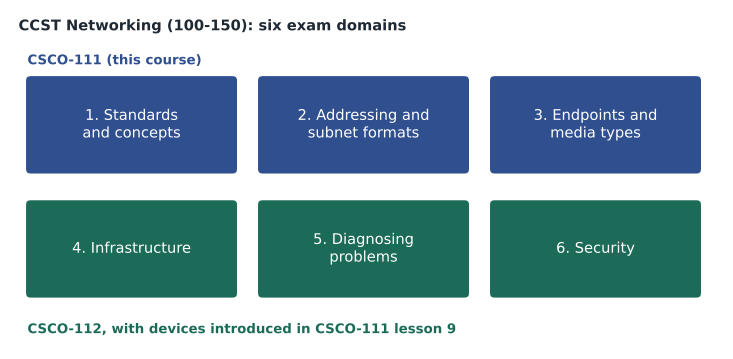
The exam topics are grouped into six domains. The first, standards and concepts, covers network models, network types, topologies, bandwidth and latency, and common protocols. The second, addressing and subnet formats, covers MAC addresses, IPv4 addressing and subnetting, and IPv6. The third, endpoints and media types, covers copper, fiber and coaxial cable, wireless standards and the devices people connect. The fourth, infrastructure, covers switches, routers, access points, firewalls, VLANs, and services such as DHCP, DNS and NAT, along with cloud basics. The fifth, diagnosing problems, covers troubleshooting methods and diagnostic commands. The sixth, security, covers firewalls, VPNs, wireless security, authentication and common threats.
Cisco does not publish weights for the CCST Networking domains, so you cannot safely skip any of them. This course covers the first three domains in depth and introduces the devices from the fourth. CSCO-112 takes the fourth, fifth and sixth domains further. The figure below shows how the domains are split between the two courses.
Entry-level network roles
The CCST Networking certification is designed for people who will support networks rather than design them. Job titles vary from employer to employer, but most entry-level roles fall into a few groups. A help-desk or service-desk technician takes calls and tickets from users, solves the common problems and escalates the rest. A desktop or field support technician visits sites to install, move and repair equipment, including patch cables, switches and access points. A network operations center technician, often called a NOC technician, watches monitoring dashboards for a larger organization or a service provider, responds to alerts, and follows runbooks to restore service. A junior network administrator in a small organization might do all of these jobs in a single day.
At a managed-services provider like Brightline, the lines blur. Jordan answers the phones in the morning, drives to Kettle & Crumb Bakery at noon to replace a failed receipt printer, and spends the afternoon helping Dev plan new addresses for the bakery's third shop. Dev says the most valuable skill in all these roles is not memorizing port numbers but knowing how a network fits together, so that every symptom points to a likely cause.
| Role | Typical tasks | Network knowledge used |
|---|---|---|
| Help-desk technician | Answer calls and tickets, reset passwords, check connectivity, escalate | Reading IP settings, using ping, recognizing DNS problems |
| Field or desktop technician | Install and replace devices, run and test cables, label ports | Cable types, connectors, switch ports, PoE |
| NOC technician | Watch alerts, follow runbooks, open cases with providers | Interface status, routing basics, escalation paths |
| Junior network administrator | Add users and devices, update records, apply simple changes | Addressing plans, VLANs, documentation |
| Managed-services technician | All of the above for many small clients | Everything in this course, on many different networks |
What a network technician actually does
Dev keeps a list of the tickets Brightline handled in a typical month. About a third were user problems that looked like network problems but were not: a laptop with Wi-Fi switched off, a printer out of paper that reported itself as offline. Another third were genuine local problems: a damaged patch cable, a switch port that had been disabled, an access point that needed to be restarted, a new device that had been given an address already in use. The rest were problems outside the building, such as an internet provider outage, an expired certificate on a cloud service, or a change at another site. Every one of those tickets started with a technician gathering facts and deciding which part of the network to look at first.
Technicians also spend much of their time on planned work. When Kettle & Crumb opened its third shop, someone had to choose its address range, order and label the cables, set up the switch and access point, connect the point-of-sale terminals, and update the network diagram. When Riverside Family Law moved two lawyers into a new office, someone had to patch their ports and confirm that the document-management system still worked. None of this is glamorous, and all of it depends on getting details right. A wrong subnet mask, an unlabeled cable or an out-of-date diagram turns a future five-minute repair into a two-hour search.
Good technicians write things down. Brightline's service desk lead, Marisol Tran, reminds everyone that a ticket is a record for the next person, not just for the current one. A good ticket note says what the user reported, what the technician checked, what was found, what was changed and how the fix was confirmed. Dev adds that the network diagram and the address plan are the same kind of record for the whole network, and that a technician who updates them after every change is worth two who do not.
Skills the exam expects
The CCST Networking exam is mostly about understanding. You will be asked to recognize which layer of a model a protocol belongs to, to identify a valid address for a host on a given subnet, to choose the right cable for a job, to match a port number to a service, and to interpret the output of common commands. Some questions describe a short scenario and ask what you would check next. The exam does not expect you to design an enterprise network or configure advanced routing protocols, but it does expect you to know what the parts of a small network do and how to read their settings.
Three skills appear throughout. First, you need a mental model of how data moves from one device to another: from an application, down through the layers, across cables and radio links, through switches and routers, and back up on the other side. Second, you need to work comfortably with addresses: MAC addresses on the local network, IPv4 addresses and masks, and IPv6 prefixes. Third, you need to know the physical side well enough to pick and check media. Lessons 2 to 11 build each of these, and lesson 12 brings them together in practice problems.
Building a study plan
Dev suggests a plan that fits around a full-time job. Work through one lesson of CSCO-111 each week, reading it twice: once quickly to get the shape and once slowly with a notebook. After each lesson, do the quiz without looking back, then explain any question you missed to someone else, or out loud to yourself. Practice subnetting a little every day rather than in long sessions; ten problems a day for three weeks builds more speed than one long weekend. When CSCO-111 is complete, move to CSCO-112, then spend the last two weeks on CSCO-190 and timed practice.
Hands-on practice matters even for an entry-level exam. Cisco offers a network simulator called Packet Tracer through its Networking Academy, which lets you build small networks of switches, routers and computers on your own laptop and see how traffic moves. Many technicians also keep an old switch and an access point at home. At Brightline, Dev keeps a lab rack with two small switches, a router and an access point, and Jordan is allowed to break it as often as necessary. You can also practice many skills in this course with the Python examples and exercises, which run in your browser.
Worked problem
Turning a ticket into a layer
A user at Northfield Community Center says the computer lab cannot reach any websites. The front-desk PCs on the same switch can browse normally, and the lab PCs can print to the lab printer. Which part of the network should the technician look at first?
Show solution
- List what works: the front desk reaches the internet, and the lab PCs reach a local printer.
- Because the lab printer works, the lab PCs have working cables and local network connections.
- Because the front desk can browse, the internet connection and the router are working.
- The difference must be something that applies only to the lab PCs, such as their address settings, their default gateway, their DNS server, or a rule that blocks the lab from the internet.
- Check one lab PC's IP configuration and compare it with a working front-desk PC.
Answer: Start with the lab PCs' addressing and gateway or DNS settings, or a filtering rule for the lab, because the physical network and the internet link are already shown to work.
Worked problem
Choosing a study order
Jordan has twelve weeks before the date planned for the exam and works full time. How could the three HSM University courses be scheduled so that there is time for review?
Show solution
- CSCO-111 has 12 lessons and CSCO-112 has 12 lessons, so there are 24 lessons in total.
- At two lessons a week, the two courses take 12 weeks, leaving no time for review.
- At three lessons a week for the first eight weeks, 24 lessons are complete by the end of week 8.
- That leaves weeks 9 to 12 for CSCO-190, practice exams and the weakest topics.
Answer: Three lessons a week for eight weeks covers both courses and leaves four weeks for final review and practice.
By the end of October, Jordan has a notebook with a page for each exam domain and a sticky note on the monitor that says 'which layer?'. Dev says that is a good start. The next lesson begins with the models that make the question 'which layer?' meaningful.
Common mistakes
MistakeBelieving CCST IT Support must be passed before CCST Networking.
InsteadEach CCST certification stands alone; none is a prerequisite for another or for the CCNA.
MistakePlanning to pass by scoring just over a guessed pass mark.
InsteadCisco does not publish a passing score; prepare to understand every objective.
MistakeSkipping a domain because it seems small.
InsteadCisco does not publish domain weights, so every domain can appear.
MistakeRelying on exam facts from an old forum post.
InsteadCheck the current exam topics, price and delivery options on Cisco's own pages before booking.
MistakeTreating every problem as a network problem.
InsteadGather facts first; many reported network problems are device or application problems.
Summary and key terms
- CCST is Cisco's entry-level certification tier; CCST Networking (exam 100-150) covers network fundamentals and diagnosis.
- Cisco lists the exam as 50 minutes and 125 US dollars, in seven languages; the question count and passing score are not published.
- The exam topics have six domains: standards and concepts, addressing and subnet formats, endpoints and media types, infrastructure, diagnosing problems, and security.
- CSCO-111 covers the first three domains and introduces devices; CSCO-112 covers the rest; CSCO-190 is final review.
- Entry-level roles include help-desk, field, NOC and junior administrator jobs, and managed-services work combines them all.
- Good technicians gather facts, reason from symptoms to a likely layer, and record what they did.
- CCST
- Cisco Certified Support Technician, Cisco's entry-level certification tier.
- 100-150
- The exam code for CCST Networking.
- Exam topics
- Cisco's published list of objectives for an exam, also called the blueprint.
- NOC
- Network operations center, where technicians monitor networks and respond to alerts.
- Managed-services provider
- A company that supports other organizations' IT under contract.
- Packet Tracer
- Cisco's network simulator, offered through its Networking Academy.
- Escalation
- Passing a problem to someone with more skill or access, with a clear record of what has been done.
Practice problems
Work each problem on paper first, then reveal the answer to check.
What is the exam code for CCST Networking?
Show answer
100-150.
Is CCST Networking a prerequisite for the CCNA?
Show answer
No. Each CCST stands alone and none is required for the CCNA.
Name the six exam domains.
Show answer
Standards and concepts; addressing and subnet formats; endpoints and media types; infrastructure; diagnosing problems; security.
Why should you not plan around a passing score?
Show answer
Cisco does not publish one, and the exam reports pass or fail.
What does a NOC technician do?
Show answer
Monitors networks, responds to alerts, follows runbooks and contacts providers.
What belongs in a good ticket note?
Show answer
What was reported, what was checked, what was found, what was changed and how the fix was confirmed.
Lesson quiz · 5 questions
Score 60% or more to complete this lesson.
Create a free account to save your progress, take quizzes and earn a certificate.