
CSCO-102 · Lesson 9 of 12 · 21 min
Ticketing systems and documentation
▶ Video coming soon A video version of this lesson is on the way.
Marisol's favorite phrase is "write it down", and on Thursday, November 5, Jordan finds out why. A ticket from Prairie Paws says the label printer at the second location has stopped printing again. Jordan has never touched that printer. But the ticket history shows two earlier tickets for the same printer, one closed by Dev in July with the note "driver reinstalled, works" and one closed by Marisol in September with a full write-up: the printer loses its reserved address whenever the clinic's router is replaced or reset, because the reservation lives in the router, and the fix is to re-enter the reservation and update a setting in the practice management app. With that note, Jordan fixes the problem in twelve minutes. Without it, he would have spent the morning rediscovering what Marisol already knew.
Ticketing systems and documentation are how a help desk remembers. They record what users need, show what is waiting, measure whether the team is meeting its promises, and hold the knowledge that lets anyone on the team solve a problem someone else solved before. The CCST IT Support exam expects support technicians to understand ticket handling, prioritization and documentation as core job skills, not as paperwork.
What a ticket is for
A ticket is a record of one piece of work. It captures who needs help, what they need, how urgent it is, what has been done, and how it ended. Tickets arrive by phone, email, a self-service portal, chat or automatic alerts from monitoring systems, and they all end up in the same queue in the ticketing system. Brightline's system, Brightline Desk, gives each ticket a number such as BL-24817, links it to the client and the device, and keeps every note, email and status change in one history.
Tickets serve several audiences at once. The user wants to know their problem is being handled. The technician needs the details to fix it. The next technician who picks it up after a shift change needs to see exactly where things stand. The manager needs to see whether the team is keeping up. The client wants reports showing what was done for their money. And months later, someone searching for a similar problem needs a clear record of what fixed it.
Incidents, requests and problems
Help desks distinguish between kinds of work, using terms from IT service management frameworks such as ITIL. An incident is an unplanned interruption or a drop in quality of a service: the printer stopped, email is down, the Wi-Fi keeps dropping. A service request is a request for something standard and planned: a new account, a software install, access to a folder, a password reset. A problem is the underlying cause of one or more incidents, which may need deeper investigation: why the printer keeps losing its address, why the clinic tablets keep dropping Wi-Fi. A change is a planned modification to systems, such as replacing a router, which is usually reviewed and scheduled because changes can cause incidents.
| Type | Meaning | Example |
|---|---|---|
| Incident | Unplanned interruption or degradation | The bakery receipt printer stopped printing |
| Service request | Standard, planned request | Create an account for a new associate |
| Problem | Underlying cause of one or more incidents | Why the clinic tablets keep dropping Wi-Fi |
| Change | Planned modification to a system | Install a second access point at the clinic |
The distinction matters because each kind is handled differently. Incidents are about restoring service quickly, even with a workaround. Requests follow a standard process, often with approvals. Problems are about finding and removing root causes so incidents stop recurring, which is exactly what Marisol asked Jordan to do with the clinic tablets in lesson 3.
Priority, impact and urgency
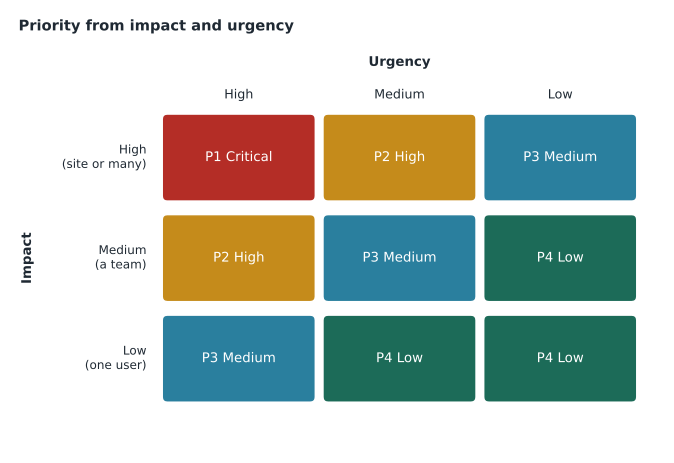
Not every ticket can be worked first. Help desks set priority from two factors. Impact is how much of the business is affected: one user, a team, a whole site or every client. Urgency is how quickly the effect becomes serious: a broken printer that can wait until tomorrow, or a point-of-sale system down on a Saturday morning. A priority matrix combines the two into a priority level, and each level has a target response time and a target resolution time agreed in the service level agreement, or SLA, with the client.
| Priority | Example | First response target | Resolution target |
|---|---|---|---|
| P1 Critical | All bakery point-of-sale terminals down | 15 minutes | 4 hours |
| P2 High | Clinic practice management app down at one location | 30 minutes | 8 business hours |
| P3 Medium | One lawyer cannot print | 2 business hours | 2 business days |
| P4 Low | Request for a second monitor | 1 business day | 5 business days |
Metrics a help desk watches
Help desks measure their work to see where they are doing well and where they are struggling. Common measures include first response time, the time to resolve tickets, the share of tickets resolved on first contact without escalation, the number of tickets breaching their SLA, the backlog of open tickets, reopen rates and user satisfaction scores. Brightline reviews these every month with each client. Measures should guide improvement, not become goals in themselves: a technician who closes tickets too quickly to improve resolution time, only for them to be reopened, has made the numbers worse in the end.
Trends matter more than single numbers. A rising count of Wi-Fi tickets at the community center told Marisol that the access points were struggling long before anyone called it an outage. A drop in password reset calls after self-service was introduced showed that the change was working. Looking at ticket categories over time is one of the best ways to find problems worth solving.
Writing for the user
Ticket updates that the user sees should be written differently from internal technical notes. Users want to know, in plain words, what is happening, what they need to do, and when they will hear next. Brightline Desk lets technicians mark notes as internal or public, and Jordan learns to write both: a public update saying "We've found the cause and are fixing it now; you'll hear from us by 2 p.m.", and an internal note with the technical detail. Mixing the two, such as sending a user a block of command output, confuses users and occasionally exposes information they should not see.
Worked problem
Setting priority
At 9:05 on a Saturday, the Kettle & Crumb shop on Main Street reports that both point-of-sale terminals show a payment network error and the shop has a queue of customers. The other two shops are fine. Using the matrix, what priority should the ticket get?
Show solution
- Impact: one site, but every terminal at that site, and the business cannot take card payments there.
- Urgency: high, because the shop is open and losing sales every minute.
- High urgency with site-wide impact on a critical function sits at the top of the matrix.
- Brightline's SLA treats an entire site's sales system as critical.
Answer: P1 Critical. Respond within 15 minutes and work toward restoring payments, even with a workaround such as a backup cellular connection.
What a good ticket contains
A good ticket is written so that someone who has never met the user or seen the problem can understand it. It records the user's name and contact details, the device and location, and a clear description of the problem in the user's words and in technical terms. It records when the problem started, what changed recently, what the user has already tried, and any error messages exactly as shown, ideally with a screenshot. As work proceeds, the technician adds dated notes of each test and its result, each change made, and every conversation with the user. When the ticket closes, the resolution note explains what the cause was and what fixed it.
Marisol has a test for every note: could Dev, reading it at 2 a.m. with no other information, carry on from where you stopped? Notes like "fixed" or "done" fail the test. Notes like "Printer at 192.168.60.40 had lost its DHCP reservation after the router was reset on Nov 4. Re-added reservation for MAC 00-1B-A9-44-12-7E, printed a test label, confirmed with Alisha at reception" pass it.
| Weak note | Strong note |
|---|---|
| Printer fixed. | Re-added DHCP reservation for the label printer (MAC 00-1B-A9-44-12-7E) after the router reset; test label printed; confirmed with Alisha. |
| User says internet broken. | User reports no websites load since 8:10. ipconfig shows 192.168.20.47, gateway pings, 9.9.9.9 pings, name lookups fail. DNS issue suspected. |
| Called user, no answer. | Called 402-555-0142 at 10:20, no answer; left voicemail with ticket number; will try again at 13:00. |
Statuses and the ticket lifecycle
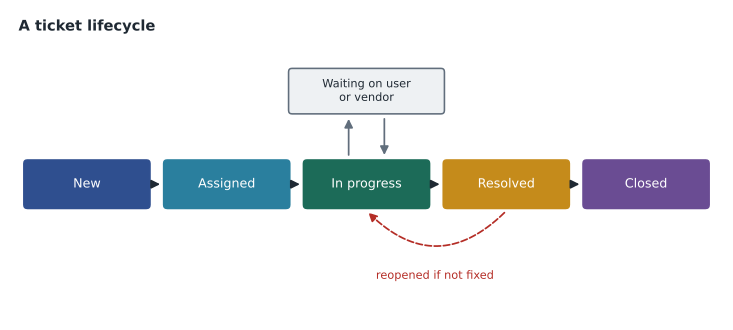
Tickets move through statuses as work proceeds. A typical lifecycle is new, assigned, in progress, waiting on user or third party, resolved and closed. Waiting statuses usually pause the SLA clock, because the delay is outside the help desk's control, but they must be used honestly; parking a ticket as waiting on user without actually asking the user anything is a quiet way of breaking a promise. Resolved means the technician believes the problem is fixed; closed means the user has confirmed or the confirmation period has passed. A ticket that is reopened because the fix did not work is a useful signal that something was missed.
Knowledge base articles
When a problem is likely to recur, its solution belongs in the knowledge base as well as the ticket. A knowledge base article is a short, searchable explanation of a symptom, its cause and its fix, written for other technicians or, in a simpler version, for users. Good articles have a clear title that matches how people describe the problem, the systems they apply to, step-by-step instructions, and the date they were last checked. Marisol's September note about the Prairie Paws label printer became an article titled "Prairie Paws label printer offline after router change", which is how Jordan found it in seconds.
Documenting systems
Beyond tickets, help desks keep documentation about each client's environment: network diagrams, IP address plans, a list of devices and their owners, software licenses, warranty dates, vendor contacts, and procedures for common tasks such as onboarding a new employee. This documentation must be kept current, because out-of-date documentation can be worse than none: a technician who trusts an old network diagram may unplug the wrong cable. Sensitive information such as administrator passwords belongs in a secured password vault, never in tickets or ordinary documents.
Managing the queue and your time
Cisco's own description of the exam lists managing work queues and time as a skill. Practically, that means working tickets in priority order while watching SLA clocks, updating users before they have to chase you, not letting low-priority tickets sit untouched until they breach their targets, and asking for help or escalating early when a ticket is going nowhere. Jordan keeps the queue sorted by time remaining on each SLA and checks it at the start of each hour. He also learns that it is better to tell a user honestly "I won't get to this until this afternoon" than to leave them guessing.
Common mistakes
MistakeWriting "fixed" as a resolution note.
InsteadRecord the cause, the fix and how it was confirmed.
MistakeTreating a recurring incident as unrelated each time.
InsteadLink the incidents and open a problem to find the root cause.
MistakePutting a ticket on hold without contacting the user.
InsteadUse waiting statuses honestly and record each contact.
MistakeStoring passwords in ticket notes.
InsteadKeep credentials in a secured password vault.
MistakeWorking tickets only in the order they arrived.
InsteadWork by priority and SLA, and keep every user informed.
Summary and key terms
- Tickets record who needs what, how urgent it is, what was done and how it ended.
- Incidents restore service, requests deliver standard items, problems remove root causes, and changes are planned modifications.
- Priority comes from impact and urgency; SLAs set response and resolution targets for each priority.
- Good tickets let anyone carry on: exact symptoms, tests, results, changes and confirmations.
- Statuses track the lifecycle; waiting states pause SLA clocks and must be used honestly.
- Knowledge base articles capture fixes for recurring problems.
- Keep environment documentation current and credentials in a vault; manage the queue by priority and time.
- Ticket
- A record of one piece of support work.
- Incident
- An unplanned interruption or degradation of a service.
- Service request
- A request for a standard, planned item or action.
- Problem
- The underlying cause of one or more incidents.
- SLA
- Service level agreement setting response and resolution targets.
- Priority matrix
- A table combining impact and urgency into a priority.
- Knowledge base
- A searchable collection of articles about known problems and fixes.
Practice problems
Work each problem on paper first, then reveal the answer to check.
Is a new-hire account an incident or a service request?
Show answer
A service request.
What two factors set a ticket's priority?
Show answer
Impact and urgency.
What is the difference between resolved and closed?
Show answer
Resolved means the technician believes it is fixed; closed means it has been confirmed or the confirmation period has passed.
Why should recurring incidents lead to a problem record?
Show answer
So someone finds and removes the root cause.
Where should administrator passwords be stored?
Show answer
In a secured password vault, not in tickets.
What does Marisol's 2 a.m. test ask?
Show answer
Whether another technician could carry on from the note with no other information.
Lesson quiz · 5 questions
Score 60% or more to complete this lesson.
Create a free account to save your progress, take quizzes and earn a certificate.