
CSCO-102 · Lesson 5 of 12 · 21 min
Accounts, passwords and multi-factor authentication
▶ Video coming soon A video version of this lesson is on the way.
Password resets are the single most common request at Brightline. On Friday, October 30, Jordan handles eleven of them before lunch. The tenth is different. A caller says she is Dana Whitcombe, the office manager at Riverside Family Law, traveling for a conference, locked out, and needing her password reset and her multifactor authentication removed "right now" because she has a filing deadline. She knows the firm's address and the names of two partners. Jordan has the reset screen open when he remembers the verification procedure Marisol drilled into him in week three. He says he will call her back on the mobile number in Brightline's records. The number in the records reaches the real Dana Whitcombe, who is at her desk in the office and has not called anyone. Jordan's stomach drops, then steadies. He has just stopped an attack.
Accounts and authentication are the front door to everything a user does. Support technicians create and manage accounts, reset passwords, enroll users in multifactor authentication and unlock locked accounts, and they are also a favorite target for attackers who want someone else to open the door for them. This lesson covers how authentication works, what makes a good password policy, how multifactor authentication protects accounts, and how to handle account requests safely.
Identification, authentication and authorization
Three ideas sit behind every sign-in. Identification is the claim: "I am dwhitcombe." Authentication is the proof: a password, a code from an app, a fingerprint. Authorization is what the proven identity is allowed to do: read these files, approve these invoices, use this application. Support tickets touch all three. A user who cannot sign in has an authentication problem. A user who signs in but cannot open a folder has an authorization problem, which belongs to permissions, not passwords. Keeping the two apart saves time, because resetting the password of someone who simply lacks permission to a folder fixes nothing.
A fourth idea, accounting, records what identities did: sign-in logs, file access logs, audit trails. Together these four are sometimes called the AAA framework. Support technicians rely on sign-in logs constantly, for example to see whether a user's failed sign-ins came from their own laptop or from an unfamiliar country.
Authentication factors
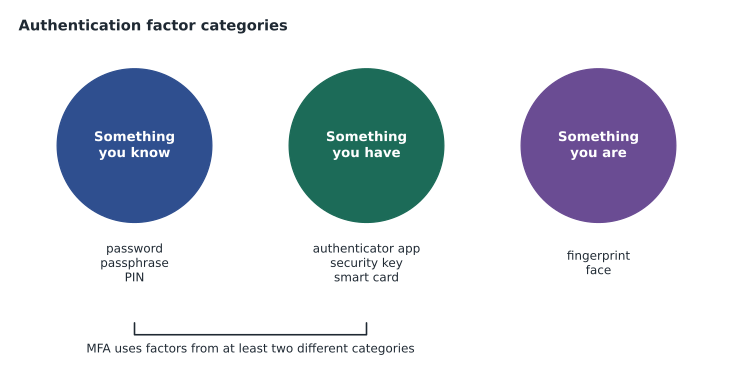
Authentication factors fall into three categories. Something you know is a password, passphrase or PIN. Something you have is a phone with an authenticator app, a hardware security key or a smart card. Something you are is a biometric such as a fingerprint or face. Some systems also use context, such as the device being used or the location, as supporting signals. Multifactor authentication, or MFA, requires factors from at least two different categories. A password plus a security question is not MFA, because both are things you know.
Passwords that work
Modern password guidance, including the United States National Institute of Standards and Technology's digital identity guidelines that many organizations in both countries follow, has moved away from the old rules of short, complex passwords changed every ninety days. Length matters more than complexity: a long passphrase of several unrelated words is both easier to remember and harder to crack than a short jumble of symbols. Users should not be forced to change passwords on a schedule unless there is evidence of compromise, because forced changes lead to predictable patterns such as adding a number to the end. New passwords should be checked against lists of passwords known to be breached or commonly used.
The biggest real-world danger is reuse. When one website is breached, attackers try the same email and password on banks, email providers and work accounts, an attack called credential stuffing. A password manager lets each user have a unique, long password for every site while remembering only one strong master passphrase. Brightline recommends a business password manager to every client, and Riverside Family Law adopted one last year.
| Older practice | Current guidance |
|---|---|
| Short passwords with forced symbols and numbers | Long passphrases; length over complexity |
| Change every 60 or 90 days | Change only when there is evidence of compromise |
| Security questions for recovery | Avoid knowledge-based questions; use stronger recovery methods |
| Allow any password that meets the rules | Block known breached and common passwords |
| Write passwords down or reuse them | Use a password manager with unique passwords |
Multifactor authentication in practice
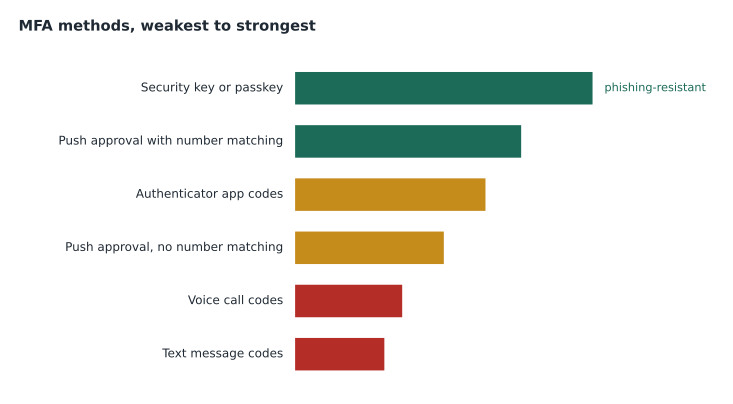
MFA stops most account takeovers, because a stolen password alone is not enough. The common methods differ in strength. Codes sent by text message are better than nothing but can be intercepted or redirected by an attacker who takes over the victim's phone number, an attack called SIM swapping. Authenticator apps that generate time-based codes are stronger. Push notifications that ask the user to approve a sign-in are convenient, but attackers have learned to send dozens of prompts until a tired user taps approve, an attack called MFA fatigue; number matching, where the user must type a number shown on the sign-in screen, defeats most of these attempts. Hardware security keys and passkeys based on the FIDO2 standard are the strongest common methods, because they resist phishing: they will only respond to the real website they were registered with.
Enrolling users in MFA is a frequent support task, and so is helping users who have lost or replaced their phone. The second case is where attackers strike, as Jordan's caller tried to. Removing or resetting a user's MFA should require the same careful identity verification as a password reset, or more.
Verifying the caller
Every help desk needs a written procedure for verifying identity before resetting passwords, unlocking accounts or changing MFA. Brightline's procedure, agreed with each client, has three parts. First, the technician confirms the request through a channel the attacker does not control: a callback to the number on file, a message through the client's own chat system, or an approval from the user's manager. Second, the technician never relies on information that an attacker could find, such as the office address, a job title or the names of colleagues, all of which are on the firm's website. Third, urgency is treated as a reason to slow down, not to skip steps. The caller pretending to be Dana Whitcombe used all three of the classic pressure tactics: authority, urgency and plausible detail.
After the call, Jordan follows the procedure for suspected social engineering: he records the caller's number and every detail of the request in the ticket, flags the ticket for Keisha Moreau, Brightline's security analyst, and tells the real Dana what happened. Keisha checks the firm's sign-in logs and finds a run of failed sign-ins on Dana's account overnight from an overseas address, which confirms an attack was under way. The attacker had her password from a breach of an unrelated website, but MFA had stopped them, so they tried to talk the help desk into removing it.
Account lockouts
Most systems lock an account after a number of failed sign-ins, to slow down password guessing. A lockout ticket is easy to fix by unlocking the account, but the support technician should ask why it happened. The usual innocent causes are a recently changed password still saved on a phone, a mapped drive or an old laptop, which keeps trying the old password in the background. The less innocent cause is someone else trying to guess the password. Sign-in logs show where the failed attempts came from. A user who is locked out repeatedly from devices they do not own needs a security review, not another unlock.
The account lifecycle
Accounts have a lifecycle: creation when someone joins, changes when they move roles, and removal when they leave. Support technicians often carry out these steps on request from a manager or human resources. Good practice is to create accounts with only the access the person needs, known as least privilege, to remove access from old roles when people move, and to disable accounts promptly when people leave. Former employees' accounts that stay active are one of the most common ways organizations are breached. Brightline's onboarding and offboarding checklists for each client list every system where an account must be created or removed, including cloud services that are easy to forget.
Shared accounts, where several people use one username and password, should be avoided because no one can tell who did what, and the password cannot be changed when one person leaves without disrupting everyone. The Kettle & Crumb point-of-sale terminals once used one shared manager account; Marisol replaced it with individual manager PINs during the summer.
Self-service password reset
Because password resets are so common, many organizations let users reset their own passwords through a self-service portal, after proving their identity with an MFA method they registered earlier. Self-service reduces help desk calls and is often more secure than a phone reset, because the user proves possession of a registered device rather than knowledge of public facts. Support technicians help users register their methods before they need them, ideally on their first day, so that a forgotten password on a weekend does not require anyone to pick up a phone.
Self-service has its own risks. If the only registered method is a phone number for text codes, a SIM swap can let an attacker reset the password. If recovery questions are allowed, an attacker may find the answers on social media. Organizations should require strong registered methods for self-service and alert users by email or app notification whenever their password is changed, so that an unauthorized change is noticed quickly.
Single sign-on
Many organizations use single sign-on, where users sign in once to an identity provider and are then trusted by many applications. Single sign-on reduces the number of passwords people must remember and lets the organization apply MFA and conditional access in one place. It also concentrates risk: one compromised account opens every connected application, which is why the identity provider account deserves the strongest protection. For support staff, single sign-on changes troubleshooting, because a sign-in failure in one app may really be a problem with the user's identity provider session, an expired password or a conditional access policy.
Service accounts deserve a word too. These are accounts used by software rather than people, such as the account a backup program uses to reach the file server. They often have broad access and passwords that never change, which makes them attractive to attackers. Support technicians should never use a service account to sign in for their own work, should record where each one is used, and should report any service account that shows interactive sign-ins, because that is a sign someone is misusing it.
Worked problem
Choosing a response
At 4:40 on a Friday, a caller says she is a new receptionist at Prairie Paws, starting Monday, and asks Jordan to create her account now so she can set up her email at home over the weekend. She gives the clinic manager's name. What should Jordan do?
Show solution
- Account creation must come from an authorized person, normally the clinic manager, through the agreed channel.
- The caller's knowledge of the manager's name is public information and proves nothing.
- Creating an account early and sending credentials to an unverified person would hand an attacker a working account.
- Jordan should thank the caller, explain that accounts are created when the manager submits the request, and contact the manager through the number on file to confirm.
Answer: Do not create the account on the caller's word. Confirm with the clinic manager through a known channel and follow the onboarding checklist.
Common mistakes
MistakeResetting a password because the caller knows public details.
InsteadVerify through a channel the attacker does not control, such as a callback to the number on file.
MistakeCalling a password plus a security question MFA.
InsteadMFA needs factors from different categories.
MistakeForcing everyone to change passwords every 90 days.
InsteadPrefer long passphrases, block breached passwords and change on evidence of compromise.
MistakeUnlocking a repeatedly locked account without asking why.
InsteadCheck for saved old passwords and for signs of guessing in the logs.
MistakeLeaving accounts active after people leave.
InsteadDisable them promptly using an offboarding checklist.
Summary and key terms
- Identification claims an identity, authentication proves it and authorization decides what it may do.
- Factors are something you know, have or are; MFA combines different categories.
- Long passphrases, breach checks and password managers beat short complex passwords and forced changes.
- Hardware keys and passkeys resist phishing best; text codes are weakest; number matching defeats MFA fatigue.
- Verify identity through a trusted channel before resetting passwords or MFA, especially under pressure.
- Ask why an account locked out before unlocking it again and again.
- Manage the account lifecycle with least privilege and prompt offboarding; avoid shared accounts.
- Authentication
- Proving a claimed identity.
- Authorization
- Deciding what an authenticated identity may do.
- MFA
- Multifactor authentication, using factors from two or more categories.
- Credential stuffing
- Trying stolen username and password pairs on many sites.
- MFA fatigue
- Flooding a user with sign-in prompts until one is approved.
- Passkey
- A phishing-resistant credential based on the FIDO2 standard.
- Least privilege
- Giving each account only the access it needs.
Practice problems
Work each problem on paper first, then reveal the answer to check.
Is a password plus a PIN multifactor authentication?
Show answer
No; both are something you know.
Why is reuse the biggest password danger?
Show answer
A breach of one site lets attackers try the same password everywhere.
What attack does number matching help defeat?
Show answer
MFA fatigue.
Which MFA methods resist phishing best?
Show answer
Hardware security keys and passkeys.
A caller knows the office address and partners' names. Is that enough to verify them?
Show answer
No; that information is public.
What is a common innocent cause of repeated lockouts?
Show answer
An old password saved on another device or mapped drive.
Lesson quiz · 5 questions
Score 60% or more to complete this lesson.
Create a free account to save your progress, take quizzes and earn a certificate.