
CRE-230 · Lesson 12 of 12 · 25 min
Brand kits, tools, licensing and capstone
A creator's visual identity lives in hundreds of graphics made over months and years, often by several people. Keeping it consistent requires a brand kit: a documented collection of the assets and rules that define the look. Producing graphics efficiently requires the right tools and workflow. And publishing graphics responsibly requires understanding the licenses that govern fonts, images, music and templates, and the rules for sponsored content. This final lesson covers brand kits, choosing and setting up tools, workflow from brief to export, file formats, licensing for fonts and assets, copyright and the use of others' work, sponsored and branded graphics, feedback and critique, and the course capstone.
What a brand kit contains
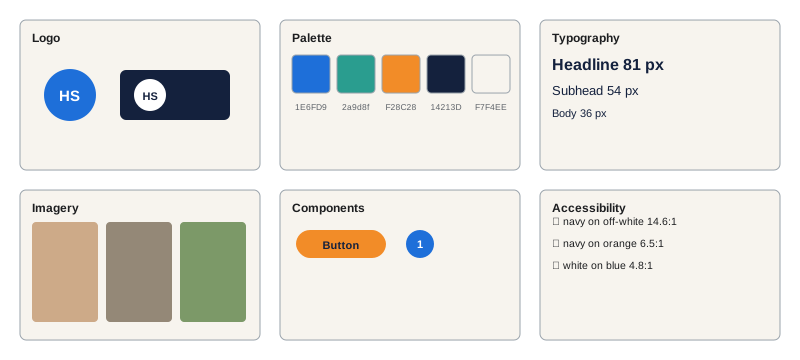
A brand kit, sometimes called a brand style guide, gathers everything needed to produce on-brand graphics:
- Brand summary: a few sentences on the brand's purpose, audience and personality (from CRE-110), which guide visual decisions.
- Logos: primary logo, logo mark or icon, wordmark, light and dark versions, minimum sizes, clear space and incorrect uses.
- Color palette: primary, accent and neutral colors with hex and RGB values, usage proportions and approved text-and-background combinations that meet contrast standards.
- Typography: typefaces, weights, the type scale, line heights and examples for headlines, body text and captions.
- Imagery: photo style, editing presets, cut-out treatments, illustration style, icon set and examples.
- Layout and components: grids, margins, spacing scale and key components.
- Templates: links to templates for each platform and format.
- Motion: animation styles, durations, transitions and logo stings.
- Voice reminders: short notes on tone for on-graphic text, linking to the writing style guide (CRE-120).
- Accessibility rules: contrast pairs, minimum sizes, alt text and caption requirements.
A brand kit can be a simple shared document, a page in a design tool, or a short PDF. Many design tools store brand colors, fonts and logos in a brand kit feature so they are available in every new design.
Choosing and setting up tools
Choose tools by the work you do, your budget, your collaborators and the formats you need. Template-based tools such as Canva and Adobe Express are fast and collaborative, with brand kit features, resizing and large template libraries, and suit most solo creators and small teams. Professional tools such as Figma, Adobe Illustrator, Photoshop and InDesign, and Affinity's apps offer precise control, vector editing, advanced typography and component systems, and suit designers and larger teams. Motion and video tools such as CapCut, Premiere Pro, After Effects and DaVinci Resolve handle animation (Lesson 10). Whatever the tools, set them up once: install brand fonts, save color swatches and text styles, create templates with guides, organize asset libraries and agree on file locations with collaborators.
A production workflow
A repeatable workflow keeps graphic production smooth:
- Brief: purpose, platform, format, primary job and deadline (Lesson 1).
- Copy: write and check the words, including spelling and accuracy.
- Assets: gather photos, icons and data, checking licenses.
- Design: start from the right template; adapt; check hierarchy and contrast.
- Review: view at actual size on a phone, in light and dark mode; run the accessibility checklist; get feedback if possible.
- Export: correct dimensions, format and naming.
- Publish: add caption, alt text, disclosure labels and tags.
- Archive: save the editable file and export together, with notes.
Worked problem
Estimating a weekly design budget
A creator publishes 4 carousels (8 slides each), 6 single graphics and 3 thumbnails per week. With templates, a carousel takes 40 minutes, a single graphic 15 minutes and a thumbnail 30 minutes, plus 10 % for reviews and fixes. How many hours a week does design take?
Show solution
- Carousels: 4 × 40 = 160 minutes.
- Single graphics: 6 × 15 = 90 minutes.
- Thumbnails: 3 × 30 = 90 minutes.
- Subtotal: 340 minutes; plus 10 % = 374 minutes, about 6.2 hours.
Answer: About 6 hours a week, useful for planning time or budgeting for a designer.
File formats
Choose export formats according to content and destination:
| Format | Best for | Notes |
|---|---|---|
| PNG | Graphics with text, flat color, transparency | Lossless; larger files for photos |
| JPEG | Photographic graphics | Lossy; use high quality to limit artifacts |
| SVG | Logos, icons, illustrations | Vector; scales without loss; not accepted by most social uploads |
| Documents, LinkedIn carousels, print | Embed fonts | |
| MP4 | Animated posts and video | H.264 widely supported |
| GIF | Simple animations in email and messaging | Limited colors, large files |
Keep editable source files, such as Figma, Canva, PSD or AI files, as well as exports, so that graphics can be updated, translated or resized later.
Licensing fonts and assets
Fonts are software, distributed under licenses that define how they may be used. Free fonts from libraries such as Google Fonts are typically licensed under the SIL Open Font License, which allows commercial use, embedding and modification with few restrictions. Fonts bundled with operating systems or design tools may be licensed only for use within those products or for certain purposes. Commercial fonts are licensed by use: desktop use for creating graphics, web use for embedding on sites, app use, and sometimes separate licenses for logos, broadcast or merchandise. Using a font for a logo or for products for sale may require a specific license. Similarly, templates, icons, illustrations, mockups, stock photos and music all come with license terms covering commercial use, attribution, number of users, resale and modification. Keep records of licenses and their terms, especially for brand assets such as logo fonts.
Copyright and others' work
Copyright protects original creative works, including photographs, illustrations, designs, text and music, from the moment they are created. Using others' work in graphics generally requires permission, a license or a legal exception.
In the United States, the doctrine of fair use allows limited use of copyrighted works based on four factors: the purpose and character of the use, including whether it is commercial or transformative; the nature of the work; the amount used; and the effect on the market for the original. The Supreme Court's 2023 decision in Andy Warhol Foundation v. Goldsmith emphasized that commercial uses serving substantially the same purpose as the original weigh against fair use, even when stylistically altered. Copyright generally lasts for the life of the author plus 70 years. Using a photographer's image as a background for a sponsored post is unlikely to be fair use.
Typeface designs themselves receive limited protection in many places, but font files, logos, illustrations and photographs are protected, and trademarks such as brand logos and names cannot be used in ways that suggest endorsement or confuse consumers. When in doubt, create your own assets, license them properly or ask permission. CRE-320 covers creator law in more depth.
Sponsored and branded graphics
Graphics created for brand partnerships must follow advertising rules and the brand's guidelines. Sponsored content must be clearly disclosed using platform paid-partnership tools and clear wording such as "ad" or "paid partnership" visible without clicking (CRE-320 covers the disclosure rules in Canada and the United States). Brands usually supply logo files, color codes, approved claims and imagery; combine them respectfully with your own style, agreeing in advance on how much of each appears. Keep product representations accurate: retouching that changes how a product looks or performs can mislead (PHOT-202). Confirm usage rights in the contract: whether the brand may reuse your graphics in its own advertising, for how long and on which channels, and whether that costs more.
Feedback and critique
Design improves through feedback. Useful practices include reviewing your own graphics against a checklist a day after making them; comparing performance data, such as saves, shares and click-through rates, across designs (CRE-202); asking trusted peers or community members for specific feedback, for example "what did you notice first?" and "what would you change?"; joining design communities; and studying graphics you admire, analyzing their hierarchy, typography, color and layout. Separate taste from function: a graphic you dislike aesthetically may still communicate well, and a beautiful one may fail its job.
Capstone: a visual identity and content set
The capstone asks you to create a complete visual system for a real or fictional creator brand, and a set of graphics using it. Your submission should include:
- A one-page brand summary and a brand kit with logo or wordmark, palette with contrast-checked pairs, type scale, imagery and icon style, spacing and grids.
- Templates for at least four formats: feed post, carousel (cover, inner and closing slides), thumbnail or cover, and story.
- A content set: one eight-slide carousel, two feed graphics, two thumbnails or covers and three stories, all produced from the templates, with alt text and captions.
- One simple motion graphic, such as an animated post, title card or lower third, under ten seconds.
- An accessibility review showing contrast checks, color vision simulation and a screen reader test.
- A license log listing every font, image, icon and template used and its license terms.
- A short reflection of about 500 words explaining your design decisions and what you would test next.
Present the system and content set as you would to a client or collaborator, showing graphics at actual size in mock feeds.
Logos for creators
Not every creator needs a logo; many personal brands rely on the creator's face, name and consistent style. When a logo is useful, for example for a channel, a podcast, a product line or merchandise, simple is better: a wordmark in a distinctive typeface, a monogram, or a simple symbol that works at tiny sizes such as a profile picture or watermark. Test logos at 32 pixels, in one color, on light and dark backgrounds. Commissioning a professional designer gives the best results for important brands; agree in writing that you own the copyright or have an exclusive license, and receive vector files. Check that the name and logo do not conflict with existing trademarks in your field; registering a trademark may be worthwhile as the brand grows (CRE-110).
Working with designers and agencies
As creators grow, they often hire designers for templates, brand kits, thumbnails or launches. A good design brief describes the brand, audience, goals, deliverables, formats, timelines, budget and examples of likes and dislikes. Agree on the number of concepts and revision rounds, file formats, ownership and licensing of the final work, and credit. Provide your brand kit and templates. Give feedback that explains problems and goals ("the headline is hard to read at phone size") rather than prescribing solutions ("make it red"), which lets designers apply their expertise.
AI tools in the design workflow
Design tools increasingly include AI features: background removal, generative fill, text-to-image generation, automatic resizing, layout suggestions and copy generation. They can save time on repetitive tasks, but outputs need checking for errors, artifacts, inaccurate text and style inconsistency, and their use may be restricted by platform rules, client contracts or competition policies. Generated images of real people or realistic events can mislead and may require labels. Keep human judgment at the center: AI can draft, but the designer decides what communicates clearly, honestly and on brand.
Protecting your own work
Creators' graphics are also copyrighted works, and others may copy them. Keep source files and dated exports as evidence of creation, include your handle or a subtle watermark where appropriate, and use platform reporting tools for copyright infringement when content is reposted without permission. Reverse image search can help find copies.
Reviewing your system yearly
Once a year, review the whole visual identity: does it still fit the brand, the audience and the platforms you use? Collect a year of graphics, view them together, and decide what to keep, refine or retire. Plan any changes as a coordinated refresh rather than gradual drift.
Common mistakes
MistakeNo documented brand rules.
InsteadCreate a brand kit and share it.
MistakeUsing fonts without checking licenses.
InsteadConfirm licenses, especially for logos and products.
MistakeAssuming others' images are fair to use.
InsteadLicense, ask permission or create your own.
MistakeHiding sponsorship disclosures.
InsteadUse clear, visible disclosure and platform tools.
MistakeKeeping only flattened exports.
InsteadKeep editable source files and exports together.
Summary and key terms
- A brand kit documents logos, colors, type, imagery, layout, templates, motion and accessibility rules.
- Choose tools by work, budget and collaborators, and set them up once.
- Follow a workflow from brief to archive.
- Export in formats suited to content and keep source files.
- Fonts, templates and assets carry licenses with specific terms.
- Use others' work with permission, licenses or legal exceptions.
- Disclose sponsorship clearly; seek feedback; the capstone builds a full visual system.
- Brand kit
- Collection of brand assets and rules.
- Clear space
- Required space around a logo.
- Wordmark
- Logo made of the brand name in type.
- SIL Open Font License
- Permissive license for many free fonts.
- Desktop font license
- License to use a font to create graphics.
- Fair dealing
- Canadian copyright exception for specified purposes.
- Fair use
- US copyright doctrine based on four factors.
- Trademark
- Protected brand name, logo or sign.
- Usage rights
- Agreed permissions to reuse content.
- License log
- Record of assets and their license terms.
Practice problems
Work each problem on paper first, then reveal the answer to check.
List five parts of a brand kit.
Show answer
Logos, palette, typography, imagery, templates, motion, accessibility.
What should logo guidelines include?
Show answer
Versions, minimum size, clear space, incorrect uses.
Name a template-based design tool.
Show answer
Canva or Adobe Express.
List the workflow stages.
Show answer
Brief, copy, assets, design, review, export, publish, archive.
Weekly time for 5 graphics at 20 min and 2 thumbnails at 30 min, plus 10 %?
Show answer
(100 + 60) × 1.1 = 176 min.
Which format suits graphics with text?
Show answer
PNG.
What license do many Google Fonts use?
Show answer
SIL Open Font License.
Why might a logo need a special font license?
Show answer
Some licenses restrict logo or product use.
How long does copyright generally last in Canada and the US?
Show answer
Life of the author plus 70 years.
What should brand contracts specify about graphics?
Show answer
Usage rights, duration, channels and cost.
Lesson quiz · 5 questions
Score 60% or more to complete this lesson.
Create a free account to save your progress, take quizzes and earn a certificate.