
CRE-120 · Lesson 7 of 12 · 25 min
Writing newsletters and email
An email list is one of the few audiences a creator truly owns. Social platforms can change their algorithms, restrict reach or suspend accounts overnight, but a list of subscribers who chose to hear from you goes wherever you go. Newsletters also build deeper relationships than feeds, because people read them deliberately, often in a quieter moment, and many creators earn significant income from newsletter sponsorships, paid subscriptions and product launches. This lesson covers newsletter formats, subject lines and preview text, structuring and writing the body, voice and consistency, calls to action, welcome sequences, metrics, and the anti-spam laws that govern commercial email.
Newsletter formats
Newsletters come in several common formats:
- The essay: one substantial piece of writing on a topic, often personal and opinionated.
- The curated digest: a selection of links, tools, news or resources with short commentary, valuable for busy readers in a niche.
- The how-to: a tutorial or practical lesson each issue.
- The update: news from the creator, behind-the-scenes, new content and launches.
- The hybrid: a short essay or main story plus a few curated items and a personal note.
Choosing a consistent format helps readers know what to expect and makes the newsletter easier to produce. Frequency, whether weekly, biweekly or monthly, should be sustainable; a reliable monthly newsletter builds more trust than an irregular weekly one.
Subject lines and preview text
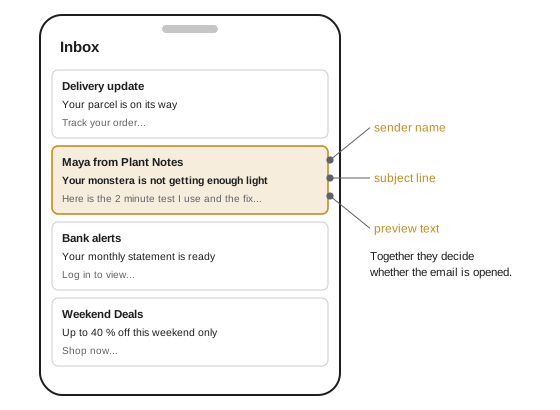
In a crowded inbox, the sender name, subject line and preview text (the snippet shown after the subject) decide whether an email is opened, ignored or deleted. Effective subject lines are specific, relevant and honest, and they usually keep the key words within the first 40 to 50 characters, since many phones truncate longer lines. Approaches include stating the benefit ("A 10-minute plan for your first 5 km"), creating curiosity ("The mistake I see in every beginner's portfolio"), personal tone ("I almost quit last week"), numbers and lists, and timely news. The preview text should extend the subject line rather than repeat it, and should be set deliberately; otherwise email clients show whatever text comes first, often "View this email in your browser". Sender name matters too: a recognizable person's name often earns more trust than a brand name alone.
Structuring the body
Readers skim emails as they skim web pages. A clear structure helps:
- A short opening that delivers on the subject line quickly, often with a personal touch.
- The main content, broken into short paragraphs, with subheadings for longer issues.
- Lists and bold key phrases (email supports formatting, unlike most social captions) used sparingly.
- Images only where they add value, with alt text, since many email clients block images by default and screen readers need descriptions.
- One primary call to action, clearly visible, plus secondary links if needed.
- A sign-off in the creator's voice, and a footer with the required sender information and unsubscribe link.
Plain, personal-looking emails often perform as well as or better than heavily designed templates for creator newsletters, because they feel like a letter from a person. They also display reliably across email clients and dark mode settings. Whatever the design, test emails on phones, since most email is opened on mobile.
Voice and relationship
Newsletters reward a personal, consistent voice. Writing to one imagined reader rather than to a crowd ("you" rather than "all of you") makes the email feel personal. Sharing honest experiences, opinions and behind-the-scenes details builds connection, and inviting replies ("Hit reply and tell me what you are working on") creates two-way conversation; replies also signal to email providers that messages are wanted, which helps deliverability. Consistency of voice, format and schedule builds a habit in readers, who come to look forward to the newsletter.
Calls to action and links
Each issue should have a clear purpose: read the new article, watch the latest video, reply with an answer, join a waitlist, buy a product, or simply enjoy and learn. A single primary CTA, presented as a clear link or button with action-oriented text ("Get the free checklist" rather than "Click here"), outperforms a crowd of competing links. Descriptive link text is also an accessibility requirement, because screen reader users often navigate by links and "click here" tells them nothing. Track which links readers click to learn what interests them.
Welcome sequences and automation
The welcome email, sent automatically when someone subscribes, is usually the most opened email a creator sends, because the subscriber has just shown interest. A good welcome email thanks the subscriber, delivers anything promised (such as a free guide), sets expectations about what they will receive and how often, introduces the creator briefly, and invites a reply or a first action. Many creators send a short welcome sequence of three to five emails over the first week or two, introducing their best content and story, before subscribers join the regular schedule. Automations can also segment subscribers by interest, so they receive content most relevant to them.
Metrics
Email platforms report several metrics:
- Open rate: the share of delivered emails opened. Privacy features such as Apple Mail Privacy Protection preload emails and inflate open rates, so open rates have become less reliable than they once were.
- Click-through rate (CTR): clicks divided by delivered emails; click-to-open rate (CTOR): clicks divided by opens, a measure of how compelling the content was to those who opened.
- Unsubscribe rate and spam complaint rate: signals of fatigue or mismatched expectations; complaint rates above about 0.1 % to 0.3 % can harm deliverability with major mailbox providers.
- List growth and churn: new subscribers minus unsubscribes over time.
- Revenue per subscriber for paid newsletters and product launches.
Worked problem
Reading newsletter metrics
A newsletter is delivered to 8,000 subscribers. It records 3,600 unique opens, 432 unique clicks and 24 unsubscribes. Compute open rate, CTR, CTOR and unsubscribe rate, and interpret them.
Show solution
- Open rate: 3,600 / 8,000 = 45 % (likely inflated by privacy features).
- CTR: 432 / 8,000 = 5.4 %.
- CTOR: 432 / 3,600 = 12 %.
- Unsubscribe rate: 24 / 8,000 = 0.3 %.
- These are healthy figures for a creator newsletter; compare with your own history rather than broad averages, and watch trends in CTR and unsubscribes after changes.
Answer: Open rate 45 %, CTR 5.4 %, CTOR 12 %, unsubscribe rate 0.3 %: a healthy issue.
Anti-spam laws and consent
Commercial email is regulated, and newsletters that promote products, sponsorships or services count as commercial messages. Creators must collect subscribers with appropriate consent, identify themselves clearly, include a working unsubscribe mechanism and honor unsubscribe requests promptly. Buying email lists is both ineffective and, in many places, illegal.
In the United States, the CAN-SPAM Act does not require prior consent for commercial email but requires accurate header information and subject lines, identification of the message as an advertisement where applicable, a valid physical postal address, and a clear way to opt out, with opt-outs honored within 10 business days. State laws and the policies of email providers, which expect permission-based lists, add further requirements, and many creators follow consent-based practices regardless.
Beyond the law, email providers such as Gmail and Yahoo now require bulk senders to authenticate their domains (SPF, DKIM and DMARC), offer one-click unsubscribe, and keep spam complaints low. Using a reputable email service provider handles most of these technical requirements.
Why creators build email lists
Social platforms control who sees posts, and reach can change overnight when algorithms change, accounts are restricted or platforms decline. An email list is an audience the creator can contact directly, which is why many creators treat it as their most valuable asset. Email subscribers have actively opted in, so they are often more engaged and more likely to buy products, support crowdfunding or attend events than followers. Email also allows longer, more personal writing than most social formats. Growing a list usually involves a clear offer: a regular newsletter with a defined promise, or a lead magnet, such as a checklist, template, guide or mini-course, given in exchange for signing up.
Newsletter formats
Newsletters come in several common formats. A personal essay newsletter shares stories and reflections in the creator's voice. A curated newsletter collects and comments on links, tools or news in a niche. A tutorial newsletter teaches one skill or answers one question per issue. A hybrid combines a short essay or tip with curated links and updates. A digest newsletter summarizes the creator's own recent content. Each format suits different creators and audiences, and consistency matters more than format: readers come to expect a certain type of value on a certain schedule, and meeting that expectation builds trust and open rates over time.
Structure of a newsletter issue
A typical issue includes a subject line and preview text that work together as the hook; a greeting and opening line that draw the reader in; the main content, broken into short paragraphs with clear subheadings; one primary call to action, such as reading a full article, watching a video or buying a product; and a sign-off that reflects the creator's voice. Secondary links can follow, but the primary action should be obvious. Many newsletters use a consistent template so readers know where to find each section. Short, scannable issues suit most audiences, though some essay newsletters successfully publish long pieces for readers who value depth.
Welcome emails and sequences
The welcome email is often the most-opened email a creator sends, because new subscribers are most interested at the moment they sign up. It should deliver any promised lead magnet immediately, set expectations about what subscribers will receive and how often, introduce the creator briefly, and invite a small action, such as replying with a question, which can also improve deliverability. Many creators set up an automated welcome sequence of three to five emails sent over the first week or two, introducing their best content, telling their story and, eventually, presenting a product or offer. Sequences should still respect consent and provide easy unsubscribing.
Deliverability basics
Deliverability is whether emails reach the inbox rather than the spam folder or promotions tab. It depends on the sender's reputation, authentication of the sending domain using technical standards such as SPF, DKIM and DMARC, list quality and how recipients engage. Large mailbox providers, including Gmail and Yahoo, introduced stricter requirements for bulk senders in 2024, such as authentication, easy one-click unsubscribing and low spam complaint rates. Creators protect deliverability by using a reputable email service provider, never buying lists, removing inactive subscribers periodically, avoiding misleading subject lines, and making unsubscribing easy, which reduces spam complaints.
Reading email metrics carefully
Open rates have become less reliable since Apple's Mail Privacy Protection, introduced in 2021, began preloading images for many users, which can register opens that did not happen. As a result, creators increasingly rely on click rates, click-to-open rates, replies, conversions and unsubscribe rates to judge performance. Comparing issues over time, testing subject lines on a portion of the list before sending to everyone, and asking readers directly what they value all help improve a newsletter. Unsubscribes are normal and even healthy: they remove readers who are not interested, improving engagement among those who remain.
Subject line testing in practice
Many email service providers let creators test two subject lines on a small share of the list, for example 10 % each, and then send the better performer to the remaining 80 % automatically. Because open rates are less reliable than they once were, creators may choose clicks as the winning measure instead. Tests are most informative when the subject lines differ in one clear way, such as a question versus a statement, or a specific number versus a general promise, and when the list is large enough for differences to be meaningful rather than random. Recording results over many sends builds a picture of what a particular audience responds to.
Common mistakes
MistakeLeaving preview text to default.
InsteadWrite preview text that extends the subject line.
MistakeFilling emails with many competing links.
InsteadFocus on one primary call to action.
MistakeUsing "click here" as link text.
InsteadUse descriptive, action-oriented link text.
MistakeBuying email lists.
InsteadGrow a consent-based list.
MistakeRelying on open rates alone.
InsteadTrack clicks, replies, unsubscribes and complaints.
Summary and key terms
- Email lists are an audience creators own.
- Formats include essays, digests, how-tos, updates and hybrids.
- Sender name, subject line and preview text decide the open.
- Structure bodies for skimming, with one primary call to action.
- Personal voice and invitations to reply build relationships.
- Welcome sequences and segmentation automate relevance.
- Follow anti-spam law, consent and authentication requirements.
- Newsletter
- Regular email publication to subscribers.
- Subject line
- Email title shown in the inbox.
- Preview text
- Snippet shown after the subject line.
- Welcome sequence
- Automated emails after subscription.
- Segmentation
- Dividing subscribers by interests or behavior.
- Open rate
- Share of delivered emails opened.
- CTOR
- Click-to-open rate.
- Deliverability
- Ability of emails to reach inboxes.
- Unsubscribe link
- Required way to opt out of emails.
- DKIM
- Email authentication using digital signatures.
Practice problems
Work each problem on paper first, then reveal the answer to check.
Why is an email list valuable to creators?
Show answer
It is an audience they own, independent of platforms.
Name three newsletter formats.
Show answer
Essay, curated digest, how-to, update, hybrid.
How long should key words in subject lines be?
Show answer
Within about the first 40 to 50 characters.
What should preview text do?
Show answer
Extend the subject line, not repeat it.
Why do plain emails often work well?
Show answer
They feel personal and display reliably.
Why invite replies?
Show answer
They build relationships and help deliverability.
What does a welcome email include?
Show answer
Thanks, promised items, expectations, introduction, invitation.
CTOR with 300 clicks and 2,500 opens?
Show answer
12 %.
Why are open rates less reliable now?
Show answer
Privacy features preload emails.
What must every commercial email include?
Show answer
Sender identification and a working unsubscribe.
Lesson quiz · 5 questions
Score 60% or more to complete this lesson.
Create a free account to save your progress, take quizzes and earn a certificate.