
CRE-120 · Lesson 10 of 12 · 25 min
Writing for search and discovery
Much content is found through search rather than feeds. People type questions into YouTube, Google, TikTok, Pinterest and Instagram every day: how to fix a leaking tap, best budget camera, easy vegan dinner, what to do in Lisbon. Content that matches these searches can attract viewers for years, long after a feed post has faded. Recommendation systems also rely on text to understand what content is about and whom it suits. Writing for search, often called search engine optimization (SEO), means choosing the words people use, placing them where platforms look, and creating content that genuinely satisfies the search. This lesson covers how search and discovery use text, keyword research, writing titles, descriptions and captions for search, hashtags and tags, chapters and transcripts, and avoiding manipulative practices.
How platforms understand content
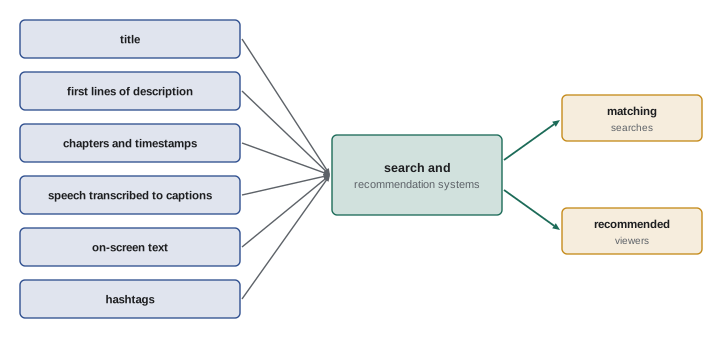
Platforms combine many signals to decide what content is about and whom to show it to: the words in titles, descriptions, captions, on-screen text and hashtags; speech in videos and podcasts, transcribed automatically; visual content recognized by image analysis; and the behavior of viewers who engage with it. Text remains one of the clearest signals, especially when content is new and has little engagement data. Clear, descriptive writing helps platforms match content to the right searches and recommendations, while vague or misleading text can send content to the wrong viewers, who leave quickly and teach the system that the content is not satisfying.
Search intent
Effective search writing starts with intent: why the person is searching. Common intents are informational (learning how or why), navigational (finding a specific creator or site), commercial investigation (comparing options before buying, such as "best budget microphone"), and transactional (ready to act or buy). Content succeeds when it matches intent: a person searching "how to repot a monstera" wants a clear tutorial, not a vlog about a trip to a plant shop. Before writing, look at what already ranks for the search: the format (video, list, guide), length, angle and questions covered reveal what searchers want, and point to gaps your content can fill.
Keyword research
Keywords are the words and phrases people search for. Research methods include:
- Autocomplete: typing the start of a query into YouTube, Google, TikTok or Pinterest search and noting the suggestions, which reflect common searches.
- "People also ask" and related searches on Google, which reveal related questions.
- Platform tools: YouTube Studio's research tab, Pinterest Trends, Google Trends and similar tools show search interest and trends.
- Audience language: comments, questions and forum posts show the exact words your audience uses, which may differ from industry terms ("how to stop my dog pulling on the leash" rather than "loose-leash training").
- Competitor analysis: titles and descriptions of successful content in the niche.
Long-tail keywords, longer and more specific phrases such as "beginner acrylic landscape tutorial" rather than "acrylic", have less search volume but less competition and clearer intent, so they are often better targets for new creators.
| Keyword | Type | Volume | Competition | Intent |
|---|---|---|---|---|
| acrylic | Head term | Very high | Very high | Unclear |
| acrylic for beginners | Mid-tail | High | High | Learning |
| easy acrylic landscape tutorial | Long-tail | Moderate | Moderate | Specific tutorial |
| how to paint clouds in acrylic | Long-tail question | Lower | Lower | Very specific how-to |
Writing titles and descriptions for search
For search-driven content, titles should include the main keyword naturally, ideally near the beginning, while still being compelling to humans (Lesson 2). "How to Paint Clouds in Acrylic (Easy Beginner Method)" contains the search phrase and a reason to click. Descriptions give platforms and viewers more context:
- On YouTube, the first one or two lines of the description appear in search results and above the "more" fold, so they should summarize the video with the main keyword. The rest can include a fuller summary, chapters, links and related keywords used naturally.
- On blogs and websites, the title tag and meta description shown in Google results should describe the page accurately and invite the click, typically within about 60 and 155 characters respectively before truncation.
- On podcasts, episode titles and descriptions should state the topic and guest clearly, since podcast apps search these fields.
- On Pinterest, pin titles and descriptions function like search snippets and should be descriptive and keyword-rich.
Writing should always read naturally; repeating keywords awkwardly ("acrylic clouds acrylic tutorial acrylic easy") looks spammy to people and to platforms.
Worked problem
Writing a search-friendly YouTube title and description
A creator made a 12-minute video showing how to fix a running toilet with three common causes. Write a title and the first two lines of the description.
Show solution
- Identify the search phrase: "how to fix a running toilet".
- Title: "How to Fix a Running Toilet: 3 Causes and Easy Fixes (No Plumber Needed)".
- Description line 1: "A running toilet can waste thousands of liters of water a month. In this video I show you how to fix a running toilet yourself by checking the flapper, the fill valve and the float."
- Description line 2: "Total cost: under $20 in parts. Chapters below so you can skip to your problem."
- Add chapters with timestamps for each cause.
Answer: Put the search phrase early in the title and first description line, with a clear benefit and chapters.
Captions, on-screen text and search on social platforms
Search is now central on TikTok, Instagram and Pinterest, especially for younger users, who often search social platforms for recommendations, how-tos and reviews. On these platforms, captions, on-screen text and spoken words are all indexed. Practices include stating the topic plainly in the caption ("Easy 15-minute chickpea curry for weeknights") rather than only a joke or emoji; saying the key phrase out loud early in the video, since speech is transcribed; including the keyword in on-screen text; and adding a few relevant hashtags. Writing for search does not mean abandoning personality: a playful hook can sit alongside a clear description of the topic.
Hashtags, tags and categories
Hashtags group content by topic and can aid discovery, although their influence varies by platform and has declined on several. Use a few relevant, specific hashtags rather than long lists of generic ones (Lesson 3). YouTube tags have limited influence today, mainly helping with misspellings, while the title, description and content matter far more. Choosing accurate categories, locations and topics in platform settings also helps classification. Avoid adding trending but irrelevant hashtags to ride on attention, which misleads viewers and can breach platform rules on spam.
Chapters, transcripts and accessibility
Video chapters, added by listing timestamps and titles in a YouTube description, help viewers navigate and can appear in search results as key moments. Transcripts and accurate captions make spoken content searchable by platforms and accessible to deaf and hard-of-hearing viewers (Lesson 11). Blog posts or show notes that accompany videos and podcasts provide indexable text and can rank in Google search, bringing additional viewers. Writing descriptive alt text for images on websites helps both accessibility and image search. In these cases, good accessibility and good search practice align.
Evergreen versus timely content
Search rewards evergreen content, which stays relevant for years, such as tutorials, explainers, reviews of long-lasting products and answers to common questions. Timely content, such as news, trends and reactions, can spike quickly in feeds but fades. A balanced strategy mixes both: evergreen pieces that steadily attract search traffic, and timely pieces that reach new audiences through feeds. Updating evergreen content periodically, refreshing outdated information, titles and thumbnails, keeps it performing.
Avoiding manipulation
Practices that try to trick search systems rather than serve searchers include keyword stuffing, misleading titles that match popular searches unrelated to the content, irrelevant trending hashtags, hidden text and fake engagement. Platforms detect and penalize these, and even when they work briefly, viewers who arrive under false pretences leave quickly, harming performance. The durable approach is simple: understand what people search for, create content that genuinely answers it, and describe it clearly and honestly.
Search on different platforms
Each platform's search works a little differently. YouTube is the world's second-largest search engine by many estimates, and its results draw heavily on titles, descriptions, captions and how satisfied viewers are with the video. Google search shows videos, short clips, images and web pages, and draws on page text, structure and links. TikTok and Instagram search have grown rapidly, especially for recommendations, recipes, travel and product reviews, and draw on captions, on-screen text, speech and hashtags. Pinterest functions as a visual search engine for ideas and planning, where pin titles, descriptions and board names matter. Podcast apps search episode titles, show descriptions and increasingly transcripts. Creators who understand where their audience searches can prioritize the text fields that matter on those platforms.
Building a keyword list
A practical keyword list starts with the main topics of a creator's content pillars. For each topic, the creator collects search phrases from autocomplete, related searches and audience questions, then groups them by intent and difficulty. A spreadsheet with columns for the phrase, platform, estimated interest, competition, intent and content idea turns the list into a content plan. Long-tail questions often become individual videos or posts, while broader terms become cornerstone pieces, such as complete guides, that link to the more specific ones. Revisiting the list every few months reveals new questions and trends.
Answering the question quickly
Search viewers arrive with a question, and content that answers it quickly tends to satisfy them. In videos, this means stating the answer or the promise early, rather than delaying with long introductions, then going into detail. In written content, it means giving a direct answer near the top, sometimes called the inverted pyramid, followed by explanation and examples. Answering quickly may seem to reduce watch time, but in practice it builds trust: viewers who get what they came for are more likely to keep watching, subscribe and return. Content that hides the answer to inflate watch time frustrates viewers and teaches platforms that it does not satisfy searches.
Titles for search and for browse
Some content is designed to be found through search, and some through browse features, such as home feeds and recommendations. Search titles name the topic plainly using the words people type, such as "How to Start a Vegetable Garden for Beginners". Browse titles lean on curiosity and emotion, such as "I Grew All My Own Vegetables for a Year". Both can work, and some titles combine them. Creators can decide which discovery route a piece is aiming for and write accordingly, while ensuring the title remains honest. Analytics showing traffic sources, such as search, browse, suggested videos or external links, reveal how each piece is actually discovered.
Search and accessibility together
Many search practices overlap with accessibility practices, which is a happy coincidence for creators. Accurate captions and transcripts make speech searchable and help deaf and hard-of-hearing viewers. Descriptive alt text helps blind and low-vision users and image search. Clear headings and descriptive link text help screen reader users and search engines understand structure. Plain, descriptive titles help everyone understand what content is about. When a creator is unsure whether a practice helps search, asking whether it also helps people understand the content is a useful test.
Measuring search performance
Platform analytics show how search contributes to performance. YouTube Studio reports traffic from YouTube search and the search terms that led viewers to each video. Google Search Console shows which queries bring visitors to a website and how pages rank. Pinterest and TikTok provide some search insights in their analytics tools. Watching these reports helps creators see which keywords work, find unexpected search terms that inspire new content, and identify older pieces worth updating. Search traffic often grows slowly over months, so patience is needed before judging results.
Updating older content for search
Older content that already ranks can often be improved with small changes. Refreshing a title to match the words people now search, updating a description with current information, adding chapters, correcting captions and pinning a comment with updated links can all help an older video or post attract more search traffic. For blog posts and show notes, updating facts, adding a section that answers a new question, and improving headings serve the same purpose. Changes should be made carefully and one at a time where possible, so their effect can be seen in analytics.
Common mistakes
MistakeWriting vague titles with no searchable words.
InsteadInclude the main keyword naturally and early.
MistakeIgnoring search intent.
InsteadMatch the format and depth people want.
MistakeStuffing keywords repeatedly.
InsteadWrite naturally for people first.
MistakeUsing trending but irrelevant hashtags.
InsteadUse a few relevant, specific hashtags.
MistakeSkipping descriptions, chapters and captions.
InsteadProvide text that helps search and accessibility.
Summary and key terms
- Search brings long-lasting traffic; text helps platforms understand content.
- Match content to search intent: informational, navigational, commercial, transactional.
- Research keywords with autocomplete, platform tools and audience language.
- Long-tail keywords offer clearer intent and less competition.
- Put keywords naturally in titles, first description lines, captions and speech.
- Chapters, transcripts and alt text help both search and accessibility.
- Avoid keyword stuffing and misleading tactics.
- SEO
- Search engine optimization.
- Search intent
- The purpose behind a search.
- Keyword
- Word or phrase people search for.
- Long-tail keyword
- Specific, lower-volume search phrase.
- Autocomplete
- Search suggestions based on common queries.
- Meta description
- Page summary shown in search results.
- Chapters
- Timestamped sections in a video description.
- Evergreen content
- Content that stays relevant over time.
- Keyword stuffing
- Unnatural repetition of keywords.
- Indexing
- Platforms recording content for search.
Practice problems
Work each problem on paper first, then reveal the answer to check.
Name four types of search intent.
Show answer
Informational, navigational, commercial investigation, transactional.
How can you find what people search for?
Show answer
Autocomplete, related searches, platform tools, audience comments.
Why target long-tail keywords?
Show answer
Less competition and clearer intent.
Where should the keyword go in a title?
Show answer
Naturally, near the beginning.
Why do the first description lines matter on YouTube?
Show answer
They appear in search and above the fold.
How is speech used in search?
Show answer
It is transcribed and indexed.
What role do YouTube tags play?
Show answer
Limited, mainly misspellings.
How do chapters help?
Show answer
Navigation and key moments in search.
What is evergreen content?
Show answer
Content that stays relevant for years.
Why avoid keyword stuffing?
Show answer
It looks spammy and is penalized.
Lesson quiz · 5 questions
Score 60% or more to complete this lesson.
Create a free account to save your progress, take quizzes and earn a certificate.