
COMP-111 · Lesson 9 of 12 · 22 min
Authentication and passwords
▶ Video coming soon A video version of this lesson is on the way.
Every Monday, Hana's queue contains password reset tickets from the weekend: staff locked out after too many wrong attempts, a branch manager who forgot a password changed under the old ninety-day rule, a volunteer who wrote theirs on a sticky note that then went missing. Fairhaven is moving staff accounts to multifactor authentication and a new password policy, and Hana wants the cert club to understand the reasoning, because Noor and the others will be the ones explaining it at the help desk. "Proving who you are, deciding what you may do, and recording what you did are three separate jobs," Hana says. "Most of the weekend tickets come from getting the first one wrong." This lesson covers authentication, authorization and accounting, the factors used to prove identity, multifactor authentication and single sign-on, and current good practice for passwords and password managers.
Authentication, authorization and accounting
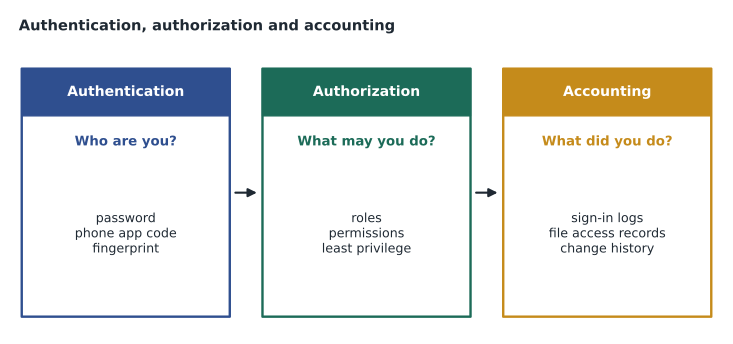
Access control is often described as AAA. Authentication proves identity: the system checks that you are who you claim to be, usually by asking for something only that person should have. Authorization decides what an authenticated person may do: which files, applications and settings their account can reach. Accounting records what they did: sign-ins, failed attempts, files opened, settings changed. A library card illustrates all three. Showing the card and PIN at a kiosk authenticates the patron; the card's type decides whether they may borrow a laptop, which is authorization; and the loan record of what was borrowed and when is accounting.
Authentication factors
Authentication relies on factors, which are categories of evidence. Something you know is a password, a PIN or the answer to a security question. Something you have is a physical object, such as a phone that receives a code, a hardware security key, a smart card or an employee badge. Something you are is a biometric trait, such as a fingerprint, face, iris or voice. Two further factors are sometimes used: somewhere you are, which checks location, such as allowing administrative sign-ins only from inside the library network or the right country; and something you do, a behavior such as typing rhythm or the way someone signs their name.
Each factor has weaknesses. Passwords can be guessed, reused, phished or stolen in a data breach. Physical tokens can be lost or stolen, and codes sent by text message can be intercepted by an attacker who persuades a mobile carrier to move a phone number to a new SIM card. Biometrics cannot be changed if they are compromised and can produce false rejections, such as a fingerprint reader that fails with cold or wet hands. The strength of multifactor authentication comes from combining factors so that one weakness is not enough.
Multifactor authentication
Multifactor authentication, or MFA, requires evidence from two or more different factor categories. A password plus a code from an authenticator app on the user's phone is MFA: something you know plus something you have. A password plus a security question is not, because both are something you know. That distinction is a favorite exam point. Two-factor authentication, or 2FA, is MFA with exactly two factors. MFA blocks the great majority of attacks that rely on stolen passwords, because the attacker also needs the second factor, which is why Fairhaven is turning it on for every staff account.
| Method | Factor | Strengths | Weaknesses |
|---|---|---|---|
| Password or PIN | Something you know | Familiar, cheap, works anywhere | Guessed, reused, phished, breached |
| Text message code | Something you have (the phone number) | Easy for most users | SIM swapping, interception; weakest second factor |
| Authenticator app code or push | Something you have (the phone) | Free, works offline for codes | Push fatigue: users may approve prompts they did not start |
| Hardware security key or passkey | Something you have | Strongly resists phishing | Can be lost; needs supported devices |
| Fingerprint or face | Something you are | Fast, nothing to remember | Cannot be changed if copied; false rejections |
Hana warns about one attack that MFA users must recognize. An attacker who has a staff member's password can trigger sign-in prompts repeatedly, hoping the tired user eventually taps Approve on their phone to make the notifications stop. Fairhaven's authenticator app is set to number matching, so the user must type the number shown on the sign-in screen, which they will not have if they did not start the sign-in. The help desk rule is simple: a prompt you did not expect means someone has your password; deny it and call the help desk.
Single sign-on and federation
Single sign-on, or SSO, lets a user authenticate once and then reach many applications without signing in to each separately. Staff at Fairhaven sign in to one identity provider with their password and MFA, and the email system, the staff intranet, the scheduling app and the hosted library system all trust that sign-in. SSO reduces the number of passwords people must remember, which reduces reuse and sticky notes, and it lets the security team enforce MFA and disable access in one place when someone leaves. Its risk is concentration: if the single sign-in is compromised, everything it unlocks is exposed, which is why SSO accounts must be protected with strong MFA. Federation extends the idea across organizations, so a library staff member can sign in to a partner's system using their own library account.
Authorization
Once a user is authenticated, authorization decides what they can do. The principle of least privilege says each account should have only the access it needs for its job and nothing more. A circulation clerk needs to check items in and out but not to change system settings; a volunteer in the makerspace needs the booking app but not staff files. Least privilege limits the damage from mistakes, from malware running under a user's account and from stolen credentials. Administrators follow it too, using an ordinary account for email and browsing and a separate administrator account only when a task needs it.
Role-based access control, or RBAC, assigns permissions to roles, such as circulation staff, branch manager or LTS technician, and then assigns people to roles. When Noor moved from Northgate to LTS, Hana removed her from the circulation role and added her to the technician role, and her permissions changed with it. That is far easier to manage, and to audit, than setting permissions person by person. Permissions themselves are the specific rights on a resource: read, write, modify, delete or full control on a folder, for example. Reviewing who belongs to each role, and removing access promptly when people change jobs or leave, is a routine part of security.
Accounting
Accounting creates the records that show what happened. Systems log successful and failed sign-ins, the time and location they came from, changes to accounts and permissions, and access to sensitive files. Logs let a security team spot an attack in progress, such as hundreds of failed sign-ins against one account, investigate an incident afterwards and prove that rules were followed. Web browser history, application usage records and print logs are everyday forms of tracking. Accounting has a privacy side too: logs about patrons are personal information and are kept only as long as needed, which for library use records is often very short.
Passwords done well
Passwords will be around for years, and policy has changed as research has shown what works. Older rules forced short passwords with a mix of character types and a change every ninety days. People responded predictably, with passwords like Summer2026! followed by Autumn2026!, written down or reused across sites. Current guidance, including from the United States National Institute of Standards and Technology, favors length over forced complexity, checks new passwords against lists of passwords already exposed in breaches, and does not force regular changes unless there is evidence a password has been compromised. Fairhaven's new policy follows that approach.
Length matters because each extra character multiplies the number of possible passwords an attacker must try. A passphrase of several random words is long, easy to remember and hard to guess, which is why it is now widely recommended. The calculation below compares the number of possible combinations for a few common styles, assuming the attacker knows the style but not the choices.
styles = [
    ("8 lowercase letters", 26 ** 8),
    ("8 characters, any of 94 keyboard symbols", 94 ** 8),
    ("12 lowercase letters", 26 ** 12),
    ("4 random words from a 7,776-word list", 7776 ** 4),
    ("6 random words from a 7,776-word list", 7776 ** 6),
]
base = styles[0][1]
for name, combos in styles:
print(f"{name:42s} {combos:.2e} combinations, about {combos / base:,.0f} times the first")8 lowercase letters 2.09e+11 combinations, about 1 times the first 8 characters, any of 94 keyboard symbols 6.10e+15 combinations, about 29,190 times the first 12 lowercase letters 9.54e+16 combinations, about 456,976 times the first 4 random words from a 7,776-word list 3.66e+15 combinations, about 17,508 times the first 6 random words from a 7,776-word list 2.21e+23 combinations, about 1,058,645,919,147 times the first
What this code does
It works out how many different passwords exist for five password styles, using simple multiplication: the number of choices for each position raised to the number of positions. It then compares each style with eight lowercase letters. The output shows that twelve lowercase letters gives about 457,000 times more possibilities than eight, and a six-word passphrase about a trillion times more, which is why length beats short, complex passwords.
The numbers explain the advice. Eight characters drawn from all 94 symbols beats eight lowercase letters, but twelve lowercase letters beats both. A four-word passphrase lands close to eight fully random keyboard characters while being far easier to remember and type, and a six-word passphrase is in another league. None of this helps if the same password is reused: when one website is breached, attackers try the leaked email and password combinations on other sites, an attack called credential stuffing. The defense is a different password for every account, which nobody can remember unaided.
That is the job of a password manager, an application that generates long random passwords, stores them in an encrypted vault and fills them in for the user. The user remembers one strong master passphrase, protected with MFA, and the manager handles the rest. Password managers also refuse to fill a password on a look-alike phishing site, because the web address does not match. Fairhaven provides one to staff, and the help desk now recommends one to patrons who ask. Passwords written on paper are not always wrong, Hana notes, as long as the paper is kept somewhere as secure as a wallet, not stuck to a monitor at a public service desk.
Passkeys go further and replace passwords altogether for websites that support them. A passkey is a pair of cryptographic keys created for one site: the private key stays on the user's device or in their password manager, unlocked with a fingerprint, face or PIN, and the site holds only the public key. There is nothing for a phishing site to steal and nothing useful in a breach of the site's database. Passkeys are spreading across major email, shopping and banking services, and technicians should expect to explain them.
| Practice | Recommended | Avoid |
|---|---|---|
| Length | Long passwords or passphrases, 15 characters or more where possible | Short passwords, even complex ones |
| Uniqueness | A different password for every account, kept in a password manager | Reusing one password across sites |
| Changes | Change when there is evidence of compromise | Forced changes on a fixed schedule |
| Screening | Reject passwords found in breach lists or easily guessed | Common words, names, dates, keyboard patterns |
| Second factor | MFA with an app, security key or passkey | Relying on a password alone |
| Recovery | Verified identity before resets | Security questions with guessable answers |
Worked problem
Answering a help desk question about the new policy
Ruth Ingram calls the help desk. Her staff want to know why they now need a code from their phones as well as a password, and why the new rules no longer make them change passwords every ninety days. How should Noor explain the changes?
Show solution
- The phone code adds a second factor. A stolen or guessed password is no longer enough, because an attacker would also need the staff member's phone.
- Forced regular changes led people to choose predictable patterns and write passwords down, so current guidance drops them and asks instead for a long, unique password that is changed if there is any sign it has been exposed.
- The new policy checks passwords against lists of ones already leaked, which blocks the weakest choices automatically.
- If anyone receives a sign-in prompt they did not start, they should deny it and call the help desk, because it means someone else knows their password.
Answer: MFA means a password alone cannot unlock an account, and long unique passwords changed only when compromised are stronger in practice than short ones changed on a schedule.
Common mistakes
MistakeCalling a password plus a security question MFA.
InsteadBoth are something you know; MFA needs different factor categories.
MistakeConfusing authentication with authorization.
InsteadAuthentication proves who you are; authorization decides what you may do.
MistakeApproving an unexpected sign-in prompt.
InsteadDeny it and report it; someone has your password.
MistakeGiving everyone administrator rights to save time.
InsteadApply least privilege and use roles.
MistakeReusing a strong password on many sites.
InsteadOne breach then exposes every account; use a password manager.
Summary and key terms
- Authentication proves identity, authorization grants access, and accounting records activity.
- Factors are something you know, have and are, plus somewhere you are and something you do.
- MFA combines different factor categories and blocks most stolen-password attacks.
- SSO means one strong sign-in for many applications; it must be protected with MFA.
- Least privilege and role-based access control limit what each account can reach.
- Long, unique passwords in a password manager, screened against breach lists, beat forced changes.
- Passkeys replace passwords with device-held keys that resist phishing.
- Authentication
- Verifying that a user is who they claim to be.
- Authorization
- Deciding what an authenticated user is allowed to do.
- Accounting
- Recording what users do, through logs and tracking.
- MFA
- Multifactor authentication, using two or more different factor types.
- SSO
- Single sign-on: one sign-in that grants access to many applications.
- Least privilege
- Giving each account only the access its job requires.
- RBAC
- Role-based access control, which grants permissions through roles.
- Password manager
- An application that creates, stores and fills unique passwords.
- Passkey
- A device-held cryptographic credential that replaces a password for a site.
Practice problems
Work each problem on paper first, then reveal the answer to check.
Which factor is a fingerprint?
Show answer
Something you are.
Is a password and a PIN multifactor?
Show answer
No; both are something you know.
What does accounting record?
Show answer
What users did, such as sign-ins and changes.
What is the principle of least privilege?
Show answer
Each account gets only the access its job needs.
What is credential stuffing?
Show answer
Trying leaked username and password pairs on other sites.
Why are passkeys resistant to phishing?
Show answer
The private key never leaves the device and works only with the genuine site.
Lesson quiz · 5 questions
Score 60% or more to complete this lesson.
Create a free account to save your progress, take quizzes and earn a certificate.