
COMP-111 · Lesson 7 of 12 · 22 min
Querying and reporting data
▶ Video coming soon A video version of this lesson is on the way.
The new makerspace booking database from lesson 6 has been running for a few weeks, and Ruth Ingram wants a report for her branch meeting: how many hours each printer was used, who the heaviest users are, and whether weekend bookings are growing. Marcus could export everything to a spreadsheet and count by hand, but he would rather ask the database directly. "A query is a question you ask the database in a language it understands," he tells the cert club. "Most of the time that language is SQL." This lesson covers how people and programs reach the data in a database, the main SQL statements for defining, reading and changing data, how reports are built on top of queries, and how database data is backed up and protected.
Ways to reach the data
Tech+ describes several methods of database access, and each suits different people and tasks. Direct or manual access means connecting to the database with an administration tool and typing queries by hand, which is what Marcus does when he explores data or a database administrator does when fixing a problem. It is powerful and risky in equal measure: a mistyped command runs against the real data. Programmatic access means an application talks to the database through code, sending queries and receiving results, which is how the circulation desk software, the website's catalog search and the self-checkout kiosks all work; staff never see the queries. User interface or utility access means a graphical tool that lets people browse tables, filter rows and make changes with menus and forms. Query and report builders let people assemble a question by choosing tables, fields and filters from lists, and the tool writes the SQL for them.
| Access method | Who typically uses it | Example at the library |
|---|---|---|
| Direct or manual | Database administrators and analysts | Marcus typing SQL into an administration tool |
| Programmatic | Applications and scripts | The kiosk software looking up a patron's loans |
| User interface or utility | Staff who need to view or edit records | A form for updating printer details |
| Query or report builder | Staff who need reports without writing SQL | Ruth choosing fields to build a monthly usage report |
SQL in two halves
SQL, the Structured Query Language, has two main groups of commands. Data definition language, or DDL, defines and changes the structure of the database: CREATE makes a new table or other object, ALTER changes it, such as adding a column, and DROP deletes it entirely, structure and data together. Data manipulation language, or DML, works with the data inside the tables: SELECT reads data, INSERT adds new records, UPDATE changes existing records and DELETE removes records. A third group, sometimes called data control language, grants and revokes permissions, such as GRANT SELECT to let a reporting account read a table without changing it. On the exam, expect to identify which statement does what, and whether it changes the structure or the data.
| Statement | Group | What it does |
|---|---|---|
| CREATE | DDL | Creates a table, index or other database object |
| ALTER | DDL | Changes the structure of an existing object, such as adding a column |
| DROP | DDL | Deletes an object and all of its data |
| SELECT | DML | Reads data that matches a question |
| INSERT | DML | Adds new rows |
| UPDATE | DML | Changes values in existing rows |
| DELETE | DML | Removes rows |
| GRANT and REVOKE | Permissions | Give or remove a user's rights on objects |
Reading data with SELECT
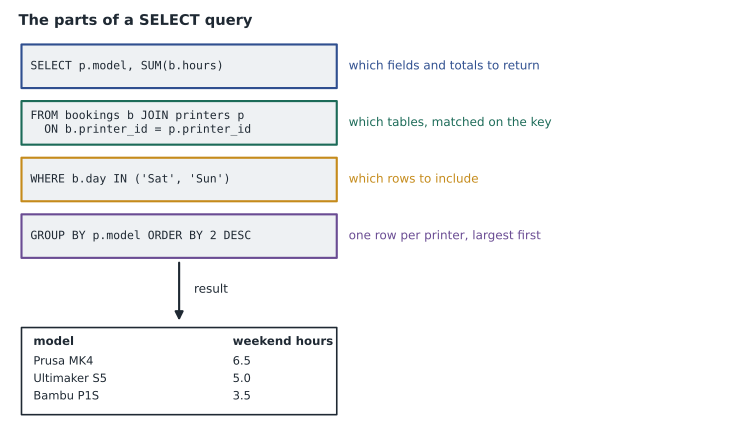
SELECT is the statement people use most, and its parts read almost like English. SELECT lists the fields you want; FROM names the table; WHERE filters the rows with conditions using the comparison and Boolean operators from lesson 2; ORDER BY sorts the results, ascending by default or descending with DESC. The query SELECT printer_id, hours FROM bookings WHERE hours > 3 ORDER BY hours DESC returns the printer and hours for every booking over three hours, longest first. An asterisk, as in SELECT *, means all fields, which is handy for exploring but wasteful in programs.
Two more parts turn rows into summaries. Aggregate functions calculate across many rows: COUNT counts them, SUM adds a field, AVG averages it, and MIN and MAX find the smallest and largest values. GROUP BY splits the rows into groups, such as one group per printer, and applies the aggregate to each group, so SELECT printer_id, SUM(hours) FROM bookings GROUP BY printer_id gives the total hours for each printer. JOIN combines rows from related tables by matching a foreign key to a primary key, so a report can show the printer's model name or the patron's branch rather than bare ID numbers.
import sqlite3
db = sqlite3.connect(":memory:")
db.executescript("""
CREATE TABLE printers (printer_id TEXT PRIMARY KEY, model TEXT);
CREATE TABLE bookings (booking_id INTEGER PRIMARY KEY, printer_id TEXT,
                       card_no TEXT, day TEXT, hours REAL);
INSERT INTO printers VALUES ('P1','Prusa MK4'), ('P2','Bambu P1S'), ('P3','Ultimaker S5');
INSERT INTO bookings VALUES
 (1,'P1','2101','Sat',2.5), (2,'P2','2101','Tue',1.0), (3,'P1','2207','Sun',4.0),
 (4,'P3','2310','Wed',3.5), (5,'P2','2207','Sat',2.0), (6,'P1','2415','Thu',1.5),
 (7,'P3','2101','Sat',5.0), (8,'P2','2310','Sun',1.5), (9,'P1','2207','Fri',3.0);
""")
print("Total hours per printer:")
for row in db.execute("""SELECT p.model, SUM(b.hours) FROM bookings b
                         JOIN printers p ON b.printer_id = p.printer_id
                         GROUP BY p.model ORDER BY SUM(b.hours) DESC"""):
    print(f"  {row[0]:13s} {row[1]:4.1f} h")
print("Weekend hours:", db.execute(
    "SELECT SUM(hours) FROM bookings WHERE day IN ('Sat','Sun')").fetchone()[0])
print("Bookings by card, busiest first:")
for row in db.execute("""SELECT card_no, COUNT(*), SUM(hours) FROM bookings
                         GROUP BY card_no ORDER BY COUNT(*) DESC, card_no"""):
print(f" card {row[0]}: {row[1]} bookings, {row[2]:.1f} h")Total hours per printer: Prusa MK4 11.0 h Ultimaker S5 8.5 h Bambu P1S 4.5 h Weekend hours: 15.0 Bookings by card, busiest first: card 2101: 3 bookings, 8.5 h card 2207: 3 bookings, 9.0 h card 2310: 2 bookings, 5.0 h card 2415: 1 bookings, 1.5 h
What this code does
It builds a small booking database with three printers and nine sample bookings, then asks it three questions. The first matches each booking to its printer's model and adds up the hours per printer; the second adds up only Saturday and Sunday bookings; the third counts bookings and hours for each library card. The results are the raw material for Ruth's report: the busiest printer, the weekend total and the heaviest users.
The report on heavy users shows card numbers, not names. Marcus will tell Ruth how many patrons account for most of the hours, not who they are, unless there is a genuine operational reason to identify someone, such as a booking dispute. Writing queries that return only what the purpose needs is the data-minimization principle from lesson 5 applied in practice.
Changing data safely
INSERT, UPDATE and DELETE change real records, and the most common serious mistake in SQL is an UPDATE or DELETE without a WHERE clause. UPDATE printers SET location = 'Room B' WHERE printer_id = 'P2' moves one printer; the same statement without the WHERE moves every printer. DELETE FROM bookings with no WHERE empties the table. Careful practice is to run a SELECT with the same WHERE first, check that it returns exactly the rows you mean to change, and only then run the change. Databases also support transactions, which group several changes so they either all succeed or are all undone with ROLLBACK, and permissions, so most staff accounts can read data but not change or delete it.
Programs that build queries from what users type have one more danger. If a catalog search box pastes the user's text straight into a query, a carefully crafted entry can change the meaning of the query and expose or damage data. This class of attack is called SQL injection. The defense is to pass user input to the database as separate parameters, which the database treats strictly as values, never as part of the command, along with input validation and least-privilege database accounts. Technicians do not usually fix this themselves, but they should recognize the term and report search boxes that behave strangely when given unusual characters.
Indexes, views and stored queries
Two database features make queries faster and safer to share. An index is a separate, sorted structure that lets the database find rows by the value of a field without reading the whole table, much as the index at the back of a textbook saves reading every page. The integrated library system indexes barcodes, card numbers and titles, which is why a lookup among millions of records returns instantly. Indexes are not free: each one takes storage and must be updated whenever data changes, so database designers add them to the fields that queries search and sort on most, not to every field.
A view is a saved query that behaves like a table. Marcus could create a view called weekend_usage that already joins bookings to printers and filters to Saturdays and Sundays; Ruth's report tool then reads from the view without anyone retyping the logic. Views are also a security tool: a reporting account can be given permission to read a view that shows totals by branch but not the underlying table with card numbers. Many systems also support stored procedures, which are named, saved sets of SQL statements that applications call like functions, keeping business rules in one place inside the database.
From queries to reports
A report presents query results in a form people can act on. Reporting tools, including the report builders in many applications, spreadsheet pivot tables and business intelligence dashboards, run queries on a schedule or on demand and display the results as tables and charts. Good reports answer a defined question, show the time period and filters used, total and compare sensibly, and avoid exposing individual records when aggregates will do. Exporting query results to CSV is a common way to share data with other tools, with the caution that once data leaves the database, the database's permissions no longer protect it.
Worked problem
Building Ruth's report
Ruth wants three numbers for her meeting: total printer hours last month, the share of hours booked on weekends, and the number of different patrons who booked. Using the sample data in the code above, what are the answers, and which SQL features produce each one?
Show solution
- Total hours: SUM(hours) over all bookings. The nine bookings add up to 2.5 + 1.0 + 4.0 + 3.5 + 2.0 + 1.5 + 5.0 + 1.5 + 3.0 = 24.0 hours.
- Weekend hours: SUM(hours) with WHERE day IN ('Sat', 'Sun'). That is 2.5 + 4.0 + 2.0 + 5.0 + 1.5 = 15.0 hours, and 15.0 out of 24.0 is 62.5 out of every 100 hours, or about five-eighths.
- Different patrons: COUNT(DISTINCT card_no), which counts each card once. The cards are 2101, 2207, 2310 and 2415, so the answer is 4.
- Ruth receives totals and shares only, with no names, and the report states the date range it covers.
Answer: 24.0 hours in total, 15.0 of them on weekends (about five-eighths), from 4 different patrons.
Marcus checks the answers before sending them, a habit worth copying. The per-printer totals from the first query, 11.0, 8.5 and 4.5 hours, add up to the same 24.0 hours as the overall sum, and the busiest-user totals add up to 24.0 as well. When two different queries that should agree do not, one of them has a mistake, usually a missing filter or a join that matched rows twice.
Backing up databases
Because a database changes constantly, copying its files while it runs can produce an inconsistent backup. Database systems therefore provide their own backup methods. A database dump exports the structure and data as a file of SQL statements or a special backup format, which can recreate the database elsewhere. Many systems also support full backups of the whole database plus more frequent backups of only the changes, and some keep a log of every transaction so the database can be restored to a particular moment, such as just before a bad DELETE. Backups should be stored away from the database server, protected because they contain all the data, and tested by actually restoring them, a theme lesson 11 returns to.
Common mistakes
MistakeRunning UPDATE or DELETE without WHERE.
InsteadRun a SELECT with the same WHERE first; without it, every row changes.
MistakeConfusing DDL with DML.
InsteadDDL changes structure (CREATE, ALTER, DROP); DML changes data (INSERT, UPDATE, DELETE, SELECT).
MistakeUsing SELECT * in reports and programs.
InsteadList only the fields the purpose needs.
MistakePasting user input straight into queries.
InsteadPass input as parameters to prevent SQL injection.
MistakeCopying a running database's files as a backup.
InsteadUse the database's own dump or backup tools, then test a restore.
Summary and key terms
- Databases are reached directly, programmatically, through user interfaces and through query or report builders.
- DDL statements define structure: CREATE, ALTER and DROP.
- DML statements work with data: SELECT, INSERT, UPDATE and DELETE.
- SELECT uses FROM, WHERE, ORDER BY, GROUP BY, JOIN and aggregate functions such as COUNT and SUM.
- Changes need WHERE clauses, transactions and limited permissions.
- Reports present query results for a defined question, preferring aggregates to individual records.
- Databases are backed up with dumps and database-aware backups, and restores must be tested.
- Query
- A request to a database to retrieve or change data.
- SQL
- The Structured Query Language used by relational databases.
- DDL
- Data definition language: statements that define database structure.
- DML
- Data manipulation language: statements that read and change data.
- Aggregate function
- A function, such as COUNT or SUM, that calculates across many rows.
- JOIN
- Combines rows from related tables by matching keys.
- SQL injection
- An attack that slips commands into a query through user input.
- Database dump
- An export of a database's structure and data for backup or transfer.
Practice problems
Work each problem on paper first, then reveal the answer to check.
Which SQL statement adds new rows?
Show answer
INSERT.
Which statement removes a table entirely, including its data?
Show answer
DROP.
Which clause filters rows in a SELECT?
Show answer
WHERE.
What does GROUP BY do?
Show answer
Splits rows into groups so aggregates are calculated for each group.
How does an application usually reach a database?
Show answer
Programmatically, by sending queries from its code.
What is the safe habit before running an UPDATE?
Show answer
Run a SELECT with the same WHERE clause and check the rows.
Lesson quiz · 5 questions
Score 60% or more to complete this lesson.
Create a free account to save your progress, take quizzes and earn a certificate.