
COMP-111 · Lesson 2 of 12 · 22 min
Variables, data types and logic
▶ Video coming soon A video version of this lesson is on the way.
Marcus Bell, the library's data and reporting analyst, joins the cert club for the second session because Lorna has promised the group a real problem. Each month Marcus exports the program attendance sign-in sheets from every branch into one file, and each month something in the file breaks his report: a branch typed "twelve" instead of 12, another left the attendance blank, and the bookmobile wrote "12 (approx)". "Every one of those is a data type problem," Marcus says. "The computer needs to know whether a value is a number, some text or a yes-or-no answer before it can do anything sensible with it." This lesson covers the building blocks that every program uses: variables and constants, the basic data types, and the logic that compares values and combines conditions.
Variables and constants
A variable is a named place in memory that holds a value the program can change. In the statement attendance = 12, the name attendance now refers to the value 12; later the program can write attendance = attendance + 3 and the variable holds 15. The name lets the programmer refer to the value without knowing where in memory it is kept. Good variable names describe what they hold, such as overdue_items or branch_name, rather than single letters, because code is read far more often than it is written.
A constant is a named value that is set once and is not meant to change while the program runs, such as the number of days in a standard loan period or the maximum number of holds a patron can place. Using a named constant, such as LOAN_DAYS = 21, instead of typing 21 in ten places, means that when the policy changes there is one line to edit and no risk of missing one. Many languages enforce constants so that any attempt to change one causes an error; in Python, writing the name in capital letters is a convention that tells other programmers to leave it alone.
Programs also need ways to hold many values together. An array is an ordered collection of values of the same type, each found by its position, or index, which in most languages starts at 0. Python calls its flexible version a list. A list of the attendance figures for each week of a month might be written [12, 9, 15, 11]; the first value is at index 0 and the last at index 3. Other collections pair names with values, such as a dictionary that links each branch name to its count. Tech+ uses the general words identifier for any name the programmer creates, and array or list for an ordered collection.
Basic data types
Every value has a data type, which tells the computer how to store it and what can be done with it. Tech+ expects you to recognize a short set of fundamental types and choose the right one for a given piece of data.
| Data type | What it holds | Examples | Typical use |
|---|---|---|---|
| Integer | Whole numbers, positive or negative | 12, 0, -3, 2026 | Counts, quantities, years |
| Floating point (float) | Numbers with a fractional part | 2.5, 0.25, 3.14159 | Measurements, averages, money in simple programs |
| Character (char) | A single letter, digit or symbol | A, 7, # | Grades, single-key menu choices |
| String | A sequence of characters | Northgate, 555-0142, 12 (approx) | Names, addresses, phone numbers, notes |
| Boolean | One of two values: true or false | true, false | Yes-or-no facts, such as whether an item is overdue |
Some choices are less obvious than they look. A phone number or a postal or ZIP code is made of digits, but it is a string, not an integer: nobody adds two phone numbers together, leading zeros matter, and it may contain spaces or dashes. A library card number is also stored as a string for the same reasons. The general rule is to store something as a number only if you will do arithmetic with it. Money is a special case: floating-point numbers are stored in binary and cannot represent some decimal fractions exactly, so financial systems use whole numbers of cents or a special decimal type to avoid tiny rounding errors.
Types matter because the same operation means different things for different types. Adding the integers 12 and 3 gives 15. Adding the strings "12" and "3" joins them into "123", an operation called concatenation. Comparing the strings "9" and "15" alphabetically puts "15" first, because the character 1 comes before 9, which is how a badly typed spreadsheet column ends up sorting 15 before 9. Converting a value from one type to another is called casting or type conversion. Marcus's report breaks when it tries to convert the string "twelve" into an integer, because there is no rule for doing so.
values = ["12", "9", "15", "twelve", "", "12 (approx)"]
total = 0
for text in values:
    if text.isdigit():
        total = total + int(text)
        print(repr(text).ljust(14), "-> integer", int(text))
    else:
        print(repr(text).ljust(14), "-> not a whole number, check by hand")
print("Total of the clean values:", total)
print("Joining the first two as strings:", values[0] + values[1])'12' -> integer 12 '9' -> integer 9 '15' -> integer 15 'twelve' -> not a whole number, check by hand '' -> not a whole number, check by hand '12 (approx)' -> not a whole number, check by hand Total of the clean values: 36 Joining the first two as strings: 129
What this code does
It looks at six attendance entries exactly as they were typed and checks whether each one is made only of digits. Entries that are become whole numbers and are added to a running total; the rest are flagged for a person to check. The last line shows that joining the text "12" and "9" gives "129" rather than 21, which is why the data type matters.
Some languages make the programmer declare each variable's type in advance, such as int attendance = 12; these are called strongly or statically typed, and the compiler refuses to put text into an integer variable. Others, including Python and JavaScript, work out the type from the value assigned and allow a variable to hold different types at different times; these are dynamically typed. Static typing catches some mistakes earlier; dynamic typing is quicker to write. Either way, the value itself always has a type, and mixing types carelessly causes errors or, worse, wrong answers that look reasonable.
Comparison and Boolean logic
Programs make decisions by comparing values. A comparison produces a Boolean result: true or false. The common comparison operators are equal to, not equal to, greater than, less than, greater than or equal to, and less than or equal to. Most languages write equal to as two equals signs, ==, because a single equals sign assigns a value to a variable. Mixing up the two is one of the most common beginner errors: attendance = 0 sets the count to zero, while attendance == 0 asks whether it is zero.
| Operator | Meaning | Example | Result when days_late is 4 |
|---|---|---|---|
| == | Equal to | days_late == 0 | false |
| != | Not equal to | days_late != 0 | true |
| > | Greater than | days_late > 3 | true |
| < | Less than | days_late < 3 | false |
| >= | Greater than or equal to | days_late >= 4 | true |
| <= | Less than or equal to | days_late <= 4 | true |
Real decisions often depend on more than one condition, and Boolean operators combine them. AND is true only when both conditions are true. OR is true when at least one is true. NOT reverses a value, turning true into false and false into true. A library rule that a patron may borrow a laptop if they have a valid card AND no outstanding fines combines two conditions with AND: a patron with a valid card but an unpaid fine is refused. A rule that a room booking is free if the patron is a student OR a senior uses OR: either one is enough. Truth tables list every combination of inputs and the result, and the exam may ask you to read one.
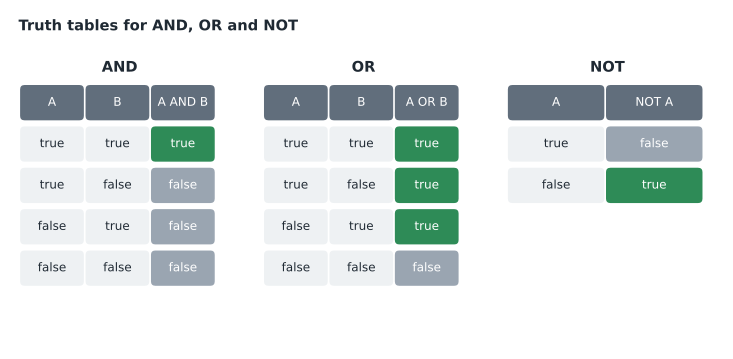
patrons = [
    ("Card valid, no fines", True, False),
    ("Card valid, owes fines", True, True),
    ("Card expired, no fines", False, False),
    ("Card expired, owes fines", False, True),
]
for label, card_valid, has_fines in patrons:
    can_borrow_laptop = card_valid and not has_fines
print(label.ljust(26), "->", can_borrow_laptop)Card valid, no fines -> True Card valid, owes fines -> False Card expired, no fines -> False Card expired, owes fines -> False
What this code does
It tests the lending rule against all four combinations of two yes-or-no facts: whether the card is valid and whether the patron owes fines. The rule says yes only when the card is valid and there are no fines, so only the first patron prints True. Checking every combination like this is how a truth table is built.
Two details trip people up. First, the English word "or" sometimes means "one or the other but not both," but in programming OR is inclusive: true OR true is true. Second, the order in which conditions are combined matters when AND and OR are mixed. Most languages evaluate NOT first, then AND, then OR, just as arithmetic does multiplication before addition. Brackets make the intended order explicit and are worth using whenever a condition mixes the two. "Student OR senior AND weekday" means something different from "(student OR senior) AND weekday."
Empty values and null
Marcus's blank attendance entries raise a separate question: what should a program do when a value is missing? An empty string is still a string; it simply has no characters in it. Many languages and databases also have a special marker for "no value at all," called null (Python calls it None). Null is not the same as zero: a program with zero attendees ran and nobody came, while a null attendance means nobody recorded the number. Treating the two as the same quietly distorts averages and totals. Good code checks for missing values explicitly and decides what to do, such as asking the branch to fill in the gap, rather than letting a blank turn into a zero by accident. On the exam, expect to recognize that null means missing or unknown, not zero or false.
Where these ideas show up outside code
These concepts are not limited to programming languages. Spreadsheet formulas use the same comparisons and the functions AND, OR and NOT; a cell that says =AND(B2>0, C2="Yes") is Boolean logic. Search boxes in the library catalog and online databases accept AND, OR and NOT between keywords. Firewall and email filter rules combine conditions such as "from outside the organization AND has an attachment." Data types appear whenever a form field insists on a date or a number, and every database column has a type, which lesson 6 covers. Understanding them makes a technician better at setting up rules, filters and forms, not just at reading code.
Worked problem
Choosing data types for a sign-in sheet
Marcus is designing a new online sign-in form for library programs. It records the program name, the date, the branch, the number of attendees, whether the program was full, the average age group as a single letter code (A for adults, T for teens, C for children) and the room temperature reading from the smart thermostat. Which data type suits each field?
Show solution
- Program name and branch are text of varying length, so they are strings.
- The number of attendees is a whole number used in totals, so it is an integer.
- Whether the program was full is a yes-or-no fact, so it is a Boolean.
- The age group code is a single letter, so it is a character, though many systems simply store it as a one-character string.
- The temperature can have a fractional part, such as 21.5, so it is a floating-point number.
- The date is best stored in a dedicated date type, which most systems provide, so that dates sort and subtract correctly instead of as text.
Answer: Strings for the name and branch, an integer for attendance, a Boolean for full or not, a character for the age code, a float for temperature, and a date type for the date.
Marcus says the form will also refuse to accept "twelve" in the attendance box, because the field will accept only an integer. Checking input when it is entered, called input validation, is far cheaper than cleaning it up later, and it is also a security habit: programs that trust whatever a user types can be tricked into misbehaving. Noor adds validation to her list of terms to remember for the security lessons.
Common mistakes
MistakeStoring phone numbers and postal or ZIP codes as integers.
InsteadStore them as strings; you never do arithmetic on them and leading zeros matter.
MistakeUsing = when you mean to compare.
InsteadA single = assigns a value; == compares two values.
MistakeTreating OR as "one but not both."
InsteadIn programming, OR is true when either or both conditions are true.
MistakeExpecting text digits to add like numbers.
Instead"12" + "3" joins to "123"; convert to integers first.
MistakeUsing floating point for exact money amounts.
InsteadUse whole cents or a decimal type to avoid rounding errors.
Summary and key terms
- A variable is a named value that can change; a constant is set once and not changed.
- Arrays and lists hold ordered collections, found by an index that usually starts at 0.
- The fundamental types are integer, floating point, character, string and Boolean.
- Store a value as a number only if you will calculate with it.
- Comparisons produce true or false; AND, OR and NOT combine conditions.
- Input validation checks values as they are entered.
- Variable
- A named place in memory holding a value that can change.
- Constant
- A named value that does not change while the program runs.
- Array
- An ordered collection of values, each found by its index.
- Integer
- A whole number with no fractional part.
- Floating point
- A number type that can hold fractions, such as 2.75.
- String
- A sequence of characters, such as a name or a code.
- Boolean
- A data type with only two values, true and false.
- Concatenation
- Joining strings end to end.
Practice problems
Work each problem on paper first, then reveal the answer to check.
Which data type should hold a ZIP or postal code?
Show answer
A string.
What is the result of true AND false?
Show answer
False.
What is the result of true OR false?
Show answer
True.
What does NOT false give?
Show answer
True.
In most languages, what does == do?
Show answer
It tests whether two values are equal.
What index does the first item in a Python list have?
Show answer
0.
Lesson quiz · 5 questions
Score 60% or more to complete this lesson.
Create a free account to save your progress, take quizzes and earn a certificate.