
BAS-420 · Lesson 6 of 12 · 19 min
Network and communication faults
▶ Video coming soon A video version of this lesson is on the way.
On the afternoon of Monday, September 21, Callie's second week, Prakash took her up to Ninefield Tower's seventh floor because the front end showed half the floor's VAV boxes dropping offline and coming back every few minutes. The trunk had worked for years. In July, a tenant fit-out contractor had replaced one box, VAV-7-14, and added a new box on a short branch. The replacement controller had arrived from the factory at MAC address 3, which was already used by VAV-7-03, and its terminator was switched on, although it sat in the middle of the trunk. The new box hung off a 40 ft stub. With the trunk powered down, Prakash's meter read 41 Ω across the two data wires. After the fixes, it read 61 Ω.
That case appears in BAS-210 and BAS-310. This lesson uses it, and the other network faults in the trouble file, to build a method for finding communication problems: on MS/TP trunks, on BACnet/IP networks, and on the Modbus and other links that connect third-party equipment. It assumes the protocol knowledge from BAS-310.
Symptoms first: what kind of network fault is it?
Network faults show up at the front end as devices offline, values going stale, writes that do not take effect, or a system that is slow. The pattern tells you a lot about where to look.
| Pattern | Usually points to | First check |
|---|---|---|
| One device offline, the rest fine | That device: power, address, wiring at its terminals, failed controller | Power and status lights at the device; its MAC address and baud rate |
| Many devices on one trunk intermittent | The trunk: duplicate address, wrong termination, stub, noise, a babbling device | Trunk resistance with power off; device list for duplicates |
| Whole trunk offline | The router or supervisory controller port, a short on the trunk, a cut cable | The router status; trunk resistance; split-half |
| Devices across several IP subnets missing from discovery | Broadcast handling between subnets (BBMD or foreign device settings) | BBMD tables; IP settings |
| Values update slowly everywhere | Too much traffic: polling, trends, COV subscriptions, a misconfigured Max_Master | Network load, trend and polling settings |
| A third-party value is wrong but present | Protocol mapping: register offset, word order, scaling, units | Map against the device's documentation; compare with its own display |
Before touching the network, gather the same data as for any other fault. Which devices, since when, and what changed? On the seventh floor, the answer to "what changed" was the fit-out in July. Network faults introduced by other contractors, by a replaced controller, or by an IT change to an IP network are very common, and the change log or a conversation with the property manager often finds them faster than any meter.
MS/TP trunks
An MS/TP trunk is an RS-485 network: a twisted, shielded pair running from device to device in a daisy chain, with a 120 Ω terminating resistor at each physical end and bias at one point, usually the router end. The devices pass a token in order of MAC address; only the device holding the token may start a message. BAS-310 covers the protocol. For troubleshooting, the physical rules matter most, because most MS/TP faults break one of them.
- One daisy chain, no stubs or star wiring. A branch longer than a short tail reflects the signal back.
- Termination at the two physical ends only. A terminator switched on in the middle of the trunk loads the signal.
- Unique MAC addresses. Two devices with the same MAC both answer the token and corrupt each other's messages.
- The same baud rate on every device. One device at a different speed can disrupt the whole trunk.
- Within the segment limits: typically about 4,000 ft of cable and 32 full unit loads without a repeater (check the device and cable data).
- Shield continuous along the trunk and grounded at one point, and the data pair kept away from line-voltage and drive cables.
The single most useful test on a trunk is a resistance measurement across the data pair with all devices powered down. Two 120 Ω terminators in parallel make 60 Ω, and the cable adds a little, so a healthy trunk reads close to 60 Ω. One terminator missing reads about 120 Ω. A third terminator in parallel reads about 40 Ω. A short reads near zero.
Worked problem
What the seventh-floor resistance reading meant
Before the fix, the seventh-floor trunk read 41 Ω across the data pair with power off. After the fix, it read 61 Ω. What does each reading show?
Show solution
- Two 120 Ω terminators in parallel: 120 ÷ 2 = 60 Ω.
- Three 120 Ω terminators in parallel: 120 ÷ 3 = 40 Ω.
- The cable's own resistance adds about 1 Ω, so 41 Ω matches three terminators and 61 Ω matches two.
Answer: 41 Ω meant a third terminator was switched on somewhere: the replaced VAV-7-14 controller in the middle of the trunk. After it was switched off, the trunk read 61 Ω, the expected two end terminators plus cable.
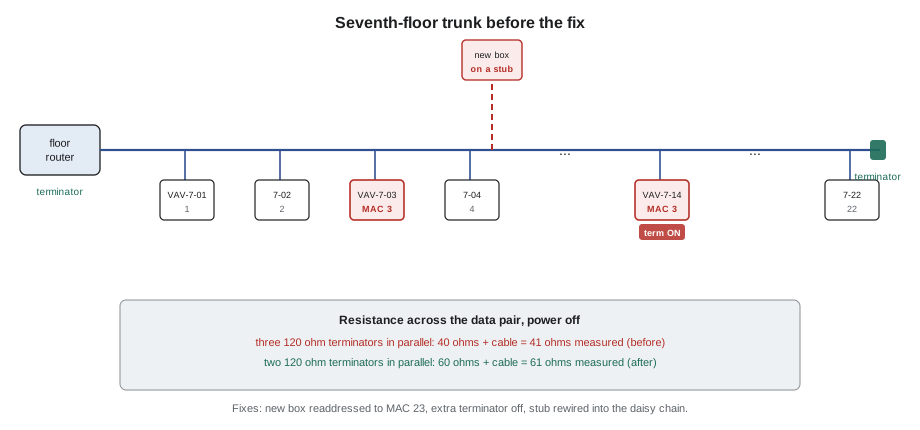
The seventh floor had three faults at once, which is why the symptoms were confusing. Each on its own might have produced only occasional errors. The duplicate MAC address was the worst: VAV-7-03 and the new VAV-7-14 controller both answered when the token reached MAC 3, and their replies collided. The extra terminator weakened the signal along the trunk. The stub reflected it. The fixes were to readdress the replacement controller (the new box was given MAC 23), switch off its terminator, and rewire the stub so that the new box was part of the daisy chain. After that, the floor's 23 controllers stayed online.
Finding a bad device on a trunk
When the pattern points to the trunk and the resistance reading is normal, the fault may be one device disrupting the others: a failed transceiver that babbles, a controller at the wrong baud rate, or a device whose address was changed. Three methods help.
The first is the front end's own device list. Look for gaps and duplicates in the MAC addresses, devices that appear and disappear, and error counters if the router keeps them. Many routers record how many bad frames they see. A rising count points to the trunk; a count that jumps when one device is powered points to that device.
The second is split-half, as in lesson 1. Disconnect the far half of the trunk at a convenient junction, terminate the near half temporarily, and watch whether the near half becomes stable. If it does, the fault is in the far half. Reconnect, split the far half, and repeat. On a 23-controller trunk, five splits find one bad device in the worst case. Remember to put the terminators back where they belong when you finish.
The third is a protocol analyzer: a laptop with an RS-485 adapter and capture software that records every frame on the trunk. Prakash's capture of the seventh floor on September 21 showed two replies to every token passed to MAC 3. A capture can also show a device at the wrong baud rate (as garbage frames), a token that is passed to addresses that do not exist (a high Max_Master setting wasting time polling for masters), and the gaps where a device fails to answer.
Max_Master deserves a note. Each MS/TP master polls for new masters up to the value of its Max_Master property. If it is set to 127 on a trunk where the highest address is 23, every device spends time polling empty addresses. On the seventh floor, Max_Master was set to 31 for 24 masters (23 controllers and the floor router), which leaves room for new devices without wasting much time. A Max_Master set lower than the highest MAC on the trunk is a fault: the devices above it never get the token.
BACnet/IP and the building network
BACnet/IP faults are usually IP faults. A controller with the wrong IP address, subnet mask or gateway can talk to some devices and not others. A duplicate IP address causes both devices to drop in and out. A switch port set to the wrong network segment, or a firewall rule added by IT, can block BACnet's UDP port (47808 by default). Discovery across subnets needs broadcast management: a BACnet broadcast management device (BBMD) on each subnet, with matching tables, as at Harcastle's central plant, Tilden and Morrow House, or a foreign device registration.
Duplicate device instances are a BACnet fault that crosses network types. Every device on a BACnet internetwork must have a unique device instance number. Ninefield's numbering plan from BAS-310 builds the instance from the floor and MAC (100,000 + 1,000 × floor + MAC) so that duplicates are unlikely, but a replacement controller that arrives with a factory default instance, or a device copied from another site's backup, can collide with an existing one. The front end may then show values from the wrong device under the right name, which is worse than showing nothing.
When an IP network problem is suspected, involve the owner's IT staff early. On many sites, as at Harcastle, the building network belongs to IT, and changes need their approval. A technician who plugs in a laptop and starts scanning can trigger security alarms. Ask what has changed on the network, ask for the switch port and VLAN of the device, and test with the tools IT allows.
Third-party integration faults
When a value from a chiller, drive, meter or boiler is present but wrong, the network is usually working and the mapping is at fault. In BAS-310, the Ninefield integration in August turned up three classic mapping faults. The main switchboard meter's power value came through as a nonsense number until the word order of its 32-bit value was swapped, and then read 623.5 kW. Its energy register was off by one because the documentation used 1-based register numbers and the driver used 0-based offsets. And the first write to chiller CH-1 was refused because the chiller panel was in local mode.
- Compare the value with the equipment's own display at the same moment.
- Check register numbers, offsets and data types against the device's documentation, including word and byte order for 32-bit values.
- Check scaling factors and units: tenths of a degree, kW versus W, signed versus unsigned.
- Check that the equipment will accept remote commands: local or remote mode, write permission, which priority the BAS writes at.
- Check firmware: an update to the equipment can change its register map. Quillon's handover rule for Ninefield now says firmware updates are agreed by Tarrant Chiller Service and Quillon, with a backup and a point check after each one.
A heartbeat point helps. If the BAS writes a changing value to the equipment and reads it back, or reads a value that the equipment updates every few seconds, a frozen heartbeat shows that communication has stopped even when the last values still look reasonable.
Network faults that are really power or wiring faults
Many network faults are lesson 4 faults in disguise. A controller that resets when its actuators drive drops off the trunk for a few seconds at every reset. A shield grounded at both ends picks up noise. A data pair run beside drive cables picks up switching pulses. A loose terminal at one controller breaks the chain for every device beyond it. Before replacing a controller that keeps going offline, measure its supply voltage under load and check its terminals.
A short checklist for any network call
Prakash keeps a short list on the inside cover of the trouble file for network calls, in the order he works through it. First, which devices are affected, since when, and what changed on the site or the network. Second, the front-end device list: gaps, duplicates and devices that come and go. Third, power and status lights at one affected device, including its supply voltage under load. Fourth, on an MS/TP trunk, the resistance across the data pair with everything powered down, compared with the expected 60 Ω. Fifth, the settings of any recently replaced controller: MAC address, baud rate, Max_Master, device instance and terminator. Sixth, a split-half test or a protocol capture if the trunk still misbehaves. Seventh, for an IP device, its address, mask, gateway and broadcast handling, checked with the owner's IT staff. Only after all of that does he consider replacing a controller, and even then he keeps the old one until the new one has run for a week without trouble.
The list is deliberately boring. Network faults tempt technicians into clever theories, and most of them turn out to be an address, a terminator, a loose wire or a supply that sags.
Common mistakes
MistakeReplacing a controller that keeps going offline without checking its power and address.
InsteadCheck supply voltage under load, MAC address, baud rate and terminals first; most offline devices are not broken.
MistakeLeaving a factory-default terminator or address on a replacement controller.
InsteadSet the address, baud rate, Max_Master, device instance and terminator to match the trunk before connecting.
MistakeMeasuring trunk resistance with devices powered.
InsteadPower the trunk down; live transceivers and bias make the reading meaningless.
MistakeScanning an owner's IP network without asking.
InsteadInvolve IT, ask what changed, and use the tools they allow.
Summary and key terms
- The pattern of offline devices points to the device, the trunk, the router, broadcast handling, traffic or mapping.
- MS/TP faults usually break a physical rule: daisy chain, two end terminators, unique MACs, one baud rate, segment limits, shield and routing.
- A powered-down trunk should read close to 60 Ω across the data pair; about 40 Ω means a third terminator, about 120 Ω means one is missing.
- Device lists, split-half tests and protocol captures find a disruptive device on a trunk.
- BACnet/IP faults are usually IP addressing, duplicate addresses or instances, blocked ports or broadcast management.
- Third-party values that are present but wrong usually have a mapping fault: register offset, word order, scaling, mode or firmware.
- Many network faults are really power or wiring faults.
- Terminator
- A 120 Ω resistor across the data pair at each physical end of an RS-485 trunk.
- Stub
- A branch off a daisy-chain trunk, which reflects the signal.
- Duplicate MAC
- Two MS/TP devices with the same address on one trunk, which corrupt each other's messages.
- Max_Master
- The highest MAC address an MS/TP master polls when looking for other masters.
- Protocol analyzer
- A tool that captures and decodes every frame on a network.
- BBMD
- A BACnet broadcast management device that passes broadcasts between IP subnets.
- Heartbeat
- A value that changes regularly so that a frozen value shows communication has stopped.
Practice problems
Work each problem on paper first, then reveal the answer to check.
A powered-down MS/TP trunk reads 118 Ω across the data pair. What is wrong?
Show answer
Only one terminator is in circuit; the other end terminator is missing or switched off, or the trunk is broken between them.
After a controller replacement, two VAV boxes on a floor drop in and out together. What do you check first?
Show answer
The replacement's MAC address and device instance for duplicates, then its terminator and baud rate.
A meter's power value on the BAS reads a huge nonsense number while the meter's display reads normal. What is the likely cause?
Show answer
A mapping fault, most likely the word order of a 32-bit value; check the data type and byte and word order against the documentation.
Lesson quiz · 5 questions
Score 60% or more to complete this lesson.
Create a free account to save your progress, take quizzes and earn a certificate.