
BAS-420 · Lesson 5 of 12 · 20 min
Program and logic errors
▶ Video coming soon A video version of this lesson is on the way.
On Saturday, November 14, after Sophie's programming workshop, Callie ran an override report on Tilden Hall for the first time. It listed 14 points still commanded at priority 8, the operator level. Some had been there since the summer. Two were VAV boxes held at maximum airflow during a heat wave in July and never released. The programs for those boxes were running perfectly every scan, calculating the right airflow for the room, and writing it to the damper at priority 16. None of it mattered, because priority 8 wins over priority 16. "That is the most common program fault I see," Prakash said when she showed him, "and it is not in the program at all."
This lesson covers faults in control programs and configuration: overrides, scaling and units, action and direction, timers and delays, the order in which logic runs, template errors and leftover code. It builds on BAS-220, where Callie learned to read and write control programs, and on BACnet priorities from BAS-310.
Is it the program?
Program faults are often blamed too early and found too late. They are blamed too early because the program is what the technician can see on a laptop, and changing a number feels like doing something. They are found too late because a program that looks right on paper can still produce the wrong result in the field, through an override, a scaling error or a timing problem. The test for whether the program is at fault is the split from lesson 1: compare what the program calculates with what the field device receives, and compare what the field device sends with what the program reads.
- If the program's calculated output is right but the device does the wrong thing, the fault is downstream of the program: an override, the output configuration, the wiring or the device.
- If the program reads an input correctly but calculates the wrong output, the fault is in the logic or its settings.
- If the program reads an input wrongly, the fault is in the input configuration, the wiring or the sensor.
Reading the program is still essential, because it tells you what the output should be. The skill from BAS-220 is to trace backward: start at the output that is wrong, find every block or line that writes to it, then follow each of their inputs back until you find the value that does not make sense.
Overrides and priorities
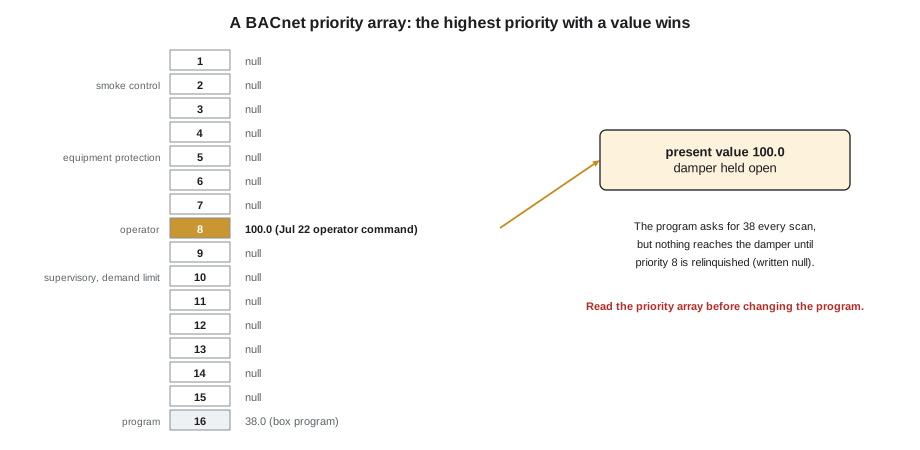
In BACnet, a commandable object such as a binary or analog output has a priority array with 16 levels. The present value is taken from the highest priority (lowest number) that has a value written to it. Quillon's standard uses priority 2 for smoke control, 5 for equipment protection, 8 for operator commands, 10 for supervisory and demand limiting, and 16 for normal program control. A command at a higher priority stays in place until it is relinquished, which means written back as null.
VAV-1-14 Damper Command (AO-1)   Present Value: 100.0
Priority  Value     Written by
   1      null
   2      null      (smoke control)
   5      null      (equipment protection)
   8      100.0     operator, Jul 22 2026 14:05
  10      null      (supervisory / demand limit)
  16      38.0      box program
Relinquish Default: 0.0
When an output is not doing what the program asks, read its priority array before anything else. It takes seconds and it changes nothing. Most front ends can also produce an override report across a whole site. Callie's report on November 14 found 14 points; releasing them was put forward as a no-cost first step in Quillon's January proposal to Gus. Priority faults also happen in the other direction: a demand limit or supervisory write at priority 10 that was meant to be temporary, or a program that writes at a higher priority than it should and overrules the operator.
Overrides are not only BACnet priorities. Other ways a value can be held include a hand-off-auto switch left in hand on a starter or drive, a point placed out of service, a manual setting in a drive's own keypad, a local override button on a zone sensor with a long timer, or a value forced in the controller's programming tool. Each one makes the program irrelevant until it is removed. A good service call checks all of them on the equipment involved.
Scaling and units
Scaling errors turn a correct signal into a wrong number. They are configuration faults rather than logic faults, but they live in the same place, the controller's database, and they are found the same way: by comparing the signal at the terminal with the value in the program.
Worked problem
A speed feedback scaled for the wrong frequency
At Marlow Lane's point-to-point checkout, the return fan drive's speed feedback (0 to 10 V for 0 to 60 Hz) had been scaled in the controller as 0 to 10 V for 0 to 50 Hz. With the drive running at 48 Hz, what did the BAS show? If the BAS showed 45 Hz, what was the real speed?
Show solution
- The drive sends 48 ÷ 60 × 10 = 8.0 V.
- The controller converts 8.0 V on a 0 to 50 Hz scale: 8.0 ÷ 10 × 50 = 40 Hz.
- Working backward, a displayed 45 Hz means 45 ÷ 50 × 10 = 9.0 V, which is really 9.0 ÷ 10 × 60 = 54 Hz.
Answer: The BAS showed 40 Hz at a real 48 Hz, and a displayed 45 Hz was really 54 Hz. A wrong span gives an error that is a fixed fraction of the reading (here every reading is 50 ÷ 60 of the truth), which is the fingerprint of a scaling fault.
The same check applies to every analog point. At Marlow Lane, the outdoor humidity sensor sent 0 to 5 V for 0 to 100 RH, but its input was set for 0 to 10 V, so every reading was half the true value. A sensor that seems to read about half, or about twice, or a fixed ratio of the truth almost always has a scaling or signal range error. A sensor that reads a fixed amount high or low has an offset, either in the configuration or in the installation.
Units cause their own faults. A setpoint entered in one unit on a point configured for another, a reset schedule written in degrees Celsius on a controller set up in degrees Fahrenheit, or an airflow in one unit compared with a limit written in another can all produce logic that runs but makes no sense. When you find a strange number, check its units in the point's configuration as well as its value.
Action and direction
Every control loop has an action. A direct-acting loop raises its output when the process variable rises above setpoint, as a cooling loop does. A reverse-acting loop raises its output when the process variable falls below setpoint, as a heating loop does. If a loop's action is set backward, it drives its output the wrong way: the heating valve closes as the room gets colder. The symptom is a loop that runs away to one limit and stays there, often within minutes of being enabled.
Direction can also be reversed outside the loop: in the output configuration (0 to 10 V meaning 100 to 0), in the actuator's direction switch, or in the valve's piping (normally open versus normally closed). At Marlow Lane's checkout, two reheat actuators were reversed. The same symptom, a device moving opposite to the command, can come from three places, so the test is to command the output to 0 and then to 100 and watch the device, then check each place in turn. Only one of them should be reversed to fix the problem. Reversing a second one to cancel the first leaves a trap for the next technician.
Timers, delays and sequence order
Timers are where many safety and comfort faults hide. Typical examples are alarm delays, proof timeouts, minimum on and off times, warm-up periods and enable delays. A timer that is too short causes nuisance trips. A timer that is too long hides a real problem or lets it do damage.
The worst example in the trouble file is AHU-2's freezestat at Tilden. It was wired only to a BAS input, not into the supply fan's circuit, and the program waited 15 minutes before acting on it. A freezestat is there to stop the fan and protect the coil within seconds when air below about 35 to 40 °F (a typical setting) reaches the coil. Fifteen minutes of freezing air can split a hot water coil. It was rewired into the fan circuit the same day it was found, October 7. The lesson for program troubleshooting is that a delay must be judged against what the input protects, not only against how often it alarms.
The order in which logic runs, and which piece of logic wins when two disagree, is another common fault. At Marlow Lane's functional test, a freeze trip closed the heating valve when it should have opened it. The heating loop's own disable logic, which drove its output to 0 whenever the fan was off, was written after the freeze response and overwrote it. In BAS-130, Tilden AHU-1's heating loop ran all night with the fan off and wound its integral up to 100, so the coil overheated the air at the 6:00 start. Both faults were in programs that did exactly what they were written to do. The fix in each case was to decide which condition should win and make the logic say so.
| Program fault | Typical symptom | Where it was found |
|---|---|---|
| Old override at a higher priority | Output ignores the program | Tilden, 14 points at priority 8 (Nov 14) |
| Wrong span or signal range | Reading is a fixed fraction of the truth | Marlow Lane return fan speed, outdoor humidity |
| Safety delay too long or safety only in software | Equipment unprotected for minutes | Tilden AHU-2 freezestat (Oct 7) |
| Logic order lets the wrong condition win | Safety response overwritten | Marlow Lane freeze test |
| Loop runs while equipment is off | Integral windup, overshoot at start | Tilden AHU-1 6:00 start |
| Template error copied to many controllers | Same fault on a whole floor | Marlow Lane third floor, loaded from an old template |
| Unhandled case in the logic | An output left in its last state | Morrow House FC-1 deadband case (original program) |
Template errors and leftover code
Most controllers on a site are loaded from templates: one program for every VAV box, one for every rooftop unit. A fault in a template appears in every controller loaded from it. At Marlow Lane, the third floor's twelve boxes had been loaded from a template made before a design change added discharge air sensors, so their discharge air limit was linked to a constant instead of the new sensor. A single failed box in the functional test sample led to the template, and the template led to twelve boxes. When the same fault appears on two controllers of the same type, suspect the template and check the rest.
Leftover code is the opposite problem: lines or blocks that nobody uses but that still affect the result. In BAS-220, Callie found an orphan variable called SUMMER_OVR in room 108's 2009 box program, and a heating gain of 10 where an older backup had 6. Nobody could say who had changed it or why, except that Nell remembered a technician from a previous service contractor changing settings around 2019. Leftover code is not always a fault, but it is always a question, and the change log and backups are how you answer it.
Unhandled cases are a third kind. Morrow House's original fan coil program, rebuilt by Quillon in 2023, had a case in its deadband where no line wrote to the fan, so the fan stayed in whatever state it was in when the room drifted into the deadband. The fault showed up only sometimes, which made it look like a hardware problem. When an output seems to stick only under certain conditions, look for the condition the program forgot.
Testing a program change safely
When a program fault is found, the fix is a program change, and a program change on a live building needs care.
- Take a backup first, and record the controller's firmware version with it. A backup that will not load on a replacement controller is not much of a backup, as Morrow House's 2023 rebuild showed.
- Make the smallest change that fixes the cause. Do not tidy up unrelated code in the same visit.
- Test the change in the conditions that matter, including the safety and failure cases. Sophie's test plan for the shared rooftop unit program in BAS-220 had 36 cases, including three regression cases to prove that the fix had not broken something that used to work.
- Watch the system after the change, with a trend, through at least one full cycle of whatever the change affects.
- Record the change in the change log, take a new backup, and say in the service report what was changed and why.
If the same program runs in other controllers, decide whether they need the same fix, and update the master template so that the next controller loaded does not bring the fault back.
Common mistakes
MistakeChanging a program setting before checking for overrides.
InsteadRead the priority array and override report first; the program may be right and simply outranked.
MistakeReversing a second setting to cancel a reversed device.
InsteadFind the one place that is reversed and fix it there, so the system stays readable.
MistakeJudging an alarm delay only by how often it alarms.
InsteadJudge it by what the input protects. Safeties belong in hardwired circuits, with the BAS reporting.
MistakeFixing a template fault in one controller only.
InsteadFix the master template and check every controller loaded from it.
Summary and key terms
- Split the chain at the program: compare what it calculates with what the field receives, and what the field sends with what it reads.
- Read the priority array first; an old command at a higher priority makes the program irrelevant.
- Scaling and signal range errors give readings that are a fixed fraction of the truth; offsets give a fixed difference.
- A reversed action or direction drives a loop to one limit; fix the one place that is reversed.
- Timers and delays must be judged against what they protect; safeties belong in hardware.
- Logic order decides which condition wins; faults such as overwritten freeze responses and integral windup come from programs doing exactly what they were written to do.
- Template faults repeat across controllers; leftover code and unhandled cases need the change log and backups to explain.
- Back up, change little, test the failure cases, watch, and document.
- Priority array
- The 16-level list of commands on a BACnet commandable object; the highest priority with a value wins.
- Relinquish
- To release a command at a priority by writing null to it.
- Override report
- A list of points currently commanded above program priority or otherwise held.
- Direct action
- A loop that raises its output as the process variable rises above setpoint.
- Reverse action
- A loop that raises its output as the process variable falls below setpoint.
- Template
- A standard program and database loaded into many controllers of the same type.
- Regression test
- A test that proves a change has not broken something that used to work.
Practice problems
Work each problem on paper first, then reveal the answer to check.
A damper sits at 100 while its box program calculates 38. What is your first check?
Show answer
Read the output's priority array to see whether a higher priority, such as an operator command at 8, is holding it.
A humidity reading is always about half of a handheld meter's reading, at every humidity. What kind of fault is this?
Show answer
A scaling or signal range fault, such as a 0 to 5 V sensor on an input configured for 0 to 10 V.
Two VAV boxes on the same floor show the same strange discharge air limit behavior. What should you suspect?
Show answer
A template fault; check the template and every controller loaded from it.
Lesson quiz · 5 questions
Score 60% or more to complete this lesson.
Create a free account to save your progress, take quizzes and earn a certificate.