
AWS-102 · Lesson 9 of 12 · 18 min
Detection services: GuardDuty, Inspector and Security Hub
▶ Video coming soon A video version of this lesson is on the way.
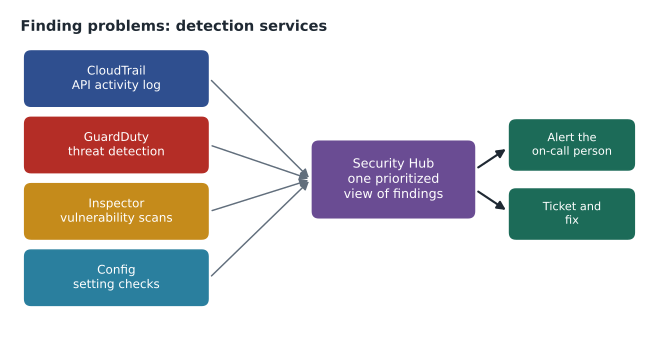
Three weeks into the project, Dr. Simone Kaur asked Gwen a question that every medical director asks eventually. "If something bad happens in AWS at three in the morning, how will we even know?" In the old server room, the honest answer had been that they probably would not, until something broke. Gwen's answer this time was a diagram.
Prevention, the subject of lessons 2 to 8, makes bad things less likely. Detection makes sure that when something does happen, someone finds out quickly. This lesson covers the services AWS provides for detection: the logs and records that capture what happened, and the services that analyze them and raise findings. The exam guide names three of these in its examples, Amazon GuardDuty, Amazon Inspector and AWS Security Hub, and expects candidates to know where security logs are captured.
The record of what happened: CloudTrail
AWS CloudTrail records API activity in an AWS account: who made a request, when, from where, to which service, and whether it succeeded. Because almost everything in AWS, from launching an instance to changing a policy to signing in to the console, is an API call, CloudTrail is the foundation of security investigation and auditing.
CloudTrail keeps a 90-day event history of management events in each account automatically, viewable in the console at no extra charge. For longer retention and more detail, the customer creates a trail, which delivers log files to an S3 bucket, or uses CloudTrail Lake for queryable storage. Gwen created an organization trail that records every account in every Region and delivers the logs to a bucket in the separate security account, with the bucket protected so that nobody in the production accounts can delete them. "If an attacker gets into production," she said, "the first thing they will want to do is erase their tracks. The logs must live somewhere they cannot reach."
| Question | Where to look |
|---|---|
| Who changed this security group, and when? | CloudTrail |
| What did this setting look like last Tuesday? | AWS Config |
| Is CPU or error rate unusually high right now? | Amazon CloudWatch metrics and alarms |
| What did the application write to its log? | Amazon CloudWatch Logs |
| Which IP addresses talked to this instance? | VPC Flow Logs |
| Is something in the account behaving like an attack? | Amazon GuardDuty |
The record of settings: AWS Config
AWS Config records the configuration of resources over time and evaluates them against rules. Where CloudTrail answers who did what, Config answers what the setting is now, what it was before, and whether it complies with policy. Config rules can check, for example, that every EBS volume is encrypted, that no security group allows SSH from anywhere, that S3 buckets block public access, or that access keys are rotated. AWS provides many managed rules and the customer can write custom ones. Non-compliant resources appear as findings, and Config can trigger automatic remediation for some of them.
Config also keeps a timeline for each resource. When Hannah needed to know whether the imaging bucket had ever been public, even briefly, Config's history showed every configuration change since recording began, alongside the CloudTrail event that caused each one.
Monitoring with CloudWatch
Amazon CloudWatch collects metrics and logs from AWS services and applications and raises alarms when thresholds are crossed. It is mainly an operations tool, but it supports security too: a metric filter can count failed console sign-ins in CloudTrail logs and raise an alarm, and application logs from BookVet can reveal suspicious patterns such as a burst of failed logins from one address. The exam guide lists CloudWatch under monitoring for governance and compliance.
Amazon GuardDuty
Amazon GuardDuty is a threat detection service. Once turned on, it continuously analyses data sources such as CloudTrail management events, VPC Flow Logs and DNS query logs, using threat intelligence and machine learning to spot suspicious activity. It needs no agents or appliances for these foundational sources, and optional protection plans extend it to S3 data events, EKS, RDS sign-in activity, Lambda network activity, malware scanning of EBS volumes and more.
GuardDuty findings describe what looks wrong, how severe it is, and which resource is involved. Typical examples include an EC2 instance communicating with a known malicious address, unusual API calls from an identity that has never made them before, an access key used from an unusual location, or signs that an instance is mining cryptocurrency. GuardDuty only reads and analyses; it does not change resources, so it is safe to enable everywhere. Gwen turned it on across all accounts with the security account as the delegated administrator, so every finding lands in one place.
Amazon Inspector
Amazon Inspector finds software vulnerabilities and unintended network exposure in workloads. It automatically discovers EC2 instances, container images in Amazon ECR and Lambda functions, scans them for known vulnerabilities (published as CVEs) in operating system packages and application libraries, and checks network reachability. It rescans when new vulnerabilities are published or when software changes. Each finding comes with a risk score that considers how severe the vulnerability is and whether the resource is reachable.
For Mateo, who used to patch the old servers on a best-effort basis, Inspector was a revelation. On its first day it listed every Windows Server update missing on the VetLedger application instances and an outdated library in BookVet's code. He could finally answer the question "are we patched?" with a list rather than a shrug.
# Prioritize sample Inspector-style findings: severity first, then internet exposure.
findings = [
    {"resource": "vetledger-app-1", "cve": "CVE-EXAMPLE-0001", "score": 9.8, "reachable": False},
    {"resource": "bookvet-web-2",   "cve": "CVE-EXAMPLE-0002", "score": 7.5, "reachable": True},
    {"resource": "bookvet-web-2",   "cve": "CVE-EXAMPLE-0003", "score": 5.3, "reachable": True},
    {"resource": "build-runner",    "cve": "CVE-EXAMPLE-0004", "score": 4.0, "reachable": False},
]
def band(score):
    return "CRITICAL" if score >= 9 else "HIGH" if score >= 7 else "MEDIUM" if score >= 4 else "LOW"
for f in sorted(findings, key=lambda f: (f["score"] + (1.0 if f["reachable"] else 0)), reverse=True):
    exposure = "internet-reachable" if f["reachable"] else "internal"
print(f"{band(f['score']):8} {f['score']:>4} {exposure:18} {f['resource']}")CRITICAL 9.8 internal vetledger-app-1 HIGH 7.5 internet-reachable bookvet-web-2 MEDIUM 5.3 internet-reachable bookvet-web-2 MEDIUM 4.0 internal build-runner
What this code does
It sorts sample vulnerability findings, like those from Amazon Inspector, by their severity score with a small bonus for servers that can be reached from the internet. Each score is also given a band name from LOW to CRITICAL. The output is a simple to-do list that puts the most dangerous and most exposed problems first.
The sample ranks findings the way Inspector's risk score does in spirit: severity matters most, and reachability from the internet makes a finding more urgent. The real scoring is more detailed, and the CVE identifiers here are placeholders.
AWS Security Hub
With CloudTrail, Config, GuardDuty and Inspector all producing information, someone needs one place to look. AWS Security Hub collects and prioritizes security findings from AWS services such as GuardDuty, Inspector, Config and Macie, and from many partner products, in a standard format across accounts and Regions. It also runs automated checks against security standards, such as the AWS Foundational Security Best Practices standard and the CIS AWS Foundations Benchmark, and gives a security score. Findings can be routed to ticketing systems or to automatic responses through Amazon EventBridge.
Gwen set Security Hub to aggregate findings from every account and Region into the security account. Each morning, Hannah opens one dashboard instead of five consoles. High-severity findings also go straight to the on-call phone, which answered Dr. Kaur's original question: if something bad happens at three in the morning, the on-call person gets a message within minutes, with the resource and the reason attached.
Other detection and analysis services
A few more services round out the picture and may appear as distractors or answers on the exam.
| Service | What it does |
|---|---|
| Amazon Macie | Discovers sensitive data such as personal information in S3 buckets and reports on bucket security |
| Amazon Detective | Helps investigate findings by building graphs of related activity across logs |
| AWS Trusted Advisor | Checks accounts against best practices, including security checks such as open ports, MFA on root and public buckets |
| IAM Access Analyzer | Finds resources shared outside the account or organization and unused access |
| AWS Audit Manager | Collects evidence to help prepare for audits (lesson 11) |
The exam guide specifically mentions AWS Trusted Advisor as a service for identifying security issues. Its security checks are among the checks available to all customers, while the full set of checks depends on the AWS Support plan. It is a good first look for a new account, and many of its findings overlap with Security Hub's.
Detection is a process, not a product
Turning services on is the easy part. Gwen insisted on three habits so that findings lead to action. Every finding type has an owner, so nothing sits in a queue that nobody watches. High-severity findings page someone; lower ones go into a weekly review. And every investigation ends with a question: what change would have prevented this, or detected it sooner? Over the first month, that question produced a Config rule for security groups, a tighter role for the build server and a new alarm on root sign-ins.
Lorraine asked what all this cost. The answer was that most of these services are priced by the volume of data they analyze or the number of resources they scan, so a company Cascade Ridge's size pays a modest monthly amount, and each service offers a free trial period on first activation. Gwen set budget alerts for them, as AWS-104 will explain, and noted that the cost of one undetected incident would dwarf a year of detection.
Common mistakes
MistakeRelying on the 90-day CloudTrail event history for audits.
InsteadCreate a trail (or CloudTrail Lake) to keep logs longer, stored in a protected log account.
MistakeConfusing GuardDuty and Inspector.
InsteadGuardDuty detects threats from activity; Inspector finds software vulnerabilities and network exposure in workloads.
MistakeThinking Security Hub replaces the other services.
InsteadSecurity Hub aggregates and prioritizes findings from them and runs standards checks; the sources still need to be on.
MistakeTurning on detection without assigning owners.
InsteadRoute findings to named people or teams, with alerts for high severity.
Protecting the logs themselves
Logs are only useful if they can be trusted. An attacker who gains administrative access often tries to delete or alter logs to hide what they did. Gwen applied several layers of protection to Cascade Ridge's log archive. The bucket lives in a separate security account that very few people can access. A service control policy denies stopping or deleting the organization trail. The bucket has versioning and S3 Object Lock in governance mode, so log files cannot be overwritten or deleted during the retention period without special permission. And CloudTrail log file integrity validation is turned on: CloudTrail writes signed digest files that allow anyone to check later that a log file has not been changed or removed since delivery.
Retention is a policy decision. Hannah chose to keep CloudTrail logs for seven years, matching the company's records retention rules for clinical and financial records, with lifecycle rules moving older logs to cheaper storage classes. Logs from VPC Flow Logs and application logs are kept for shorter periods, because they are larger and their value fades faster.
Responding to a finding
A finding is the start of work, not the end. Cascade Ridge's response runbook for a high-severity GuardDuty finding has five short steps: confirm the finding is genuine by checking the resource and the activity in CloudTrail; contain the problem, for example by moving an instance into an isolated security group or deactivating a key; collect evidence, such as an EBS snapshot of the affected instance; fix the root cause; and record what happened and what changed. Several of these steps can be automated with Amazon EventBridge rules that react to findings, but Gwen preferred to start with a human in the loop until the team had seen what normal findings looked like.
Worked problem
Which service answers each question?
Hannah has four questions: (1) Did anyone use an access key from an unusual country last night? (2) Which EC2 instances are missing critical operating system patches? (3) Which S3 buckets contain files with owners' home addresses? (4) Where can I see all of these findings together, across accounts?
Show solution
- Unusual use of credentials is a threat pattern in API activity: Amazon GuardDuty.
- Missing patches are software vulnerabilities: Amazon Inspector.
- Finding personal information in S3 is sensitive data discovery: Amazon Macie.
- One prioritized view across accounts and Regions: AWS Security Hub.
Answer: GuardDuty, Inspector, Macie and Security Hub, with CloudTrail as the underlying record for the first question.
Summary and key terms
- Detection complements prevention.
- AWS CloudTrail records API activity; it keeps 90 days of management event history automatically, and trails deliver logs to S3 for longer retention, ideally in a protected log account.
- AWS Config records resource configurations over time and evaluates them against rules.
- Amazon CloudWatch collects metrics and logs and raises alarms.
- Amazon GuardDuty detects threats by analyzing sources such as CloudTrail, VPC Flow Logs and DNS logs, without agents.
- Amazon Inspector scans EC2, container images and Lambda for vulnerabilities and network exposure.
- AWS Security Hub aggregates and prioritizes findings and checks security standards.
- Macie finds sensitive data in S3, Detective helps investigations, and Trusted Advisor checks best practices.
- AWS CloudTrail
- The service that records API activity in an AWS account.
- Trail
- A CloudTrail configuration that delivers log files to an S3 bucket.
- AWS Config
- A service that records resource configurations and evaluates them against rules.
- Amazon GuardDuty
- A threat detection service that analyses account and network activity.
- Amazon Inspector
- A vulnerability management service for EC2, container images and Lambda.
- AWS Security Hub
- A service that aggregates and prioritizes security findings and runs standards checks.
- Amazon Macie
- A service that discovers sensitive data in Amazon S3.
- Finding
- A record of a potential security issue produced by a detection service.
Practice problems
Work each problem on paper first, then reveal the answer to check.
Which service records who changed a resource?
Show answer
AWS CloudTrail.
Which service finds missing patches on EC2 instances?
Show answer
Amazon Inspector.
Which service brings findings from many services into one view?
Show answer
AWS Security Hub.
Lesson quiz · 5 questions
Score 60% or more to complete this lesson.
Create a free account to save your progress, take quizzes and earn a certificate.