
AWS-102 · Lesson 4 of 12 · 19 min
IAM policies and least privilege
▶ Video coming soon A video version of this lesson is on the way.
Kwame's test account had a simple permission setup: everyone who touched it had the AWS managed policy called AdministratorAccess. "It was quicker," he admitted. Gwen did not argue about speed. She opened the account's access analysis and showed him a number. Over the previous ninety days, the developers had used services from a short list: EC2, S3, CloudWatch and a little of RDS. Their policy allowed every action in every one of the hundreds of AWS services. "Everything you never use," she said, "is something an attacker can use with your credentials."
Identities on their own do nothing. Their permissions come from policies, documents that state which actions are allowed or denied on which resources. This lesson explains how IAM policies are written and evaluated, the difference between AWS managed, customer managed and inline policies, and the principle that should guide every permission decision: least privilege.
What a policy says
Most IAM policies are JSON documents made of one or more statements. Each statement answers four questions.
| Element | Question it answers | Example |
|---|---|---|
| Effect | Allow or deny? | Allow |
| Action | Which operations? | s3:GetObject, s3:ListBucket |
| Resource | On which resources? | The imaging archive bucket and its objects |
| Condition (optional) | Only when? | Only if the request comes from the clinics' network, or only if MFA was used |
Actions are written as a service prefix and an operation name, such as ec2:StartInstances or s3:PutObject. Resources are identified by Amazon Resource Names (ARNs), a standard format that names the service, Region, account and resource. Wildcards are allowed in actions and resources, which is convenient and also exactly how over-broad permissions creep in: s3:* means every S3 action, and a resource of * means every resource.
Here is a policy that lets BookVet's servers read images from one bucket and nothing else.
{
  "Version": "2012-10-17",
  "Statement": [
    {
      "Sid": "ReadImagingArchive",
      "Effect": "Allow",
      "Action": ["s3:GetObject", "s3:ListBucket"],
      "Resource": [
        "arn:aws:s3:::crvp-imaging-archive",
        "arn:aws:s3:::crvp-imaging-archive/*"
      ]
    }
  ]
}
Identity-based and resource-based policies
Policies attach to two kinds of thing. Identity-based policies attach to users, groups or roles and say what that identity can do. Resource-based policies attach to a resource, such as an S3 bucket policy or a KMS key policy, and say who can use that resource. A resource-based policy names principals, so it can grant access to identities in other accounts.
For the Cloud Practitioner level, the essential idea is that a request can be allowed by either kind within the same account, and that a role's trust policy, met in lesson 3, is a resource-based policy on the role. Organizations also use service control policies in AWS Organizations to set the maximum permissions available in member accounts; they never grant anything themselves, they only limit. Lesson 11 returns to them.
How AWS evaluates a request
When a request arrives, AWS gathers every policy that applies and reaches a decision with three rules, applied in this order.
- An explicit deny always wins. If any applicable policy has a Deny statement matching the request, the request is denied, whatever else says Allow.
- Otherwise, an explicit allow is needed. If some applicable policy allows the request, and nothing denies it, the request is allowed.
- Otherwise, the default is deny. If no policy mentions the request at all, it is denied. This is called an implicit deny.
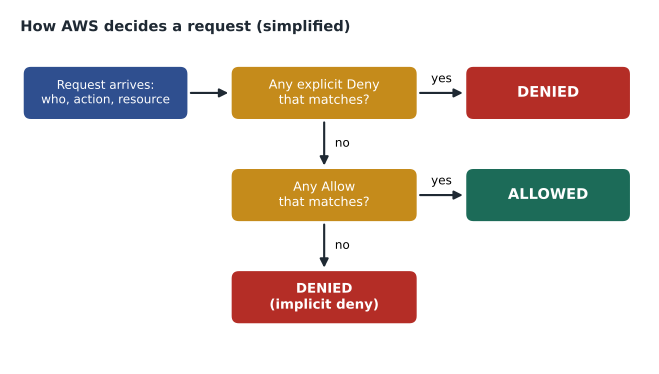
The default deny is what makes least privilege possible. A brand new IAM role with no policies can do nothing at all. Every permission it ever gains is one someone chose to grant. The explicit deny is the safety catch: Hannah can write a statement that denies deleting CloudTrail logs, and no later Allow, however broad, can override it.
Managed and inline policies
Policies come in three forms.
| Type | Who writes and maintains it | Good for | Watch out for |
|---|---|---|---|
| AWS managed policy | AWS | Getting started; common job functions such as ReadOnlyAccess or Billing | Often broader than needed; AWS may update it |
| Customer managed policy | You | Reusable, tailored permissions attached to many identities | You must maintain and review it |
| Inline policy | You, embedded in one identity | A strict one-to-one permission that should be deleted with the identity | Hard to see and reuse; easy to forget |
AWS managed policies include job function policies written for common roles, such as a database administrator or a billing user. They are a good starting point, and AWS keeps them current as services change. Their weakness is that they are written for everyone, so they usually allow more than any one organization needs. A common path is to start with an AWS managed policy, observe what is actually used, and then replace it with a narrower customer managed policy.
Gwen's rule for Cascade Ridge: prefer customer managed policies attached to groups or permission sets, use AWS managed policies where they fit closely, and avoid inline policies except for rare cases.
Least privilege
The principle of least privilege means granting only the permissions needed to perform a task, on only the resources needed, for only as long as they are needed. It limits the damage from mistakes, malicious insiders and stolen credentials. If BookVet's server role can only read one bucket, an attacker who takes over a BookVet server can read that bucket and nothing else: bad, but contained. If the role had AdministratorAccess, the attacker would own the whole account.
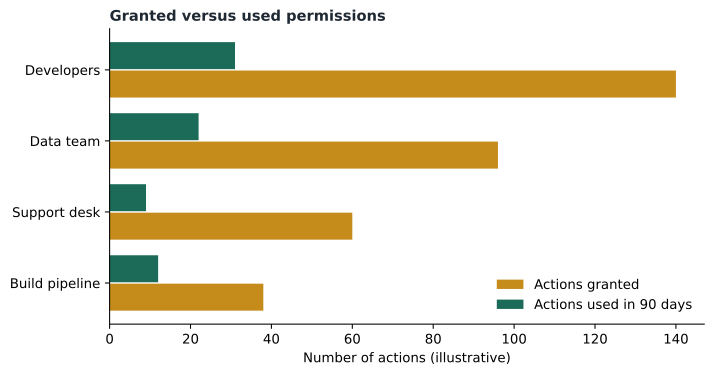
Least privilege is a direction of travel rather than a switch. Gwen explained a practical cycle that many teams follow.
- Start reasonable. Use a job function or narrow managed policy rather than full administrator access.
- Observe. IAM shows when each service was last accessed by an identity, and IAM Access Analyzer can review activity and generate a policy based on what was actually used. Access Analyzer also flags resources shared outside the account or organization.
- Tighten. Replace the broad policy with a customer managed policy that matches real use.
- Review regularly. People change jobs, projects end and permissions accumulate. Remove what is no longer needed.
Least privilege also applies to time. Instead of giving someone permanent administrator access for an occasional task, give them a role they can assume when needed, with MFA, for a limited session. The exam calls the general idea just enough and just in time.
# Simplified IAM-style evaluation: explicit deny wins, then allow, else implicit deny.
import fnmatch

def matches(pattern, value):
    return fnmatch.fnmatchcase(value, pattern)

def evaluate(statements, action, resource):
    allowed = False
    for s in statements:
        if any(matches(a, action) for a in s["Action"]) and any(matches(r, resource) for r in s["Resource"]):
            if s["Effect"] == "Deny":
                return "DENY (explicit)"
            allowed = True
    return "ALLOW" if allowed else "DENY (implicit)"

policy = [
    {"Effect": "Allow", "Action": ["s3:Get*", "s3:List*"], "Resource": ["arn:aws:s3:::crvp-imaging-archive*"]},
    {"Effect": "Deny",  "Action": ["s3:DeleteObject"],     "Resource": ["*"]},
]
tests = [("s3:GetObject", "arn:aws:s3:::crvp-imaging-archive/x-ray-1042.dcm"),
         ("s3:DeleteObject", "arn:aws:s3:::crvp-imaging-archive/x-ray-1042.dcm"),
         ("s3:GetObject", "arn:aws:s3:::crvp-finance/payroll.csv")]
for action, res in tests:
print(action, res.split(":::")[1], "->", evaluate(policy, action, res))s3:GetObject crvp-imaging-archive/x-ray-1042.dcm -> ALLOW s3:DeleteObject crvp-imaging-archive/x-ray-1042.dcm -> DENY (explicit) s3:GetObject crvp-finance/payroll.csv -> DENY (implicit)
What this code does
It imitates the core rule of how AWS evaluates permissions: if any matching statement says Deny, the request is refused; otherwise it is allowed only if some statement allows it, and anything not mentioned is refused by default. A small policy allows reading the imaging archive bucket and denies deleting anything. Three test requests show an allowed read, an explicit deny for a delete, and an implicit deny for a bucket the policy never mentions.
Real IAM evaluation has more layers than this sketch, such as service control policies, permissions boundaries, session policies and resource-based policies across accounts. The three core rules, however, are exactly the ones the code implements, and they are the ones the exam expects.
Policies, groups and permission sets together
Policies do their best work when combined with the identities from lesson 3. Cascade Ridge's design attaches a small number of customer managed policies to a small number of groups: Developers, Data, Finance, Auditors and Platform Admins. In IAM Identity Center the same policies become permission sets, which lesson 6 explains. When Hannah reviews access each quarter, she reviews five groups and their members rather than four hundred individual permission lists.
Common mistakes
MistakeGranting AdministratorAccess to everyone "for now".
InsteadStart with job function or narrow policies and add only what is needed; for occasional admin work, use an assumable role.
MistakeWriting Resource: * when only one bucket is needed.
InsteadName the specific resource ARNs so the permission cannot spread.
MistakeAssuming a later Allow can override a Deny.
InsteadAn explicit deny always wins over any allow.
MistakeHiding permissions in inline policies.
InsteadUse customer managed policies attached to groups so they can be reviewed and reused.
Conditions make policies sharper
The optional Condition element is where policies become precise. A condition adds a test that must be true for a statement to apply. AWS provides global condition keys that work across services, along with service-specific keys. A few illustrate the idea.
| Condition idea | What it checks | Example use |
|---|---|---|
| Require MFA | Whether the caller authenticated with MFA | Allow stopping production instances only in MFA sessions |
| Source address | The IP address range the request came from | Allow access only from the clinics' known network ranges |
| Requested Region | Which Region the request targets | Deny creating resources outside the approved US Regions |
| Resource and principal tags | Tags on the caller or the resource | Allow developers to manage only instances tagged with their team |
| Secure transport | Whether the request used TLS | Deny any S3 request not sent over HTTPS |
Tag-based conditions support an approach called attribute-based access control (ABAC). Instead of writing a separate policy for each team's resources, one policy says that a principal may manage resources whose team tag matches the principal's own team tag. When a new team is formed, it needs new tags, not new policies. Gwen kept ABAC for later; at Cascade Ridge's size, a handful of groups is simpler. But she did add two conditions immediately: a Deny on any S3 request not using secure transport for the imaging archive, and a Deny on creating resources outside the chosen Regions, applied across the organization.
Permissions boundaries and guardrails
Two further controls limit what permissions can ever be granted. A permissions boundary is a managed policy attached to a user or role that sets the maximum permissions that identity can have; even if a broader policy is attached, the effective permissions are the overlap of the two. Organizations use boundaries to let teams create their own roles safely: a developer may create roles for their Lambda functions, but only within the boundary. At the organization level, service control policies play a similar role for whole accounts. Neither grants permissions; both define a ceiling.
Hannah summarized the layers in her notes as a sentence she could remember: "Policies say yes; boundaries and SCPs say not beyond here; a deny says never."
The ceiling idea also explains a puzzle that often appears in practice questions. A developer is given AdministratorAccess in a member account, yet cannot turn off CloudTrail. The reason is not a mistake in the developer's policy: a service control policy at the organization level denies that action for every identity in the account. Effective permissions are always the overlap of everything that applies, and any explicit deny anywhere in the chain removes the action. When a request is unexpectedly denied, checking the layers in that order, from organization down to identity, usually finds the cause quickly.
Worked problem
Evaluating three requests
The Support group has two policies. Policy A allows ec2:Describe* on all resources and ec2:RebootInstances on all resources. Policy B denies ec2:TerminateInstances on all resources. A support desk user makes three requests: list instances, reboot an instance, and stop an instance. What happens to each?
Show solution
- Listing instances is ec2:DescribeInstances, which matches ec2:Describe* in Policy A, and nothing denies it: allowed.
- Rebooting matches ec2:RebootInstances in Policy A, and Policy B does not mention it: allowed.
- Stopping is ec2:StopInstances. No Allow matches it and no Deny mentions it, so it falls to the default: implicitly denied.
Answer: List: allowed. Reboot: allowed. Stop: denied by implicit deny. Termination would be denied explicitly by Policy B even if another policy allowed it.
Kwame grumbled a little when the Developers policy first blocked something he needed, a CloudWatch Logs action for a new dashboard. Gwen added it the same afternoon. "That is how it is supposed to work," she said. "Ask, get it, and the reason is written down in the change."
Summary and key terms
- IAM policies are JSON documents whose statements give an Effect (Allow or Deny), Actions, Resources identified by ARNs and optional Conditions.
- Identity-based policies attach to users, groups and roles; resource-based policies, such as bucket policies, attach to resources and name principals.
- Evaluation follows three rules: an explicit deny always wins, otherwise an explicit allow is required, otherwise the request is implicitly denied.
- AWS managed policies are maintained by AWS and include job function policies; customer managed policies are written and reused by you; inline policies are embedded in one identity.
- Least privilege grants only what is needed, on only the resources needed, for only as long as needed, refined over time with last-accessed data and IAM Access Analyzer.
- Policy
- A document that allows or denies actions on resources.
- ARN
- Amazon Resource Name, the standard identifier for an AWS resource.
- Explicit deny
- A Deny statement that matches a request; it overrides any allow.
- Implicit deny
- The default denial when no policy allows a request.
- AWS managed policy
- A policy created and maintained by AWS.
- Customer managed policy
- A reusable policy that the customer creates and maintains.
- Inline policy
- A policy embedded directly in a single user, group or role.
- Least privilege
- Granting only the minimum permissions needed for a task.
- IAM Access Analyzer
- A tool that finds external access and helps generate least-privilege policies from activity.
Practice problems
Work each problem on paper first, then reveal the answer to check.
What happens if no policy mentions a request?
Show answer
It is denied by the implicit deny.
Which wins: an explicit allow or an explicit deny?
Show answer
The explicit deny.
Name a tool that helps right-size permissions.
Show answer
IAM Access Analyzer or the last-accessed information in IAM.
Lesson quiz · 5 questions
Score 60% or more to complete this lesson.
Create a free account to save your progress, take quizzes and earn a certificate.