
AWS-102 · Lesson 3 of 12 · 19 min
IAM users, groups and roles
▶ Video coming soon A video version of this lesson is on the way.
With the root user locked away, the next question was who else should be able to sign in. The list was longer than Mateo expected. Kwame needed to deploy BookVet. Lorraine Beaudry, the CFO, wanted to read the bill. Hannah needed to review security settings. Andre Leclerc, the operations manager, wanted to see whether the clinic systems were healthy. The backup job needed to copy data every night, and the BookVet servers needed to read images from storage. "That is six people and two machines," Gwen said, "and none of them should have the same permissions."
AWS's tool for answering who can do what is AWS Identity and Access Management, usually called IAM. IAM is a global service: identities and policies created in it apply across all Regions of the account. There is no extra charge for IAM itself. This lesson introduces its building blocks, the identities: users, groups and roles. Lesson 4 covers the policies that give those identities permissions.
Authentication and authorization
Two words underpin all of IAM. Authentication answers who you are: the system checks a password, an MFA code, an access key or a signed token. Authorization answers what you may do: once your identity is known, the system checks the policies that apply to you before allowing each request. Signing in successfully is only the first step; every later action is authorized separately.
In AWS, the identity making a request is called a principal. A principal can be a person, an application or an AWS service acting on someone's behalf. Each request names an action, such as reading an object, and a resource, such as a particular S3 bucket. IAM's job is to decide, for every request, whether that principal may perform that action on that resource.
IAM users
An IAM user is an identity created inside one AWS account to represent a person or an application. A user can have a password for the console, access keys for programmatic access, or both, plus MFA devices. These credentials are long-term: they keep working until someone changes or removes them.
IAM users were the original way to give people access, and many older accounts still use them. Today AWS recommends a different approach for people. For employees, AWS recommends federation, usually through IAM Identity Center, so that people sign in with the company's identity source and receive temporary credentials. For applications, AWS recommends roles, which also give temporary credentials. IAM users remain useful for a few specific cases, such as an emergency break-glass identity or a third-party tool that cannot use roles, but they are no longer the default for daily human access. Lesson 6 explains Identity Center in detail.
Mateo found that Kwame had already created an IAM user called kwame during early testing. Gwen did not delete it immediately, because a build script used its access keys, but she put both on the list to replace.
IAM groups
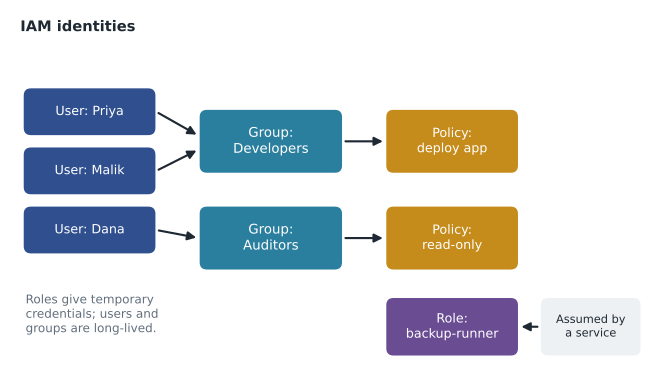
An IAM group is a collection of IAM users. Permissions attached to a group apply to every user in it, so administrators manage permissions by job rather than by person. When a new developer joins, they are added to the Developers group and inherit its permissions; when they change jobs, they are moved to another group. Without groups, an account soon ends up with dozens of slightly different personal permission sets that nobody can review.
Groups have two limits worth knowing. A group contains users only; a group cannot contain another group, and roles cannot be members of groups. And a group is not an identity that can sign in or be named as a principal in a policy; it is simply a convenient way to attach the same policies to many users. The same idea, managing access by job rather than by person, continues in IAM Identity Center, where groups from the company directory receive permission sets.
IAM roles
An IAM role is an identity with permissions but without long-term credentials. Nobody signs in as a role directly. Instead, a trusted principal assumes the role and receives temporary security credentials that expire automatically, typically after an hour or a few hours. The service that issues these credentials is the AWS Security Token Service (AWS STS).
Every role has two parts. Its trust policy says who is allowed to assume it, for example the EC2 service, a user in another account, or users signed in through the company's identity provider. Its permissions policies say what the role can do once assumed. Separating who may become the role from what the role may do is what makes roles flexible.
Roles appear in many common situations.
- AWS services acting for you. An EC2 instance can have a role attached through an instance profile, so software on the instance gets temporary credentials automatically. The BookVet servers will use a role that can read the imaging bucket, and no access key ever sits on the server.
- Lambda functions run with an execution role that defines what the function can touch.
- Cross-account access. A user or role in one account can assume a role in another account, which is how Cascade Ridge's security account will read logs from the production account.
- Federated users. People who sign in through an external identity provider or IAM Identity Center receive temporary credentials through roles behind the scenes.
- Service-linked roles. Some AWS services create a predefined role in your account so that they can act on your behalf; the service defines its permissions.
Temporary credentials are the key benefit. If a temporary credential leaks, it stops working on its own within hours. A long-term access key that leaks keeps working until someone notices and deletes it, which in published incident reports is often weeks later.
Choosing the right identity
Gwen gave Mateo a short decision rule for any new access request.
| Who needs access? | Use | Why |
|---|---|---|
| An employee or contractor | IAM Identity Center user or group, with a permission set | Central sign-in, MFA, temporary credentials, one place to remove leavers |
| Software on an EC2 instance | An IAM role attached to the instance | No keys on the server; credentials rotate automatically |
| A Lambda function | The function's execution role | Each function gets only what it needs |
| Another AWS account | A role in your account that trusts theirs | No shared passwords; access can be revoked by editing the trust policy |
| A tool outside AWS that cannot use roles | A narrowly scoped IAM user with an access key, as a last resort | Long-term keys are riskier, so limit and rotate them |
The table also shows why the exam keeps asking about roles. Whenever a question mentions an application, a service or another account needing access, the answer is very often a role.
Naming, tags and the shape of the account
A few habits keep IAM understandable as it grows. Name roles by purpose, such as bookvet-app-read-images or backup-runner, so their job is obvious in logs. Tag roles with an owner and a system. Keep a short written list of who may create IAM identities, because the ability to create users or attach policies is itself powerful: an identity that can attach any policy to itself can make itself an administrator. Gwen restricted IAM administration to two people and the security account.
# A tiny model of IAM: users get permissions from their groups; roles are assumed.
groups = {
    "Developers": {"deploy-bookvet", "read-logs"},
    "Finance":    {"view-billing"},
    "Auditors":   {"read-config", "read-logs"},
}
membership = {"kwame": ["Developers"], "lorraine": ["Finance"], "hannah": ["Auditors", "Finance"]}

def permissions(user):
    perms = set()
    for g in membership.get(user, []):
        perms |= groups[g]
    return sorted(perms)

for u in membership:
print(u, "->", permissions(u))kwame -> ['deploy-bookvet', 'read-logs'] lorraine -> ['view-billing'] hannah -> ['read-config', 'read-logs', 'view-billing']
What this code does
Groups are given sets of permissions, and users are placed in one or more groups. Each user's permissions are worked out by combining the permissions of all their groups. The output shows that a person in two groups gets the permissions of both, which is how group-based access works in IAM.
The model makes one property visible: a user in two groups receives the union of both groups' permissions. Hannah, in Auditors and Finance, can read configuration, read logs and view billing. That is intended here, but it is also how permissions quietly accumulate, which is why lesson 4 introduces least privilege and regular reviews.
IAM and the rest of the account
IAM controls access to the AWS APIs and console: creating instances, reading buckets, changing settings. It does not control who can sign in to the Windows desktop of an EC2 instance or to the VetLedger application itself; those use the operating system's and the application's own accounts. Cascade Ridge therefore has two identity questions to answer: who can manage AWS resources, through IAM, and who can use the applications running on them, through each application's sign-in. For the practice system, Gwen plans to connect both to the company directory so that a leaver loses both at once.
Common mistakes
MistakeCreating an IAM user with access keys for software on an EC2 instance.
InsteadAttach an IAM role to the instance; the software receives temporary credentials automatically.
MistakeTrying to add a group to another group.
InsteadIAM groups contain users only. Organize by attaching several policies to one group or by using several groups.
MistakeThinking a role has a password.
InsteadRoles have no long-term credentials. A trusted principal assumes the role and receives temporary credentials.
MistakeGiving each person a hand-built set of permissions.
InsteadGrant permissions to groups (or Identity Center permission sets) based on job, then add people to them.
Service roles and service-linked roles
Two special kinds of role appear constantly once an account is in use, and they are easy to confuse. A service role is a role that you create so that an AWS service can act on your behalf, for example a role that AWS Backup assumes to copy your EBS volumes, or the role CodeBuild uses to fetch code. You write or choose its permissions, and you can change them. A service-linked role is created by the service itself, its permissions are defined by the service, and you generally cannot edit them; the service needs exactly those permissions to work. When Mateo turned on AWS Backup, a service-linked role appeared in the account. Kwame initially thought someone had created it by mistake. The role's description and its name, which begins with AWSServiceRoleFor, made its purpose clear.
Knowing the difference helps during reviews. When Hannah finds a role she does not recognize, she checks whether it is service-linked. If it is, it belongs to an AWS service the company turned on, and deleting it would break that service. If it is an ordinary role, someone created it, and it should have an owner tag and a clear purpose.
Access for outside partners
Cascade Ridge works with several outside parties: a radiology specialist group that reads complex images, an IT support company that helps after hours, and the VetLedger vendor. Each wants some form of access. Gwen's principle is the same as for staff: give each party its own identity, scoped to its job, with temporary credentials, and never share a Cascade Ridge person's sign-in. For the after-hours IT company, a cross-account role in production that trusts the support company's AWS account, with read-only permissions and MFA required, does the job. For the vendor, access is through the application itself, not through AWS at all. Every external arrangement is written in a short register with an owner and an end date, so that access granted for a project does not quietly outlive it.
Worked problem
Choosing identities for Cascade Ridge
Gwen lists four needs: Lorraine must view the monthly bill; the nightly job on an EC2 instance must copy files to the backup bucket; the security account must read CloudTrail logs stored in the production account; and an outside radiology reading service needs its staff to see specific images. What identity type fits each?
Show solution
- Lorraine is a person: give her an Identity Center user in a Finance group with a billing read permission set.
- The nightly job runs on EC2: attach a role to the instance with permission to write to the backup bucket only.
- The security account needs cross-account access: create a role in production that trusts the security account and allows reading the log bucket.
- Outside staff are people from another organization: they should use the application's sharing features or a federated, tightly scoped access path, not shared passwords; this is a design question for Hannah and Gwen.
Answer: A person: Identity Center. A machine on AWS: a role. Another account: a cross-account role. Outside people: federation or application-level sharing, never shared credentials.
Summary and key terms
- IAM controls who can do what in an AWS account.
- It is global and free.
- Authentication proves identity; authorization checks policies for each request made by a principal.
- IAM users are long-term identities with passwords and access keys; AWS now recommends federation through IAM Identity Center for people and roles for applications.
- Groups collect users so permissions are managed by job; groups cannot contain groups.
- Roles have no long-term credentials: trusted principals assume them through AWS STS and receive temporary credentials.
- A role's trust policy says who may assume it, and its permissions policies say what it can do.
- Roles serve EC2 instances, Lambda functions, cross-account access and federated users.
- IAM
- AWS Identity and Access Management, the service that controls access to AWS resources.
- Principal
- A person, application or service that makes a request to AWS.
- IAM user
- A long-term identity in one account with a password, access keys or both.
- IAM group
- A collection of IAM users that share attached policies.
- IAM role
- An identity with permissions but no long-term credentials, assumed for temporary access.
- Trust policy
- The part of a role that defines which principals may assume it.
- AWS STS
- The Security Token Service, which issues temporary security credentials.
- Instance profile
- The container that attaches a role to an EC2 instance.
Practice problems
Work each problem on paper first, then reveal the answer to check.
What does a role have instead of a password?
Show answer
Temporary credentials, issued when a trusted principal assumes it.
Can an IAM group contain another group?
Show answer
No; groups contain users only.
What is the recommended way to give software on EC2 access to S3?
Show answer
Attach an IAM role to the instance.
Lesson quiz · 5 questions
Score 60% or more to complete this lesson.
Create a free account to save your progress, take quizzes and earn a certificate.