
AWS-102 · Lesson 7 of 12 · 18 min
Network security basics: security groups and network ACLs
▶ Video coming soon A video version of this lesson is on the way.
In the old server room, the network was simple. A firewall appliance sat between the internet and everything else, and Mateo's rule of thumb was that anything inside was trusted. When he built his first test servers in AWS, he copied that habit: he opened the Remote Desktop port to the whole internet so he could work from home. Within an hour the Windows security log on the test server showed hundreds of failed sign-in attempts from addresses all over the world.
"Nobody is targeting Cascade Ridge," Gwen said. "They are targeting every open Remote Desktop port on the internet, all day, automatically. In AWS you decide exactly which doors exist, and the default is that none do."
This lesson explains the network layer of security in AWS: the virtual private cloud, the two built-in filters called security groups and network access control lists, and a few habits that keep resources off the open internet. It sits firmly on the customer's side of the shared responsibility model: AWS provides the tools, and the customer decides the rules.
The virtual private cloud
A virtual private cloud (VPC) is a logically isolated network within an AWS Region that belongs to one account. The customer chooses its private address range and divides it into subnets, each in one Availability Zone. A public subnet has a route to an internet gateway, so resources in it can have public addresses. A private subnet has no direct route from the internet; resources there can be reached only from inside the VPC or through deliberate connections.
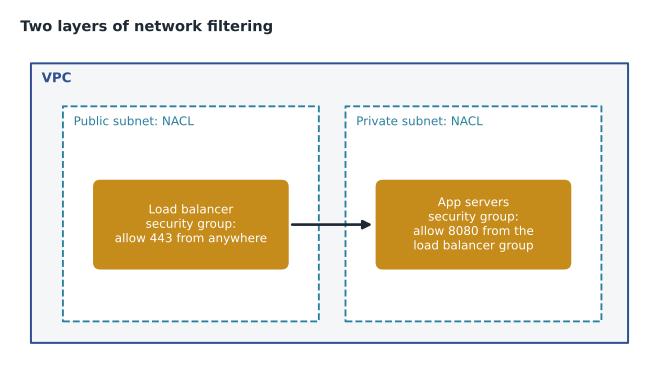
Cascade Ridge's design follows a common pattern. The internet-facing load balancer for BookVet sits in public subnets. The application servers and the RDS database sit in private subnets, spread across Availability Zones, with no public addresses at all. Traffic from the internet can reach only the load balancer, and the load balancer can reach only the application servers.
Security groups
A security group is a virtual firewall attached to an elastic network interface, which in practice means attached to an EC2 instance, an RDS database, a load balancer or another resource in the VPC. It controls inbound and outbound traffic for that resource.
- Allow rules only. A security group lists what is allowed. Anything not listed is blocked. There is no way to write a deny rule in a security group.
- Stateful. If an inbound request is allowed, the response is automatically allowed back out, and vice versa. You do not write separate rules for return traffic.
- Default behavior. A new security group allows no inbound traffic and allows all outbound traffic, unless you change it.
- All rules evaluated together. There is no rule order; if any rule allows the traffic, it is allowed.
- Sources can be other security groups. A rule can say allow port 8080 from anything in the load balancer's security group, instead of naming addresses.
That last feature is powerful. Gwen's rule for the application servers does not mention any IP address. It allows the application port only from members of the load balancer's security group, and the database's security group allows the database port only from members of the application servers' group. When servers are added or replaced, the rules still hold without editing.
Network access control lists
A network access control list (network ACL) filters traffic at the boundary of a subnet. Every subnet is associated with exactly one network ACL. Network ACLs differ from security groups in ways the exam likes to test.
- Allow and deny rules. A network ACL can explicitly deny traffic, for example from a range of addresses known to be abusive.
- Stateless. Return traffic is not automatically allowed. Rules for inbound and outbound traffic must both permit a conversation, including the range of temporary ports used for responses.
- Numbered rules, evaluated in order. The lowest-numbered matching rule decides, and later rules are not checked.
- Default behavior. The default network ACL that comes with a VPC allows all inbound and outbound traffic. A newly created custom network ACL denies everything until rules are added.
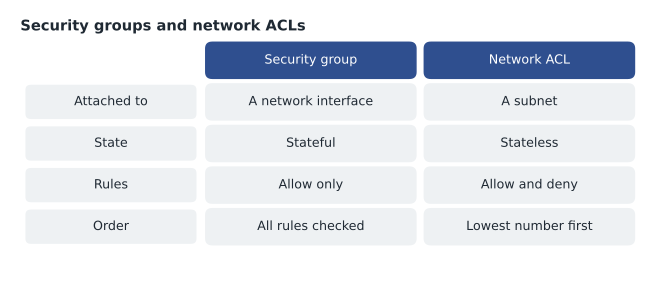
Most organizations rely mainly on security groups, because they are precise and stateful, and use network ACLs as a coarse second layer, for example to block a known bad address range for a whole subnet. Defense in depth, using more than one independent control, means that a mistake in one layer is less likely to expose a resource.
Reading a rule set
Gwen had Mateo read the rules for BookVet aloud as if they were sentences.
| Resource | Direction | Port | Source or destination | In plain words |
|---|---|---|---|---|
| Load balancer security group | Inbound | 443 (HTTPS) | 0.0.0.0/0 | Anyone on the internet may connect over HTTPS |
| App servers security group | Inbound | 8080 | Load balancer security group | Only the load balancer may reach the app |
| Database security group | Inbound | 1433 (SQL Server) | App servers security group | Only the app servers may reach the database |
| Public subnet network ACL | Inbound | All | A blocked address range | Deny rule numbered 50 drops traffic from a known abusive range |
The notation 0.0.0.0/0 means every IPv4 address. It is correct for a public website's HTTPS port and almost never correct for anything else. A security group rule allowing Remote Desktop, SSH or a database port from 0.0.0.0/0 is one of the most common findings in security reviews, and AWS Trusted Advisor and Security Hub both flag it.
# Check security group rules for administrative ports open to the whole internet.
risky_ports = {22: "SSH", 3389: "Remote Desktop", 1433: "SQL Server", 3306: "MySQL"}
rules = [
    {"group": "lb-public",  "port": 443,  "source": "0.0.0.0/0"},
    {"group": "app-tier",   "port": 8080, "source": "sg:lb-public"},
    {"group": "mateo-test", "port": 3389, "source": "0.0.0.0/0"},
    {"group": "db-tier",    "port": 1433, "source": "sg:app-tier"},
]
for r in rules:
    if r["source"] == "0.0.0.0/0" and r["port"] in risky_ports:
        print(f"FINDING {r['group']}: {risky_ports[r['port']]} open to the internet")
    else:
print(f"ok {r['group']}: port {r['port']} from {r['source']}")ok lb-public: port 443 from 0.0.0.0/0 ok app-tier: port 8080 from sg:lb-public FINDING mateo-test: Remote Desktop open to the internet ok db-tier: port 1433 from sg:app-tier
What this code does
It scans sample security group rules for administrative or database ports, such as SSH and Remote Desktop, that are open to the whole internet (shown as 0.0.0.0/0). Rules that only accept traffic from another security group, or that open the normal web port 443, are reported as fine. It finds one test server with Remote Desktop exposed to everyone, which should be closed.
Managing servers without opening ports
Mateo still needed to manage the Windows servers. Gwen showed him AWS Systems Manager Session Manager, which opens a shell or a port-forwarding session to an instance through the Systems Manager service. The instance needs no inbound ports open at all, access is controlled with IAM, and every session can be logged. He closed the Remote Desktop rule that afternoon and connected through Session Manager instead. The failed sign-in attempts stopped immediately, because there was no longer anything for the scanners to find.
Other network protections
Several other services and features build on the VPC. They appear in later lessons or later courses, but it helps to recognize them now.
- VPC Flow Logs record information about the IP traffic going to and from network interfaces, useful for troubleshooting and investigations.
- AWS Network Firewall is a managed firewall for VPCs that can inspect and filter traffic with more detailed rules than security groups.
- AWS WAF filters web requests to applications; AWS Shield protects against distributed denial of service attacks. Lesson 10 covers both.
- VPC endpoints let resources in private subnets reach AWS services such as S3 without going over the internet.
- Amazon S3 Block Public Access is a separate, account-wide and bucket-level setting that prevents buckets from being made public by mistake.
Common mistakes
MistakeOpening SSH or Remote Desktop to 0.0.0.0/0 for convenience.
InsteadUse Session Manager, or restrict administrative ports to a known address range.
MistakeTrying to write a deny rule in a security group.
InsteadSecurity groups only allow. Use a network ACL deny rule for subnet-wide blocks.
MistakeForgetting that network ACLs are stateless.
InsteadAllow both directions, including the return ports, or conversations will fail.
MistakeExpecting the first matching security group rule to win.
InsteadSecurity group rules are evaluated together; network ACL rules are evaluated in number order.
Public and private by design
The strongest network control is not a rule at all: it is not giving a resource a path from the internet in the first place. Gwen's design checklist for every new workload starts with placement. Does this resource need to be reached from the internet? If not, it goes in a private subnet with no public address, and the question of which internet ports to open never arises. For Cascade Ridge, the answer was yes only for the BookVet load balancer and, later, the public website's content delivery network. Everything else, including the practice system, the database, the imaging archive and the backup servers, lives in private subnets or is a managed service reached through private endpoints.
Resources in private subnets still sometimes need to make outbound connections, for example to download operating system updates. A NAT gateway in a public subnet lets private resources start outbound connections to the internet while preventing the internet from starting connections to them. VPC endpoints are even better where they exist, because traffic to AWS services such as S3 or Secrets Manager then never leaves the AWS network.
Connecting the clinics
The eleven clinics and the emergency hospital need to reach the practice system in AWS. Publishing VetLedger on the internet would be the wrong answer. Instead, Gwen planned an AWS Site-to-Site VPN: encrypted tunnels over the internet from each site's router to the VPC, so clinic computers reach the private application as if it were on the office network. If traffic grows, AWS Direct Connect, a dedicated private connection from a data center or office to AWS, is an option for the head office. The security groups then allow the application port from the clinics' address ranges and from nowhere else.
| Need | Network tool | Security benefit |
|---|---|---|
| Private resources need software updates | NAT gateway | Outbound only; nothing can connect in |
| Private resources call AWS services | VPC endpoints | Traffic stays on the AWS network |
| Clinics reach the practice system | Site-to-Site VPN | Encrypted tunnels; app never public |
| Administrators reach servers | Session Manager | No inbound administrative ports at all |
Testing the rules
Rules that look right on paper can still be wrong. AWS provides tools that check reachability without sending real traffic, such as VPC Reachability Analyzer, which traces whether one resource can reach another and which rule blocks it, and Network Access Analyzer, which finds unintended paths, such as a database reachable from the internet. Mateo used Reachability Analyzer to confirm that the database could not be reached from the public subnet, and kept the result as evidence for Hannah's audit file.
Mateo kept a simple register of every rule that allows traffic from outside the VPC: the resource, the port, the source and the reason. At first it had six entries. Gwen asked him to review it monthly, and to treat any rule that nobody could explain as a finding to remove. Over time, the register became the quickest way to answer an auditor's favorite question: show me everything that is reachable from the internet, and tell me why.
Worked problem
Why can't the app reach the database?
After a change, BookVet's app servers cannot connect to the RDS database. The database security group allows port 1433 from the app servers' security group. The private subnet's custom network ACL has inbound rule 100 allowing port 1433 from the VPC range, and outbound rule 100 allowing port 1433 to the VPC range. What is wrong?
Show solution
- The security group is fine: it allows the app tier, and being stateful it allows the responses.
- The network ACL is stateless. Requests into the database subnet are allowed, but the database's responses go back to the app servers on temporary high-numbered ports, not port 1433.
- The outbound rule only allows port 1433, so the responses on temporary ports are denied by the network ACL's final catch-all deny.
- Add an outbound rule allowing the temporary port range to the VPC range (and the matching inbound rule in the app subnet's ACL if it is custom).
Answer: The custom network ACL blocks return traffic because ACLs are stateless. Allow the ephemeral port range for responses.
Summary and key terms
- A VPC is a logically isolated network in a Region, divided into public and private subnets in Availability Zones.
- Security groups are stateful virtual firewalls on network interfaces: they have allow rules only, all rules are evaluated together, new groups allow no inbound and all outbound traffic, and rules can reference other security groups.
- Network ACLs filter at the subnet boundary: they are stateless, have numbered allow and deny rules evaluated lowest first, and the default ACL allows all traffic while a new custom ACL denies all.
- Use both for defense in depth.
- Avoid opening administrative ports to 0.0.0.0/0; Session Manager manages instances with no inbound ports.
- VPC Flow Logs, Network Firewall, VPC endpoints and S3 Block Public Access add further protection.
- VPC
- A virtual private cloud: a logically isolated network in an AWS Region.
- Subnet
- A range of addresses in a VPC within one Availability Zone; public or private.
- Security group
- A stateful virtual firewall with allow rules, attached to network interfaces.
- Network ACL
- A stateless subnet-level filter with numbered allow and deny rules.
- Stateful
- Remembering a connection so that return traffic is allowed automatically.
- Session Manager
- A Systems Manager capability for managing instances without opening inbound ports.
- VPC Flow Logs
- Records of IP traffic to and from network interfaces in a VPC.
Practice problems
Work each problem on paper first, then reveal the answer to check.
Can a security group deny traffic from one address?
Show answer
No. Use a network ACL deny rule.
Is a network ACL stateful?
Show answer
No, it is stateless.
What does 0.0.0.0/0 mean in a rule?
Show answer
Every IPv4 address.
Lesson quiz · 5 questions
Score 60% or more to complete this lesson.
Create a free account to save your progress, take quizzes and earn a certificate.