
AWS-102 · Lesson 5 of 12 · 19 min
Multi-factor authentication and access keys
▶ Video coming soon A video version of this lesson is on the way.
Hannah came to the Tuesday session with a news story printed out. A company in another city had lost months of customer records after a developer pasted an AWS access key into a public code repository. Automated scanners found the key within minutes. "Could that happen to us?" she asked.
Gwen opened Kwame's early test code. Near the top of a configuration file were two long strings: an access key ID and a secret access key, belonging to the IAM user kwame, which had administrator permissions. The file had not been pushed anywhere public, but it had been emailed to a contractor once. "It could," Gwen said. "Today we fix the way people prove who they are, and the way programs do."
This lesson covers the credentials AWS identities use: passwords, multi-factor authentication, access keys and temporary credentials. It also covers password policies and where to store secrets that applications need, such as database passwords.
Passwords and password policies
People who sign in to the AWS Management Console as IAM users use a password. An account administrator can set an IAM password policy for the account's IAM users: a minimum length, which character types are required, how often passwords must change, whether old passwords may be reused, and whether users can change their own. The password policy applies to IAM users, not to the root user, and not to people who sign in through IAM Identity Center with an external identity source, whose passwords are governed by that directory.
Current guidance on passwords favors length and uniqueness over complicated character rules and frequent forced changes, which tend to produce predictable patterns. Whatever the policy, a password alone is a weak guard, because passwords are phished, guessed and reused. That is why MFA matters.
Multi-factor authentication
Multi-factor authentication (MFA) requires two or more different kinds of evidence at sign-in: something you know, such as a password, plus something you have, such as a security key or a phone, or something you are, such as a fingerprint used to unlock a device. A stolen password is then not enough to sign in.
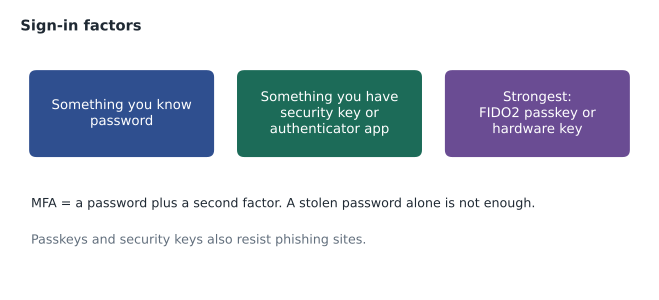
AWS supports several MFA types for the root user and IAM users.
| MFA type | How it works | Strengths and limits |
|---|---|---|
| Passkeys and FIDO2 security keys | A cryptographic key on a hardware key or in a device or password manager, unlocked by a PIN, fingerprint or face | Phishing-resistant: the key only answers the genuine AWS sign-in site |
| Virtual authenticator app | An app on a phone generates a time-based one-time code | Common and free; codes can still be phished by a fake sign-in page |
| Hardware TOTP token | A small device that displays time-based codes | No phone needed; codes can still be phished |
AWS allows several MFA devices to be registered for one identity, which is useful for keeping a spare. AWS also requires MFA for root users in many account types, and IAM Identity Center can require MFA for every workforce user.
MFA can also be used inside policies. A policy condition can require that the caller signed in with MFA before allowing a sensitive action, such as terminating production instances. Gwen used this for the Platform Admins group: the role that can change production requires an MFA-authenticated session to be assumed.
Access keys
Programs and the AWS Command Line Interface do not type passwords. They sign each API request with credentials. For an IAM user, those credentials are an access key: an access key ID, which is like a user name, and a secret access key, which is like a password. The secret is shown only once, when the key is created.
Access keys are long-term credentials. They work until someone deactivates or deletes them, from anywhere in the world, with whatever permissions the user has. That is why leaked keys are dangerous, and why public code repositories are scanned for them constantly by attackers and by defenders alike. AWS itself watches for its keys in some public places and notifies customers, and Amazon GuardDuty, covered in lesson 9, can detect unusual use of credentials, but prevention is far better than detection.
Prefer temporary credentials
The best practice is to avoid long-term access keys wherever possible and use temporary credentials instead.
- People using the CLI sign in through IAM Identity Center, and the CLI receives short-lived credentials for the session. Nothing permanent is saved on the laptop.
- Software on EC2, ECS or Lambda uses an IAM role. The service delivers temporary credentials to the software and refreshes them automatically.
- Software in another AWS account assumes a cross-account role.
- Software outside AWS, such as an on-premises server or another cloud, can often use a role through features designed for that, such as IAM Roles Anywhere or workload identity federation, instead of a stored key.
Only when none of these is possible should a long-term key be created, and then it should belong to an identity with minimal permissions, be stored in a secrets manager rather than in code, be rotated regularly, and be monitored.
Kwame's build script was one such case at first, because it ran on an old on-site build server. The plan was to move the build into AWS CodeBuild in December, where it would use a role. Until then, Gwen replaced his administrator key with a key for a new user, build-bot, that could only upload files to one deployment bucket, and scheduled its deletion.
Rotating and retiring keys
Rotation means replacing a key with a new one on a schedule. IAM lets a user have two access keys at once precisely so rotation can happen without downtime: create the new key, update the application to use it, confirm the old key is no longer used, then deactivate and delete the old one. The IAM console shows when each key was last used, which makes the confirmation step easy.
# Flag access keys that are old or unused (sample data).
from datetime import date
today = date(2026, 11, 12)
keys = [
    {"user": "kwame",     "created": date(2026, 9, 30), "last_used": date(2026, 11, 10), "active": True},
    {"user": "build-bot", "created": date(2026, 11, 4), "last_used": date(2026, 11, 11), "active": True},
    {"user": "old-sync",  "created": date(2025, 6, 2),  "last_used": date(2026, 1, 15), "active": True},
]
for k in keys:
    age = (today - k["created"]).days
    idle = (today - k["last_used"]).days
    advice = []
    if age > 90:
        advice.append(f"rotate (age {age} days)")
    if idle > 60:
        advice.append(f"unused for {idle} days: deactivate")
print(f"{k['user']:10} {'; '.join(advice) or 'ok'}")kwame ok build-bot ok old-sync rotate (age 528 days); unused for 301 days: deactivate
What this code does
It reviews three sample access keys against today's date, working out each key's age and how many days since it was last used. Keys older than 90 days are flagged for rotation and keys unused for more than 60 days are flagged for deactivation. Only the old sync key is flagged, on both counts, showing the routine hygiene check administrators run on long-term credentials.
The sample uses common thresholds: rotate keys older than ninety days, and deactivate keys unused for sixty. Organizations choose their own numbers; AWS Config, covered in lesson 9, has managed rules that check key age automatically.
Storing secrets for applications
Applications need more secrets than AWS keys: the password for the VetLedger database, an API key for the payment provider, the credentials BookVet uses to send email. These must never be written into code or plain configuration files. AWS offers two services for storing them.
| Service | What it stores | Notable features |
|---|---|---|
| AWS Secrets Manager | Secrets such as database credentials and API keys | Encrypts with KMS; controls access with IAM; can rotate some secrets automatically, including credentials for supported databases |
| AWS Systems Manager Parameter Store | Configuration values and secrets as parameters | Plain or encrypted (SecureString) parameters; organizes values in a hierarchy; no built-in rotation |
The application asks the service for the secret at run time, using its IAM role. Access to the secret is governed by IAM and logged by CloudTrail, so Hannah can see which roles read the database password and when. Gwen chose Secrets Manager for the VetLedger database credentials, because automatic rotation means the password changes on a schedule without anyone needing to know it.
Kwame asked whether this was overkill for a small company. "A password in a config file gets copied to every laptop, every backup and every email that ever contains that file," Gwen said. "A secret in Secrets Manager stays in one place, behind a lock that writes down every time it is opened."
Putting it together at Cascade Ridge
By the end of the week, the credential picture had changed completely. People signed in through IAM Identity Center with MFA, using security keys for administrators and authenticator apps for everyone else. The root user had two security keys in two safes. No human had a long-term access key. Applications used roles and read their secrets from Secrets Manager. One temporary user, build-bot, held one narrowly scoped key with a deletion date in December.
Common mistakes
MistakeEmbedding access keys in source code or emailing them.
InsteadUse roles and temporary credentials; if a key is unavoidable, store it in a secrets manager and limit its permissions.
MistakeCreating access keys for the root user.
InsteadThe root user should have no access keys at all.
MistakeThinking the IAM password policy covers the root user.
InsteadIt applies to IAM users only; protect root separately with a strong password and MFA.
MistakeTreating an authenticator app code as phishing-proof.
InsteadOne-time codes can be phished; passkeys and FIDO2 security keys resist phishing.
Signing requests and the CLI
It helps to know roughly what happens when a program uses credentials. Every request to an AWS API is signed: the program uses the secret part of its credentials to compute a signature over the request's details and the current time, and sends the signature with the request. AWS recomputes it and checks that it matches. The secret itself never travels over the network. Signatures also include a timestamp, so an intercepted request cannot be replayed much later. The AWS SDKs and the CLI do all of this automatically; developers only decide where the credentials come from.
That last decision is the one that matters. The SDKs and the CLI look for credentials in a standard order: values set for the current session, shared configuration files, the single sign-on session created by Identity Center, and finally the role attached to the instance or container they are running on. Gwen's standard for Cascade Ridge laptops is that the configuration files contain Identity Center profiles only, never a secret key. On servers, the instance role supplies everything.
aws configure sso
aws sso login --profile crvp-dev
aws s3 ls --profile crvp-dev
When a key leaks anyway
Kwame asked what to do if, despite everything, a key ends up somewhere public. The response is quick and practical: deactivate the key immediately, which stops it working; check CloudTrail for every action taken with it; remove anything the attacker created, such as new users, keys or instances, often in Regions the company does not use; then delete the key and fix the process that leaked it. Deactivating before investigating matters, because automated attackers can start resources within minutes. Hannah added these steps to the incident plan beside the root compromise steps from lesson 2.
Gwen also asked for a scheduled report. Each Monday, a short script reads the IAM credential report and lists any access key older than ninety days or unused for sixty, and any console user without MFA. The list goes to the platform team's channel. Most weeks it is empty, which is exactly the point: problems are caught while they are small.
Worked problem
Rotating a key without downtime
The build-bot user has one active access key, created on November 4. A policy says keys must be rotated within ninety days. List the steps to rotate it without breaking the build.
Show solution
- Create a second access key for build-bot; IAM allows two keys at once.
- Store the new secret in the secrets manager the build server reads, replacing the old value.
- Run a build and confirm it succeeds with the new key.
- Check the old key's last-used time to make sure nothing still uses it.
- Deactivate the old key, wait a short period in case something breaks, then delete it.
Answer: Create, switch, confirm, deactivate, delete. Better still, move the build into AWS so it can use a role and needs no key at all.
Summary and key terms
- Console users authenticate with passwords; an IAM password policy sets rules for IAM users' passwords.
- Multi-factor authentication adds a second factor so a stolen password is not enough.
- AWS supports passkeys and FIDO2 security keys, which resist phishing, as well as authenticator apps and hardware TOTP tokens.
- Access keys are long-term credentials for programmatic access; they are risky if leaked, so prefer temporary credentials from roles and IAM Identity Center.
- When a key is unavoidable, limit its permissions, store it in a secrets manager, rotate it using two keys, and delete unused keys.
- AWS Secrets Manager and Systems Manager Parameter Store keep application secrets out of code, with IAM access control and CloudTrail logging; Secrets Manager can rotate some secrets automatically.
- MFA
- Multi-factor authentication, which requires two or more kinds of evidence to sign in.
- Passkey
- A phishing-resistant FIDO2 credential stored on a device, security key or password manager.
- Access key
- An access key ID and secret access key used to sign programmatic requests.
- Temporary credentials
- Short-lived credentials issued for a role or federated session.
- Key rotation
- Replacing a credential with a new one on a schedule.
- AWS Secrets Manager
- A service that stores, controls access to and can rotate secrets.
- Parameter Store
- A Systems Manager capability for storing configuration values and encrypted parameters.
Practice problems
Work each problem on paper first, then reveal the answer to check.
Which MFA type resists phishing?
Show answer
Passkeys and FIDO2 security keys.
Why can an IAM user have two access keys?
Show answer
So keys can be rotated without downtime.
Where should an application keep its database password?
Show answer
In AWS Secrets Manager (or an encrypted Parameter Store parameter), read at run time with its role.
Lesson quiz · 5 questions
Score 60% or more to complete this lesson.
Create a free account to save your progress, take quizzes and earn a certificate.