
SLS-221 · Lesson 7 of 12 · 20 min
A professional online presence
▶ Video coming soon A video version of this lesson is on the way.
On October 26, Owen asked Maya to open her LinkedIn profile on the big screen. It showed a photo from a friend's wedding, a headline that read "Appliance sales at Juniper & Pine Home," and an About section left blank. She had joined Ridgeline almost two months earlier. "Before your next call, half your prospects will look you up," Owen said. "Right now they'll think they're getting a fridge salesperson. Let's fix that, and then let's talk about what you should and shouldn't post."
A seller's online presence is everything a prospect can find about them online: their profile on professional networks, their page on the company website, anything they have posted or commented on, and sometimes what others have written about them. In B2B selling, buyers often research the seller as well as the company before agreeing to a meeting. A clear, credible presence makes that research work in the seller's favour; a missing or careless one creates doubt before the first conversation.
Why buyers look sellers up
Buyers check sellers for several reasons. They want to know whether the person is legitimate and not a scammer. They want to judge whether the seller understands their kind of business. They want to see whether they have anything in common, such as a mutual contact or a shared background, which makes a first conversation easier. And for larger purchases, they want some sign that the seller will still be around to handle problems after the sale. A profile that answers these questions quickly saves the prospect time and the seller a weak first impression.
For most B2B sellers, the most important single place is a professional network, and in Canada and the United States that usually means LinkedIn. Some industries also use other platforms, and many companies publish short staff profiles on their own websites. The principles are the same everywhere: be accurate, be clear about whom you help and how, and keep anything personal and unprofessional out of view.
The parts of a professional profile
| Profile part | What it should do | Maya's before and after |
|---|---|---|
| Photo | Show a clear, recent, friendly picture of the person's face | Wedding photo; after: a plain head-and-shoulders photo taken in the office |
| Headline | Say whom you help and with what, not just your title | "Appliance sales at Juniper & Pine Home"; after: "Helping clinics and professional offices get printing, meeting rooms and furniture that just work | Ridgeline Workplace Solutions" |
| About section | Explain in a few short paragraphs how you help customers and why they might talk to you | Blank; after: three short paragraphs and a line on how to reach her |
| Experience | List roles accurately, with one or two lines on what each involved | Retail job only; after: Ridgeline added, retail role described in terms of customer skills |
| Featured | Pin a few useful items, such as a guide or a short case study | Nothing; after: Ridgeline's clinic printing guide and a RoomFlow overview video |
| Recommendations | Show what customers or colleagues say | None; after: two from former Juniper & Pine customers who now ran small offices |
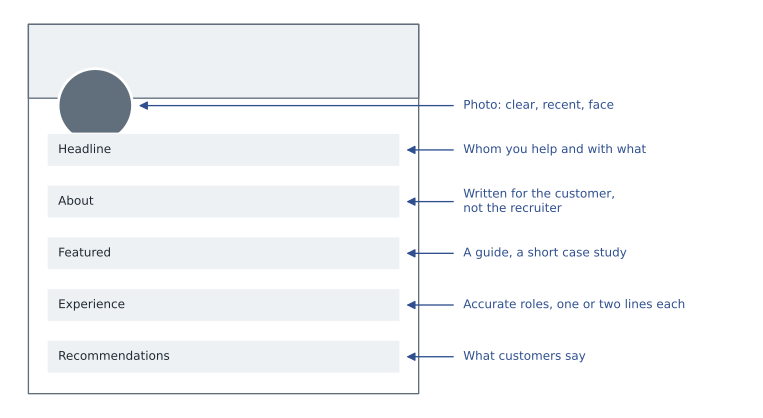
The biggest change Owen recommended was a shift in audience. Most people write their profiles for recruiters, listing achievements and skills. A seller's profile is read mainly by customers, so it should be written for them. That means explaining what problems the seller helps solve, in the customer's language, and giving them a reason and an easy way to get in touch. Maya's new About section started with a question her clinic prospects often asked: "Why does our printer always jam on the busiest morning of the week?"
Accuracy matters. A profile must not claim qualifications, titles or results the seller does not have, and must not imply that Ridgeline offers things it does not. Inflated claims on a profile are a misleading representation like any other sales claim, and they are easy to check. Maya listed her retail years honestly and described the skills they had built, such as explaining technical products simply and handling unhappy customers, which were relevant to her new customers.
Company rules for online presence
Most companies have a social media policy that covers how employees present themselves and the company online. Ridgeline's policy, which Owen showed Maya, had six main points. Employees may say where they work, but must make clear that personal opinions are their own. They must not share confidential information, including customer names, prices, contract terms or anything about a deal, without written permission. They must not post photos taken inside customer sites without permission. They must follow the company's brand guidelines when using the logo. They must not make claims about products that marketing and legal have not approved. And they must disclose their connection to Ridgeline when they recommend Ridgeline's products, as advertising rules require for endorsements.
The last point reflects advertising law. In Canada, the Competition Act's rules on misleading representations, and the Competition Bureau's guidance on influencer marketing, expect anyone promoting a product online to disclose a material connection, such as being employed by the seller. A seller who praises Ridgeline's printers in a comment on a prospect's post without saying they work for Ridgeline could mislead readers.
| Fine to post | Needs permission or approval | Do not post |
|---|---|---|
| A useful article with your own comment | A case study naming a customer | Customer prices, contract terms or complaints |
| Congratulations to a prospect on their news | Photos taken inside a customer's office | Opinions presented as Ridgeline's position |
| Ridgeline's published guides and events | Product claims not already approved | Criticism of competitors by name |
| Your own experience in plain terms | The Ridgeline logo in new designs | Anything about a deal in progress |
Measuring social selling activity
LinkedIn has for many years offered a measure called the Social Selling Index (SSI), a score from 0 to 100 that it describes as reflecting how well a person establishes a professional brand, finds the right people, engages with insights and builds relationships on the platform. As LinkedIn has usually described it, each of these four areas contributes up to 25 points. LinkedIn's own sales pages have more recently described the SSI as evolving and have emphasized AI-assisted tools instead, so sellers should treat the score as a rough guide to their activity on one platform, not as a measure of sales skill or results.
Worked problem
Reading an SSI score
In late October, Maya's score showed 9 for establishing a professional brand, 12 for finding the right people, 6 for engaging with insights and 11 for building relationships, each out of 25. Two weeks after updating her profile and posting twice, it showed 15, 13, 9 and 12. What were her totals, how much did the score rise, and which area changed most?
Show solution
- First total.
- \[9 + 12 + 6 + 11 = 38\]
- Second total.
- \[15 + 13 + 9 + 12 = 49\]
- Rise.
- \[49 - 38 = 11 \text{ points}\]
- Changes by area: brand +6, finding people +1, engaging +3, relationships +1.
Answer: Her score rose from 38 to 49, an increase of 11 points, mostly from the professional-brand area after she rewrote her profile. Owen's comment was that the score was a useful nudge but not a target: two good conversations with clinic managers mattered more than any number of points.
Grace preferred to measure outcomes in the CRM: how many conversations, meetings and opportunities began with a LinkedIn connection, comment or message. In the third quarter of 2026, she found that 9 of the 84 new opportunities had started with a LinkedIn conversation, and that most of those involved a prospect who had first seen something the seller had posted or commented on. The numbers were small, but they gave the team a reason to keep their profiles current.
Automation and platform rules
Professional networks set rules on how their services may be used. LinkedIn's user agreement prohibits using software that automates activity, such as bots that send connection requests or messages in bulk, or tools that copy profile data. Accounts that break these rules can be restricted or closed. Some sales tools promise to automate LinkedIn outreach in ways that break the platform's rules; Ridgeline did not allow them. Approved features within the platform, such as LinkedIn's own Sales Navigator, are a different matter, because the platform provides them.
Sales Navigator is LinkedIn's paid tool for sellers. It offers search filters for finding people and companies, saved lists of leads and accounts with alerts when something changes, such as a job move or company news, ways to see shared connections who might introduce the seller, and messaging to people outside the seller's network. In recent years LinkedIn has added AI features, such as help drafting messages and suggested leads. Ridgeline gave Sales Navigator licences to the inside team and to field AEs on request; Maya asked for one after this session.
Privacy and personal boundaries
A seller's online presence mixes the professional and the personal, and each person decides where to draw the line. Owen kept his personal social accounts private and used LinkedIn only for work. Tyler shared some personal posts about volunteering at a community hockey program, which prospects sometimes mentioned in conversation. Both approaches are fine within the policy. What sellers should avoid is assuming that a personal account is invisible: prospects and employers can often find more than people expect, and posts are hard to delete once they have been shared.
Sellers should also respect prospects' privacy. Looking at a prospect's professional profile before a call is normal; searching their personal accounts, family or home address is not, and mentioning anything personal the prospect did not share professionally is unsettling. The test Owen used was whether the prospect would be comfortable knowing exactly how the seller had found a piece of information. If not, the seller should not use it.
Worked problem
A profile audit
Owen scores profiles out of 10 with one point for each of: a clear face photo; a headline that says whom the seller helps; a customer-focused About section; current role listed; a contact method; at least one featured item; at least one recommendation; no unapproved claims; no confidential customer information; activity in the last month. Maya's original profile met only three: current role listed (she had added Ridgeline with no description), no unapproved claims and no confidential information. Her updated profile met all except activity in the last month, which she had not yet built up. What were her scores, and what was the change?
Show solution
- Original score: 3 of 10.
- Updated score: 10 − 1 = 9 of 10.
- Change.
- \[9 - 3 = 6 \text{ points}\]
Answer: Her profile went from 3 to 9 out of 10. The missing point, recent activity, is the subject of lesson 8.
Beyond the professional network
A seller's presence is not only on social networks. Two other places matter. The first is the email signature, which every prospect sees many times. Ridgeline's standard signature had the seller's name, title, direct phone number, the company website and a single line describing what Ridgeline did, with no inspirational quotes, animated images or long legal notices that bury the contact details. Maya replaced the signature she had copied from her retail job, which listed store hours, with the Ridgeline standard.
The second is the company website. Ridgeline published a short page for each field AE and account manager, with a photo, the territory or industries they covered and a sentence in their own words about how they liked to work with customers. Prospects who searched for Maya's name after a cold call often found that page first. It reassured them that she was a real employee of a real local company, which mattered in a period when many people had learned to be suspicious of unexpected calls and emails. Owen asked every new seller to send marketing a photo and a paragraph within their first two weeks, and to check every few months that the page and their network profile still matched: a title or territory that differs between the two looks careless, and prospects notice.
Common mistakes
MistakeWriting a profile for recruiters.
InsteadWrite it for customers: whom you help, with what, and how to reach you.
MistakeLeaving an old job or photo in place after changing roles.
InsteadUpdate the profile as soon as you start, so prospects see your current role.
MistakePraising your company's products online without saying you work there.
InsteadDisclose your connection, as endorsement rules require.
MistakeUsing bots to send connection requests in bulk.
InsteadFollow the platform's rules; use only approved tools and features.
MistakeMentioning personal details you found about a prospect.
InsteadUse only what a prospect would be comfortable knowing you found.
Summary and key terms
- Buyers often research sellers before meeting them, so a clear, accurate online presence matters.
- A seller's profile should be written for customers: a clear photo, a headline saying whom they help, a customer-focused About section, accurate experience, featured material and recommendations.
- Company social media policies protect confidential information, brand use and product claims, and endorsement rules require disclosing a connection when recommending your company's products.
- LinkedIn's Social Selling Index scores four areas from 0 to 100 overall, but is only a rough guide.
- Platforms prohibit unapproved automation.
- Respect prospects' privacy.
- Online presence
- Everything a prospect can find about a seller online.
- Headline
- The short line under a profile name that says what the person does; for sellers, whom they help and with what.
- Social media policy
- A company's rules for how employees present themselves and the company online.
- Material connection
- A relationship, such as employment, that could affect how readers judge an endorsement.
- Social Selling Index (SSI)
- LinkedIn's score from 0 to 100 summarizing a person's social selling activity on the platform.
- Sales Navigator
- LinkedIn's paid tool for finding, tracking and contacting prospects.
Practice problems
Work each problem on paper first, then reveal the answer to check.
An SSI shows 14, 10, 8 and 13 in its four areas. What is the total?
Show answer
14 + 10 + 8 + 13 = 45 out of 100.
Rewrite the headline "Account Executive at Ridgeline" to focus on the customer.
Show answer
For example: "Helping law and accounting firms simplify printing and meeting rooms | Ridgeline Workplace Solutions."
Can a seller post a photo of a newly installed printer room at a customer's office?
Show answer
Only with the customer's permission, and without showing anything confidential.
Lesson quiz · 5 questions
Score 60% or more to complete this lesson.
Create a free account to save your progress, take quizzes and earn a certificate.