
PYTH-290 · Lesson 9 of 12 · 25 min
Security review
▶ Video coming soon A video version of this lesson is on the way.
Ridgeline Ops stores names, email addresses and home addresses of real customers, lets staff change orders, and holds keys that the web shop uses to call it. That makes it a target, not because Ridgeline is important to anyone in particular, but because automated attacks scan the whole internet for weak applications, and personal data has value. Security had been part of every story through the definition of done, but before deployment the team set aside two days in the final week for a focused security review, with Sam Ortiz, the IT technician from CYB-101, joining them as a second pair of eyes.
This lesson follows that review. It is entirely defensive: the goal is to find and fix weaknesses in your own system before anyone else does. The exercises build the protections the review called for.
Start with a threat model
A security review without a plan turns into a random search for things that look scary. The team started with a threat model, a structured look at what the system protects, who might attack it, how, and what stops them. CYB-101 introduced the idea; the capstone applied it to a real design. The team drew the context diagram from lesson 3, marked the trust boundaries where data crosses from a less trusted place into a more trusted one, such as the internet into the web adapter, and listed the assets: subscriber personal data, staff accounts, the shop's API key, the database and its backups, and the integrity of orders and money.
For each boundary they walked through STRIDE, a mnemonic from Microsoft's threat modelling practice for six kinds of threat. Spoofing is pretending to be someone else, such as signing in with a stolen password. Tampering is changing data you should not, such as editing another subscriber's delivery. Repudiation is denying you did something, which good logging prevents. Information disclosure is seeing data you should not, such as reading the full subscriber list. Denial of service is making the system unavailable. Elevation of privilege is gaining powers you should not have, such as a subscriber reaching staff pages.
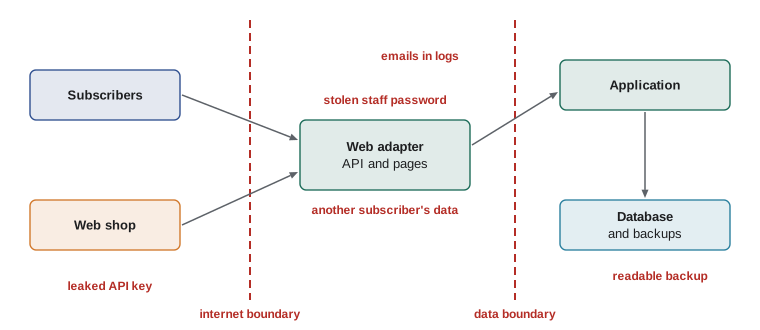
The exercise produced nineteen possible threats. The team scored each by likelihood and impact, the same way as the risk register in lesson 4, and worked from the top. Five rose to the top: a subscriber reading or changing someone else's subscription by changing the id in a URL; a weak or reused staff password; the shop's API key leaking from a repository or a log; personal data appearing in logs and error reports; and a backup being readable by anyone who found it.
Broken access control
The most serious finding was also the most common web application weakness of recent years, at the top of the OWASP Top 10 list: broken access control. The subscriber page under development called GET /api/v1/subscriptions/42 to show a subscription. The endpoint checked that the caller was signed in, but not that subscription 42 belonged to them. Anyone signed in could change the number and read, skip or pause any other subscriber's deliveries, and see their address. This pattern is often called an insecure direct object reference.
The fix is to check authorization for every object, not just authentication for the request. Authentication answers who are you; authorization answers are you allowed to do this to this thing. The team wrote a single authorization function in the application layer that every service calls with the current user, the action and the object, and wrote tests for every combination of role and ownership. Subscribers may act only on their own subscriptions. Cafe staff may sign up and view subscribers but not see the daily report. Operations may see addresses on the packing list. Only the owner and the bookkeeper may see revenue. The rule is deny by default: anything not explicitly allowed is refused.
Because the check lives in the application layer, it protects the API, the staff pages and the command-line interface at once. An authorization check written only in a web route is one forgotten decorator away from failing.
Try it yourself
Authorize every action
Write allowed(user, action, sub) where user is a dictionary with "id" and "role", and sub is a dictionary with "customer_id" (or None for actions that do not involve a subscription). Return True only if the action is permitted.
Rules: a "subscriber" may "view", "skip" or "pause" a subscription whose customer_id equals their own id, and nothing else. "cafe" staff may "view" and "create" subscriptions. "operations" may "view" and "packing_list". "owner" and "bookkeeper" may also "report", and the owner may do any action. Anything else, including unknown roles or actions, is refused.
def allowed(user, action, sub):
    if user["role"] == "subscriber":
        return action in ("view", "skip", "pause")
    return True
Injection and input handling
The team checked every place where input reaches an interpreter: SQL, templates, the shell and logs. SQL was safe by construction, because every query used ? parameters, as PYTH-215 required. The review found one near miss: the staff page that lists subscriptions let the user choose a sort column, and a column name cannot be a parameter. The first version inserted the requested name straight into the ORDER BY clause, which would have allowed SQL injection through a crafted link. The fix was an allow-list: a dictionary from the names the page offers to the real column names, with anything else refused.
Templates were safe because Jinja escapes values by default, which prevents cross-site scripting; the review searched for the few places where escaping had been turned off and found none. Nothing in the application ran shell commands. Logs needed attention for a different reason, covered below.
Try it yourself
Build a safe listing query
Write listing_query(status, sort, descending=False) that returns (sql, params) for listing subscriptions. Filter on status with a ? parameter unless status is None (no filter). The sort name must be one of "next", "customer" or "coffee", mapped to the columns next_delivery, customer_id and sku; anything else raises ValueError.
Build SELECT id, customer_id, sku, next_delivery FROM subscriptions, then WHERE status = ? if filtering, then ORDER BY column with DESC when descending, then , id as a tie-breaker. The setup creates a database so the tests can run your query.
def listing_query(status, sort, descending=False):
    sql = f"SELECT id, customer_id, sku, next_delivery FROM subscriptions WHERE status = '{status}' ORDER BY {sort}"
    return sql, ()
Accounts, passwords and secrets
Staff signed in with an email address, a password and a second factor. The review checked the password handling against the practices from PYTH-220 and CYB-101: passwords are stored only as salted hashes from a slow key-derivation function, compared with a constant-time comparison, never logged and never emailed. New passwords must be at least fifteen characters, or eight with multi-factor sign-in, following the current NIST guidance, and are checked against a list of commonly breached passwords instead of being forced through rules about symbols. Sign-in attempts are rate-limited to slow down guessing, and the second factor is a time-based one-time code or a passkey.
Secrets were the second finding. The shop's API key and the email service key had been read from environment variables from the start, but a search of the repository's history found the email key in a commit from the first sprint, when Sam had pasted it into a test file before moving it out. Removing a secret in a later commit does not remove it from the history. The only safe fix is to revoke the key and issue a new one, which the team did that afternoon. They then turned on the hosting service's secret scanning for the repository and added a check to the pipeline that fails if anything that looks like a key is committed.
The review also listed the project's third-party dependencies and ran a vulnerability scanner, pip-audit, against them. One indirect dependency had a published vulnerability in a feature Ridgeline did not use; the team upgraded it anyway, because the fix was a one-line change and an explanation of why a known vulnerability is harmless tends to be wrong eventually. The scanner now runs weekly in the pipeline.
Limiting abuse
Two threats in the model involved volume rather than cleverness. Someone could guess at the subscriber sign-in page thousands of times, or flood the public sign-up endpoint with fake subscriptions that Theo would then try to pack. Neither needs a sophisticated attacker; simple scripts do both. The team added rate limits at two levels. The hosting platform's load balancer refuses more than a set number of requests per minute from one address, which absorbs crude floods before they reach the application. Inside the application, sign-in attempts are limited per account and per address, using the sliding-window limiter from PYTH-220, and the sign-up form requires a confirmed email address before a subscription becomes active, so fake sign-ups never reach the packing list.
The team also made sure that a busy or failing outside service could not take Ridgeline Ops down with it. Calls to the email service and the web shop have timeouts and retries with backoff, as PYTH-240 taught, and a failed email is queued and retried later rather than failing the whole renewal. Availability is part of security: a system that is easy to knock over is not secure, even if nobody can read its data.
Personal data and logging
Logs are essential for running a system, and lesson 10 depends on them. They are also a common way for personal data to leak, because logs are copied to more places, kept longer and protected less carefully than the database. The review found subscriber email addresses in the application logs, written by a debug line in the sign-up service, and full request bodies, including addresses, in the error reports sent to the monitoring service.
The fix had two parts. A logging filter redacts anything that looks like an email address, phone number or postal code before a log line is written, as a safety net. And the code was changed to log identifiers rather than personal details: subscription 42 skipped, not Priya Natarajan at her home address skipped. Identifiers let staff investigate a problem by looking the subscription up in the system, where access is controlled, without copying personal data into logs.
The review also checked the obligations in Canadian privacy law. Under PIPEDA and British Columbia's Personal Information Protection Act, Ridgeline must collect only the personal information it needs for a stated purpose, protect it with safeguards suited to its sensitivity, let customers see and correct it, and report breaches that create a real risk of significant harm. The team removed the optional birthday field from sign-up, because nobody could name a purpose for it, and wrote a short retention rule: data about cancelled subscriptions is deleted two years after cancellation, except what the bookkeeper must keep for tax records.
Try it yourself
Redact personal data from logs
Write redact(line) that replaces email addresses with "[email]" and phone numbers written as three digits, three digits and four digits (separated by spaces, dots or hyphens, optionally in brackets for the first group, such as 250-555-0147 or (250) 555 0147) with "[phone]". Leave everything else, including subscription ids and dates, unchanged.
An email address here is one or more letters, digits, dots, plus signs, hyphens or underscores, then @, then a domain with at least one dot.
def redact(line):
    return line.replace("@", "[at]")
Hardening the deployment
The last part of the review looked at configuration. The staff pages and API were served only over HTTPS, with HTTP redirected and the HSTS header telling browsers never to try HTTP again. Session cookies were marked Secure, HttpOnly and SameSite, as PYTH-220 described. Security headers limited what the pages could load and stopped them being framed by other sites. The debug mode that shows source code on errors, which Flask warns about loudly, was checked to be off in production by a test that fails if the production configuration enables it. Backups were encrypted, and the storage bucket was private, with access only for the backup job and the restore test.
Finally, the team wrote down what would happen if something went wrong anyway: who is told, how to revoke keys and sessions quickly, how to restore from backup, and when the privacy obligations above require telling customers. CYB-101's incident response steps became a one-page runbook in the repository. Nobody wanted to use it, which is exactly why it had to exist before it was needed.
Common mistakes
MistakeChecking that a user is signed in but not that they may act on this object.
InsteadAuthorize every action on every object in the application layer, denying by default.
MistakeInserting user-chosen column names into SQL.
InsteadUse ? parameters for values and an allow-list for identifiers such as sort columns.
MistakeDeleting a committed secret in a later commit and moving on.
InsteadRevoke and replace the secret; it remains in the history. Turn on secret scanning.
MistakeIgnoring a known dependency vulnerability because the affected feature is unused.
InsteadUpgrade when the fix is cheap, and scan dependencies regularly.
MistakeLogging names, emails and addresses to make debugging easier.
InsteadLog identifiers, and add a redaction filter as a safety net.
MistakePlanning the incident response after an incident.
InsteadWrite a short runbook before launch: who to tell, how to revoke, how to restore.
Summary and key terms
- A security review starts with a threat model: assets, trust boundaries and threats.
- STRIDE names six kinds of threat: spoofing, tampering, repudiation, information disclosure, denial of service and elevation of privilege.
- Broken access control is the most common serious weakness; authorize every action on every object.
- Parameters stop SQL injection for values; allow-lists protect identifiers such as sort columns.
- Passwords are stored as slow salted hashes, with multi-factor sign-in and rate limits.
- Committed secrets must be revoked and replaced; scanning prevents repeats.
- Logs should contain identifiers, not personal details, with redaction as a safety net.
- Privacy law requires purpose, safeguards, access and correction, retention limits and breach response.
- threat model
- A structured analysis of what a system protects, who might attack it and how.
- trust boundary
- A point where data passes from a less trusted area to a more trusted one.
- STRIDE
- A mnemonic for six threat types: spoofing, tampering, repudiation, information disclosure, denial of service, elevation of privilege.
- authentication
- Confirming who a user is.
- authorization
- Deciding whether an authenticated user may perform an action on a resource.
- insecure direct object reference
- Access to another user's data by changing an identifier, because ownership is not checked.
- allow-list
- A list of permitted values; anything not on it is refused.
- secret scanning
- Automatically searching code and history for committed keys and passwords.
- redaction
- Removing or masking sensitive data, such as email addresses in logs.
- runbook
- A short written procedure for handling a specific operational situation.
Practice problems
Work each problem on paper first, then reveal the answer to check.
A subscriber changes /subscriptions/42 to /subscriptions/43 and sees someone else's address. What kind of weakness is this?
Show answer
Broken access control, specifically an insecure direct object reference: ownership is not checked.
Which STRIDE category covers a staff member denying they cancelled a subscription?
Show answer
Repudiation, prevented by reliable audit logging.
Why can a sort column not simply be passed as a ? parameter?
Show answer
Parameters stand for values, not identifiers; an allow-list mapping names to real columns is needed.
An API key was committed and removed in the next commit. Is it safe now?
Show answer
No. It is still in the history; it must be revoked and replaced.
What should the log line for a skip contain instead of the subscriber's name and address?
Show answer
The subscription id (and other identifiers), so staff can look up details in the access-controlled system.
Why did the team remove the optional birthday field?
Show answer
Privacy law requires a purpose for collecting personal data, and nobody could name one.
Lesson quiz · 5 questions
Score 60% or more to complete this lesson.
Create a free account to save your progress, take quizzes and earn a certificate.