
PYTH-290 · Lesson 10 of 12 · 25 min
Deployment
▶ Video coming soon A video version of this lesson is on the way.
Software that runs only on developers' laptops has not been delivered. In the final week the team moved Ridgeline Ops onto real infrastructure, connected it to the web shop, scheduled the morning renewal job, set up monitoring, and launched it to a first group of ten subscribers. PYTH-260 taught the tools in depth: packaging, container images, configuration, pipelines, monitoring and rollbacks. This lesson shows how the capstone team chose among those tools for a small application with a SQLite database, and how they planned a launch that could be undone.
The guiding idea was that deploying should be boring. A deployment that needs a hero, a late night and luck will eventually fail at the worst moment. A deployment that is automated, rehearsed and reversible can happen on a Tuesday afternoon while the team drinks coffee.
Environments
The team ran three environments. Development is each person's laptop, with the seed database from lesson 5. Staging is a copy of production in the cloud account, with its own database filled with anonymized seed data and its own keys for the shop's test system, so nothing done there can touch real customers or money. Production is the real system. Every change passes through staging before production, and staging is configured as much like production as possible: the same container image, the same kind of database, the same scheduler, differing only in configuration.
Keeping environments alike is what makes staging useful. A bug that appears only in production usually comes from a difference: a missing environment variable, a different operating system, a database with real data in it. The team kept a short list of the deliberate differences between staging and production, in the repository, and treated any other difference as a bug.
Configuration from the environment
The same container image runs in staging and production. What differs is configuration: the database location, the shop's API address and key, the email service key, the time zone for the renewal job, the tax rates and whether debug features are on. Following the twelve-factor practice from PYTH-260, all of it comes from environment variables read once at startup into a typed configuration object, with defaults only for values that are safe to default. Secrets are injected by the hosting platform's secrets manager, never written into the image or the repository.
The configuration loader fails fast. If production starts without a shop key, or with debug mode switched on, it refuses to start and says exactly which setting is wrong. A service that starts with a missing setting and fails an hour later when the first renewal runs is much harder to diagnose than one that refuses to start at all.
Try it yourself
Load configuration safely
Write load_config(env) where env is a dictionary like os.environ. Return a dictionary with env_name (from RIDGELINE_ENV, default "development"), database (RIDGELINE_DATABASE, default "ridgeline.db"), debug (RIDGELINE_DEBUG: "1", "true" or "yes" in any case mean True; anything else or missing means False), shop_key (RIDGELINE_SHOP_KEY, default None) and renew_hour (RIDGELINE_RENEW_HOUR as an int, default 6).
Raise ValueError if renew_hour is not an integer from 0 to 23. In production (env_name "production"), also raise ValueError if debug is True or shop_key is missing or empty.
def load_config(env):
    return {
        "env_name": env.get("RIDGELINE_ENV"),
        "database": env.get("RIDGELINE_DATABASE"),
        "debug": bool(env.get("RIDGELINE_DEBUG")),
        "shop_key": env.get("RIDGELINE_SHOP_KEY"),
        "renew_hour": env.get("RIDGELINE_RENEW_HOUR"),
    }
Packaging the application
Ridgeline Ops is packaged the way PYTH-260 packaged ridgeline-tools: a pyproject.toml declares the package, its dependencies with compatible version ranges, and a command called ridgeline-ops that runs the CLI; a lock file pins the exact versions the pipeline tested. The container image is built in two stages, one to install the dependencies and build the wheel and a second, smaller one that contains only the installed application on a slim Python base image. The application runs as an ordinary user rather than as root, listens on one port, and writes nothing inside the image except to the mounted volume for the database and a temporary directory.
Two small decisions saved time later. The image is identified by its digest, the content hash the registry gives it, rather than by a tag such as latest, so staging and production provably run the same bytes. And the image includes a build label with the commit id and version, which the readiness check returns, so anyone can ask the running system exactly which code it is running.
One instance and a database file
The decision to use SQLite in lesson 3 shaped the deployment. A SQLite database is a file, and only one process should write to it at a time, so Ridgeline Ops runs as exactly one container instance with a persistent volume attached for the database. PYTH-260's web shop ran several instances behind a load balancer and released changes as a canary to one request in ten; that is not possible with one instance and one file. The team accepted the trade-off knowingly: a deployment causes about thirty seconds of downtime while the old container stops and the new one starts, and deployments are scheduled in the early afternoon, after the morning packing and before the evening web shop rush.
The decision record noted when this would stop being acceptable: if downtime of thirty seconds ever mattered to customers, or if the application needed more than one instance for load, it would be time to move to the managed PostgreSQL alternative, which the repository design keeps within reach. Writing down the trigger for revisiting a decision is a good habit; it turns a vague worry into a clear signal.
The delivery pipeline
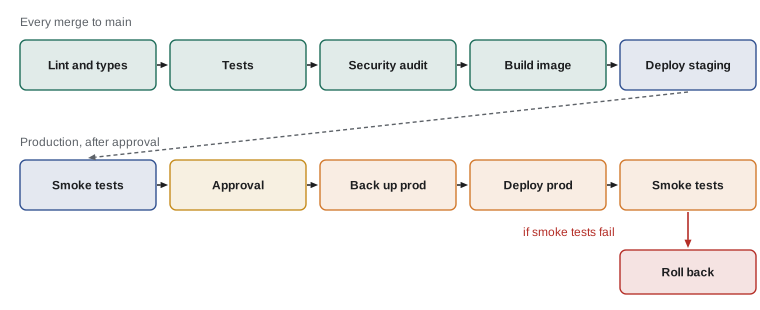
The pipeline extended the continuous integration from lesson 4 into continuous delivery. Every merge to the main branch runs the checks, builds a container image tagged with the commit, and deploys it to staging automatically. Smoke tests then run against staging: a handful of quick requests that prove the most important paths work, such as the health endpoint, reading a seed subscription through the API, and a dry run of the renewal job. Production deployment waits for a person to approve it, Jordan or Rosa, and begins by taking a backup of the production database. Only then does it run any new migrations, start the new image and run the same smoke tests against production.
Migrations need special care when the old and new code briefly share a database, and even more when rolling back. The team followed the expand and contract pattern: a migration may add columns and tables, which old code ignores, but never removes or renames something the old code uses in the same release. Removals happen in a later release, once nothing depends on them. That way the previous image can always run against the new schema, and a rollback is just a matter of starting the previous image. The backup taken before each deployment is the last resort if a migration goes wrong in a way nobody predicted.
Health checks
The hosting platform needs to know whether the application is alive, and the team needed to know whether it was working. PYTH-260 separated the two questions. A liveness check, /healthz, answers whether the process is running and should be restarted if not; it does almost nothing, so it never fails for the wrong reason. A readiness check, /readyz, answers whether the application can do useful work: can it read the database, is the database at the expected migration version, is there disk space on the volume, has the renewal job run today? The smoke tests and the monitoring both call the readiness check.
A readiness check that reports only up or down hides useful information. The team's version reports each component separately and an overall status: ok when everything passes, degraded when something non-essential fails, such as the email service, and failing when something essential fails, such as the database. The HTTP status code follows the overall status, 200 for ok or degraded and 503 for failing, so simple tools can read it at a glance.
Try it yourself
Summarize the health checks
Write readiness(checks, essential) where checks maps a component name to a function that returns True when healthy (and may raise an exception, which counts as unhealthy), and essential is a set of component names. Return (status_code, body) where body has "status" and "components", a dictionary from each name to "ok" or "fail".
The overall status is "ok" if every check passes, "failing" if any essential check fails, and "degraded" otherwise. The status code is 503 when failing and 200 otherwise. Run every check even after one fails.
def readiness(checks, essential):
    for name, check in checks.items():
        if not check():
            return 503, {"status": "failing"}
    return 200, {"status": "ok"}
Scheduling the renewal job
The renewal job runs every morning at 6:00 local time from the hosting platform's scheduler, calling the command-line interface from lesson 7 inside the same container image. Time zones caught the team once: the scheduler's times were in UTC, so the first schedule ran the job at 6:00 UTC, which is the middle of the night in British Columbia and the previous evening's date. The job created orders for the wrong day. The fix was to schedule it in UTC at an hour safely after local midnight and have the job compute the local date itself from the configured time zone, and to add a test for the date calculation around midnight.
A scheduled job that silently fails is worse than one that fails loudly. The job writes a heartbeat when it finishes, and the monitoring raises an alert if no heartbeat arrives by 6:30, the same dead man's switch PYTH-260 used for the morning report. Its exit code, 2 when some subscriptions were short of stock, raises a gentler alert to Kai and Theo rather than to the developers.
Monitoring and alerts
The team kept monitoring small and focused on symptoms users would notice. Logs are structured JSON with a request id on every line, redacted as lesson 9 required. Metrics follow the RED pattern from PYTH-260: the rate of requests, the rate of errors, and the duration of requests, measured as the time within which 95 of every 100 requests finish. Three alerts mattered enough to wake someone: the readiness check failing for five minutes, the renewal job heartbeat missing, and more than two errors in every hundred API requests for ten minutes. Everything else went to a weekly summary rather than a phone.
Alerting on too much is as harmful as alerting on too little. Every alert should be something a person must act on now. When the team first set up monitoring, a noisy alert about slow requests fired every evening during the web shop's busy hour; within three days everyone had learned to ignore alerts. They removed it, raised the threshold to a level that reflected a real problem, and the alerts started meaning something again.
Launching gradually
Ridgeline Ops did not launch to every customer at once. The first release went to ten subscribers who Mei recruited from the cafe's regulars, people who knew the team and would report problems rather than quietly cancel. For two weeks, Theo packed their orders from the system while also checking them against the old email process, and Anita compared the daily report with her spreadsheet each evening. Only when both had matched for a week did Rosa open subscriptions on the web shop.
Before the launch, the team walked through a written checklist together: backups restored successfully in the weekly test; the runbook from lesson 9 printed and on the office wall; alerts tested by deliberately breaking staging; a rollback rehearsed on staging, which took four minutes; keys rotated to fresh production values; and the privacy notice on the web shop updated to describe subscriptions. Launch day was quiet, which was the point.
Try it yourself
Choose the next version number
The team versions releases with semantic versioning and Conventional Commits, as PYTH-260 described. Write next_version(current, messages) where current is a string such as "1.2.3" and messages is a list of commit subjects since the last release.
If any message contains "BREAKING CHANGE" or its type ends with "!" (such as "feat!: drop v0 API"), increase the major number and reset the others. Otherwise, if any message starts with "feat", increase the minor number and reset the patch. Otherwise, if any starts with "fix", increase the patch. If nothing qualifies (only docs, tests or chores), return current unchanged.
def next_version(current, messages):
    major, minor, patch = current.split(".")
    return f"{major}.{minor}.{int(patch) + 1}"
Common mistakes
MistakeLetting staging drift away from production.
InsteadRun the same image in both and keep a short list of deliberate differences.
MistakeStarting a service with missing or unsafe settings.
InsteadLoad configuration once at startup and refuse to start if anything required is missing or unsafe.
MistakeRemoving a column in the same release as the code that stops using it.
InsteadExpand first, contract later, so the previous release can always run against the new schema.
MistakeHaving only a liveness check, or one that tests everything.
InsteadKeep liveness trivial and put real dependency checks in a readiness check with component detail.
MistakeScheduling jobs without thinking about time zones.
InsteadKnow the scheduler's time zone, compute local dates in code and test around midnight.
MistakeAlerting on everything.
InsteadAlert only on symptoms someone must act on now; send the rest to a summary.
Summary and key terms
- Deployments should be automated, rehearsed and reversible, so that they are boring.
- Development, staging and production run the same image with different configuration.
- Configuration comes from the environment, is checked at startup and keeps secrets out of the image.
- Using SQLite means one instance and brief downtime per deploy, a trade-off recorded with its trigger for revisiting.
- The pipeline deploys to staging automatically and to production after approval and a backup.
- Expand-and-contract migrations keep rollbacks possible.
- Liveness and readiness checks answer different questions; readiness reports each component.
- Gradual launches with a small group, parallel checks and a written checklist reduce risk.
- environment
- A complete place where the application runs, such as development, staging or production.
- staging
- A production-like environment used to test releases before they reach real users.
- twelve-factor app
- A set of practices for cloud applications, including configuration from the environment.
- continuous delivery
- Keeping every change releasable through an automated pipeline, with release on demand.
- smoke test
- A quick check of the most important paths after a deployment.
- expand and contract
- A migration approach that adds new structures first and removes old ones in a later release.
- readiness check
- An endpoint reporting whether the application can do useful work right now.
- heartbeat
- A signal a job sends when it finishes, so a missing signal can raise an alert.
- semantic versioning
- Version numbers of the form major.minor.patch that signal the kind of change.
Practice problems
Work each problem on paper first, then reveal the answer to check.
Why does staging use the same container image as production?
Show answer
So that a release tested on staging is exactly the release deployed, with differences limited to configuration.
Production starts with RIDGELINE_DEBUG set to 1. What should happen?
Show answer
The configuration loader should refuse to start and name the unsafe setting.
A release removes the old skips_count column that the previous release still reads. What problem does this cause?
Show answer
The previous release can no longer run, so a rollback would fail; the removal should wait for a later release.
The email service is down but the database is fine. What does the readiness check report?
Show answer
Degraded, with status code 200, and email marked fail.
The scheduler runs at 6:00 UTC. Why might the renewal job pick the wrong date in British Columbia?
Show answer
6:00 UTC is the previous evening in British Columbia, so a date based on UTC is a day early relative to the local morning.
Version 1.4.2 is followed by commits "feat: gift subscriptions" and "fix: email typo". What is the next version?
Show answer
1.5.0, because a feature increases the minor number and resets the patch.
Lesson quiz · 5 questions
Score 60% or more to complete this lesson.
Create a free account to save your progress, take quizzes and earn a certificate.