
PYTH-260 · Lesson 2 of 12 · 23 min
Project layout and pyproject.toml
▶ Video coming soon A video version of this lesson is on the way.
The first step in turning Ridgeline's tools into a product is to describe them in a way that other people and other machines can understand without asking Jordan. A Python project does this with two things: a conventional folder layout, so tools know where the code, tests and documentation are, and a configuration file called pyproject.toml, which states the project's name, version, requirements and how to build it. Together they are the project's front door. Anyone who opens the repository, and any tool that installs or tests the project, starts there.
This lesson walks through a modern Python project layout, the sections of pyproject.toml and what each one is for, entry points that turn a function into a command, and how to read and check pyproject.toml from Python itself with the standard library's tomllib module.
A layout everyone recognizes
Python does not force any particular folder structure, which is why older projects vary wildly. Over the past decade the community has settled on a layout that most tools understand without configuration. The ridgeline-tools repository already follows most of it, from PYTH-110:
ridgeline-tools/
    pyproject.toml          project metadata, dependencies, tool settings
    README.md               what it is, how to install and use it
    LICENSE                 the terms under which others may use it
    CHANGELOG.md            what changed in each release
    src/
        ridgeline/          the importable package
            __init__.py
            cli.py          command-line entry point
            stock.py
            sales.py
            loyalty.py
            roast.py
            db.py           the SQLite store from PYTH-215
    tests/
        test_stock.py
        test_loyalty.py
    docs/
        cafe-guide.md
    .gitignore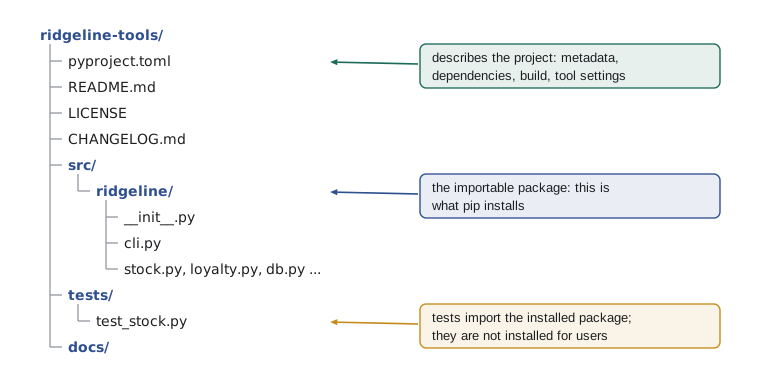
The most important choice is the src folder. Putting the package inside src/ rather than at the top level means that Python cannot import it by accident just because the current directory happens to be the repository. To use the package, even in its own tests, you must install it. That sounds like a nuisance, but it catches a whole class of bugs: if the installed package is missing a file, or the metadata is wrong, the tests fail on your machine instead of on a customer's. The alternative flat layout, with ridgeline/ beside pyproject.toml, still works and is common in small projects, but the src layout is the safer default for anything that will be distributed.
Tests live outside the package, in tests/, so they are not installed on customers' machines. Documentation lives in docs/. The README, LICENSE and CHANGELOG sit at the top, where people and package indexes expect to find them. Generated files, such as virtual environments, build output and caches, are listed in .gitignore and never committed.
What pyproject.toml is
pyproject.toml is a text file in TOML format (Tom's Obvious Minimal Language), a simple configuration language with sections in square brackets, keys and values, strings in quotes, lists in square brackets and tables of related keys. It was introduced by PEP 518 in 2016 to tell installers how to build a project, and PEP 621 in 2020 standardized where the project's metadata goes. Before it, the same information was spread across setup.py, setup.cfg, requirements.txt, MANIFEST.in and several tool-specific files, and setup.py was a Python program that had to be run, with all the risks that implies. Today one declarative file covers almost everything.
Here is the pyproject.toml Jordan writes for ridgeline-tools 0.5.0:
[build-system]
requires = ["hatchling>=1.25"]
build-backend = "hatchling.build"

[project]
name = "ridgeline-tools"
version = "0.5.0"
description = "Stock, sales, loyalty and roast-log tools for Ridgeline Coffee Roasters"
readme = "README.md"
requires-python = ">=3.11"
license = "MIT"
authors = [{ name = "Jordan Reyes", email = "jordan@ridgeline.example" }]
dependencies = [
    "openpyxl>=3.1,<4",
]

[project.optional-dependencies]
web = ["flask>=3.0,<4"]

[dependency-groups]
dev = ["pytest>=9", "ruff>=0.8"]

[project.scripts]
ridgeline = "ridgeline.cli:main"

[tool.ruff]
line-length = 88
It has four kinds of section. [build-system] says which tool builds the package. [project] holds the standard metadata. [project.optional-dependencies] and [dependency-groups] list extra dependencies for particular uses. [project.scripts] defines commands. Sections that start with [tool. belong to individual tools, here the Ruff linter from PYTH-110. The rest of this lesson takes them in turn.
The build system
The [build-system] table answers one question: what program turns this source tree into an installable package? Python separates the front end that users run (pip, uv, or the build tool) from the back end that does the work (hatchling, setuptools, flit-core, pdm-backend, poetry-core and others). The requires key lists what the front end must install before building, and build-backend names the Python object to call. Because the interface is standardized, any front end can build any project, and the project can switch back ends by editing two lines.
Ridgeline uses hatchling, a modern back end that understands the src layout without extra settings. Setuptools, the oldest and most widely used back end, would work equally well; it now reads the same [project] table. Lesson 3 shows what the back end actually produces.
Project metadata
The [project] table is defined by the packaging standards, so every tool reads it the same way. The keys Ridgeline uses are the ones almost every project needs:
- name: the distribution name, used on package indexes and in pip install. It may differ from the import name: people pip install ridgeline-tools but import ridgeline. Names are compared case-insensitively, with runs of hyphens, underscores and dots treated as equal, so ridgeline-tools, Ridgeline_Tools and ridgeline.tools are the same project.
- version: the release number, following the version scheme in PEP 440 and, by convention, semantic versioning (lesson 11). Some projects mark the version as dynamic and derive it from a git tag instead.
- description and readme: a one-line summary and the long description shown on the package index page.
- requires-python: the Python versions the project supports. Installers refuse to install the project on other versions, which is far better than failing later with a confusing error.
- license, authors and similar fields: who wrote it and under what terms others may use it.
- dependencies: the packages that must be installed for the project to work, with version constraints. Lesson 4 covers how to choose those constraints.
import tomllib

text = """
[project]
name = "ridgeline-tools"
version = "0.5.0"
requires-python = ">=3.11"
dependencies = ["openpyxl>=3.1,<4"]

[project.scripts]
ridgeline = "ridgeline.cli:main"
"""
data = tomllib.loads(text)
project = data["project"]
print("name:", project["name"])
print("version:", project["version"])
print("python:", project["requires-python"])
print("dependencies:", project["dependencies"])
print("commands:", data["project"]["scripts"])name: ridgeline-tools
version: 0.5.0
python: >=3.11
dependencies: ['openpyxl>=3.1,<4']
commands: {'ridgeline': 'ridgeline.cli:main'}Since Python 3.11 the standard library includes tomllib for reading TOML. It only reads; writing TOML needs a third-party package such as tomli-w or tomlkit. tomllib.loads takes a string and tomllib.load takes a file opened in binary mode. The result is ordinary Python: tables become dictionaries, arrays become lists, and strings, numbers and booleans become their Python equivalents. That makes pyproject.toml easy to check in a test or a CI job, as the exercises show.
Optional dependencies and dependency groups
Not every user needs every dependency. The wholesale site needs Flask, but Kai's roast-log uploader does not, and installing a web framework on the roastery's small computer would be wasteful. Optional dependencies, also called extras, solve this. The table [project.optional-dependencies] defines named groups that users can request at install time: pip install ridgeline-tools[web] installs the core dependencies plus Flask, while pip install ridgeline-tools installs only the core.
Development tools are a different case. pytest and Ruff are needed by people working on ridgeline-tools, but never by its users. Putting them in an extra would publish them as part of the package's metadata, which is misleading. The newer [dependency-groups] table, standardized in PEP 735 in 2024, holds lists that are used only inside the project, for development, testing or documentation, and are never published. Tools such as uv and recent versions of pip can install a group by name.
import tomllib

text = """
[project]
name = "ridgeline-tools"
dependencies = ["openpyxl>=3.1,<4"]

[project.optional-dependencies]
web = ["flask>=3.0,<4"]
excel-charts = ["matplotlib>=3.8"]

[dependency-groups]
dev = ["pytest>=9", "ruff>=0.8"]
"""
data = tomllib.loads(text)
core = data["project"]["dependencies"]
extras = data["project"]["optional-dependencies"]

def install_set(*wanted):
    deps = list(core)
    for name in wanted:
        deps += extras[name]
    return deps

print("plain install:", install_set())
print("with [web]:   ", install_set("web"))
print("dev group (never published):", data["dependency-groups"]["dev"])plain install: ['openpyxl>=3.1,<4'] with [web]: ['openpyxl>=3.1,<4', 'flask>=3.0,<4'] dev group (never published): ['pytest>=9', 'ruff>=0.8']
Entry points: turning a function into a command
Jordan has been running the tools with python -m ridgeline.cli. Users should not need to know the module path. The [project.scripts] table maps a command name to a function: ridgeline = "ridgeline.cli:main" means that installing the package creates a command called ridgeline which imports ridgeline.cli and calls main(). On Linux and macOS the installer writes a small launcher script into the environment's bin folder; on Windows it writes a ridgeline.exe launcher. Either way, after pip install, Theo can type ridgeline report at a terminal and it just works.
The value has the form module.path:function, and the function is called with no arguments. It should read its own arguments from sys.argv, usually with argparse, and return an exit status: 0 for success and a non-zero number for failure. Returning a status matters in production, because schedulers and CI systems use it to decide whether a job succeeded.
import sys

def main(argv=None):
    """Entry point for the ridgeline command."""
    args = sys.argv[1:] if argv is None else argv
    if not args or args[0] in ("-h", "--help"):
        print("usage: ridgeline {report,low,export} [options]")
        return 0
    command = args[0]
    if command == "low":
        print("RC-104 Sumatra Dark: 9 bags (reorder)")
        return 0
    print(f"ridgeline: unknown command {command!r}")   # a real tool prints this to sys.stderr
    return 2

# What the launcher does, simulated with explicit argument lists:
for argv in [["--help"], ["low"], ["refund"]]:
    status = main(argv)
print(f" -> exit status {status}")usage: ridgeline {report,low,export} [options]
-> exit status 0
RC-104 Sumatra Dark: 9 bags (reorder)
-> exit status 0
ridgeline: unknown command 'refund'
-> exit status 2The example passes argv explicitly so it can be tested and run here; the real launcher calls main() with no arguments, and main falls back to sys.argv. Accepting an optional argv is a small habit that makes command-line code much easier to test, and PYTH-230's tests rely on it.
Tool configuration in the same file
Many development tools read their settings from [tool.NAME] tables in pyproject.toml: [tool.ruff] for the linter and formatter, [tool.pytest.ini_options] for pytest, [tool.coverage.run] for coverage, [tool.mypy] for type checking, and [tool.hatch] for build details. Keeping them in one file means a new contributor sees all the project's conventions in one place. The packaging standards reserve the tool table for this purpose, so tools do not collide with each other or with the standard metadata.
[tool.ruff]
line-length = 88
target-version = "py311"

[tool.ruff.lint]
select = ["E", "F", "I", "B"]

[tool.pytest.ini_options]
testpaths = ["tests"]
addopts = "-q"

[tool.coverage.report]
fail_under = 85
Installing the project while you work on it
During development you want the installed package to be your working copy, so that a change to a source file takes effect without reinstalling. An editable install does this: pip install -e . (or uv pip install -e .) installs the project in development mode, pointing the environment at the src folder instead of copying it. Editable installs are standardized by PEP 660, so they work with any modern back end. The usual setup on a fresh clone is three commands: create a virtual environment, activate it, and install the project in editable mode with its development tools.
> python -m venv .venv
> source .venv/bin/activate          (Windows: .venv\Scripts\activate)
> python -m pip install -e ".[web]"
> python -m pip install --group dev   (pip 25.1 or later; uv sync also installs groups)
> ridgeline --help
Worked problem
Fixing a broken pyproject.toml
A contributor sends this [project] table: name = "Ridgeline Tools", version = "1.0", dependencies = "openpyxl", and no requires-python. pip refuses to build it. What is wrong, and what should it say?
Show solution
- The name contains a space. Distribution names may use letters, digits, hyphens, underscores and dots only: use "ridgeline-tools".
- dependencies must be a list of requirement strings, not a single string: use ["openpyxl>=3.1,<4"].
- "1.0" is a valid PEP 440 version, but the project is mid-way through 0.x releases; keep "0.5.0" until the 1.0 decision (lesson 11).
- Add requires-python = ">=3.11", because the code uses tomllib and other 3.11 features; installers then refuse older Pythons cleanly.
Answer: name = "ridgeline-tools", version = "0.5.0", requires-python = ">=3.11", dependencies = ["openpyxl>=3.1,<4"].
Try it yourself
These exercises read and check pyproject.toml content with tomllib, the kind of check a CI job can run on every change.
Try it yourself
Read the name and version
Write name_version(text) that parses the TOML string text with tomllib and returns a string like "ridgeline-tools 0.5.0" built from [project] name and version.
import tomllib

def name_version(text):
    return ""
Try it yourself
Check required metadata
Write metadata_problems(text) that parses the TOML and returns a list of problem messages, in this order: "missing [project]" (and stop) if there is no project table; then "missing name", "missing version" and "missing requires-python" for each absent key; then "dependencies must be a list" if dependencies is present but not a list. A complete table returns [].
import tomllib

def metadata_problems(text):
    return []
Try it yourself
List the commands
Write commands(text) that returns a sorted list of strings "command -> module:function" from the [project.scripts] table, or [] if there is none.
import tomllib

def commands(text):
    return []
Common mistakes
MistakeKeeping the package at the top level and running tests from the repository folder.
InsteadUse the src layout and an editable install, so tests import the installed package and catch packaging mistakes.
MistakeWriting the version number in several files.
InsteadKeep it in one place, pyproject.toml or a git tag, and read it at run time with importlib.metadata.version("ridgeline-tools").
MistakePutting pytest and Ruff in [project] dependencies.
InsteadDevelopment tools belong in a dependency group, so users never install them.
MistakeLeaving out requires-python.
InsteadState the supported versions so installers refuse unsupported ones with a clear message.
MistakeAn entry-point function that never returns a status.
InsteadReturn 0 for success and non-zero for failure; schedulers and CI depend on it.
Summary and key terms
- A conventional layout and pyproject.toml are the project's front door for people and tools.
- The src layout forces tests to use the installed package, catching packaging mistakes early.
- pyproject.toml is TOML: [build-system] names the build back end, [project] holds standard metadata, [tool.*] holds tool settings.
- Distribution names may differ from import names and are compared after normalizing case and separators.
- Extras are optional, published dependency sets; dependency groups are private lists for development.
- [project.scripts] turns module:function into an installed command; the function should return an exit status.
- tomllib (Python 3.11+) reads TOML into dictionaries, which makes pyproject.toml easy to check in code.
- pyproject.toml
- The standard configuration file describing a Python project's build, metadata and tool settings.
- TOML
- A simple configuration file format with tables, keys and values.
- src layout
- A project layout with the importable package inside a src folder.
- build back end
- The tool that turns a source tree into a package, such as hatchling or setuptools.
- extra
- A named set of optional dependencies users can request, such as ridgeline-tools[web].
- dependency group
- A named list of dependencies used only within the project, such as dev tools.
- entry point
- A mapping from a command name to a Python function that the installer turns into a command.
- editable install
- An install that points at your working copy so edits take effect immediately.
Practice problems
Work each problem on paper first, then reveal the answer to check.
Why does the src layout catch packaging mistakes that a flat layout can hide?
Show answer
Tests cannot import the package straight from the repository, so they use the installed copy; missing files or wrong metadata make them fail.
A user runs pip install ridgeline-tools[web]. What gets installed?
Show answer
The core dependencies plus the packages listed in the web extra, here Flask.
What does ridgeline = "ridgeline.cli:main" in [project.scripts] do?
Show answer
Installing the package creates a ridgeline command that imports ridgeline.cli and calls main().
Which standard library module reads TOML, and since which Python version?
Show answer
tomllib, since Python 3.11; it reads but does not write.
Lesson quiz · 5 questions
Score 60% or more to complete this lesson.
Create a free account to save your progress, take quizzes and earn a certificate.