
PYTH-260 · Lesson 12 of 12 · 25 min
Capstone: a deployment pipeline
▶ Video coming soon A video version of this lesson is on the way.
Everything in this course now comes together. Ridgeline is ready to release ridgeline-tools 1.0.0, the first version with a stable public API, and to deploy the wholesale ordering site built on it. In this capstone, Jordan assembles the complete path from a commit to production: the project description, the lock file, the CI checks, the package and image builds, configuration and secrets, staging, an approval, a canary in production, monitoring and a practised rollback. The lesson walks through the finished pipeline stage by stage, simulates it in Python to see how it behaves when things go right and wrong, and ends with the release checklist and runbook that the team keeps beside it.
The finished pipeline
Ridgeline's pipeline has ten stages. Each one proves something specific, and each runs only if every earlier stage succeeded. The first five run on every pull request, so problems are caught before code reaches main. The rest run when a release tag such as v1.0.0 is pushed.
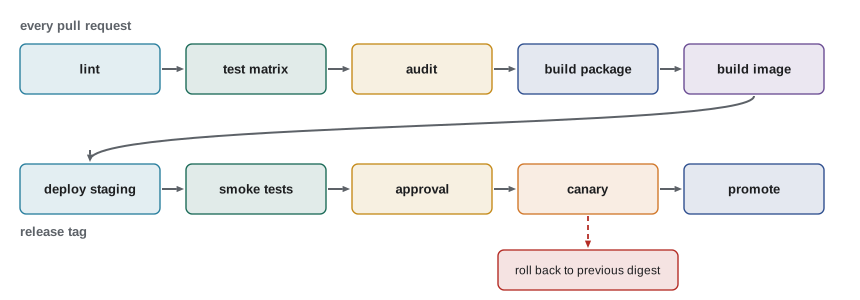
- lint (lesson 5): Ruff check and format check. Seconds to run, so it goes first.
- test-matrix (lesson 5): the full pytest suite on Linux and Windows with Python 3.11 to 3.13, from the lock file, with coverage of at least 85 in 100 lines.
- audit (lessons 4 and 7): pip-audit against the lock file and a secret scan of the changes.
- build-package (lesson 3): python -m build, then twine check; on a release tag, the version in pyproject.toml must equal the tag.
- build-image (lesson 6): the multi-stage Dockerfile, installing the new wheel and the hashed lock file, then a vulnerability scan of the image; the image is pushed and its digest recorded.
- deploy-staging (lessons 8 and 9): apply the infrastructure code for staging with the new digest, run pending database migrations, and wait until the readiness check passes.
- smoke-staging: a handful of automated checks against the real staging site: the home page loads, a test cafe can sign in, look up stock, place and cancel an order, and the health endpoint reports the expected version.
- approve: Jordan or Rosa reviews the changelog and the staging results and clicks approve. This is the only manual step.
- canary-production (lesson 9): the same digest serves one request in ten in production for fifteen minutes, with automatic rollback if errors or slow requests rise (lesson 10).
- promote: all traffic moves to the new version; the previous digest is kept as the rollback target.
Simulating the pipeline
A pipeline is a program, and like any program it can be reasoned about by running a model of it. The simulation below encodes the stages and the rule that a failure stops everything after it. It is not a CI system, but it captures the property that matters most: nothing reaches production unless every earlier check passed and a person approved.
STAGES = [
    # name,               needs approval?, what it proves
    ("lint",              False, "code is formatted and has no obvious mistakes"),
    ("test-matrix",       False, "tests pass on every supported OS and Python"),
    ("audit",             False, "no known vulnerable dependencies or committed secrets"),
    ("build-package",     False, "wheel and sdist build from a clean checkout"),
    ("build-image",       False, "the container image builds and passes its scan"),
    ("deploy-staging",    False, "the image starts and becomes ready in staging"),
    ("smoke-staging",     False, "key journeys work against staging"),
    ("approve",           True,  "a person agrees the release is ready"),
    ("canary-production", False, "the new version is healthy on a slice of real traffic"),
    ("promote",           False, "all traffic is on the new version"),
]

def run_pipeline(results, approved):
    """Walk the stages in order; stop at the first failure or a missing approval."""
    log = []
    for name, needs_approval, proves in STAGES:
        if needs_approval:
            if not approved:
                log.append(f"WAIT    {name}: waiting for approval")
                return log, "waiting"
            log.append(f"OK      {name}: {proves}")
            continue
        ok = results.get(name, True)
        log.append(f"{'OK' if ok else 'FAILED':<7} {name}: {proves}")
        if not ok:
            log.append("STOPPED later stages skipped; production unchanged")
            return log, "failed"
    return log, "released"

log, outcome = run_pipeline(results={}, approved=True)
print("\n".join(log))
print("outcome:", outcome)OK lint: code is formatted and has no obvious mistakes OK test-matrix: tests pass on every supported OS and Python OK audit: no known vulnerable dependencies or committed secrets OK build-package: wheel and sdist build from a clean checkout OK build-image: the container image builds and passes its scan OK deploy-staging: the image starts and becomes ready in staging OK smoke-staging: key journeys work against staging OK approve: a person agrees the release is ready OK canary-production: the new version is healthy on a slice of real traffic OK promote: all traffic is on the new version outcome: released
STAGES = [
    # name,               needs approval?, what it proves
    ("lint",              False, "code is formatted and has no obvious mistakes"),
    ("test-matrix",       False, "tests pass on every supported OS and Python"),
    ("audit",             False, "no known vulnerable dependencies or committed secrets"),
    ("build-package",     False, "wheel and sdist build from a clean checkout"),
    ("build-image",       False, "the container image builds and passes its scan"),
    ("deploy-staging",    False, "the image starts and becomes ready in staging"),
    ("smoke-staging",     False, "key journeys work against staging"),
    ("approve",           True,  "a person agrees the release is ready"),
    ("canary-production", False, "the new version is healthy on a slice of real traffic"),
    ("promote",           False, "all traffic is on the new version"),
]

def run_pipeline(results, approved):
    """Walk the stages in order; stop at the first failure or a missing approval."""
    log = []
    for name, needs_approval, proves in STAGES:
        if needs_approval:
            if not approved:
                log.append(f"WAIT    {name}: waiting for approval")
                return log, "waiting"
            log.append(f"OK      {name}: {proves}")
            continue
        ok = results.get(name, True)
        log.append(f"{'OK' if ok else 'FAILED':<7} {name}: {proves}")
        if not ok:
            log.append("STOPPED later stages skipped; production unchanged")
            return log, "failed"
    return log, "released"

for scenario, results, approved in [
    ("a test fails on Windows", {"test-matrix": False}, True),
    ("all checks pass, nobody has approved yet", {}, False),
    ("the canary shows errors", {"canary-production": False}, True),
]:
    log, outcome = run_pipeline(results, approved)
print(f"{scenario}: {outcome}; last step -> {log[-1]}")a test fails on Windows: failed; last step -> STOPPED later stages skipped; production unchanged all checks pass, nobody has approved yet: waiting; last step -> WAIT approve: waiting for approval the canary shows errors: failed; last step -> STOPPED later stages skipped; production unchanged
Look at what the failing scenarios have in common. In each, production is never left half-updated: a test failure stops the pipeline before anything is built, a missing approval leaves the new version waiting in staging, and a failed canary is withdrawn while nine in ten requests are still on the old version. That is the property to protect when changing the pipeline later.
The release checklist
Automation does not remove the need for a checklist; it shrinks it to the things that need human judgement or that happen outside the pipeline. Ridgeline's release checklist lives in the repository as docs/release.md, and a small script checks the parts that can be checked automatically, such as whether the changelog has an entry for the version being released.
import re

def release_problems(version, pyproject_version, changelog, tag):
    """Checks a release job can make before publishing anything."""
    problems = []
    if not re.fullmatch(r"\d+\.\d+\.\d+((a|b|rc)\d+)?", version):
        problems.append(f"{version} is not a valid release version")
    if pyproject_version != version:
        problems.append(f"pyproject.toml says {pyproject_version}, releasing {version}")
    if tag != "v" + version:
        problems.append(f"tag {tag} does not match v{version}")
    if f"## [{version}]" not in changelog:
        problems.append(f"CHANGELOG.md has no section for {version}")
    if "## [Unreleased]" in changelog and re.search(r"## \[Unreleased\]\n+- ", changelog):
        problems.append("entries are still under Unreleased")
    return problems

changelog = "# Changelog\n\n## [Unreleased]\n\n## [1.0.0] - 2026-11-16\n### Added\n- CSV output\n"
print(release_problems("1.0.0", "1.0.0", changelog, "v1.0.0") or "ready to publish")
print(release_problems("1.0.0", "0.10.0", changelog.replace("[1.0.0]", "[0.10.0]"), "v1.0"))ready to publish ['pyproject.toml says 0.10.0, releasing 1.0.0', 'tag v1.0 does not match v1.0.0', 'CHANGELOG.md has no section for 1.0.0']
The human part of the checklist is short: read the generated changelog and edit it for clarity; confirm that any database migration in the release follows expand and contract; check that someone who can roll back is available for the next hour; and announce the release to Theo, Anita and the cafes if the change is visible to them.
Smoke tests after deployment
Unit tests check pieces of code in isolation; smoke tests check that the deployed system, with its real configuration, network and database, actually works. They are few, fast and focused on the journeys that matter most. The name comes from electronics: switch the new device on and see whether smoke comes out. Ridgeline's smoke tests run after staging deploys and again after promotion, and they use a dedicated test cafe account so they never touch a real customer's orders.
def smoke(get, expected_version):
    """Run quick checks against a deployed site through `get(path) -> (status, json)`."""
    checks = []
    status, body = get("/healthz")
    checks.append(("health endpoint answers", status == 200))
    checks.append(("expected version deployed", body.get("version") == expected_version))
    status, body = get("/stock/RC-101")
    checks.append(("stock lookup works", status == 200 and body.get("sku") == "RC-101"))
    status, body = get("/orders?cafe=smoke-test")
    checks.append(("test cafe can list orders", status == 200 and isinstance(body.get("orders"), list)))
    return checks

def fake_site(path):
    """Stands in for HTTP calls to staging in this example."""
    pages = {"/healthz": (200, {"status": "ok", "version": "1.0.0"}),
             "/stock/RC-101": (200, {"sku": "RC-101", "bags": 42}),
             "/orders?cafe=smoke-test": (200, {"orders": []})}
    return pages.get(path, (404, {}))

for name, ok in smoke(fake_site, "1.0.0"):
print(f"{'PASS' if ok else 'FAIL'} {name}")PASS health endpoint answers PASS expected version deployed PASS stock lookup works PASS test cafe can list orders
Watching the release
For the first hour after promotion, Jordan watches the dashboard from lesson 10: request rate, error share and p95 duration for the order endpoints, compared with the same hour last week; database connections; and the number of running containers. The three alerts (order errors, slow orders and the missing morning report) are already in place. The release notes record the digest that is now live and the previous digest, so rolling back is one command if the numbers go the wrong way.
before = {"requests_per_min": 41, "error_share": 0.002, "p95_ms": 210}
after = {"requests_per_min": 43, "error_share": 0.003, "p95_ms": 620}
limits = {"error_share": 0.01, "p95_ms": 1.5}     # absolute error ceiling; p95 may grow by at most 1.5 times

verdicts = []
if after["error_share"] > limits["error_share"]:
    verdicts.append("error share above 1 in 100")
if after["p95_ms"] > before["p95_ms"] * limits["p95_ms"]:
    verdicts.append(f"p95 rose from {before['p95_ms']} to {after['p95_ms']} ms")
print("ROLL BACK:" if verdicts else "healthy", "; ".join(verdicts))ROLL BACK: p95 rose from 210 to 620 ms
In this simulated hour, errors stayed low but slow requests tripled, which is exactly the kind of regression that error-only checks miss. The right response is the same as for errors: roll back first, then investigate calmly with the traces and logs, because restoring good service matters more than understanding the cause in the moment.
The runbook
A runbook is a short document that tells whoever is on duty what to do when something specific goes wrong. It is written in calm conditions so it can be followed under pressure. Ridgeline's runbook has a page for each alert. The page for a bad release reads, in summary:
- Confirm: check the dashboard; is the problem real and did it start with the release?
- Roll back: redeploy the previous digest recorded in the release notes, with the pipeline's rollback job; confirm the readiness checks and the dashboard recover.
- Communicate: tell Theo and Rosa; if cafes were affected, send the prepared message.
- Investigate: use traces and logs to find the cause; fix it with a test that would have caught it; release again through the full pipeline.
- Learn: write a short, blameless review: what happened, how it was detected, how long recovery took, and what will change so it does not happen again.
Worked problem
A full rehearsal before 1.0.0
Before the real release, Jordan rehearses the whole pipeline in staging with a deliberately broken build: 1.0.0rc2 contains a bug that makes the stock endpoint slow. What should the rehearsal show, and what should the team check afterwards?
Show solution
- The pipeline should pass lint, tests, audit and the builds, because the bug is a performance problem the unit tests do not cover.
- The smoke tests pass too, because the stock endpoint still answers, only slowly; this reveals a gap, so Jordan adds a smoke check that fails if the stock lookup takes over one second.
- In a simulated canary against staging traffic, the p95 check rolls the canary back automatically within minutes.
- The team then performs a manual rollback from the runbook, timing it: four minutes from decision to recovered dashboard.
- Afterwards they confirm the rollback target was recorded, the alert fired, and the runbook steps matched reality, and fix the two places where the runbook was out of date.
Answer: The rehearsal shows that the canary catches the regression, exposes a missing performance smoke check, and proves a four-minute rollback, so the real release can go ahead with confidence.
What the course built
Looking back, each lesson moved one piece of tacit knowledge into a file in the repository. pyproject.toml records what the project is and needs. The lock file records the exact environment. The CI workflow records how to check it. The Dockerfile records the runtime. Environment variables and the secrets manager hold configuration outside the code. Infrastructure code records the cloud resources. The changelog and tags record releases. The dashboards, alerts and runbook record how to know when something is wrong and what to do. Together they make Ridgeline's tools a product: reproducible, automated, observable and recoverable, maintainable by people other than Jordan.
Try it yourself
Try it yourself
Run a pipeline
Write pipeline_outcome(stages, results) where stages is a list of stage names in order and results maps stage names to True or False (stages not in results count as passing). Return a tuple (outcome, stage): ("released", None) if every stage passes, or ("failed", name) for the first failing stage.
def pipeline_outcome(stages, results):
    return ("released", None)
Try it yourself
Check a deployment request
Write deploy_errors(req) for a dictionary like {"env": "production", "image": "ghcr.io/r/web@sha256:4f2a9c01b7e3", "approved_by": "Rosa", "smoke_passed": True, "rollback_digest": "sha256:..."}. Return a list of problems in this order: "unknown environment" if env is not staging or production; "image must be pinned by digest" if "@sha256:" is not in image; and for production only: "approval required" if approved_by is missing or empty, "staging smoke tests must pass" unless smoke_passed is True, and "rollback target missing" if rollback_digest is missing or empty.
def deploy_errors(req):
    return []
Try it yourself
Write release notes
Write release_notes(version, date, commits, digest, previous) that returns a Markdown string. First line "## ridgeline-tools VERSION (DATE)", a blank line, then a "### Added" section listing feat commit descriptions and a "### Fixed" section listing fix descriptions (omit a section that would be empty; each item on its own line starting with "- "), then a blank line and "Image: DIGEST (rollback: PREVIOUS)". Descriptions are the text after the first ": ".
def release_notes(version, date, commits, digest, previous):
    return ""
Common mistakes
MistakeBuilding a new image for production instead of promoting the staging one.
InsteadPromote the same digest through every stage; only configuration changes.
MistakeTreating a green pipeline as proof that production is healthy.
InsteadRun smoke tests after each deployment and watch the dashboard after promotion.
MistakeInvestigating a bad release while customers are still affected.
InsteadRoll back first, then investigate calmly.
MistakeKeeping the runbook in someone's head.
InsteadWrite it down beside the code, and rehearse it so it stays accurate.
MistakeAdding a stage to the pipeline that can be skipped "just this once".
InsteadKeep the rule that every stage passes; if a check is wrong, fix the check.
Summary and key terms
- Ridgeline's pipeline: lint, test matrix, audit, package build and image build on every pull request; staging, smoke tests, approval, canary and promotion on a release tag.
- Each stage proves one thing, and a failure stops everything after it, so production is never half-updated.
- Automated release checks keep the version, tag, pyproject.toml and changelog in agreement.
- Smoke tests check the real deployed system on the most important journeys.
- After promotion, compare errors and percentiles with a baseline and roll back first if they worsen.
- A runbook, written calmly and rehearsed, turns an incident into a routine: confirm, roll back, communicate, investigate, learn.
- The result is software that is reproducible, automated, observable and recoverable.
- deployment pipeline
- The automated sequence of stages that takes a change from commit to production.
- smoke test
- A quick end-to-end check that a deployed system basically works.
- promotion
- Moving the same tested build from one environment, or traffic share, to the next.
- rollback target
- The previous known-good release, recorded so it can be redeployed quickly.
- runbook
- A written procedure for handling a specific operational problem.
- blameless review
- An incident write-up that focuses on causes and improvements rather than on who made a mistake.
Practice problems
Work each problem on paper first, then reveal the answer to check.
Which pipeline stages run on every pull request, and which only on a release tag?
Show answer
Lint, tests, audit and the builds on every pull request; staging, smoke, approval, canary and promotion on a release tag.
Why does the pipeline record the previous digest at every release?
Show answer
So rollback is one command: redeploy that digest.
The canary passes but p95 doubles an hour after promotion. What now?
Show answer
Roll back to the previous digest, then investigate with traces and logs.
Name two things a blameless review should record.
Show answer
For example what happened, how it was detected, how long recovery took and what will change.
Lesson quiz · 5 questions
Score 60% or more to complete this lesson.
Create a free account to save your progress, take quizzes and earn a certificate.