
PYTH-260 · Lesson 1 of 12 · 26 min
From script to product
▶ Video coming soon A video version of this lesson is on the way.
For most of this program, Jordan Reyes has been the only person who runs Ridgeline Coffee Roasters' Python tools, and the tools have run on one laptop. The stock report, the roast-log export, the loyalty calculator and the SQLite store from PYTH-215 all live in the ridgeline-tools repository, and when something needs to happen, Jordan opens a terminal and types a command. That arrangement worked while Ridgeline was one cafe with an online shop. It stops working the moment the software has other users.
And it now has them. Rosa has signed up a dozen wholesale cafes and two grocers, and the wholesale ordering site from NET-120 needs the same inventory and pricing code that Jordan's command-line tools use. Theo wants the shipping report to run every morning at six without anyone touching a keyboard. Anita wants the tax summary on the office computer, not on Jordan's laptop. Kai wants the roastery's small computer to upload the roast log on its own. Each of those wishes turns a script into a product: software that other people and other machines depend on, that must install cleanly, run the same way everywhere, and keep working after the person who wrote it goes home.
This course is about that journey. It covers how to lay out and describe a Python project, build it into a package, manage its dependencies, test it automatically on every change, put it in a container, configure it safely, deploy it to servers and to the cloud, watch it in production, and release new versions without drama. This first lesson sets the scene: what changes when code becomes a product, the problems that appear, and the habits and tools that solve them.
What changes when other people depend on your code
A script is written for one person, one machine and one moment. Its author knows which Python version is installed, which packages are present, where the data files are, which environment variables hold the passwords and which steps to run in which order. None of that knowledge is written down because it does not need to be. When the script breaks, the author fixes it on the spot.
A product reverses every one of those assumptions. It must run on machines its author has never seen, set up by people who have never read its code. It must state its requirements so that a computer can satisfy them. It must find its configuration and secrets without anyone editing the source. It must fail loudly and clearly when something is wrong, and leave enough evidence behind for someone to diagnose the failure later. And because people rely on it, every change must be checked before it reaches them.
Engineers sometimes summarize the gap with a phrase every developer has said at least once: it works on my machine. The phrase is usually true and never helpful. The work of this course is to make sure that what works on Jordan's machine also works on the build server, the office computer, the roastery's small computer and the cloud, and that we can prove it.
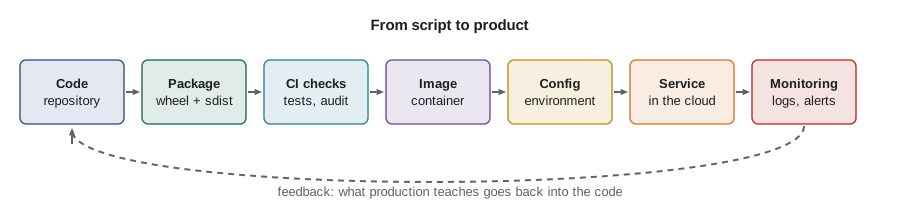
The problems that appear first
When software leaves its author's laptop, the same handful of problems appear in almost every project. Naming them helps, because each has a well-known remedy, and most of the remedies are the subjects of later lessons.
- Missing or different dependencies. The office computer has a different version of openpyxl, or none at all, and Anita's tax export fails with an import error. The remedy is declaring dependencies precisely and installing them reproducibly (lessons 2 to 4).
- Different Python versions. The roastery's small computer runs an older Python that lacks a feature Jordan used. The remedy is stating the supported versions and testing on each of them (lessons 2 and 5).
- Hidden manual steps. Jordan always creates the data folder and copies a settings file before running the tool; nobody else knows to. The remedy is automating every step and writing down what cannot be automated (lessons 1, 5 and 12).
- Configuration and secrets in the code. The shop's API key is pasted into a source file, so it is visible to anyone who can read the repository and must be edited for every environment. The remedy is reading configuration from the environment (lesson 7).
- No way to tell what went wrong. The six o'clock report silently produced nothing on Tuesday and nobody knows why. The remedy is logging, metrics and alerts (lesson 10).
- Changes that break things for others. A fix for Theo's report changed a function that the wholesale site also called. The remedy is automated tests in continuous integration and careful versioning (lessons 5 and 11).
problems = {
    "ImportError on the office computer": "dependencies",
    "works with Python 3.13, fails on 3.11": "python version",
    "must create the data folder first": "manual step",
    "API key pasted into stock.py": "secrets in code",
    "report produced nothing, no idea why": "observability",
    "fix for one user broke another": "untested change",
}
remedy = {
    "dependencies": "declare and lock dependencies (lessons 2-4)",
    "python version": "state supported versions and test each (lessons 2, 5)",
    "manual step": "automate it in the pipeline (lessons 5, 12)",
    "secrets in code": "read configuration from the environment (lesson 7)",
    "observability": "add logging, metrics and alerts (lesson 10)",
    "untested change": "run tests in CI on every change (lessons 5, 11)",
}
for symptom, kind in problems.items():
print(f"{symptom:<40} -> {remedy[kind]}")ImportError on the office computer -> declare and lock dependencies (lessons 2-4) works with Python 3.13, fails on 3.11 -> state supported versions and test each (lessons 2, 5) must create the data folder first -> automate it in the pipeline (lessons 5, 12) API key pasted into stock.py -> read configuration from the environment (lesson 7) report produced nothing, no idea why -> add logging, metrics and alerts (lesson 10) fix for one user broke another -> run tests in CI on every change (lessons 5, 11)
Reproducibility: the same input, the same result, anywhere
The idea underneath most of these remedies is reproducibility. A reproducible process gives the same result every time it is run with the same inputs, on any suitable machine, by anyone. A reproducible install produces the same set of packages at the same versions. A reproducible build produces the same package file from the same source. A reproducible deployment produces the same running system from the same release. Reproducibility turns a fragile ritual that only Jordan can perform into a procedure that a build server can perform a hundred times a day.
Reproducibility depends on making every input explicit. The source code is already explicit, because it is in version control. The other inputs are the Python version, the dependencies and their versions, the operating system packages, the configuration and the commands that tie them together. Each later lesson moves one of those inputs out of someone's head and into a file that lives next to the code: pyproject.toml for metadata and dependencies, a lock file for exact versions, a CI workflow file for the test commands, a Dockerfile for the operating system and runtime, and environment variables for configuration.
A practical way to check reproducibility is to compute a fingerprint of everything that should be the same. If two builds or two installs have the same fingerprint, they are the same; if not, something leaked in. The example below fingerprints an environment description with a cryptographic hash. Real tools do the same thing with lock files and container images, as later lessons show.
import hashlib, json

def fingerprint(env):
    """A short hash of an environment description. Same contents, same hash."""
    text = json.dumps(env, sort_keys=True)
    return hashlib.sha256(text.encode()).hexdigest()[:12]

laptop = {"python": "3.12.8", "packages": {"openpyxl": "3.1.5", "ridgeline-tools": "0.5.0"}}
office = {"packages": {"ridgeline-tools": "0.5.0", "openpyxl": "3.1.5"}, "python": "3.12.8"}
roastery = {"python": "3.11.2", "packages": {"openpyxl": "3.1.2", "ridgeline-tools": "0.5.0"}}

for name, env in [("laptop", laptop), ("office", office), ("roastery", roastery)]:
    print(f"{name:<9} {fingerprint(env)}")
print("laptop and office match:", fingerprint(laptop) == fingerprint(office))laptop 3c57c5af9929 office 3c57c5af9929 roastery 24b947d56ebc laptop and office match: True
The laptop and the office computer match even though their descriptions list the keys in a different order, because the description is normalized before hashing. The roastery computer does not match: it has an older Python and an older openpyxl. That is exactly the kind of drift that produces bugs nobody can reproduce, and a fingerprint makes it visible in one line.
Automation: if a step matters, a machine should do it
The second big idea is automation. Every step that a person performs from memory is a step that can be forgotten, done in the wrong order, or done differently by someone else. Automation does not remove the need to think, but it moves the thinking to one place, the script or pipeline definition, where it can be reviewed, versioned and improved.
Jordan's first attempt at a release process was a checklist in a text file: run the tests, update the version number, update the changelog, build the package, copy it to the shared folder, tell Theo. It was a good start, because writing a checklist is the first step to automating it. Over this course each line becomes a job in a continuous integration pipeline that runs on every change and every release, and the checklist shrinks to the decisions only a person can make.
Worked problem
Turning a release ritual into automated steps
Jordan's release checklist reads: (1) run the tests on the laptop; (2) edit the version number in two files; (3) write the changelog entry; (4) build the package; (5) copy it to the shared drive; (6) email Theo and Anita. Which steps can a pipeline automate, and what remains for people?
Show solution
- Step 1 is fully automatable: CI runs the test suite on every push and on every supported Python version (lesson 5).
- Step 2 becomes one source of truth: the version lives only in pyproject.toml, or is derived from a git tag (lessons 2 and 11).
- Step 3 can be generated from conventional commit messages, then reviewed by a person (lesson 11).
- Steps 4 and 5 become build and publish jobs that upload to a package index when a release tag is pushed (lesson 3).
- Step 6 becomes an automatic release note and notification (lessons 11 and 12).
- What remains for people: deciding that a release is ready, reviewing the changelog wording, and approving deployment to production.
Answer: Five of the six steps can be automated; people keep the judgement calls: readiness, wording and the final approval to deploy.
Environments: development, staging and production
A product usually runs in more than one environment. Development is where people write and try code: Jordan's laptop, with test data and the debugger. Production is where real customers and real money are: the wholesale site, the morning report, the cafe tills. Between them, many teams keep a staging environment that copies production as closely as is practical, so that a release can be tried with realistic settings before it reaches customers.
The rule that makes multiple environments work is that the same build moves from one environment to the next, and only the configuration changes. If the package or container image tested in staging is rebuilt for production, the thing that was tested is not the thing that is deployed. Lesson 7 shows how configuration is supplied from outside the code, and lessons 9 and 12 show how one image is promoted from staging to production.
release = {"name": "ridgeline-tools", "version": "1.0.0", "image": "sha256:4f2a9c01"}

environments = {
    "development": {"database": "sqlite:///dev.db", "debug": True,  "shop_api": "sandbox"},
    "staging":     {"database": "postgres://staging-db/ridgeline", "debug": False, "shop_api": "sandbox"},
    "production":  {"database": "postgres://prod-db/ridgeline", "debug": False, "shop_api": "live"},
}

for env, config in environments.items():
print(f"{env:<12} runs image {release['image']} with debug={config['debug']}, shop_api={config['shop_api']}")development runs image sha256:4f2a9c01 with debug=True, shop_api=sandbox staging runs image sha256:4f2a9c01 with debug=False, shop_api=sandbox production runs image sha256:4f2a9c01 with debug=False, shop_api=live
The twelve-factor app in brief
In 2011 developers at the hosting company Heroku published a short set of guidelines for building software that deploys cleanly to modern platforms, called the twelve-factor app. They are not laws, and some are dated, but they summarize the habits this course builds. A few of them matter from the start:
- One codebase in version control, deployed to many environments.
- Dependencies declared explicitly and isolated, never assumed to be installed.
- Configuration stored in the environment, not in the code.
- Build, release and run kept as separate stages: build once, combine with configuration to make a release, then run it.
- Processes that are stateless and disposable, so they can be started, stopped and replaced quickly.
- Logs treated as a stream of events written to standard output, collected by the platform.
- Development, staging and production kept as similar as possible.
Each of these will reappear with a concrete Python example. For now, it is enough to recognize that they all serve the two big ideas above: make every input explicit, so the result is reproducible, and let machines do the repetitive steps.
Thinking about failure from the start
A product will fail sometimes. Disks fill, networks drop, a supplier's API changes its format, a new release has a bug. Mature teams plan for failure rather than hoping to avoid it. They make deployments easy to roll back, they keep the previous version ready, they check the health of each service automatically, and they write down what to do when an alarm fires. The question is not whether something will go wrong but how quickly the team will notice and recover.
Two measures from the operations world capture this. Mean time to detect is how long a problem exists before someone knows about it. Mean time to recover is how long it takes to restore service after that. Logging, monitoring and alerts (lesson 10) shrink the first; automated, repeatable deployments and quick rollbacks (lessons 9 and 12) shrink the second. Ridgeline's silent Tuesday failure, when the morning report simply did not arrive, had a detection time of several hours, because the first person to notice was Theo looking for it at nine.
incidents = [
    # (what happened, minutes until noticed, minutes to fix after noticing)
    ("morning report silently empty", 180, 25),
    ("wholesale site down after a bad release", 6, 4),
    ("roast log upload failing", 1440, 15),
    ("disk full on the office computer", 95, 20),
]
detect = [d for _, d, _ in incidents]
recover = [r for _, _, r in incidents]
print(f"mean time to detect:  {sum(detect) / len(detect):.0f} minutes")
print(f"mean time to recover: {sum(recover) / len(recover):.0f} minutes")
worst = max(incidents, key=lambda i: i[1] + i[2])
print(f"longest outage: {worst[0]} ({worst[1] + worst[2]} minutes)")mean time to detect: 430 minutes mean time to recover: 16 minutes longest outage: roast log upload failing (1455 minutes)
The numbers tell a familiar story. Most incidents were fixed in under half an hour once noticed, but they went unnoticed for hours. The roast-log upload failed for a whole day because nobody was watching it. The bad release was the shortest outage of all, because the team saw the problem immediately and rolled back with one command. That is the kind of outcome this course aims for.
Try it yourself
The exercises below practise the habit of writing release checks as code. They run in your browser; edit the starter, press Run to experiment and Check my code to grade your answer.
Try it yourself
Check a release checklist
Write missing_steps(done) that returns a list of the required release steps that are not in the list done, in the order of REQUIRED. Each step counts only once and case does not matter, so "Run Tests" counts as "run tests".
REQUIRED = ["run tests", "update changelog", "build package", "publish package", "tag release"]

def missing_steps(done):
    return []
Try it yourself
Spot environment drift
Write drift(a, b) that compares two package dictionaries such as {"openpyxl": "3.1.5"} and returns a sorted list of strings describing every difference: "openpyxl: 3.1.5 vs 3.1.2" when the versions differ, "requests: only in a" or "requests: only in b" when a package is present on one side only.
def drift(a, b):
    return []
Try it yourself
Mean time to detect
Each incident is a tuple (name, minutes_to_detect, minutes_to_recover). Write outage_report(incidents) that returns a dictionary with keys "mttd" and "mttr" (the means, rounded to one decimal place) and "longest" (the name of the incident with the largest total outage). For an empty list return {"mttd": 0, "mttr": 0, "longest": None}.
def outage_report(incidents):
    return {}
Common mistakes
MistakeTreating "it works on my laptop" as proof that the software is ready.
InsteadProve it on a clean machine, ideally a CI runner, using only what is written down in the repository.
MistakeKeeping release steps in your head.
InsteadWrite them as a checklist first, then turn each line into an automated job.
MistakeRebuilding the software separately for staging and production.
InsteadBuild once and promote the same package or image, changing only configuration.
MistakePlanning only for success.
InsteadPlan for failure: health checks, logs, alerts, and a rollback you have practised.
MistakePasting passwords or API keys into source files to get something working quickly.
InsteadRead secrets from the environment from day one, even in development.
Summary and key terms
- A product is software that other people and machines depend on: it must install cleanly, run the same everywhere and keep working unattended.
- The first problems are usually missing dependencies, different Python versions, hidden manual steps, secrets in code, silent failures and changes that break other users.
- Reproducibility means making every input explicit, so the same inputs give the same result anywhere; fingerprints make drift visible.
- Automation moves repeated steps from memory into reviewed, versioned pipeline definitions.
- Development, staging and production run the same build with different configuration.
- The twelve-factor guidelines summarize good habits: explicit dependencies, configuration in the environment, separate build, release and run, and logs as streams.
- Plan for failure: shorten the time to detect and the time to recover.
- product
- Software that other people or machines rely on, as opposed to a personal script.
- reproducibility
- Getting the same result from the same inputs every time, on any suitable machine.
- environment
- A place where the software runs with its own configuration, such as development, staging or production.
- staging
- An environment that copies production closely, used to try a release before customers see it.
- twelve-factor app
- A set of guidelines for building software that deploys cleanly to modern platforms.
- mean time to detect
- The average time a problem exists before someone knows about it.
- mean time to recover
- The average time to restore service after a problem is noticed.
Practice problems
Work each problem on paper first, then reveal the answer to check.
Name three inputs, other than the source code, that affect whether a Python program behaves the same on two machines.
Show answer
For example the Python version, the installed dependency versions, operating system packages, configuration and environment variables.
Why should staging and production use the same build?
Show answer
So the thing you tested is exactly the thing you deploy; a rebuild could pick up different dependencies.
An outage lasted 3 hours: 2 hours 40 minutes before anyone noticed and 20 minutes to fix. Which measure should the team work on first?
Show answer
Detection: monitoring and alerts would have cut most of the outage.
Give one twelve-factor guideline and the problem it prevents.
Show answer
For example, configuration in the environment prevents secrets in source code and per-environment code edits.
Lesson quiz · 5 questions
Score 60% or more to complete this lesson.
Create a free account to save your progress, take quizzes and earn a certificate.