
PYTH-260 · Lesson 11 of 12 · 23 min
Releases and versioning
▶ Video coming soon A video version of this lesson is on the way.
ridgeline-tools has been at 0.x since its first release in PYTH-110. Now three systems depend on it: the wholesale site, the morning report job and Kai's roast-log uploader, and each installs it from the private index with a version constraint. Every new release raises the same questions. What does the version number promise? How do people relying on the package know whether an upgrade is safe? How are changes recorded, and how does a team release a fix to an old version without dragging in unfinished work? This lesson covers semantic versioning, pre-releases, deprecation, generating version bumps and changelogs from commit messages, tagging, and the release workflow that takes Ridgeline to 1.0.0.
Semantic versioning
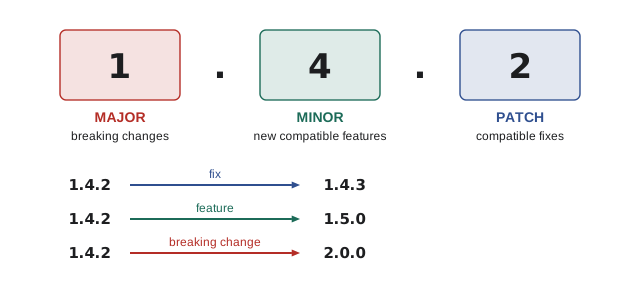
A version number is a promise to the people who depend on your code. Semantic versioning, or SemVer, is the most widely used convention for making that promise precise. A version has three numbers, MAJOR.MINOR.PATCH, and each kind of change increments one of them:
- PATCH (1.4.2 to 1.4.3) for backwards-compatible bug fixes. Nothing that worked before stops working.
- MINOR (1.4.3 to 1.5.0) for backwards-compatible new features. New functions or options appear; existing ones behave as before. The patch number resets to zero.
- MAJOR (1.5.0 to 2.0.0) for incompatible changes: removing or renaming a function, changing its arguments or return values, changing behaviour that callers rely on. Minor and patch reset to zero.
The promise only means something relative to a public API: the functions, classes, command-line options and file formats that users are told they may rely on. For ridgeline-tools, that is everything importable without a leading underscore from ridgeline, ridgeline.stock, ridgeline.loyalty and ridgeline.db, plus the ridgeline command and its options. Internal helpers can change freely in any release.
Version 0.x is special. The SemVer specification says anything may change at any time before 1.0.0, so users of 0.x packages should expect breaking changes in minor releases. Many Python projects treat 0.MINOR roughly as if it were MAJOR. Releasing 1.0.0 is therefore a statement: the public API is stable and the rules above now apply. Python's own version numbers, and some large projects, follow different conventions, so it is always worth reading what a project says about its numbering.
def bump(version, change):
    """Return the next semantic version for a change of type 'major', 'minor' or 'patch'."""
    major, minor, patch = (int(x) for x in version.split("."))
    if change == "major":
        return f"{major + 1}.0.0"
    if change == "minor":
        return f"{major}.{minor + 1}.0"
    if change == "patch":
        return f"{major}.{minor}.{patch + 1}"
    raise ValueError(f"unknown change type {change!r}")

v = "0.9.3"
for change in ["patch", "minor", "patch", "major", "minor"]:
    v = bump(v, change)
print(f"{change:<6} -> {v}")patch -> 0.9.4 minor -> 0.10.0 patch -> 0.10.1 major -> 1.0.0 minor -> 1.1.0
How version constraints rely on the promise
Lesson 4 described the compatible-release operator. The morning report's requirements say ridgeline-tools~=1.2, which allows 1.2 and any later 1.x. That constraint is safe only because of semantic versioning: every 1.x release promises not to break code written for 1.2, so the report can pick up fixes and features automatically, while 2.0, which might break it, is excluded until someone checks. A project that breaks things in a minor release breaks every user who trusted its version numbers.
An alternative scheme, calendar versioning or CalVer, uses the release date, such as 26.11 for November 2026. pip itself uses a year-based scheme. CalVer suits applications and tools whose users always want the newest release, but says nothing about compatibility, so libraries usually prefer SemVer.
Pre-releases
Before 1.0.0 is final, Jordan wants the wholesale site and the morning report to try it. Pre-releases make that possible without promising stability. In PEP 440 a pre-release adds a suffix: 1.0.0a1 for the first alpha (incomplete, for early testing), 1.0.0b1 for a beta (feature complete, still being tested), and 1.0.0rc1 for a release candidate (expected to become the final release unless a serious problem appears). They sort before the final release: 1.0.0a1 < 1.0.0a2 < 1.0.0b1 < 1.0.0rc1 < 1.0.0. Installers ignore pre-releases unless they are asked for one explicitly, with pip install --pre or a requirement that names a pre-release, so users who did not opt in never receive them.
import re

ORDER = {"a": 0, "b": 1, "rc": 2, None: 3}     # a final release sorts after its pre-releases

def key(version):
    """Sort key for versions like 1.0.0, 1.0.0rc1 or 1.0.0b2 (a simplified PEP 440)."""
    m = re.fullmatch(r"(\d+)\.(\d+)\.(\d+)(?:(a|b|rc)(\d+))?", version)
    if not m:
        raise ValueError(version)
    major, minor, patch, kind, n = m.groups()
    return (int(major), int(minor), int(patch), ORDER[kind], int(n or 0))

releases = ["1.0.0", "0.9.3", "1.0.0rc1", "1.0.0a1", "1.0.0b1", "1.0.0a2", "1.0.1", "1.0.0rc2"]
print(" < ".join(sorted(releases, key=key)))0.9.3 < 1.0.0a1 < 1.0.0a2 < 1.0.0b1 < 1.0.0rc1 < 1.0.0rc2 < 1.0.0 < 1.0.1
Deprecation: changing an API gently
Sometimes the public API needs to change. In ridgeline-tools, loyalty.points_for(total) was written before refunds existed, and Anita needs a version that understands them. Removing the old function in the next release would break three systems at once. The kind way to change an API is deprecation: keep the old function working, make it emit a warning that tells callers what to use instead and when the old name will disappear, and remove it only in the next major release.
import functools, warnings

def deprecated(replacement, removal):
    """Decorator: keep a function working but warn callers to move to `replacement`."""
    def wrap(func):
        @functools.wraps(func)
        def inner(*args, **kwargs):
            warnings.warn(f"{func.__name__}() is deprecated; use {replacement}() instead. "
                          f"It will be removed in {removal}.", DeprecationWarning, stacklevel=2)
            return func(*args, **kwargs)
        return inner
    return wrap

def loyalty_points(total, refunded=0):
    return max(0, int(total - refunded))

@deprecated("loyalty_points", "2.0.0")
def points_for(total):
    return loyalty_points(total)

with warnings.catch_warnings(record=True) as caught:
    warnings.simplefilter("always")
    print("points:", points_for(42.75))
print("warning:", caught[0].message)points: 42 warning: points_for() is deprecated; use loyalty_points() instead. It will be removed in 2.0.0.
Python hides DeprecationWarning by default except in code run directly as __main__ and in test runners, so pytest shows these warnings to developers while customers never see them. Running the test suite with warnings turned into errors (pytest -W error::DeprecationWarning) is a good way to find every use of deprecated functions before a major upgrade.
Changelogs and commit messages
Users deciding whether to upgrade need to know what changed. A changelog is a file, usually CHANGELOG.md, that lists the notable changes in each release, newest first, grouped by kind. The Keep a Changelog convention sorts entries into six groups (added, changed, deprecated, removed, fixed and security), with an Unreleased section at the top where entries collect until the next release. Ridgeline's changelog has followed it since 0.4.0.
Writing the changelog by hand at release time means trying to remember a month of work. Since 0.5.0 Ridgeline's commits follow the Conventional Commits format, which makes each commit message machine-readable: a type, an optional scope in parentheses, a colon and a description, such as fix(loyalty): no points for refunded orders or feat(report): add CSV output. The types that matter for versioning are feat (a new feature: minor bump), fix (a bug fix: patch bump), and any commit marked as breaking, either with an exclamation mark after the type (feat!:) or a BREAKING CHANGE: line in the body (major bump). Other types, such as docs, test, refactor and ci, do not change the version on their own.
import re

commits = [
    "feat(report): add CSV output for the morning report",
    "fix(loyalty): no points for refunded orders",
    "docs: explain the roast-log upload",
    "fix(db): close connections on shutdown",
    "feat(web)!: require an API key for the stock endpoint",
    "ci: cache pip downloads",
]
PATTERN = re.compile(r"(?P<type>\w+)(\((?P<scope>[\w-]+)\))?(?P<bang>!)?: (?P<desc>.+)")

def change_level(messages):
    level = None
    for m in map(PATTERN.match, messages):
        if not m:
            continue
        if m["bang"]:
            return "major"
        if m["type"] == "feat":
            level = "minor"
        elif m["type"] == "fix" and level is None:
            level = "patch"
    return level

groups = {"feat": "Added", "fix": "Fixed"}
print("next release is a", change_level(commits), "release")
for m in map(PATTERN.match, commits):
    if m["type"] in groups or m["bang"]:
        section = "Changed (breaking)" if m["bang"] else groups[m["type"]]
print(f"- {section}: {m['desc']}" + (f" ({m['scope']})" if m["scope"] else ""))next release is a major release - Added: add CSV output for the morning report (report) - Fixed: no points for refunded orders (loyalty) - Fixed: close connections on shutdown (db) - Changed (breaking): require an API key for the stock endpoint (web)
Tools such as python-semantic-release, commitizen and release-please automate exactly this: they read the commits since the last tag, choose the next version, update the changelog and pyproject.toml, create the tag and trigger the publishing workflow. A person still reviews the generated changelog, because commit messages written for developers are not always the clearest explanation for users.
Tags and the release workflow
A git tag marks the exact commit that became a release. Ridgeline uses annotated tags named after the version with a v prefix, v1.0.0, created with git tag -a v1.0.0 -m "ridgeline-tools 1.0.0" and pushed with git push origin v1.0.0. Pushing a tag that matches v*.*.* triggers the release workflow: CI builds the wheel and sdist from the tagged commit, checks that the version in the files matches the tag, publishes to the private index with trusted publishing, builds and pushes the container image, and drafts release notes from the changelog. Because the tag names one commit, anyone can later check out exactly what was released.
> git switch main
> git pull
> git log --oneline v0.9.3..HEAD
a7c31e0 feat(web)!: require an API key for the stock endpoint
5e2d9b4 fix(db): close connections on shutdown
...
> git tag -a v1.0.0 -m "ridgeline-tools 1.0.0"
> git push origin v1.0.0            (starts the release workflow)
Maintaining older releases
After 1.0.0, work continues on main towards 1.1.0. Then a bug is found in 1.0.0's tax rounding, and Anita needs the fix today, but main contains half-finished features that are not ready. A release branch solves this: create a branch release/1.0 from the v1.0.0 tag, apply the fix there (usually by cherry-picking the fix commit from main, where it is also merged), and release 1.0.1 from that branch. Main keeps moving; the release branch receives only fixes. Small teams like Ridgeline support only the latest minor version, and say so; large projects publish a support policy listing how long each version receives fixes and security updates.
Worked problem
Planning the 1.0.0 release
ridgeline-tools is at 0.9.3. Planned changes: a new CSV output option (feature), a fix to refund points (fix), removing the deprecated points_for function, and making the stock endpoint require an API key. What should the version sequence be?
Show solution
- Removing points_for and requiring an API key both break existing callers, so they belong in a major release, the first stable one: 1.0.0.
- Before removing points_for, release 0.10.0 with the CSV feature, the refund fix and points_for deprecated with a warning, so users have one release to move.
- Then publish 1.0.0rc1 to the private index; the wholesale site and the morning report test it with pip install --pre in staging for a week.
- If no problems appear, release 1.0.0 from the same commit as rc1 plus the version change, tag v1.0.0, and document the public API that 1.x now promises to keep.
Answer: 0.10.0 (feature, fix, deprecation warning), then 1.0.0rc1 for testing, then 1.0.0 with the two breaking changes and a documented stable API.
Try it yourself
Try it yourself
Next version from commits
Write next_version(current, commits) for conventional commit messages. If any commit has "!" right before the colon (as in "feat!:" or "fix(db)!:") or contains "BREAKING CHANGE:", bump MAJOR; otherwise if any commit starts with "feat", bump MINOR; otherwise if any starts with "fix", bump PATCH; otherwise return current unchanged.
def next_version(current, commits):
    return current
Try it yourself
Group changelog entries
Write changelog(commits) that returns a dictionary with keys "Added" and "Fixed", each a list of descriptions in commit order: commits starting with "feat" go to Added, commits starting with "fix" go to Fixed, everything else is ignored. The description is the text after the first ": ".
def changelog(commits):
    return {"Added": [], "Fixed": []}
Try it yourself
Sort with pre-releases
Write release_key(v) for versions of the form X.Y.Z optionally followed by a1, b1, rc1 and so on, so that sorted(versions, key=release_key) puts alphas before betas before release candidates before the final release, and compares numbers numerically.
def release_key(v):
    return v
Common mistakes
MistakeMaking a breaking change in a minor or patch release.
InsteadBreaking changes need a new MAJOR version; deprecate first, remove later.
MistakeRemoving a public function without warning.
InsteadDeprecate it with a DeprecationWarning naming the replacement and the removal version, for at least one release.
MistakeWriting the changelog from memory on release day.
InsteadUse conventional commits and generate a draft, then edit it for users.
MistakeReleasing straight from a laptop.
InsteadTag the commit and let the CI release workflow build and publish from the tag.
MistakeShipping hotfixes from main when main has unfinished work.
InsteadFix on a release branch cut from the release tag, and merge the fix to main too.
Summary and key terms
- Semantic versioning: MAJOR for breaking changes, MINOR for compatible features, PATCH for compatible fixes, relative to a documented public API.
- Before 1.0.0 anything may change; releasing 1.0.0 declares the public API stable.
- Version constraints such as ~=1.2 rely on projects keeping the SemVer promise.
- Pre-releases (a, b, rc) sort before the final release and are installed only on request.
- Deprecate before removing: warn with DeprecationWarning, remove in the next major release.
- Conventional commits make version bumps and changelogs automatic; a person reviews the result.
- Tags mark releases and trigger the release workflow; release branches carry fixes to older versions.
- semantic versioning
- The MAJOR.MINOR.PATCH convention, where the changed number signals the kind of change.
- public API
- The functions, classes, options and formats users are told they may rely on.
- breaking change
- A change that can make existing correct code stop working.
- pre-release
- An alpha, beta or release candidate version published for testing before the final release.
- deprecation
- Marking a feature as scheduled for removal while it still works, with a warning.
- changelog
- A file listing the notable changes in each release.
- Conventional Commits
- A commit message format, type(scope): description, that tools can read.
- release branch
- A branch created from a release tag to carry fixes for that release line.
Practice problems
Work each problem on paper first, then reveal the answer to check.
A release adds a new optional argument and fixes a bug. What kind of bump is it?
Show answer
MINOR: a compatible new feature, which also includes the fix.
Does pip install ridgeline-tools install 1.1.0rc1 if 1.0.4 is the newest final release?
Show answer
No: pre-releases are skipped unless requested with --pre or an explicit requirement.
Which commit triggers a MAJOR bump: "fix: rounding", "feat(api)!: rename Order", "docs: install guide"?
Show answer
"feat(api)!: rename Order", because of the exclamation mark.
Why is DeprecationWarning hidden by default?
Show answer
So end users are not bothered; developers see it in tests and in code run as __main__.
Lesson quiz · 5 questions
Score 60% or more to complete this lesson.
Create a free account to save your progress, take quizzes and earn a certificate.