
PYTH-220 · Lesson 7 of 12 · 24 min
Django: projects, apps and models
▶ Video coming soon A video version of this lesson is on the way.
Flask gave Ridgeline a working shop with a handful of files, and you saw every piece: routes, templates, forms and SQL. As the shop grows, Rosa has new wishes: staff accounts with different permissions, a back-office screen where Theo can edit stock without asking Jordan, product photos, order statuses and reports. Each of these could be built in Flask by choosing and wiring together extensions. Django takes the other approach. It arrives with an ORM, migrations, an admin site, user accounts, forms, templates and security protections already built and designed to work together.
This lesson and the next rebuild Ridgeline's catalog and orders in Django. You will set up a project, create an app, define models for coffees and orders, create the tables with migrations and query them with Django's ORM. Django code needs Django installed, so it appears in listings without a Run button; the runnable examples and exercises recreate the key ideas in plain Python so you can see how they work.
Projects and apps
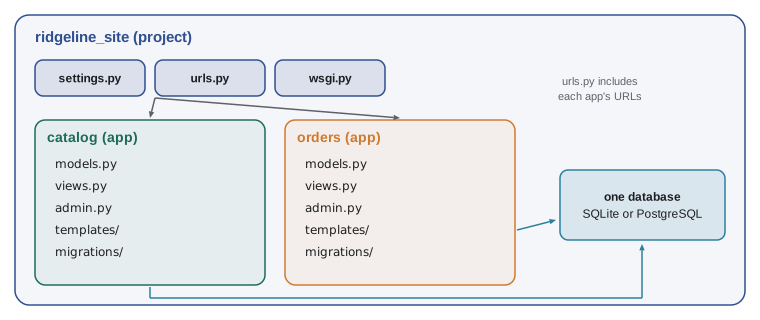
Django separates a project from its apps. The project is the whole website: its settings, its top-level URL list and its deployment configuration. An app is a self-contained piece of functionality, such as a catalog, orders or accounts, with its own models, views, templates and tests. A project contains several apps, and a well-made app can be reused in other projects. Ridgeline's site will have a catalog app for coffees and an orders app for pickup and shipping orders.
> python -m venv .venv
> .venv\Scripts\activate
> python -m pip install django
> django-admin startproject ridgeline_site .
> python manage.py startapp catalog
> python manage.py startapp orders
> python manage.py runserver
Starting development server at http://127.0.0.1:8000/ridgeline_site/ the project package
settings.py configuration for the whole site
urls.py the top-level URL list
wsgi.py the WSGI entry point for production servers
asgi.py the ASGI entry point (for async servers)
catalog/ an app
models.py database models
views.py view functions or classes
admin.py admin site registration
migrations/ schema changes, generated by Django
tests.py
orders/ another app, same layout
manage.py the command-line tool for this projectmanage.py is the project's command-line tool: it starts the development server, creates and applies migrations, opens a shell with the project loaded, creates admin users and runs tests. The wsgi.py file holds the same kind of WSGI callable you met in lesson 2, which is what Gunicorn or Waitress serve in production. Each new app must be added to INSTALLED_APPS in settings.py so Django finds its models, templates and admin registrations.
# ridgeline_site/settings.py (parts)
import os

SECRET_KEY = os.environ["DJANGO_SECRET_KEY"]       # never commit the real key
DEBUG = os.environ.get("DJANGO_DEBUG") == "1"
ALLOWED_HOSTS = ["shop.ridgeline.example", "127.0.0.1", "localhost"]

INSTALLED_APPS = [
    "django.contrib.admin",
    "django.contrib.auth",
    "django.contrib.contenttypes",
    "django.contrib.sessions",
    "django.contrib.messages",
    "django.contrib.staticfiles",
    "catalog",
    "orders",
]

DATABASES = {"default": {"ENGINE": "django.db.backends.sqlite3", "NAME": "ridgeline.sqlite3"}}
DEBUG must be False in production for the same reason as Flask's debug mode: detailed error pages reveal settings and code. ALLOWED_HOSTS lists the host names the site will answer to, which protects against a class of attacks that use forged Host headers. SQLite is a fine database for development and for small sites; for production with several web workers writing at once, PostgreSQL is the usual choice, and switching is mostly a change to DATABASES.
Models: Python classes that describe tables
A Django model is a Python class that describes a database table. Each attribute is a field with a type, such as CharField for short text, IntegerField for whole numbers, DecimalField for money, DateTimeField for timestamps and ForeignKey for a link to another model. Options on each field set rules such as maximum length, uniqueness and default values. From the model, Django can create the table, validate data, build admin forms and generate parameterized SQL for every query.
# catalog/models.py
from django.db import models

class Coffee(models.Model):
    class Roast(models.TextChoices):
        LIGHT = "light"
        MEDIUM = "medium"
        DARK = "dark"

    sku = models.CharField(max_length=10, unique=True)
    name = models.CharField(max_length=100)
    roast = models.CharField(max_length=10, choices=Roast.choices)
    price = models.DecimalField(max_digits=7, decimal_places=2)
    bags = models.PositiveIntegerField(default=0)
    roasted_on = models.DateField(null=True, blank=True)

    class Meta:
        ordering = ["sku"]

    def __str__(self):
        return f"{self.sku} {self.name}"

    @property
    def is_low(self):
        return self.bags < 10
Django adds an automatic integer primary key named id to every model unless you choose another. TextChoices gives the roast field a fixed set of allowed values, which the admin site shows as a drop-down list. null=True allows NULL in the database column, while blank=True allows the field to be left empty in forms; for an optional date you usually want both. The __str__ method controls how a coffee appears in the admin and in the shell, and the ordinary Python property is_low works just as it did in the PYTH-102 Coffee class.
A model class describes rules as well as columns. The same idea, a class that validates its own data as it is created, can be written with a dataclass in plain Python, and doing so shows what Django's field options are doing for you.
from dataclasses import dataclass
import re

SKU = re.compile(r"RC-\d{3}")
ROASTS = {"light", "medium", "dark"}

@dataclass
class Coffee:
    sku: str
    name: str
    roast: str
    price_cents: int
    bags: int = 0

    def __post_init__(self):
        if not SKU.fullmatch(self.sku):
            raise ValueError(f"bad sku {self.sku!r}")
        if not 1 <= len(self.name) <= 100:
            raise ValueError("name must be 1 to 100 characters")
        if self.roast not in ROASTS:
            raise ValueError(f"roast must be one of {sorted(ROASTS)}")
        if self.price_cents < 0 or self.bags < 0:
            raise ValueError("price and bags cannot be negative")

print(Coffee("RC-104", "Sumatra Dark", "dark", 2025, 9))
for bad in [("RC-4", "X", "dark", 100), ("RC-107", "Kenya AA", "blonde", 2300)]:
    try:
        Coffee(*bad)
    except ValueError as err:
print("rejected:", err)Coffee(sku='RC-104', name='Sumatra Dark', roast='dark', price_cents=2025, bags=9) rejected: bad sku 'RC-4' rejected: roast must be one of ['dark', 'light', 'medium']
Try it yourself
A model with rules
Write a dataclass OrderLine with fields sku (str), quantity (int) and price_cents (int). In __post_init__, raise ValueError if the quantity is not between 1 and 20, or if price_cents is negative. Add a property total_cents that returns quantity times price.
For example, OrderLine("RC-104", 3, 2025).total_cents is 6075.
from dataclasses import dataclass

@dataclass
class OrderLine:
    sku: str
    quantity: int
    price_cents: int

line = OrderLine('RC-104', 3, 2025)
print(line)
Migrations
A model describes what the table should look like; a migration is the step that makes the database match. When you add or change a model, python manage.py makemigrations compares your models with the last recorded state and writes a migration file describing the difference, such as CreateModel or AddField. python manage.py migrate applies any migrations the database has not yet seen. Migration files are code: you review them and commit them to Git, so the database on Jordan's laptop, in the tests and on the server all evolve in the same steps.
> python manage.py makemigrations catalog
Migrations for 'catalog':
  catalog/migrations/0001_initial.py
    + Create model Coffee
> python manage.py migrate
Applying catalog.0001_initial... OK

(later, after adding roasted_on to the model)
> python manage.py makemigrations catalog
  catalog/migrations/0002_coffee_roasted_on.py
    + Add field roasted_on to coffee
Under the hood, a migration tool compares two descriptions of the schema and lists the operations that turn one into the other. The function below does a simplified version of that comparison for one table, which is a useful way to understand what makemigrations reports.
def diff_fields(old, new):
    """Compare two {field: type} dicts and list the operations needed."""
    ops = []
    for name in new:
        if name not in old:
            ops.append(f"add field {name} ({new[name]})")
        elif old[name] != new[name]:
            ops.append(f"alter field {name}: {old[name]} -> {new[name]}")
    for name in old:
        if name not in new:
            ops.append(f"remove field {name}")
    return ops

v1 = {"sku": "char", "name": "char", "price": "decimal", "bags": "integer"}
v2 = {"sku": "char", "name": "char", "price": "decimal", "bags": "positive integer", "roasted_on": "date"}
for op in diff_fields(v1, v2):
print(op)alter field bags: integer -> positive integer add field roasted_on (date)
Removing a field deletes its data, so a real migration tool asks for confirmation and you should think before running it on a live database. Renames are also tricky: a tool cannot always tell a renamed field from a removed field plus an added one, which is why Django asks you whether a field was renamed.
Try it yourself
List the migration steps
Write diff_fields(old, new) that compares two dictionaries mapping field names to types and returns a list of strings: "add NAME" for each field only in new (in the order of new), "alter NAME" for each field in both with a different type (in the order of new), and then "remove NAME" for each field only in old (in the order of old).
def diff_fields(old, new):
    return ['add ' + name for name in new if name not in old]

print(diff_fields({'sku': 'char', 'bags': 'int'}, {'sku': 'char', 'bags': 'uint', 'roast': 'char'}))
Querying with the ORM
Each model gets a manager, Coffee.objects, that builds queries. Coffee.objects.all() returns every coffee, filter keeps rows that match, exclude drops them, order_by sorts and get returns exactly one object or raises an error. Conditions use field lookups written with double underscores: bags__lt=10 means bags less than 10, name__icontains="guji" means the name contains guji ignoring case, and price__range=(18, 20) is a range. Queries are lazy: Django builds the SQL but only runs it when you use the results, so you can chain conditions cheaply.
# python manage.py shell
from catalog.models import Coffee

Coffee.objects.count()                                   # 6
low = Coffee.objects.filter(bags__lt=10)                  # a QuerySet, not yet run
dark = Coffee.objects.filter(roast="dark").order_by("-bags")
guji = Coffee.objects.get(sku="RC-102")                   # exactly one, or an exception
cheap_names = list(Coffee.objects.filter(price__lt=20).values_list("name", flat=True))
print(low.query)                                          # shows the SQL Django will run

from django.db.models import F
Coffee.objects.filter(sku="RC-104").update(bags=F("bags") - 3)   # done inside the database
The F expression in the last line tells Django to compute bags - 3 inside the database, in one UPDATE statement, rather than reading the value into Python, subtracting and writing it back. That is the ORM version of the race-free stock update from lesson 6. Lookups are a small language of their own, and seeing them implemented makes them easy to remember. The function below supports a few lookups over a list of dictionaries.
COFFEES = [
    {"sku": "RC-101", "name": "Sunrise Blend", "roast": "medium", "price_cents": 1850, "bags": 42},
    {"sku": "RC-102", "name": "Ethiopia Guji", "roast": "light", "price_cents": 2200, "bags": 15},
    {"sku": "RC-103", "name": "Colombia Huila", "roast": "medium", "price_cents": 1975, "bags": 27},
    {"sku": "RC-104", "name": "Sumatra Dark", "roast": "dark", "price_cents": 2025, "bags": 9},
    {"sku": "RC-105", "name": "Decaf Swiss Water", "roast": "medium", "price_cents": 1900, "bags": 12},
    {"sku": "RC-106", "name": "Espresso Ridge", "roast": "dark", "price_cents": 2150, "bags": 30},
]

import operator

LOOKUPS = {"exact": operator.eq, "lt": operator.lt, "lte": operator.le, "gt": operator.gt, "gte": operator.ge,
           "icontains": lambda value, arg: arg.lower() in value.lower()}

def filter_rows(rows, **conditions):
    result = []
    for row in rows:
        keep = True
        for key, arg in conditions.items():
            field, _, lookup = key.partition("__")
            if not LOOKUPS[lookup or "exact"](row[field], arg):
                keep = False
                break
        if keep:
            result.append(row)
    return result

print([c["sku"] for c in filter_rows(COFFEES, bags__lt=15)])
print([c["sku"] for c in filter_rows(COFFEES, roast="dark", price_cents__gte=2100)])
print([c["name"] for c in filter_rows(COFFEES, name__icontains="RIDGE")])['RC-104', 'RC-105'] ['RC-106'] ['Espresso Ridge']
Relationships
Orders refer to coffees, and Django expresses that with a ForeignKey. In the orders app, an Order has a customer email, a status and a creation time, and each OrderLine points to one Order and one Coffee. on_delete says what happens to the lines if a coffee is deleted: PROTECT refuses the deletion, which is right for coffees that appear in past orders, while CASCADE would delete the lines too. related_name gives the reverse direction a readable name, so order.lines.all() lists an order's lines.
# orders/models.py
from django.db import models
from catalog.models import Coffee

class Order(models.Model):
    class Status(models.TextChoices):
        NEW = "new"
        READY = "ready"
        COLLECTED = "collected"

    email = models.EmailField()
    status = models.CharField(max_length=10, choices=Status.choices, default=Status.NEW)
    created = models.DateTimeField(auto_now_add=True)

class OrderLine(models.Model):
    order = models.ForeignKey(Order, on_delete=models.CASCADE, related_name="lines")
    coffee = models.ForeignKey(Coffee, on_delete=models.PROTECT)
    quantity = models.PositiveSmallIntegerField()
    price = models.DecimalField(max_digits=7, decimal_places=2)    # price at the time of the order

# Avoid N+1 queries when listing lines with their coffees:
#   OrderLine.objects.select_related("coffee").filter(order__status="new")
Storing the price on the order line, rather than reading the coffee's current price, means old orders keep the price the customer actually paid when Rosa changes the price list. select_related tells Django to fetch each line's coffee in the same query with a JOIN, which avoids the N+1 problem from lesson 6; prefetch_related does the same for many-to-many and reverse relationships using a second query.
Try it yourself
Field lookups
COFFEES (in the setup) is a list of dictionaries. Write select(rows, **conditions) that keeps rows matching every condition. Support a plain field name for equality and the suffixes __lt, __gte and __in (value is in a list). For example select(COFFEES, roast__in=["light", "dark"], bags__lt=20) returns the Ethiopia Guji and Sumatra Dark rows.
def select(rows, **conditions):
    return [r for r in rows if all(r.get(k) == v for k, v in conditions.items())]

print([r['sku'] for r in select(COFFEES, roast='dark')])
Common mistakes
MistakeForgetting to add a new app to INSTALLED_APPS, so its models and templates are ignored.
InsteadAdd every app you create to INSTALLED_APPS in settings.py.
MistakeChanging models without running makemigrations and migrate.
InsteadMake and apply a migration after every model change, and commit the migration files.
MistakeUsing null=True on text fields to mean optional.
InsteadFor text, use blank=True and store an empty string; use null=True mainly for non-text fields such as dates.
MistakeReading a value into Python, changing it and saving it back for counters such as stock.
InsteadUse F expressions or update() so the database does the change in one step.
MistakeUsing CASCADE on links that point to records you must keep, such as coffees in past orders.
InsteadUse PROTECT where deleting the target would destroy history.
MistakeLeaving DEBUG on or committing SECRET_KEY.
InsteadRead secrets and the debug flag from environment variables.
Summary and key terms
- Django is a batteries-included framework with an ORM, migrations, admin, accounts, forms and security built in.
- A project holds settings, top-level URLs and the WSGI entry point; apps hold models, views, templates and tests, and are listed in INSTALLED_APPS.
- Models are classes whose fields describe table columns and their rules; Django builds tables, forms and SQL from them.
- makemigrations writes migration files from model changes; migrate applies them; migrations are committed to version control.
- The ORM's manager builds lazy QuerySets with filter, exclude, get and order_by, using field lookups such as bags__lt.
- ForeignKey links models; on_delete sets what happens when the target is deleted, and select_related avoids N+1 queries.
- project
- The whole Django website: settings, top-level URLs and deployment entry points.
- app
- A self-contained part of a Django project with its own models, views and templates.
- model
- A class that describes a database table and its rules.
- field
- An attribute of a model that maps to a column.
- migration
- A versioned file that changes the database schema to match the models.
- QuerySet
- A lazy, chainable description of a database query.
- field lookup
- A condition such as bags__lt=10 written with double underscores.
- ForeignKey
- A field that links a row to a row in another table.
Practice problems
Work each problem on paper first, then reveal the answer to check.
What is the difference between a Django project and an app?
Show answer
The project is the whole site with settings and top-level URLs; an app is one self-contained feature, such as the catalog.
You added roasted_on to the Coffee model. What two commands update the database?
Show answer
python manage.py makemigrations, then python manage.py migrate.
Write the ORM filter for dark coffees with fewer than 10 bags.
Show answer
Coffee.objects.filter(roast="dark", bags__lt=10).
Why does OrderLine store its own price?
Show answer
So past orders keep the price paid even after the coffee's price changes.
Which on_delete option stops a coffee from being deleted while order lines refer to it?
Show answer
models.PROTECT.
Lesson quiz · 5 questions
Score 60% or more to complete this lesson.
Create a free account to save your progress, take quizzes and earn a certificate.