
PYTH-220 · Lesson 3 of 12 · 21 min
Routes, requests and responses
▶ Video coming soon A video version of this lesson is on the way.
Ridgeline's first Flask app had two fixed pages. A real shop needs pages whose address contains data: /coffees/RC-104 for the Sumatra Dark page, /orders/1042 for one order, /coffees?roast=dark for a filtered list. It also needs to read what the customer sent, such as form fields, query parameters, cookies and JSON, and to answer in different ways: an HTML page, a redirect, a JSON document or an error. This lesson covers the three pieces that do this work in every framework: routing, the request object and the response.
To make sure none of it feels like magic, the lesson also builds a small router in plain Python that you can run here, and then shows the Flask features that do the same job with far more polish.
Routes with variable parts
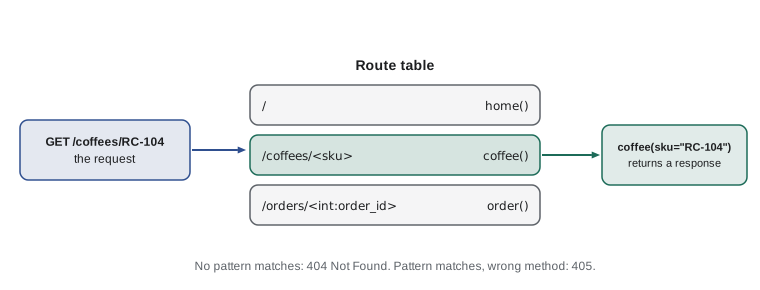
A route is a URL pattern linked to a view function. Patterns can contain variable parts in angle brackets. In Flask, @app.route("/coffees/<sku>") matches /coffees/RC-104 and calls the view with sku="RC-104". A converter before a colon restricts and converts the value: <int:order_id> matches only digits and passes an int, so /orders/1042 works and /orders/latest gives a 404 without your code running at all. Flask also has float, path (which may contain slashes) and uuid converters.
# Flask (on your own computer)
from flask import Flask, abort

app = Flask(__name__)
COFFEES = {"RC-101": "Sunrise Blend", "RC-104": "Sumatra Dark"}

@app.get("/coffees/<sku>")
def coffee(sku):
    if sku not in COFFEES:
        abort(404)
    return f"<h1>{COFFEES[sku]}</h1>"

@app.get("/orders/<int:order_id>")
def order(order_id):
    return f"Order number {order_id + 0}"     # order_id is already an int
Under the hood a router turns each pattern into a regular expression with named groups, tries the request path against each in turn and converts the captured pieces. You met regular expressions in PYTH-102; here they earn their keep. The compile_route function below handles str and int converters in about fifteen lines.
import re

CONVERTERS = {"str": (r"[^/]+", str), "int": (r"\d+", int)}

def compile_route(pattern):
    """Turn '/coffees/<sku>' or '/orders/<int:order_id>' into a regex (use fullmatch) and its converters."""
    regex, convs = "", {}
    for part in re.split(r"(<[^>]+>)", pattern):
        if part.startswith("<"):
            kind, _, name = part[1:-1].rpartition(":")
            kind = kind or "str"
            rx, fn = CONVERTERS[kind]
            regex += f"(?P<{name}>{rx})"
            convs[name] = fn
        else:
            regex += re.escape(part)
    return re.compile(regex), convs


rx, convs = compile_route("/orders/<int:order_id>/lines/<sku>")
print(rx.pattern)
m = rx.fullmatch("/orders/1042/lines/RC-104")
print({name: convs[name](value) for name, value in m.groupdict().items()})
print(rx.fullmatch("/orders/latest/lines/RC-104"))/orders/(?P<order_id>\d+)/lines/(?P<sku>[^/]+)
{'order_id': 1042, 'sku': 'RC-104'}
Nonere.escape protects the fixed parts of the pattern, so a dot or a plus sign in a URL is matched literally rather than treated as regex syntax. The named groups, written (?P<name>...), let the router hand each value to the view by name. Because int parts only match digits, a request for /orders/latest simply does not match this route, which is exactly how Flask produces a 404 for it.
Try it yourself
Match a route
Using compile_route (already defined in the setup), write match(pattern, path) that returns a dictionary of the converted values if the path matches, or None if it does not.
For example match("/orders/<int:order_id>", "/orders/1042") returns {"order_id": 1042} with an int, not a string.
def match(pattern, path):
    rx, convs = compile_route(pattern)
    m = rx.fullmatch(path)
    return m.groupdict()

print(match('/orders/<int:order_id>', '/orders/1042'))
Methods and dispatch
A route can accept several HTTP methods, and the same URL often means different things for GET and POST. GET /cart shows the cart; POST /cart adds an item. In Flask you list the methods, @app.route("/cart", methods=["GET", "POST"]), and check request.method inside, or register separate functions with @app.get and @app.post. When a URL exists but the method does not, the right answer is 405 Method Not Allowed, with an Allow header listing the methods that would work. That is different from 404, which says the URL itself does not exist.
import re

CONVERTERS = {"str": (r"[^/]+", str), "int": (r"\d+", int)}

def compile_route(pattern):
    """Turn '/coffees/<sku>' or '/orders/<int:order_id>' into a regex (use fullmatch) and its converters."""
    regex, convs = "", {}
    for part in re.split(r"(<[^>]+>)", pattern):
        if part.startswith("<"):
            kind, _, name = part[1:-1].rpartition(":")
            kind = kind or "str"
            rx, fn = CONVERTERS[kind]
            regex += f"(?P<{name}>{rx})"
            convs[name] = fn
        else:
            regex += re.escape(part)
    return re.compile(regex), convs


ROUTES = []

def route(pattern, methods=("GET",)):
    def register(view):
        rx, convs = compile_route(pattern)
        ROUTES.append((rx, convs, set(methods), view))
        return view
    return register

@route("/coffees/<sku>")
def coffee(sku):
    return 200, f"page for {sku}"

@route("/cart", methods=("GET", "POST"))
def cart():
    return 200, "the cart"

def dispatch(method, path):
    allowed = set()
    for rx, convs, methods, view in ROUTES:
        m = rx.fullmatch(path)
        if m:
            if method in methods:
                kwargs = {k: convs[k](v) for k, v in m.groupdict().items()}
                return view(**kwargs)
            allowed |= methods
    if allowed:
        return 405, "Allow: " + ", ".join(sorted(allowed))
    return 404, "Not found"

for method, path in [("GET", "/coffees/RC-102"), ("POST", "/cart"), ("DELETE", "/cart"), ("GET", "/nowhere")]:
print(method, path, "->", dispatch(method, path))GET /coffees/RC-102 -> (200, 'page for RC-102') POST /cart -> (200, 'the cart') DELETE /cart -> (405, 'Allow: GET, POST') GET /nowhere -> (404, 'Not found')
This little router already has the shape of Flask's: a decorator registers views, dispatch finds the first matching pattern, and the method check produces a 405 rather than a 404 when the path exists. Flask's real router, from the Werkzeug library, adds converters, URL building, host matching and careful ordering rules, but you now know what it is doing.
The request object
Inside a view, Flask gives you the current request as the object request, imported from flask. It wraps the WSGI environ in friendly attributes. request.method and request.path give the basics. request.args holds the query string, request.form holds fields from a submitted HTML form, request.get_json() parses a JSON body, request.headers gives case-insensitive access to headers, request.cookies holds cookies and request.files holds uploads. Each of the dictionary-like attributes has a get method with a default, and request.args.get("page", 1, type=int) even converts the value, returning the default if conversion fails.
# Flask (on your own computer)
from flask import Flask, request

app = Flask(__name__)

@app.get("/coffees")
def coffee_list():
    roast = request.args.get("roast", "all")
    page = request.args.get("page", 1, type=int)
    sizes = request.args.getlist("size")         # every value of a repeated name
    lang = request.headers.get("Accept-Language", "en")
    return f"roast={roast} page={page} sizes={sizes} lang={lang}"
You might wonder how request can be a global name when many customers are being served at once. Flask uses context-local storage: during each request, request refers to that request's data only. It behaves like a global inside a view and is safe to use there, but it is not available outside a request, for example in a script run from the command line. That is one reason to keep business logic in plain functions that take arguments, and to call them from views.
from urllib.parse import parse_qs

class Request:
    """A tiny request object built from a WSGI environ, like a cut-down Flask request."""
    def __init__(self, environ):
        self.method = environ.get("REQUEST_METHOD", "GET")
        self.path = environ.get("PATH_INFO", "/")
        self.args = {k: v[0] for k, v in parse_qs(environ.get("QUERY_STRING", "")).items()}
        self.headers = {k[5:].replace("_", "-").title(): v for k, v in environ.items() if k.startswith("HTTP_")}

    def arg_int(self, name, default):
        try:
            return int(self.args.get(name, default))
        except ValueError:
            return default

req = Request({"REQUEST_METHOD": "GET", "PATH_INFO": "/coffees", "QUERY_STRING": "roast=dark&page=abc",
               "HTTP_ACCEPT_LANGUAGE": "fr-CA", "HTTP_USER_AGENT": "Firefox"})
print(req.method, req.path, req.args)
print(req.headers)
print("page:", req.arg_int("page", 1))GET /coffees {'roast': 'dark', 'page': 'abc'}
{'Accept-Language': 'fr-CA', 'User-Agent': 'Firefox'}
page: 1The arg_int method mirrors Flask's type=int: a page parameter of abc falls back to page 1 rather than crashing the view. Treat every value from a request as untrusted text. It may be missing, empty, the wrong type, absurdly long or deliberately malicious, and your code should cope with all of those.
Building responses
A view's return value becomes the response. Flask accepts several forms. A string becomes an HTML page with status 200. A dictionary or list becomes a JSON response. A tuple adds a status and optionally headers: return "Not found", 404 or return body, 201, {"Location": "/orders/1042"}. For more control, make_response builds a response object you can modify, redirect returns a 302 or other redirect to a URL, and abort(404) stops the view immediately with an error response. url_for("coffee", sku="RC-104") builds a URL from a view name and arguments, so URLs in your code stay correct when you change a route pattern.
# Flask (on your own computer)
from flask import Flask, jsonify, redirect, url_for, make_response, request

app = Flask(__name__)

@app.post("/cart")
def add_to_cart():
    sku = request.form["sku"]
    # ... add it to the cart ...
    return redirect(url_for("show_cart"), code=303)     # Post/Redirect/Get

@app.get("/cart")
def show_cart():
    resp = make_response("<h1>Your cart</h1>")
    resp.headers["Cache-Control"] = "no-store"
    return resp

@app.get("/api/stock/<sku>")
def stock_api(sku):
    return {"sku": sku, "bags": 9}          # a dict becomes JSON
The redirect after a POST is a pattern called Post/Redirect/Get. If the cart page were returned directly from the POST, refreshing it would resubmit the form and add the coffee a second time, and the browser would warn about resending data. Redirecting with 303 See Other tells the browser to load the cart with a fresh GET, so refreshing is harmless. You will use this pattern for every form in lesson 5.
import json
from http import HTTPStatus

def make_json(data, status=200):
    body = json.dumps(data, indent=2).encode("utf-8")
    s = HTTPStatus(status)
    headers = [("Content-Type", "application/json"), ("Content-Length", str(len(body)))]
    return f"{s.value} {s.phrase}", headers, body

def make_redirect(location, status=303):
    s = HTTPStatus(status)
    return f"{s.value} {s.phrase}", [("Location", location)], b""

status, headers, body = make_json({"sku": "RC-104", "name": "Sumatra Dark", "bags": 9})
print(status, headers)
print(body.decode())
print(make_redirect("/cart"))200 OK [('Content-Type', 'application/json'), ('Content-Length', '60')]
{
"sku": "RC-104",
"name": "Sumatra Dark",
"bags": 9
}
('303 See Other', [('Location', '/cart')], b'')Try it yourself
A JSON response
Write json_response(data, status=200) that returns a tuple (status_line, headers, body) where status_line is like "200 OK", headers is a list containing ("Content-Type", "application/json"), and body is the data encoded as JSON in UTF-8 bytes.
Use HTTPStatus for the phrase, so json_response({}, 404) gives "404 Not Found".
import json

def json_response(data, status=200):
    return str(status), [('Content-Type', 'text/plain')], json.dumps(data)

print(json_response({'sku': 'RC-104'}))
Errors and custom error pages
Things go wrong in every web application: a customer types a product code that does not exist, a form is missing a field, the database is locked. Flask turns abort(404) and unhandled exceptions into error responses, and you can replace the plain default pages with your own using error handlers. A friendly 404 page that links back to the coffee list keeps a lost customer in the shop. A 500 handler should apologize, log the details for Jordan and show nothing technical to the customer, because a stack trace can reveal file paths, settings and other details an attacker would love to see.
# Flask (on your own computer)
from flask import Flask, render_template

app = Flask(__name__)

@app.errorhandler(404)
def not_found(error):
    return render_template("404.html"), 404

@app.errorhandler(500)
def server_error(error):
    app.logger.exception("Unhandled error")      # details go to the log, not the page
    return render_template("500.html"), 500
Try it yourself
Dispatch with 404 and 405
ROUTES (in the setup) is a list of (path, methods, view) with fixed paths, for example ("/cart", {"GET", "POST"}, cart). Write dispatch(method, path) that calls the view and returns its result when both match; returns (405, "Method Not Allowed") when the path exists but not with that method; and returns (404, "Not Found") when no route has that path.
def dispatch(method, path):
    for p, methods, view in ROUTES:
        if p == path:
            return view()
    return (404, 'Not Found')

print(dispatch('DELETE', '/cart'))
Common mistakes
MistakeUsing a plain <order_id> and converting with int() inside the view, so /orders/latest crashes with a 500.
InsteadUse the <int:order_id> converter so non-numbers never reach the view.
MistakeReturning a page directly from a POST, so a refresh resubmits the form.
InsteadRedirect with 303 after a successful POST (Post/Redirect/Get).
MistakeWriting URLs as strings throughout templates and views.
InsteadBuild them with url_for so they follow route changes.
MistakeAnswering 404 when the URL exists but the method is wrong.
InsteadReturn 405 Method Not Allowed with an Allow header.
MistakeTrusting request values to be present and well formed.
InsteadUse .get with defaults, convert carefully and validate every value.
MistakeShowing tracebacks or exception messages to customers.
InsteadLog the details and show a friendly error page.
Summary and key terms
- Routes map URL patterns to view functions; variable parts in angle brackets, with converters such as int, pass values to the view.
- A router compiles patterns into regular expressions and tries them in order; no match gives 404, a match with the wrong method gives 405.
- Flask's request object exposes method, path, args, form, get_json(), headers, cookies and files for the current request.
- A view can return a string, a dictionary (JSON), a tuple with status and headers, or a response from make_response, redirect or abort.
- Post/Redirect/Get uses a 303 redirect after a successful POST so refreshing does not resubmit.
- Custom error handlers give friendly 404 and 500 pages while technical details go to the log.
- route
- A URL pattern linked to a view function.
- converter
- A rule such as int that restricts and converts a variable part of a route.
- dispatch
- Choosing and calling the view for a request.
- 405 Method Not Allowed
- The answer when a URL exists but does not accept the request method.
- url_for
- A Flask function that builds a URL from a view name and arguments.
- Post/Redirect/Get
- Redirecting after a POST so a refresh repeats only a harmless GET.
- error handler
- A function that produces the response for a given error code or exception.
Practice problems
Work each problem on paper first, then reveal the answer to check.
Which route pattern matches /orders/1042 but not /orders/latest?
Show answer
/orders/<int:order_id>.
A customer refreshes the page after submitting an order and gets a second order. What pattern fixes this?
Show answer
Post/Redirect/Get: after saving the order, redirect with 303 to a confirmation page.
What does request.args.get("page", 1, type=int) return for ?page=abc?
Show answer
1, because conversion fails and the default is used.
Why build links with url_for instead of writing "/coffees/RC-104"?
Show answer
If the route pattern changes, url_for produces the new URL automatically.
What status and header should a server send for DELETE /cart if only GET and POST are allowed?
Show answer
405 Method Not Allowed with Allow: GET, POST.
Lesson quiz · 5 questions
Score 60% or more to complete this lesson.
Create a free account to save your progress, take quizzes and earn a certificate.