
PYTH-220 · Lesson 1 of 12 · 26 min
How the web works
▶ Video coming soon A video version of this lesson is on the way.
By the end of PYTH-102, Jordan Reyes had turned Ridgeline Coffee Roasters' stock tool into a proper Python package, and PYTH-215 moved its data into a SQLite database. The tool still lives on one computer behind the counter, though. Rosa Delgado wants customers to order beans online and pick them up at the cafe. Theo Barnes wants to check stock from his phone while he is at the shipping depot. Mei Lin wants the cafe menu on the website to update itself when she changes a price. All three requests have the same answer: the shop's Python code needs to talk to the web.
This course teaches web development with Python. Over twelve lessons, Jordan builds the Ridgeline web shop and an order API, first with Flask, a small framework that shows every moving part, and then with Django, a larger framework that does more for you. Before writing any framework code, though, you need a clear picture of what actually happens when someone types an address into a browser. Every framework is a convenience layer over the same few ideas: URLs, HTTP requests, HTTP responses, status codes and headers. Once those ideas are clear, Flask and Django stop looking like magic.
Most of the examples in this course run right here in your browser. Code that needs a real web server or a framework installed on your own computer is shown as a listing without a Run button. The exercises use Python's standard library, which has everything needed to take URLs apart, build responses and test web code without a network.
Clients, servers and the request-response cycle
The web is built on a simple arrangement. A client, usually a web browser, sends a request to a server. The server works out what was asked for and sends back a response. Then the conversation is over: the next click starts a new request. This is called the request-response cycle, and almost everything in web development fits inside it. When a customer opens the Ridgeline shop page, the browser requests the page, the server's Python code builds the HTML for the coffee list and sends it back, and the browser draws it. When the customer clicks Add to cart, that is a new request, and the server must work out who the customer is all over again.
The server is just a program listening on a network port. In production, a dedicated web server program such as nginx usually sits in front, handling encryption and static files, and passes the requests that need Python to an application server, which calls your code. On your own computer during development, the framework's built-in development server does all of this in one process. Either way, your Python code sees the same thing: a request comes in, and your code must return a response.
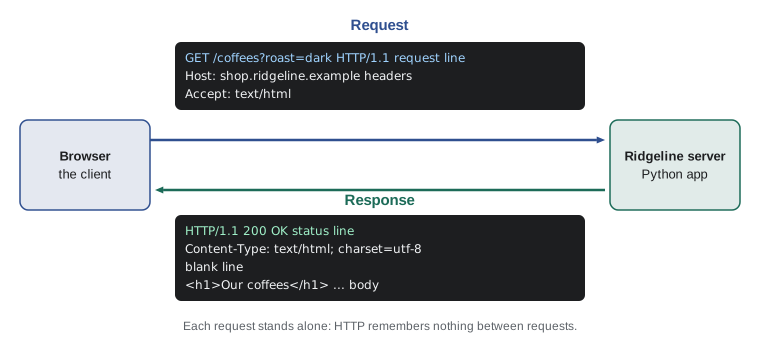
Two properties of this cycle shape every design decision you will make. First, HTTP is stateless: the server does not automatically remember anything between requests. If the shop needs to remember that a customer is signed in or has a cart, it must send something back to the browser, usually a cookie, that the browser returns with each later request. Second, every request takes time to travel. A page that needs twenty separate requests feels slow even if each one is fast, so web developers think about how many round trips a page needs.
URLs: the address of a resource
Every request names a resource with a URL (uniform resource locator). A URL is made of parts, and Python's urllib.parse module can take any URL apart for you. The scheme says which protocol to use (https almost everywhere today). The host names the server. The path names the resource on that server. The query string, after a question mark, carries extra parameters as name=value pairs separated by ampersands. The fragment, after a hash sign, is used only by the browser to jump to part of a page and is never sent to the server.
from urllib.parse import urlsplit, parse_qs

url = "https://shop.ridgeline.example:443/coffees/RC-104?roast=dark&size=340&size=1000#reviews"
parts = urlsplit(url)
print("scheme:  ", parts.scheme)
print("host:    ", parts.hostname)
print("port:    ", parts.port)
print("path:    ", parts.path)
print("query:   ", parts.query)
print("fragment:", parts.fragment)
print(parse_qs(parts.query))scheme: https
host: shop.ridgeline.example
port: 443
path: /coffees/RC-104
query: roast=dark&size=340&size=1000
fragment: reviews
{'roast': ['dark'], 'size': ['340', '1000']}parse_qs turns the query string into a dictionary whose values are lists, because a name can appear more than once, as size does here. That detail matters: if your code assumes every parameter appears once, a crafted URL with a repeated name can surprise it. Frameworks give you helpers that return the first value or all of them, and you should choose deliberately.
Going the other way, urlencode builds a query string from a dictionary and quote escapes characters that are not allowed in a URL. Spaces, accented letters and symbols such as & and # must be URL-encoded, which means each one is replaced by a three-character escape code: a % sign and two hexadecimal digits, such as %20 for a space. Never build a query string by gluing strings together with plus signs: a coffee name such as "Café & Co" would break the URL or, worse, add a parameter you did not intend.
from urllib.parse import urlencode, quote

params = {"q": "Café & Co", "page": 2}
print(urlencode(params))
print(quote("Ethiopia Guji/Natural"))
print(quote("Ethiopia Guji/Natural", safe=""))
print("https://shop.ridgeline.example/search?" + urlencode(params))q=Caf%C3%A9+%26+Co&page=2 Ethiopia%20Guji/Natural Ethiopia%20Guji%2FNatural https://shop.ridgeline.example/search?q=Caf%C3%A9+%26+Co&page=2
See how the slash survives the first quote call but not the second. By default quote leaves slashes alone because they normally separate parts of a path; passing safe="" encodes them too, which is what you want when a single path segment, such as a product name, might contain one.
Try it yourself
Read the query string
Write a function filters(url) that returns a dictionary of the query parameters in the URL, keeping only the FIRST value of each name. For example, filters("https://shop.example/coffees?roast=dark&size=340&size=1000") returns {"roast": "dark", "size": "340"}.
Use urllib.parse; a URL with no query string should give an empty dictionary.
from urllib.parse import urlsplit, parse_qs

def filters(url):
    query = urlsplit(url).query
    return parse_qs(query)

print(filters('https://shop.example/coffees?roast=dark&size=340&size=1000'))
HTTP requests: method, path, headers and body
An HTTP request is plain text with a strict layout, at least in HTTP/1.1, the version easiest to read. The first line, the request line, holds the method, the path with any query string, and the protocol version. Then come headers, one per line as Name: value, then a blank line, then an optional body. Newer versions, HTTP/2 and HTTP/3, send the same information in a compact binary form over the network, but frameworks hand your code the same method, path, headers and body whichever version the browser used.
The method says what the client wants to do. GET asks for a resource and must not change anything on the server, which is why browsers and search engines feel free to repeat GET requests. POST sends data for the server to process, such as an order form. PUT replaces a resource, PATCH changes part of one and DELETE removes one; you will use these when you build the order API in lesson 10. HEAD is like GET but asks only for the headers. The rule that GET is safe is not just good manners: a delete link that works through GET can be triggered by a search engine crawler or a prefetching browser.
raw = (
    "POST /cart/add HTTP/1.1\r\n"
    "Host: shop.ridgeline.example\r\n"
    "Content-Type: application/x-www-form-urlencoded\r\n"
    "Content-Length: 21\r\n"
    "Cookie: session=7f3a9c\r\n"
    "\r\n"
    "sku=RC-102&quantity=2"
)

head, body = raw.split("\r\n\r\n", 1)
request_line, *header_lines = head.split("\r\n")
method, target, version = request_line.split(" ")
headers = {}
for line in header_lines:
    name, value = line.split(":", 1)
    headers[name.strip().lower()] = value.strip()

print(method, target, version)
print(headers["content-type"])
print("body:", body)POST /cart/add HTTP/1.1 application/x-www-form-urlencoded body: sku=RC-102&quantity=2
You will never parse raw HTTP by hand in a real application, because the server and framework do it for you, carefully and safely. Seeing it once, though, removes the mystery from the request object a framework gives you. Note that header names are case-insensitive, so the code stores them in lower case; Content-Type and content-type are the same header. Lines end with a carriage return and line feed, written \r\n, which is why the example splits on that pair.
HTTP responses and status codes
The response has the same shape: a status line, headers, a blank line and a body. The status line carries a three-digit status code and a short reason phrase. The first digit tells you the class of the answer, and it is worth memorizing because you will read these codes in logs every day. Codes in the 200s mean success, the 300s mean redirection to another URL, the 400s mean the client made a mistake, and the 500s mean the server failed. Python's http module has an HTTPStatus enumeration with every standard code, its phrase and a description.
from http import HTTPStatus

for code in (200, 201, 204, 301, 302, 304, 400, 401, 403, 404, 405, 422, 500, 503):
    s = HTTPStatus(code)
print(code, s.phrase)200 OK 201 Created 204 No Content 301 Moved Permanently 302 Found 304 Not Modified 400 Bad Request 401 Unauthorized 403 Forbidden 404 Not Found 405 Method Not Allowed 422 Unprocessable Content 500 Internal Server Error 503 Service Unavailable
A few of these deserve a note. 201 Created is the right answer when a POST creates something, such as a new order, and 204 No Content when the request worked but there is nothing to send back. 301 and 302 send the browser to another URL; 301 means the move is permanent, so browsers and search engines remember it. 401 Unauthorized really means not signed in, while 403 Forbidden means signed in but not allowed. 404 Not Found is familiar to everyone. 422 Unprocessable Content (called Unprocessable Entity in older standards and Python versions) is common in APIs when the data is well formed but fails validation, such as an order for minus three bags. 500 Internal Server Error means your code crashed, and 503 Service Unavailable means the server is overloaded or down for maintenance.
from http import HTTPStatus

def status_line(code):
    s = HTTPStatus(code)
    return f"HTTP/1.1 {s.value} {s.phrase}"

def response(code, body, content_type="text/plain; charset=utf-8"):
    data = body.encode("utf-8")
    lines = [status_line(code), f"Content-Type: {content_type}", f"Content-Length: {len(data)}", "", body]
    return "\r\n".join(lines)

print(response(200, "Sunrise Blend: 42 bags").replace("\r\n", "\n"))
print()
print(response(404, "No coffee with code RC-999").replace("\r\n", "\n"))HTTP/1.1 200 OK Content-Type: text/plain; charset=utf-8 Content-Length: 22 Sunrise Blend: 42 bags HTTP/1.1 404 Not Found Content-Type: text/plain; charset=utf-8 Content-Length: 26 No coffee with code RC-999
Content-Length counts bytes, not characters, which is why the code encodes the body before measuring it. The two differ as soon as the text contains a character such as é, which takes two bytes in UTF-8. The Content-Type header tells the browser how to treat the body: text/html for a web page, application/json for API data, image/png for a picture. Getting it wrong makes a browser show HTML source as plain text, or try to download a page instead of displaying it.
Try it yourself
Which class of status?
Write a function status_kind(code) that returns "success" for 200-299, "redirect" for 300-399, "client error" for 400-499 and "server error" for 500-599. For anything else, raise a ValueError.
Then print status_kind(404).
def status_kind(code):
    if code < 300:
        return 'success'
    if code < 400:
        return 'redirect'
    return 'client error'

print(status_kind(404))
Headers that matter
Headers carry the details that make the web work. On requests, Host names the site (one server often hosts many sites), User-Agent describes the browser, Accept lists the content types the client would like, Cookie returns cookies the server set earlier, and Authorization carries credentials for APIs. On responses, Content-Type and Content-Length describe the body, Location gives the address for a redirect, Set-Cookie asks the browser to store a cookie, and Cache-Control tells browsers and proxies whether and how long they may keep a copy.
Caching deserves a moment because it saves Ridgeline real money. The coffee photos and the style sheet change rarely, so the server can send Cache-Control: max-age=86400, telling browsers to reuse them for a day without asking again. The stock page changes every time a bag sells, so it should not be cached for long. Getting this right means returning customers load the shop almost instantly while still seeing current stock.
CACHE_RULES = [
    (".css", "public, max-age=86400"),
    (".png", "public, max-age=86400"),
    ("/api/", "no-store"),
]

def cache_header(path):
    for pattern, rule in CACHE_RULES:
        if path.endswith(pattern) or path.startswith(pattern):
            return rule
    return "no-cache"

for p in ["/static/site.css", "/img/RC-102.png", "/api/stock", "/coffees"]:
print(f"{p:<20} Cache-Control: {cache_header(p)}")/static/site.css Cache-Control: public, max-age=86400 /img/RC-102.png Cache-Control: public, max-age=86400 /api/stock Cache-Control: no-store /coffees Cache-Control: no-cache
no-store means never keep a copy, which suits private API data. no-cache, despite its name, allows a copy but requires the browser to check with the server before using it. These distinctions trip up experienced developers, so it is worth looking them up whenever caching matters.
HTTPS, ports and DNS in one paragraph each
Before a request can be sent, the browser must find the server. The Domain Name System (DNS) turns a name such as shop.ridgeline.example into an IP address, much as a phone book turns a name into a number. Changes to DNS can take time to spread because answers are cached, which is why a newly launched site sometimes appears for some people before others.
The browser then connects to a port on that address: 443 for HTTPS and 80 for plain HTTP. Ports let one computer run several network services at once. During development you will see addresses such as http://127.0.0.1:5000, which means this computer, port 5000, a common default for Flask's development server.
HTTPS is HTTP sent through an encrypted TLS connection. Encryption stops anyone between the customer and the shop, on cafe Wi-Fi for example, from reading or changing the traffic, and the server's certificate proves the site really is Ridgeline. Every public site should use HTTPS, and modern browsers mark plain HTTP pages as not secure. Free certificates from services such as Let's Encrypt removed the last excuse. A shop that takes passwords or payment details over plain HTTP is a serious breach of trust.
Try it yourself
Build a product URL
Write a function product_url(name, size) that returns a URL of the form https://shop.ridgeline.example/coffees/<name>?size=<size>, where the name is ONE path segment, so a slash inside it must be encoded, and the query string is built with urlencode.
For example, product_url("Guji/Natural", 340) returns https://shop.ridgeline.example/coffees/Guji%2FNatural?size=340.
def product_url(name, size):
    return 'https://shop.ridgeline.example/coffees/' + name + '?size=' + str(size)

print(product_url('Guji/Natural', 340))
Where Python fits: frameworks
With the protocol in mind, the job of a Python web application is easy to state. Given a request (method, path, query, headers, body), produce a response (status, headers, body). Everything else is organization. A web framework supplies that organization: it reads the request into a convenient object, decides which of your functions should handle the URL (routing), helps you produce HTML from templates, reads forms, talks to the database, manages sessions and protects against common attacks.
The two frameworks in this course sit at opposite ends of a range. Flask is a microframework: a small core with a few clear ideas, to which you add only the pieces you need. Django is batteries-included: it arrives with an object-relational mapper for the database, an admin site, user accounts, forms and security features, at the cost of more structure to learn. Other popular choices include FastAPI, which is built around type hints and is popular for APIs. Under the hood they all follow the same request-response model you have just seen, and the next lesson shows the standard interface, WSGI, that lets any Python framework run on any Python web server.
# Flask: install with  pip install flask  (on your own computer)
from flask import Flask

app = Flask(__name__)

@app.get("/")
def home():
    return "Welcome to Ridgeline Coffee Roasters"

# run with:  flask --app shop run --debug
Common mistakes
MistakeBuilding query strings by joining strings, so a value containing & or # breaks the URL.
InsteadUse urlencode for query strings and quote for path segments.
MistakeAssuming each query parameter appears once, then being surprised by a repeated name.
InsteadDecide whether you want the first value or all values, and use the matching helper.
MistakeChanging data on the server in response to a GET request, such as a delete link.
InsteadUse GET only to read; use POST, PUT, PATCH or DELETE for changes.
MistakeMeasuring Content-Length in characters instead of bytes.
InsteadEncode the body first, then use the length of the bytes.
MistakeReturning 200 OK with an error message in the body.
InsteadReturn the status code that matches what happened, such as 404 or 422.
MistakeServing a login or checkout page over plain HTTP.
InsteadUse HTTPS for the whole site; certificates are free.
Summary and key terms
- The web runs on the request-response cycle: a client sends a request, a server returns a response, and HTTP itself remembers nothing between requests.
- A URL has a scheme, host, optional port, path, query string and fragment; urllib.parse takes URLs apart and builds them safely.
- A request has a method, a path, headers and an optional body; GET must never change data.
- A response has a status code, headers and a body; the first digit of the code gives its class: 2 success, 3 redirect, 4 client error, 5 server error.
- Headers such as Content-Type, Location, Set-Cookie and Cache-Control control how browsers handle a response.
- HTTPS encrypts traffic and proves the site's identity, and every public site should use it.
- A Python web framework turns requests into function calls and function results into responses.
- HTTP
- The protocol browsers and servers use to exchange requests and responses.
- request-response cycle
- One request from a client followed by one response from the server.
- stateless
- Not remembering anything between requests unless something, such as a cookie, carries it.
- query string
- The name=value pairs after the question mark in a URL.
- status code
- The three-digit number in a response that says what happened.
- header
- A Name: value line that carries details about a request or response.
- URL encoding
- Writing a character as % followed by two hexadecimal digits so it is safe in a URL.
- HTTPS
- HTTP sent over an encrypted TLS connection.
Practice problems
Work each problem on paper first, then reveal the answer to check.
Which part of https://shop.example/coffees?roast=dark#reviews is never sent to the server?
Show answer
The fragment, #reviews. The browser uses it to scroll the page.
A customer submits the checkout form and the order is saved. Which status code fits best for an API that created the order?
Show answer
201 Created, usually with a Location header pointing to the new order.
Why should a link that empties the cart not use GET?
Show answer
GET must be safe to repeat; crawlers, prefetching and the back button can repeat a GET and empty the cart without the customer meaning to.
How many bytes does Content-Length report for the body Café?
Show answer
5: C, a and f take one byte each, and é takes two bytes in UTF-8.
What is the difference between 401 and 403?
Show answer
401 means the client is not authenticated (not signed in); 403 means it is authenticated but not allowed to do this.
Lesson quiz · 5 questions
Score 60% or more to complete this lesson.
Create a free account to save your progress, take quizzes and earn a certificate.