
PYTH-220 · Lesson 2 of 12 · 23 min
A first Flask application
▶ Video coming soon A video version of this lesson is on the way.
In lesson 1 you saw that a web application's whole job is to turn a request into a response. This lesson makes that concrete. First you will meet WSGI, the small standard that connects every Python web server to every Python web framework, and write a working web application in a dozen lines of plain Python. Then you will see how Flask wraps the same idea in a friendlier form, set up a Flask project the way professionals do, and run Ridgeline's first web page on the development server.
Jordan's goal for the day is modest: a home page that says welcome, and a page at /stock that lists the six coffees and how many bags are on the shelf. Theo will use the stock page from his phone at the depot, so it has to work from any browser. Small as it is, this first application touches every layer of a real web stack.
WSGI: the contract between server and application
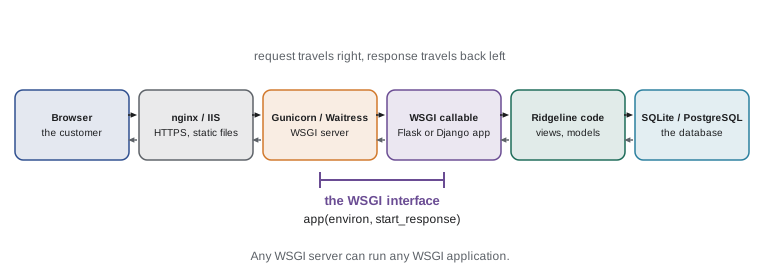
Python has many web servers (Gunicorn, Waitress, uWSGI, mod_wsgi in Apache) and many frameworks (Flask, Django, Pyramid, Bottle). Without a shared standard, every framework would need custom code for every server. WSGI, the Web Server Gateway Interface, defined in PEP 3333, is that standard. It says that a web application is simply a callable, usually a function, that takes two arguments and returns the response body as an iterable of byte strings.
The first argument, conventionally named environ, is a dictionary describing the request: REQUEST_METHOD holds GET or POST, PATH_INFO holds the path, QUERY_STRING holds the part after the question mark, and headers appear with names such as HTTP_HOST and HTTP_COOKIE. The second argument, start_response, is a function the application calls once with the status line and a list of header pairs before returning the body. That is the whole contract. A Flask app object and a Django project are both, at the bottom, WSGI callables.
def app(environ, start_response):
    path = environ["PATH_INFO"]
    if path == "/":
        status, text = "200 OK", "Welcome to Ridgeline Coffee Roasters"
    else:
        status, text = "404 Not Found", f"Nothing at {path}"
    body = text.encode("utf-8")
    start_response(status, [("Content-Type", "text/plain; charset=utf-8"),
                            ("Content-Length", str(len(body)))])
    return [body]

# A web server would call app() for each request. We can call it ourselves:
def start_response(status, headers):
    print("status: ", status)
    print("headers:", headers)

print(app({"PATH_INFO": "/", "REQUEST_METHOD": "GET"}, start_response))
print(app({"PATH_INFO": "/menu", "REQUEST_METHOD": "GET"}, start_response))status: 200 OK
headers: [('Content-Type', 'text/plain; charset=utf-8'), ('Content-Length', '36')]
[b'Welcome to Ridgeline Coffee Roasters']
status: 404 Not Found
headers: [('Content-Type', 'text/plain; charset=utf-8'), ('Content-Length', '16')]
[b'Nothing at /menu']Because a WSGI application is just a function, you can test it without a network or a server: build an environ dictionary, pass a start_response that records what it receives, and inspect the result. This is exactly how framework test clients work, and it is how the exercises in this course check your web code. The helper below wraps the pattern so later examples can call an app in one line.
def call_app(app, path="/", method="GET", query=""):
    """Call a WSGI app the way a web server would and return (status, headers, body)."""
    environ = {"REQUEST_METHOD": method, "PATH_INFO": path, "QUERY_STRING": query,
               "SERVER_NAME": "localhost", "SERVER_PORT": "5000", "wsgi.url_scheme": "http"}
    captured = {}
    def start_response(status, headers):
        captured["status"] = status
        captured["headers"] = headers
    chunks = app(environ, start_response)
    body = b"".join(chunks).decode("utf-8")
    return captured["status"], captured["headers"], body


def app(environ, start_response):
    start_response("200 OK", [("Content-Type", "text/plain; charset=utf-8")])
    return [b"Hello from Ridgeline"]

status, headers, body = call_app(app)
print(status)
print(headers)
print(body)200 OK
[('Content-Type', 'text/plain; charset=utf-8')]
Hello from RidgelineServing this function to real browsers takes one more step. The standard library's wsgiref module includes a tiny reference server: make_server('127.0.0.1', 8000, app).serve_forever() would serve it on your computer. It is fine for experiments but far too simple for real traffic. In production you hand the same callable to Gunicorn on Linux or Waitress on Windows, which handle many requests at once, restart crashed workers and sit happily behind nginx or IIS.
Try it yourself
Hello, name
Write a WSGI application app(environ, start_response) that reads a name parameter from the query string and returns Hello, <name>! as plain text with status 200 OK. If there is no name, use Hello, guest!.
The helper call_app(app, path, method, query) is already defined for you (in the setup); the example call at the bottom uses it.
def app(environ, start_response):
    start_response('200 OK', [('Content-Type', 'text/plain; charset=utf-8')])
    return [b'Hello, guest!']

print(call_app(app, query='name=Mei'))
From WSGI to Flask
Writing raw WSGI quickly becomes tedious. You must parse query strings and form bodies yourself, map paths to functions with a growing chain of if statements, encode every body and remember every header. Flask takes care of all of that. Its Flask object is a WSGI application; you register ordinary Python functions, called view functions, for URL patterns with a decorator, and Flask works out which one to call. Whatever the function returns becomes the response: a string becomes an HTML response with status 200, and you can also return a tuple of body and status, or a full response object.
# shop.py  (run on your own computer)
from flask import Flask

app = Flask(__name__)

STOCK = {"RC-101": 42, "RC-102": 15, "RC-103": 27, "RC-104": 9, "RC-105": 12, "RC-106": 30}

@app.route("/")
def home():
    return "<h1>Ridgeline Coffee Roasters</h1><p>Fresh beans, roasted in small batches.</p>"

@app.route("/stock")
def stock():
    rows = "".join(f"<li>{sku}: {bags} bags</li>" for sku, bags in STOCK.items())
    return f"<h1>Stock</h1><ul>{rows}</ul>"
The decorator @app.route("/stock") is a registration: it records that requests for /stock should call the stock function. You learned how decorators work in PYTH-102, and this is one of their most common uses. Flask passes the first argument, __name__, so it can find the folders for templates and static files next to your module. Since Flask 2.0 there are also shortcut decorators such as @app.get and @app.post that register a view for one method.
Setting up a Flask project properly
Professional Python projects always use a virtual environment, an isolated folder of installed packages for one project, which you met in PYTH-110. It keeps Ridgeline's Flask version separate from whatever other projects on the same computer need, and it makes the exact package list reproducible on the server. The usual steps, shown for a terminal on your own computer, look like this.
> python -m venv .venv
> .venv\Scripts\activate          (Windows)
> source .venv/bin/activate       (macOS and Linux)
> python -m pip install flask
> python -m pip freeze > requirements.txt
> flask --app shop run --debug
 * Running on http://127.0.0.1:5000
 * Debug mode: on
The flask command finds the application object in shop.py and starts the development server on port 5000. The --debug flag turns on two developer conveniences: the server restarts whenever you save a file, and an error shows an interactive traceback in the browser. That debugger can run arbitrary Python code, so debug mode must never be switched on for a site anyone else can reach. This is one of the most common and most serious mistakes in Flask deployments.
requirements.txt records the exact versions installed, so the server, a teammate or Sam Okoye on the co-op team can recreate the same environment with pip install -r requirements.txt. You commit it to Git along with the code; the .venv folder itself goes in .gitignore, as you set up in PYTH-110.
How a Flask project is laid out
A one-file application is fine for learning, but Ridgeline's shop will grow to dozens of pages. Flask leaves layout to you, and the community has settled on a standard shape: a package for the application, with templates and static files beside the code, and tests in their own folder. Flask looks for HTML templates in a folder named templates and serves files in a folder named static at the URL /static/ by default.
ridgeline-web/
    requirements.txt
    ridgeline_web/
        __init__.py        create_app() lives here
        views.py           the page functions
        api.py             the JSON API (lesson 10)
        db.py              database helpers (lesson 6)
        templates/
            base.html
            stock.html
        static/
            site.css
            logo.png
    tests/
        test_views.py
Larger Flask applications use an application factory: a function, conventionally create_app, that builds and returns a configured Flask object. The factory lets tests create an app with a test configuration and a fresh database, and lets the same code run with development or production settings. Related views are grouped into blueprints, which are like mini applications registered with the main one.
# ridgeline_web/__init__.py
from flask import Flask

def create_app(config=None):
    app = Flask(__name__)
    app.config.from_mapping(SECRET_KEY="dev", DATABASE="ridgeline.db", REORDER_POINT=10)
    if config:
        app.config.update(config)          # tests pass their own settings
    from . import views
    app.register_blueprint(views.bp)
    return app
Configuration without the framework
The settings pattern in that factory, defaults that a caller can override, is easy to practise in plain Python. Configuration usually comes from three places in order of priority: built-in defaults, a settings file or object, and environment variables set on the server. Secrets such as the SECRET_KEY used to sign cookies must never be written in the code you commit; on the server they come from environment variables or a secrets manager.
DEFAULTS = {"DEBUG": False, "DATABASE": "ridgeline.db", "REORDER_POINT": 10}

def load_config(overrides=None, environ=None):
    config = dict(DEFAULTS)
    config.update(overrides or {})
    environ = environ or {}
    if "RIDGELINE_DATABASE" in environ:
        config["DATABASE"] = environ["RIDGELINE_DATABASE"]
    if "RIDGELINE_SECRET_KEY" in environ:
        config["SECRET_KEY"] = environ["RIDGELINE_SECRET_KEY"]
    return config

print(load_config())
print(load_config({"DEBUG": True}))
print(load_config(environ={"RIDGELINE_DATABASE": "/srv/ridgeline/shop.db", "RIDGELINE_SECRET_KEY": "x9-from-the-server"})){'DEBUG': False, 'DATABASE': 'ridgeline.db', 'REORDER_POINT': 10}
{'DEBUG': True, 'DATABASE': 'ridgeline.db', 'REORDER_POINT': 10}
{'DEBUG': False, 'DATABASE': '/srv/ridgeline/shop.db', 'REORDER_POINT': 10, 'SECRET_KEY': 'x9-from-the-server'}In real code you would read os.environ rather than pass a dictionary, but passing it in keeps the function easy to test, the same dependency-injection idea you used for the inventory clock in PYTH-102.
Try it yourself
Settings with safe defaults
Write load_config(overrides, environ) that starts from DEFAULTS (already defined), applies the overrides dictionary, and then, if environ contains "RIDGELINE_REORDER_POINT", sets REORDER_POINT to that value converted to an int.
It must not change DEFAULTS itself.
def load_config(overrides, environ):
    config = DEFAULTS
    config.update(overrides)
    if 'RIDGELINE_REORDER_POINT' in environ:
        config['REORDER_POINT'] = environ['RIDGELINE_REORDER_POINT']
    return config

print(load_config({'DEBUG': True}, {'RIDGELINE_REORDER_POINT': '12'}))
Development server versus production
The development server Flask starts is single-purpose: convenient, automatically reloading and deliberately simple. It is not built for security or heavy traffic. When Ridgeline's shop goes live in lesson 12, the same application object will be served by a production WSGI server. On a Linux host that is typically Gunicorn behind nginx; on Windows, Waitress behind IIS works well. The application code does not change at all, which is the whole point of WSGI.
> python -m pip install waitress
> waitress-serve --listen=127.0.0.1:8080 --call ridgeline_web:create_app
With the server question settled, the next lesson looks inside the request and response objects Flask gives you, and at routing: how URL patterns with variable parts, such as /coffees/RC-104, reach the right function.
Try it yourself
A two-page WSGI app
Write a WSGI application app that serves two pages: / returns Ridgeline Coffee Roasters and /stock returns one line per coffee in STOCK (already defined) formatted as RC-101: 42, in the dictionary's order, joined with newlines. Any other path returns status 404 Not Found with the body Not found.
Use call_app (from the setup) to try it.
def app(environ, start_response):
    start_response('200 OK', [('Content-Type', 'text/plain; charset=utf-8')])
    return [b'Ridgeline Coffee Roasters']

print(call_app(app, '/stock'))
Common mistakes
MistakeLeaving debug mode on when the site is reachable by others.
InsteadUse --debug only on your own computer; the browser debugger can run any code.
MistakeRunning the development server in production.
InsteadServe the same app with Gunicorn or Waitress behind nginx or IIS.
MistakeInstalling Flask into the system Python for every project.
InsteadCreate a virtual environment per project and record versions in requirements.txt.
MistakeWriting SECRET_KEY and passwords directly in the code that goes into Git.
InsteadRead secrets from environment variables or a secrets manager on the server.
MistakeReturning a str from a raw WSGI app.
InsteadWSGI bodies are iterables of bytes: encode text and return it in a list.
MistakeCalling start_response more than once, or not at all.
InsteadCall it exactly once, before returning the body.
Summary and key terms
- WSGI (PEP 3333) is the standard interface between Python web servers and applications: an app is a callable taking environ and start_response and returning byte strings.
- Because a WSGI app is a function, it can be tested by calling it with a fake environ, which is how framework test clients work.
- Flask's app object is a WSGI application; @app.route registers view functions for URL patterns, and a returned string becomes an HTML response.
- Every project gets its own virtual environment and a requirements.txt; the flask command runs the development server.
- Debug mode is for your own computer only; production uses a WSGI server such as Gunicorn or Waitress.
- Larger apps use an application factory, create_app, and blueprints; configuration combines defaults, overrides and environment variables.
- WSGI
- The Web Server Gateway Interface, the standard connecting Python web servers and applications.
- environ
- The dictionary describing a request that a WSGI server passes to the application.
- start_response
- The function a WSGI application calls with the status and headers.
- view function
- A function that handles requests for a URL and returns a response.
- development server
- A simple server for local testing, never for public sites.
- application factory
- A function that creates and configures the app, used for tests and different settings.
- blueprint
- A group of related Flask views registered with the main application.
- virtual environment
- An isolated folder of packages for one project.
Practice problems
Work each problem on paper first, then reveal the answer to check.
What two arguments does every WSGI application receive?
Show answer
environ, a dictionary describing the request, and start_response, a function to call with the status and headers.
Why does Flask pass __name__ when creating the app?
Show answer
So Flask can find the templates and static folders relative to the module.
A teammate wants the same packages you have. Which file do you give them, and what command do they run?
Show answer
requirements.txt, then pip install -r requirements.txt inside their own virtual environment.
Why is it dangerous to deploy with debug mode on?
Show answer
The interactive debugger in the browser can run arbitrary code on the server.
Name a production WSGI server for Linux and one for Windows.
Show answer
Gunicorn on Linux; Waitress works on Windows (and Linux).
Lesson quiz · 5 questions
Score 60% or more to complete this lesson.
Create a free account to save your progress, take quizzes and earn a certificate.