
PRIN-141 · Lesson 3 of 12 · 25 min
Controlling a stage II: monitoring, reviewing and reporting
Once work packages are authorized, the project manager's job shifts to watching the stage: how far each work package has progressed, what the forecasts say, whether tolerances are threatened, and what the board needs to know. Four activities of controlling a stage do this work. Reviewing work package status gathers progress from the team managers. Receiving completed work packages confirms that finished work really is finished. Reviewing the stage status pulls everything together and decides what to do next. Reporting highlights keeps the board informed between its decision points. This lesson takes each in turn, using Ridgeline Water's pilot stage at week 30, six weeks after the board approved the exception plan described in PRIN-131.
The baseline the project manager controls against
After the exception plan, the pilot stage has a new baseline. The board approved a stage budget of 1,568 thousand with a cost tolerance of +2 % (an upper limit of about 1,599 thousand), an end date of week 38 with a time tolerance of +1 week, a scope of 2,800 connections with a tolerance down to 2,750, and a read-rate target of 98 % with a tolerance down to 97 %. Everything the project manager reports from here on is measured against this revised baseline, not the original plan. Mixing the two is a common way to confuse a board.
| Target | Revised baseline | Tolerance | Limit |
|---|---|---|---|
| Cost | 1,568 thousand | +2 % | About 1,599 thousand |
| Time | End week 38 | +1 week | End week 39 |
| Scope | 2,800 connections | −50 connections | 2,750 connections |
| Quality | 98 % daily read rate | −1 point | 97 % |
| Risk | Risk budget 120 thousand | No single risk above 100 thousand expected cost | Escalate if breached |
| Benefits | Leak detection proved in the pilot district | Measured at the boundary | Reported in the end stage report |
| Sustainability | Old meters recycled | At least 95 % by weight | Reported at the boundary |
Reviewing work package status
Team managers report through checkpoint reports at the frequency agreed in the work package. A good checkpoint report says what was done in the period, what will be done in the next period, the status of products and quality checks, the issues and risks the team manager is handling, the tolerance position and any lessons. The project manager reviews each report against the team plan and the work package and updates the stage plan with actual progress and new forecasts. The project manager may also check progress directly, for example by visiting the installation crews or looking at the quality register, because a report is only as good as the information behind it.
| Checkpoint item | WP1 installation, week 30 | What the project manager does with it |
|---|---|---|
| Done this period | 182 meters installed and commissioned; 2,104 to date | Updates the stage plan with actuals |
| Next period | 190 installations; finish the eastern streets | Checks the forecast against the end date |
| Products and quality | 5 % sample inspected; 2 rework items; quality register updated | Confirms the approval method is working |
| Issues and risks | Two crews lost to illness for three days; backflow valve shortage risk | Logs the issue; checks the risk owner's response |
| Tolerance position | Cost forecast 1,002 against 1,009 limit; time on track | Watches the cost trend closely |
| Lessons | Booking appointments two weeks ahead cut no-shows | Adds to the lessons log for rollout |
Receiving completed work packages
When a team manager has delivered the products in a work package, the team manager notifies the project manager. The project manager then checks that every product has been approved using the approval method in the work package, that the quality register shows the checks were done, that the product records show the products as approved, and that anything handed over to another team or to operations has arrived. Only then does the project manager record the work package as complete and update the stage plan. If something is missing, the work package is not complete, however confident the team manager is.
At week 27, Ridgeline's network team reported WP2, the collector network, as complete. The project manager checked the coverage test report and found that it covered 96 % of the pilot district's meter locations, not the 100 % the product description required; the remaining streets had been surveyed but not tested. The work package stayed open for one more week while the team tested the rest. This was well within WP2's time tolerance, so there was no need to involve the board, but recording it as complete early would have hidden a real gap.
Reviewing the stage status
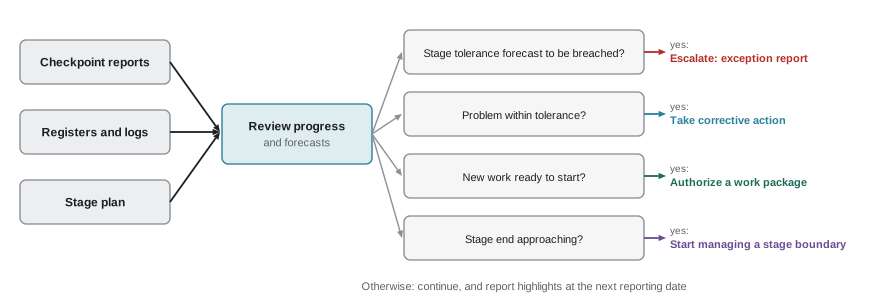
Reviewing the stage status is the hub of controlling a stage. At a regular rhythm, Ridgeline's project manager does it every Friday, the project manager brings together the checkpoint reports, the registers, the logs and the stage plan and asks a short set of questions. Where are we against the plan? What is the forecast for each tolerance? What has changed in the business case, the risks and the issues? Is the stage end approaching? What, if anything, needs to be done? The answers lead to one of a few actions: carry on, authorize further work packages, take corrective action, raise an issue with the board, escalate an exception, or start managing a stage boundary.
The code below shows a simple version of the cost check the project manager performs at week 30. It combines each work package's forecast cost with the project manager's own costs and the remaining risk exposure, compares the total with the revised stage limit and reports how much of the tolerance has been used.
baseline, upper = 1568, 1568 * 1.02
forecasts = {  # work package: forecast at completion (thousand)
    "WP1 installation (2,800 meters)": 1002,
    "WP2 collector network": 196,
    "WP3 billing interface incl. data cleansing": 232,
    "WP4 customer communication": 49,
    "Project management and assurance": 72,
}
risk_exposure = 9   # expected cost of open stage risks still to occur
total = sum(forecasts.values()) + risk_exposure
tol = upper - baseline
used = max(0.0, total - baseline)
for k, v in forecasts.items():
    print(f"{k:45} {v:6.0f}")
print(f"{'expected cost of open risks':45} {risk_exposure:6.0f}")
print(f"forecast {total:,.0f}k against baseline {baseline:,}k and limit {upper:,.0f}k")
print(f"cost tolerance used {used:.0f}k of {tol:.0f}k ({used / tol:.0%})")
status = "red" if total > upper else "amber" if used / tol > 0.6 else "green"
print("status:", status)WP1 installation (2,800 meters) 1002 WP2 collector network 196 WP3 billing interface incl. data cleansing 232 WP4 customer communication 49 Project management and assurance 72 expected cost of open risks 9 forecast 1,560k against baseline 1,568k and limit 1,599k cost tolerance used 0k of 31k (0%) status: green
The forecast of 1,560 thousand sits slightly below the revised baseline, so none of the cost tolerance is being used and the status is green. The project manager does not stop there, though. The installation work package is forecasting 1,002 thousand against its own limit of about 1,009 thousand, so a small further problem in installation would breach the work package tolerance. The project manager notes this as a watch item and asks Northline Metering to report crew availability daily for the next two weeks.
Reporting highlights
Highlight reports are the board's main source of information between its decisions. They are time-driven: the board sets the frequency when it authorizes the stage, often weekly, fortnightly or monthly. A highlight report summarizes the stage status, the products completed and planned, the tolerance position for each target, issues and risks that the board should know about, the business case position and lessons. It also lists any requests for decisions. Its job is to let the board stay confident that the stage is under control without attending to the detail.
| Section | Ridgeline Water pilot, highlight report for week 30 |
|---|---|
| Overall status | Green: on track against the exception plan baseline |
| This period | 2,104 of 2,800 meters installed; collector network complete; billing interface test cycle 3 passed |
| Next period | Finish eastern streets; start parallel billing run for 500 accounts |
| Tolerances | Cost forecast 1,560 against 1,599 limit; end week 38 against week 39 limit; scope on target; read rate 98.3 % |
| Issues and risks | Short-term crew illness handled within the work package; backflow valve supply risk monitored |
| Business case | No change; first leak alerts confirm the leak detection benefit |
| Lessons | Appointment booking two weeks ahead cut no-shows by half |
| Decisions requested | None this period |
A highlight report should never be the first time the board hears about something that needs its decision. If a decision is needed between reports, the project manager raises it at once, through an issue report or an exception report. Equally, a highlight report should not bury bad news in neutral language. A board that reads 'minor delays in crew availability' and later discovers that installations were two weeks behind will stop trusting the reports, and then it will start managing the detail itself.
Choosing the reporting rhythm
Reporting has a cost. Each checkpoint report takes a team manager's time, and each highlight report takes the project manager's. The frequency should match the pace and risk of the work. Ridgeline uses weekly checkpoint reports from the installation team, because installations move fast and crews change daily, but checkpoint reports at the end of each two-week sprint for the billing interface team. Highlight reports go to the board fortnightly. In the riskiest weeks of rollout, the board may ask for weekly highlight reports and relax the frequency again later.
Because Ridgeline Water is a public body, its highlight reports and end stage reports are records that may be requested under provincial access-to-information law for municipalities. Reports should be written on the assumption that a member of the public, a councillor or a journalist may one day read them: factual, clear and free of personal remarks about staff or contractors.
Monitoring in agile delivery
For the agile billing interface team, the project manager monitors through the team's burn-up chart and sprint reviews rather than percentage complete. The key question is whether the must-have features will be done within the timebox. At week 30, the burn-up shows the must-haves complete by the end of sprint 13 at the current velocity, one sprint before the end of the work package, and two could-have reports have been deferred. That is exactly the kind of flexing the work package allowed, so it is reported but not escalated.
Worked problem
Reading the signals
At week 32, three things arrive: WP1 reports 165 installations instead of 190 because of rain; WP3 reports that the parallel billing run found 4 accounts with wrong rates; and the stage cost forecast rises to 1,571 thousand. What should the project manager do?
Show solution
- Rain: check the installation forecast. If the work package is still within its time tolerance, it is the team manager's to manage; ask for a recovery plan.
- Billing errors: log an issue, ask the IT team to find the cause, and check whether any product needs to fail its quality check and be reworked.
- Cost: 1,571 thousand is 3 thousand above baseline, using about 10 % of the 31 thousand tolerance. Report it, keep watching, no escalation.
- Record all three in the next highlight report with their effect on the tolerances.
Answer: None of these needs the board's decision yet. Each is handled at the right level and reported honestly in the next highlight report.
Common mistakes
MistakeRecording a work package as complete because the team manager says it is.
InsteadCheck approvals, quality records and handovers against the work package first.
MistakeReporting against the original plan after an exception plan was approved.
InsteadReport against the current approved baseline.
MistakeUsing highlight reports to ask for urgent decisions.
InsteadRaise urgent matters at once with an issue or exception report.
MistakeHiding bad news in neutral language.
InsteadState the facts and their effect on tolerances plainly.
MistakeSetting one reporting frequency for every team regardless of pace and risk.
InsteadMatch checkpoint and highlight frequency to the work.
Summary and key terms
- Reviewing work package status uses checkpoint reports and direct checks to update the stage plan.
- Receiving completed work packages confirms approvals, quality records and handovers before closing them.
- Reviewing the stage status is the hub that decides whether to continue, correct, escalate or start the stage boundary.
- Highlight reports keep the board informed at a frequency it sets.
- Progress is measured against the current approved baseline, including any exception plan.
- Agile teams are monitored through burn-up charts and sprint reviews against fixed must-haves.
- Highlight report
- A time-driven report from the project manager to the board on stage progress.
- Checkpoint report
- A time-driven report from a team manager to the project manager.
- Stage status review
- The regular review in which the project manager assesses progress and forecasts and decides on action.
- Baseline
- An approved version of a plan or product against which progress and change are measured.
- Tolerance used
- The part of a tolerance that current forecasts consume.
- Burn-up chart
- A chart showing scope completed over time against total scope.
Practice problems
Work each problem on paper first, then reveal the answer to check.
Which four activities of controlling a stage are covered in this lesson?
Show answer
Review work package status, receive completed work packages, review the stage status and report highlights.
What is the revised cost limit for Ridgeline Water's pilot stage?
Show answer
About 1,599 thousand (1,568 + 2 %).
Why did WP2 stay open at week 27?
Show answer
The coverage test covered only 96 % of meter locations instead of 100 %.
Who sets the highlight report frequency?
Show answer
The project board.
What is the stage cost forecast at week 30?
Show answer
About 1,560 thousand.
Which work package is close to its own cost limit at week 30?
Show answer
WP1, the installation work package.
Name four sections of a highlight report.
Show answer
Status, products done and planned, tolerance position, issues and risks (also business case, lessons, decisions requested).
How should an urgent decision be raised between highlight reports?
Show answer
Through an issue report or exception report straight away.
How is the agile billing team monitored?
Show answer
Through its burn-up chart and sprint reviews against the must-have features.
What should progress be measured against after an exception plan is approved?
Show answer
The exception plan's revised baseline.
Lesson quiz · 5 questions
Score 60% or more to complete this lesson.
Create a free account to save your progress, take quizzes and earn a certificate.